1. ആമുഖം
This manual provides detailed instructions for the proper use and maintenance of your CAMMHD C8 1296P Body Camera. Please read this manual thoroughly before operating the device to ensure optimal performance and longevity.
The CAMMHD C8 is a compact and versatile body camera designed for various applications, including law enforcement, security, personal safety, and outdoor activities. It features high-definition video recording, infrared night vision, and a robust battery for extended operation.

Image: The CAMMHD C8 Body Camera is suitable for diverse scenarios such as incident recording, industrial monitoring, security surveillance, and meeting documentation.
2. ഉൽപ്പന്നം കഴിഞ്ഞുview
2.1. ഘടകങ്ങളും നിയന്ത്രണങ്ങളും

ചിത്രം: മുൻഭാഗം view of the CAMMHD C8 Body Camera showing the lens, infrared lights, and microphone. Rear view displays the 2.0-inch HD screen and control buttons.
2.2 പ്രധാന സവിശേഷതകൾ
- 1296P HD Image Quality: Equipped with a 3600W pixel sensor, offering 1296P HD resolution and a 170° wide-angle lens for clear and expansive footage. The 2.0-inch HD screen allows direct file viewing.
- വിപുലീകരിച്ച ബാറ്ററി ലൈഫ്: Features a built-in 4000mAh high-capacity battery. Provides up to 12 hours of continuous recording at 1080P or 16 hours at 480P with IR night vision off and screen off. Full charge takes approximately 5 hours.
- വികസിപ്പിക്കാവുന്ന മെമ്മറി: Includes a 32GB internal memory card. The memory card slot is located at the bottom of the camera, allowing replacement with a TF card up to 512GB.
- Infrared Night Vision & HDR: Two infrared lights provide a night vision range of approximately 10-15 meters. When set to automatic switching, the light sensor adjusts to night vision mode, producing black and white images in low light.
- Multi-function & One-click Recording: Includes features such as pre-recording, motion detection, and car recorder mode. Supports one-click video or audio recording by pressing and holding the respective buttons in emergencies.
- ഭാരം കുറഞ്ഞതും പോർട്ടബിൾ: 126 ഗ്രാം മാത്രം ഭാരമുള്ള ഇതിന് 58mm x 30mm x 92mm അളവുകളുണ്ട്.
- 360° Rotating Clip: Comes with two clips of different lengths, enabling attachment to clothing, backpacks, pockets, or shoulder straps. The clip allows 360° rotation for flexible camera positioning.
- H.265/H.264 Video Compression: Utilizes advanced video compression technology for efficient storage and transfer.
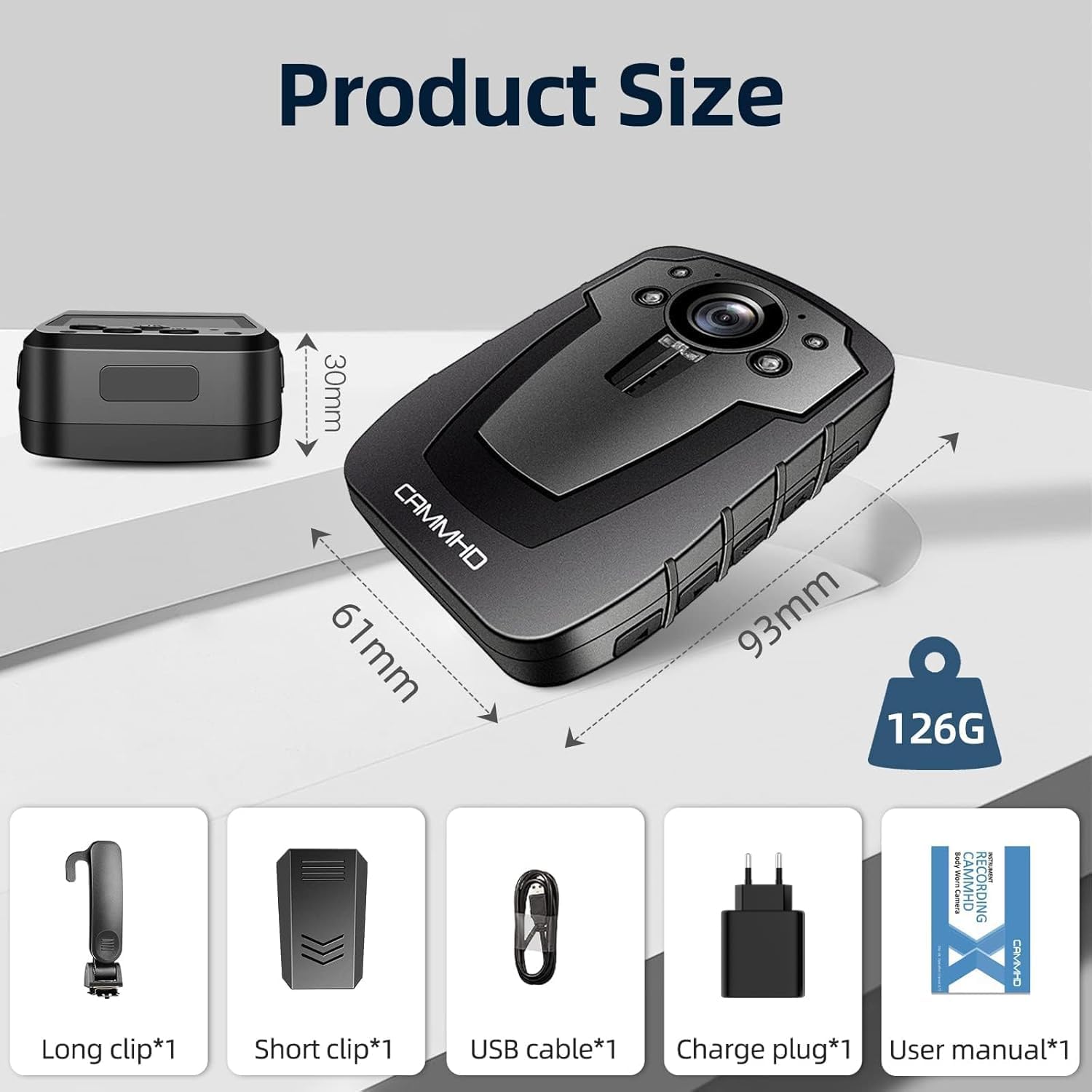
Image: Product dimensions (61mm x 30mm x 93mm, 126g) and included accessories: long clip, short clip, USB cable, charge plug, and user manual.

Image: Illustration of H.265/H.264 video compression technology, indicating potential savings in transfer time (30%) and SD storage (50%).
3. സജ്ജീകരണം
3.1 ബാറ്ററി ചാർജ് ചെയ്യുന്നു
Before first use, fully charge the camera. Connect the camera to the provided charge plug and USB cable. A full charge takes approximately 5 hours. The charging indicator will show the charging status.
3.2. Memory Card Installation/Replacement
The camera comes with a built-in 32GB memory card. To replace or upgrade the memory card:
- ക്യാമറയുടെ താഴെയുള്ള മെമ്മറി കാർഡ് സ്ലോട്ട് കണ്ടെത്തുക.
- Carefully remove the slot sticker.
- Gently push the existing memory card to eject it.
- Insert a new TF card (up to 512GB supported) into the slot until it clicks into place.
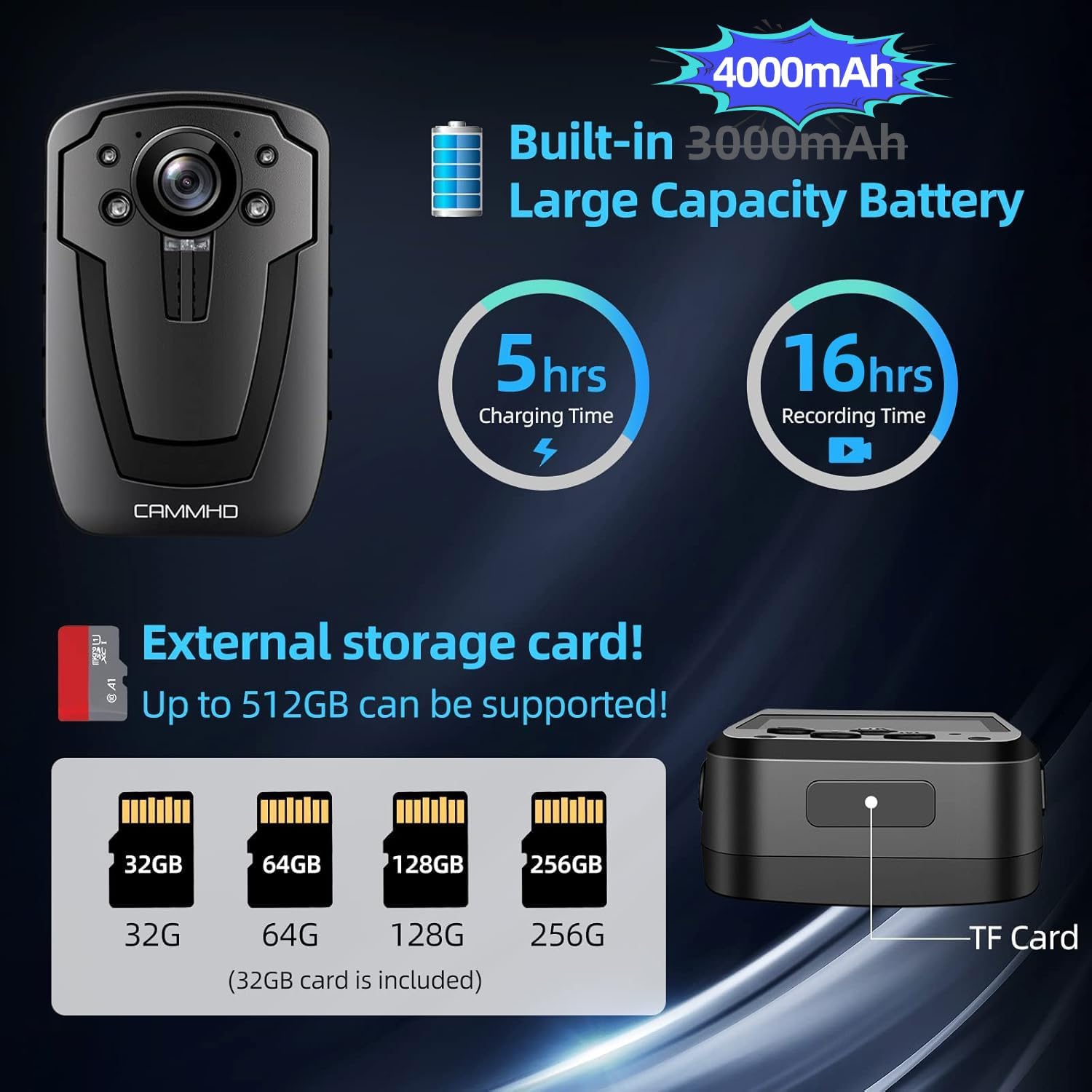
Image: Illustration of the 4000mAh battery capacity, 5-hour charging time, 16-hour recording time, and support for external TF cards up to 512GB.
3.3. പവർ ഓൺ/ഓഫ്
- പവർ ഓണാക്കാൻ: സ്ക്രീൻ പ്രകാശിക്കുന്നത് വരെ പവർ ബട്ടൺ അമർത്തിപ്പിടിക്കുക.
- പവർ ഓഫ് ചെയ്യാൻ: ഉപകരണം ഓഫാകുന്നത് വരെ പവർ ബട്ടൺ അമർത്തിപ്പിടിക്കുക.
4. പ്രവർത്തന നിർദ്ദേശങ്ങൾ
4.1. വീഡിയോ റെക്കോർഡിംഗ്
- From standby mode, press the Video button once to start recording. The recording indicator will flash.
- Press the Video button again to stop recording. The file ഓട്ടോമാറ്റിക്കായി സേവ് ചെയ്യപ്പെടും.
- In emergency situations, press and hold the Video button to quickly power on and begin recording simultaneously.
4.2. ഓഡിയോ റെക്കോർഡിംഗ്
- From standby mode, press the Audio button once to start audio recording.
- Press the Audio button again to stop recording.
- In emergency situations, press and hold the Audio button to quickly power on and begin audio recording simultaneously.
4.3. ഇൻഫ്രാറെഡ് നൈറ്റ് വിഷൻ
- The camera features automatic infrared night vision. When enabled, the light sensor will detect low-light conditions and automatically switch to night vision mode.
- In night vision mode, recordings will be in black and white.
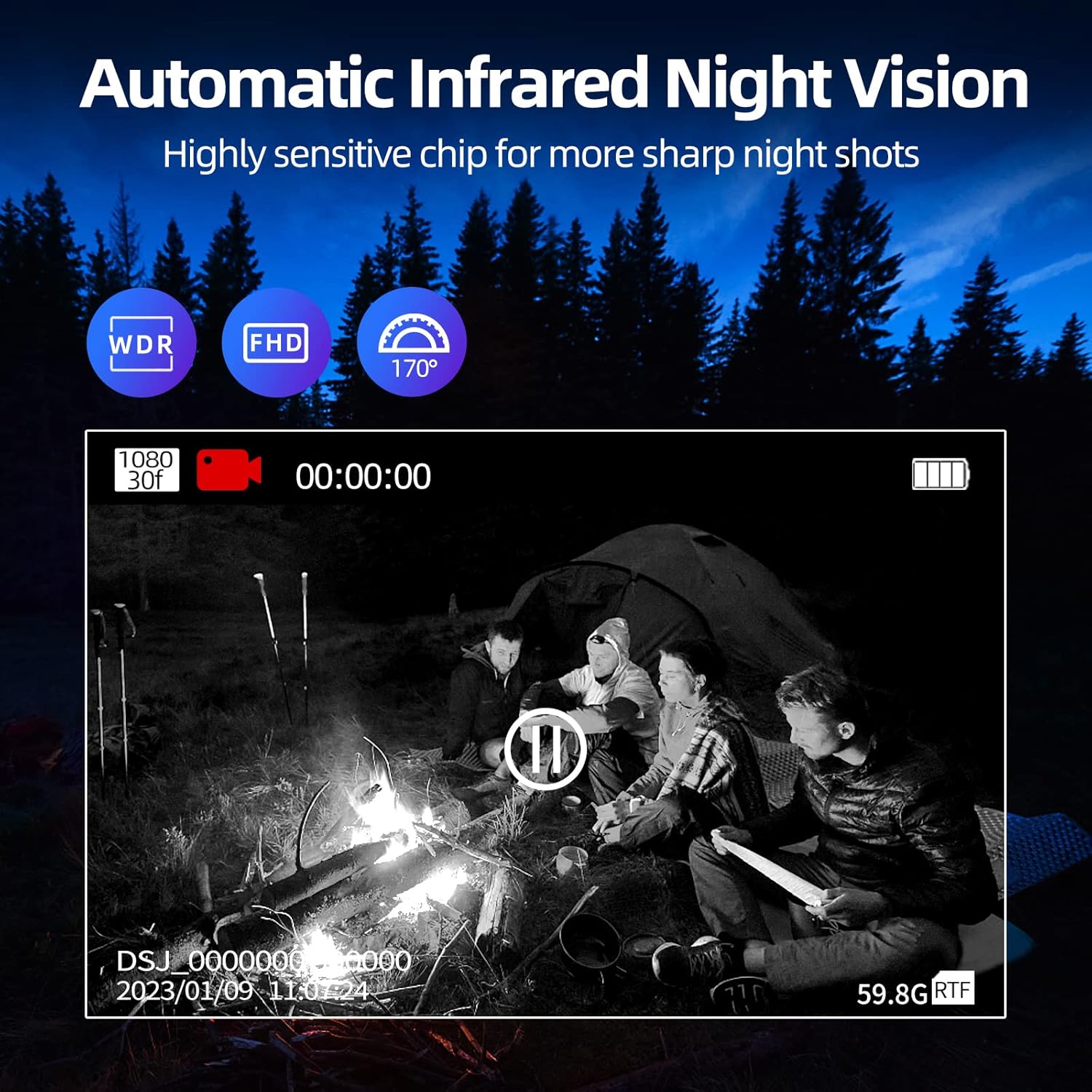
Image: The CAMMHD C8 Body Camera capturing a scene in low light using automatic infrared night vision, displaying a clear black and white image.
4.4. ലൂപ്പ് റെക്കോർഡിംഗ്
The camera supports loop recording. When the memory card reaches its full capacity, the oldest video files will be automatically overwritten by new recordings. Important videos can be manually protected to prevent overwriting.

Image: Diagram illustrating the loop recording function, where new video files automatically overwrite the oldest ones when the 32GB memory card is full, while allowing important videos to be saved permanently.
4.5. Viewing Files
Fileകൾ ആകാം viewed directly on the camera's 2.0-inch HD screen. Navigate through the menu using the control buttons to access recorded videos and audio files.
5. പരിപാലനം
5.1. വൃത്തിയാക്കൽ
- ക്യാമറ ബോഡി വൃത്തിയാക്കാൻ മൃദുവായതും ഉണങ്ങിയതുമായ തുണി ഉപയോഗിക്കുക.
- ലെൻസിന്, പോറലുകൾ ഒഴിവാക്കാൻ ഒരു പ്രത്യേക ലെൻസ് ക്ലീനിംഗ് തുണിയും ലായനിയും ഉപയോഗിക്കുക.
- കഠിനമായ രാസവസ്തുക്കളോ ഉരച്ചിലുകളോ ഉപയോഗിക്കരുത്.
5.2. ബാറ്ററി പരിചരണം
- Avoid exposing the camera to extreme temperatures, which can degrade battery performance.
- Charge the battery regularly, even if the camera is not in frequent use, to maintain battery health.
5.3. സംഭരണം
Store the camera in a cool, dry place away from direct sunlight and moisture when not in use.
6. പ്രശ്നപരിഹാരം
6.1. പൊതുവായ പ്രശ്നങ്ങളും പരിഹാരങ്ങളും
| ഇഷ്യൂ | സാധ്യമായ കാരണം | പരിഹാരം |
|---|---|---|
| ക്യാമറ പവർ ഓൺ ചെയ്യുന്നില്ല. | ബാറ്ററി കുറവാണ്; ഉപകരണത്തിന്റെ തകരാറ് | Charge the battery fully; Contact support if issue persists. |
| Cannot record video/audio | Memory card full; Memory card error; Incorrect settings | പഴയത് ഇല്ലാതാക്കുക files or replace memory card; Format memory card; Check recording settings. |
| മോശം ചിത്ര നിലവാരം | Dirty lens; Low light conditions (without IR); Incorrect resolution settings | Clean the lens; Ensure IR night vision is active in low light; Adjust video resolution settings. |
| ചെറിയ ബാറ്ററി ലൈഫ് | Frequent use of IR or screen; Battery degradation | Minimize screen usage and IR when not needed; Battery may need replacement over time. |
7 സാങ്കേതിക സവിശേഷതകൾ
| ഫീച്ചർ | സ്പെസിഫിക്കേഷൻ |
|---|---|
| ബ്രാൻഡ് | CAMMHD |
| മോഡലിൻ്റെ പേര് | C8-32GB |
| സ്ക്രീൻ വലിപ്പം | 2 ഇഞ്ച് |
| കണക്റ്റിവിറ്റി ടെക്നോളജി | USB |
| പ്രത്യേക സവിശേഷതകൾ | Infrared, Night Vision |
| അനുയോജ്യമായ ഉപകരണങ്ങൾ | Smartphone, Tablet, PC, Laptop |
| ബാറ്ററി കോമ്പോസിഷൻ | ലിഥിയം-അയൺ |
| റീചാർജ് ചെയ്യാവുന്ന ബാറ്ററി | Yes (1 C-cell included) |
| മൗണ്ടിംഗ് തരം | ക്ലിപ്പ്-ഓൺ |
| ഫീൽഡ് View | 170 ഡിഗ്രി |
| നിയന്ത്രണ രീതി | ബട്ടൺ നിയന്ത്രണം |
| ഉൽപ്പന്ന അളവുകൾ | 2.9D x 5.8W x 9.1H സെന്റീമീറ്റർ |
| ഇനത്തിൻ്റെ ഭാരം | 126 ഗ്രാം |
8. വാറൻ്റിയും പിന്തുണയും
CAMMHD is committed to providing high-quality products and excellent customer service.
- വാറൻ്റി: The CAMMHD C8 Body Camera comes with a one-year warranty.
- പിന്തുണ: We offer lifetime support for our products. For any inquiries or assistance, please refer to the contact information provided with your purchase or visit the official CAMMHD brand store.
- പ്രതികരണം: We aim for a 24-hour response time for customer queries.

ചിത്രം: കഴിഞ്ഞുview of CAMMHD's after-sales support, highlighting product quality, quick response times, warranty, and lifetime support.


