ഉൽപ്പന്നം കഴിഞ്ഞുview
The BOBLOV A23 is a compact and versatile body-worn camera designed for various recording needs, from daily life to professional applications. It features a 180-degree rotatable lens, 1080p HD video recording, 48-megapixel photo capture, and night vision capabilities. The camera is equipped with a 2-inch display and a long-lasting battery for extended use.
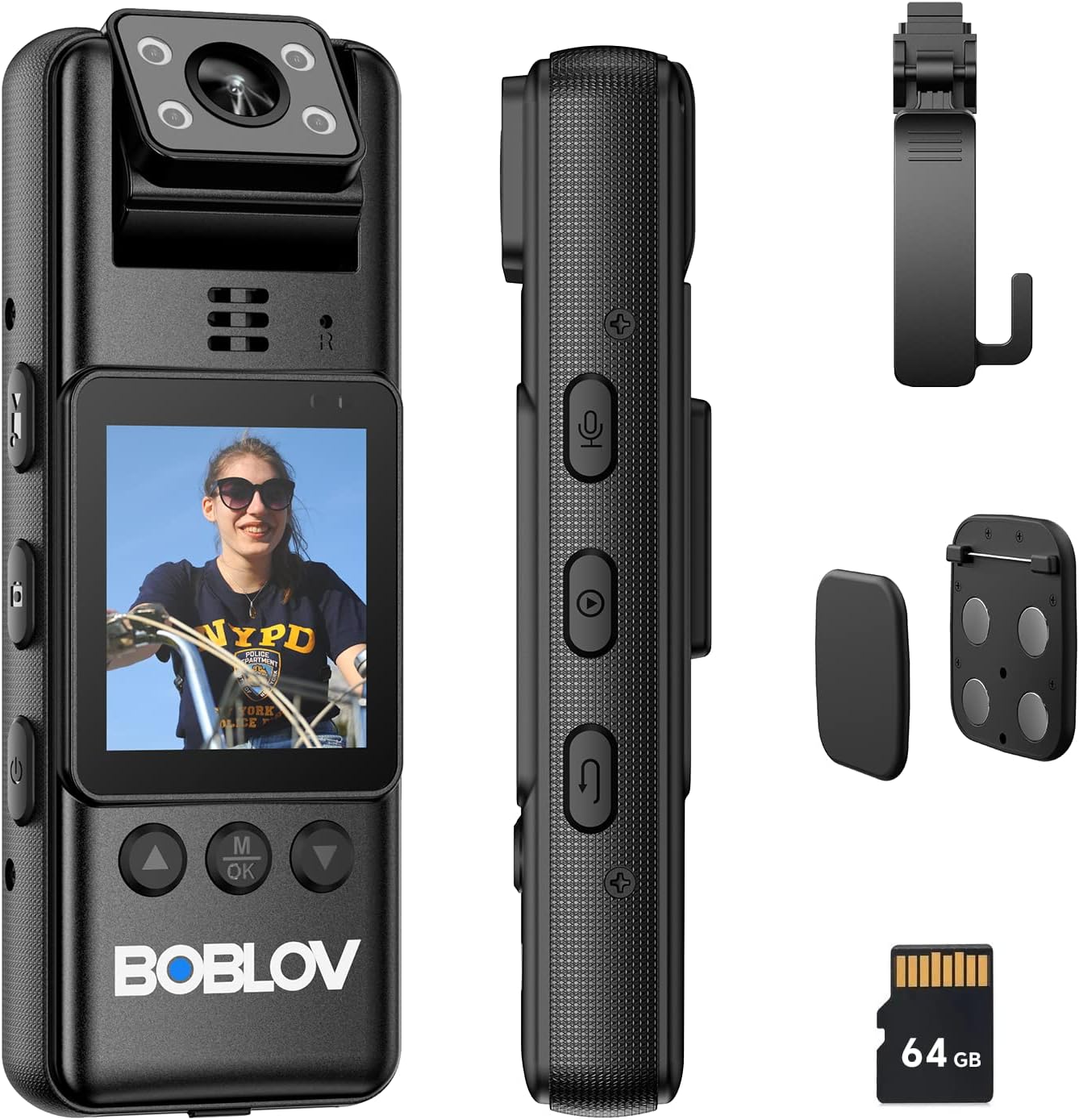
Figure 1: BOBLOV A23 Body Camera and its components, including the camera unit, USB-C cable, magnetic clips, and a 360-degree rotatable clip.
പ്രധാന സവിശേഷതകൾ:
- 180-Degree Rotatable Lens: Allows for flexible recording angles and automatic image orientation adjustment when in standby mode.
- 1080p HD Video & 48MP Photo: വ്യക്തവും വിശദവുമായ foo പകർത്തുന്നുtage and high-resolution still images.
- രാത്രി കാഴ്ച: Equipped with 4 built-in IR lights for effective recording in low-light or dark conditions.
- നീണ്ട ബാറ്ററി ലൈഫ്: സംയോജിത 2200mAh ബാറ്ററി 9 മണിക്കൂർ വരെ തുടർച്ചയായ റെക്കോർഡിംഗ് നൽകുന്നു.
- 64GB Micro SD Card Included: Comes with a pre-installed A1 64GB micro SD card for immediate use.
- ബഹുമുഖ മൗണ്ടിംഗ് ഓപ്ഷനുകൾ: Includes magnetic clips and a 360-degree rotatable long clip for various attachment methods.
- 2-ഇഞ്ച് ഡിസ്പ്ലേ: For easy navigation and playback.
സജ്ജീകരണവും ആദ്യ ഉപയോഗവും
1. അൺബോക്സിംഗും പാക്കേജ് ഉള്ളടക്കങ്ങളും
Before using your BOBLOV A23 camera, please ensure all components are present in the package:

ചിത്രം 2: വിശദമായി view of the BOBLOV A23 packaging list.
- BOBLOV A23 Body Worn Camera (1 unit)
- USB-C Cable (1 unit)
- Magnetic Clips (1 set)
- ഉപയോക്തൃ മാനുവൽ (1 യൂണിറ്റ്)
- Long 360° Rotatable Clip (1 unit)
2. ക്യാമറ ചാർജ് ചെയ്യുന്നു
Fully charge the camera before its first use to ensure optimal battery performance. Use the provided USB-C cable.
- ക്യാമറയുടെ ചാർജിംഗ് പോർട്ടിലേക്ക് USB-C കേബിൾ ബന്ധിപ്പിക്കുക.
- കേബിളിന്റെ മറ്റേ അറ്റം ഒരു USB പവർ അഡാപ്റ്ററുമായി (ഉൾപ്പെടുത്തിയിട്ടില്ല) അല്ലെങ്കിൽ ഒരു കമ്പ്യൂട്ടറിന്റെ USB പോർട്ടുമായി ബന്ധിപ്പിക്കുക.
- ചാർജിംഗ് ഇൻഡിക്കേറ്റർ ലൈറ്റ് ചാർജിംഗ് സ്റ്റാറ്റസ് കാണിക്കും. പൂർണ്ണമായി ചാർജ് ചെയ്യാൻ സാധാരണയായി ഏകദേശം 4 മണിക്കൂർ എടുക്കും.

Figure 3: USB-C charging port and battery capacity information.
The built-in 2200mAh battery provides sufficient power for up to 9 hours of video recording.
3. മൈക്രോ എസ്ഡി കാർഡ് ഇൻസ്റ്റാളേഷൻ
The camera comes with a 64GB A1 micro SD card pre-installed. If you need to access or replace it:
- Locate the micro SD card slot on the camera.
- Gently push the card into the slot until it clicks into place. Ensure the card is inserted in the correct orientation.
- To remove, push the card again until it pops out.
കുറിപ്പ്: For optimal performance, use high-speed (Class 10 or higher) micro SD cards. The camera supports loop recording, but this feature may not function correctly with cards larger than the camera's specified capacity (64GB for this model).
പ്രവർത്തന നിർദ്ദേശങ്ങൾ
1. Basic Controls and Buttons
Familiarize yourself with the camera's buttons for easy operation:

Figure 4: Button layout and functions on the BOBLOV A23 camera.
- പവർ ബട്ടൺ: Press and hold to turn the camera on or off.
- Video Mode Button: Switches to video recording mode.
- Photo Mode Button: Switches to photo capture mode.
- ഓഡിയോ മോഡ് ബട്ടൺ: Switches to audio-only recording mode.
- Playback Mode Button: Enters playback mode to review രേഖപ്പെടുത്തി files.
- റിട്ടേൺ ബട്ടൺ: Used to go back in menus or exit playback.
- OK/Menu Button (M/OK): തിരഞ്ഞെടുപ്പുകൾ സ്ഥിരീകരിക്കുന്നു അല്ലെങ്കിൽ മെനുവിൽ പ്രവേശിക്കുന്നു.
- Navigation Buttons (Up/Down): Used to navigate through menus and options.
2. പവർ ഓൺ/ഓഫ്
- പവർ ഓണാക്കാൻ: Press and hold the Power Button until the screen illuminates.
- പവർ ഓഫ് ചെയ്യാൻ: Press and hold the Power Button until the camera shuts down.
3. വീഡിയോ റെക്കോർഡിംഗ്
- ക്യാമറ ഓണാണെന്ന് ഉറപ്പാക്കുക.
- അമർത്തുക വീഡിയോ മോഡ് ബട്ടൺ to enter video recording mode.
- അമർത്തുക ശരി/മെനു ബട്ടൺ to start recording. A red indicator light will typically blink to confirm recording is active.
- അമർത്തുക ശരി/മെനു ബട്ടൺ റെക്കോർഡിംഗ് നിർത്താൻ വീണ്ടും.
4. ഫോട്ടോ എടുക്കൽ
- ക്യാമറ ഓണാണെന്ന് ഉറപ്പാക്കുക.
- അമർത്തുക Photo Mode Button to enter photo capture mode.
- അമർത്തുക ശരി/മെനു ബട്ടൺ ഒരു ഫോട്ടോ എടുക്കാൻ.
5. ഓഡിയോ റെക്കോർഡിംഗ്
- ക്യാമറ ഓണാണെന്ന് ഉറപ്പാക്കുക.
- അമർത്തുക ഓഡിയോ മോഡ് ബട്ടൺ to enter audio-only recording mode.
- അമർത്തുക ശരി/മെനു ബട്ടൺ to start audio recording.
- അമർത്തുക ശരി/മെനു ബട്ടൺ ഓഡിയോ റെക്കോർഡിംഗ് നിർത്താൻ വീണ്ടും.
6. പ്ലേബാക്ക്
- അമർത്തുക Playback Mode Button പ്ലേബാക്ക് മോഡിൽ പ്രവേശിക്കാൻ.
- ഉപയോഗിക്കുക Navigation Buttons (Up/Down) to browse through your recorded videos, photos, and audio files.
- അമർത്തുക ശരി/മെനു ബട്ടൺ to play a selected file.
- അമർത്തുക റിട്ടേൺ ബട്ടൺ to exit playback or go back to the file പട്ടിക.
7. 180-Degree Rotatable Lens
The camera's lens can be manually rotated 180 degrees to adjust the recording angle. When the camera is in standby mode, the image direction on the screen will automatically adjust to match the lens orientation. However, during active video recording, the image orientation will not change.

Figure 5: Illustration of the 180-degree rotatable lens for flexible filming.
8. നൈറ്റ് വിഷൻ
The BOBLOV A23 features built-in IR lights for enhanced recording in low-light or dark environments. The camera can automatically switch to night vision mode when light conditions require it, or it can be manually activated through the settings menu.

Figure 6: Day and night recording capabilities of the BOBLOV A23 camera, demonstrating effective night vision.
Mounting and Usage Scenarios
The BOBLOV A23 offers multiple carrying options to suit various situations:

Figure 7: Magnetic clips and the 360-degree rotatable clip for secure attachment.
- മാഗ്നറ്റിക് ക്ലിപ്പുകൾ: For quick and secure attachment to clothing or other magnetic surfaces.
- Long 360° Rotatable Clip: Ideal for attaching the camera to a shoulder strap, belt, or other gear, allowing for flexible positioning and rotation.
The camera is suitable for a variety of uses, including:

ചിത്രം 8: ഉദാamples of multiple uses for the A23 video recorder, including business, dog walking, law enforcement, and travel.
മെയിൻ്റനൻസ്
Proper maintenance ensures the longevity and optimal performance of your BOBLOV A23 camera.
- വൃത്തിയാക്കൽ: ക്യാമറ ബോഡി വൃത്തിയാക്കാൻ മൃദുവായതും ഉണങ്ങിയതുമായ തുണി ഉപയോഗിക്കുക. ലെൻസിന്, പോറലുകൾ ഒഴിവാക്കാൻ ഒരു പ്രത്യേക ലെൻസ് ക്ലീനിംഗ് തുണിയും ലായനിയും ഉപയോഗിക്കുക. കഠിനമായ രാസവസ്തുക്കളോ ഉരച്ചിലുകളോ ഉള്ള വസ്തുക്കൾ ഉപയോഗിക്കരുത്.
- സംഭരണം: നേരിട്ടുള്ള സൂര്യപ്രകാശം, തീവ്രമായ താപനില, ഉയർന്ന ഈർപ്പം എന്നിവയിൽ നിന്ന് മാറി തണുത്തതും വരണ്ടതുമായ സ്ഥലത്ത് ക്യാമറ സൂക്ഷിക്കുക.
- ബാറ്ററി കെയർ: ബാറ്ററി ലൈഫ് നിലനിർത്താൻ, ബാറ്ററി ഇടയ്ക്കിടെ പൂർണ്ണമായും ഡിസ്ചാർജ് ചെയ്യുന്നത് ഒഴിവാക്കുക. ദീർഘനേരം സൂക്ഷിക്കുകയാണെങ്കിൽ, കുറച്ച് മാസങ്ങൾ കൂടുമ്പോൾ ബാറ്ററി ഏകദേശം 50% വരെ ചാർജ് ചെയ്യുക.
- ഫേംവെയർ അപ്ഡേറ്റുകൾ: Periodically check the official BOBLOV website for any available firmware updates to ensure your camera has the latest features and bug fixes.
ട്രബിൾഷൂട്ടിംഗ്
If you encounter issues with your BOBLOV A23 camera, refer to the following common problems and solutions:
| പ്രശ്നം | സാധ്യമായ കാരണം / പരിഹാരം |
|---|---|
| ക്യാമറ ഓണാകുന്നില്ല. |
|
| Recording stops unexpectedly or camera freezes. |
|
| മോശം വീഡിയോ/ഫോട്ടോ നിലവാരം. |
|
| Cannot unclip camera from mount. |
|
If the problem persists, please contact BOBLOV customer support for further assistance.
സ്പെസിഫിക്കേഷനുകൾ
| ഫീച്ചർ | വിശദാംശങ്ങൾ |
|---|---|
| ബ്രാൻഡ് | ബോബ്ലോവ് |
| മോഡൽ | A23 |
| സ്ക്രീൻ വലിപ്പം | 2 ഇഞ്ച് |
| പ്രത്യേക സവിശേഷതകൾ | Night Vision, 180° Rotatable Lens |
| അപ്പേർച്ചർ | f/2 |
| പിന്തുണയ്ക്കുന്ന ഫോർമാറ്റുകൾ | മൈക്രോ എസ്.ഡി |
| ബാറ്ററി കോമ്പോസിഷൻ | ലിഥിയം-പോളിമർ |
| വീഡിയോ റെസല്യൂഷൻ | 1080p |
| പാക്കേജ് അളവുകൾ (L x W x H) | 12.6 x 7.5 x 5.7 സെ.മീ |
| ഇമേജ് സ്റ്റെബിലൈസേഷൻ | ഇല്ല |
| ഫലപ്രദമായ സ്റ്റിൽ റെസല്യൂഷൻ | 48 മെഗാപിക്സലുകൾ |
| ഫോട്ടോ സെൻസർ ടെക്നോളജി | CMOS |
| വീഡിയോ ക്യാപ്ചർ ഫോർമാറ്റ് | എംഒവി |
| ഇനത്തിൻ്റെ ഭാരം | 270 ഗ്രാം |
വാറൻ്റിയും പിന്തുണയും
BOBLOV offers a two-year warranty for high-quality products. For warranty claims, technical support, or any inquiries not covered in this manual, please refer to the official BOBLOV webസൈറ്റിൽ ബന്ധപ്പെടുകയോ അവരുടെ ഉപഭോക്തൃ സേവനവുമായി നേരിട്ട് ബന്ധപ്പെടുകയോ ചെയ്യുക. വാറന്റി ആവശ്യങ്ങൾക്കായി വാങ്ങിയതിന്റെ തെളിവായി നിങ്ങളുടെ വാങ്ങൽ രസീത് സൂക്ഷിക്കുക.
ഏറ്റവും കാലികമായ പിന്തുണാ വിവരങ്ങൾക്ക്, ദയവായി സന്ദർശിക്കുക: www.boblov.com