1. ആമുഖം
This manual provides comprehensive instructions for the setup, operation, and maintenance of your ROYALAXE L98 Wireless Mechanical Keyboard. Please read this manual thoroughly before using the product to ensure optimal performance and longevity.

2. ബോക്സിൽ എന്താണുള്ളത്?
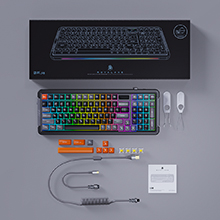
പാക്കേജിൽ എല്ലാ ഇനങ്ങളും ഉണ്ടെന്ന് ഉറപ്പാക്കുക:
- വയർലെസ് മെക്കാനിക്കൽ കീബോർഡ്
- 4 Spare Switches & 8 Spare Keycaps
- Coiled USB Cable & Dust Cover
- കീക്യാപ് പുള്ളർ
- ഉപയോക്തൃ മാനുവലും ദ്രുത ഗൈഡും
3 പ്രധാന സവിശേഷതകൾ
- 1.14" TFT LCD: Displays time, connection mode, battery level, and system (WIN/MAC). Customizable with images or GIF animations via downloadable driver.
- Upgraded Gateron G Pro 3.0 Yellow Switches: Pre-lubed switches with improved condenser light effect structure for brighter, more consistent backlight, and harder pins for stable typing.
- ഗാസ്കറ്റ് മൗണ്ട് ഡിസൈൻ: Incorporates two silicone dampeners for reduced noise and a comfortable typing experience with satisfying sound.
- Triple Connection Modes: Supports 3 Bluetooth channels, 2.4GHz wireless USB, and Type-C wired connection for multi-device tasking (up to 5 devices). Compatible with WIN and MAC systems.
- 18+4 RGB Lighting Effects: 22 RGB light modes with adjustable brightness and monochromatic light switch.
- Hot-swappable 5-Pin Sockets: Allows for easy replacement of switches without soldering.
- വലിയ ശേഷിയുള്ള ബാറ്ററി: 6000 mAh battery provides up to 75 hours standby with RGB off (15 hours with RGB on).
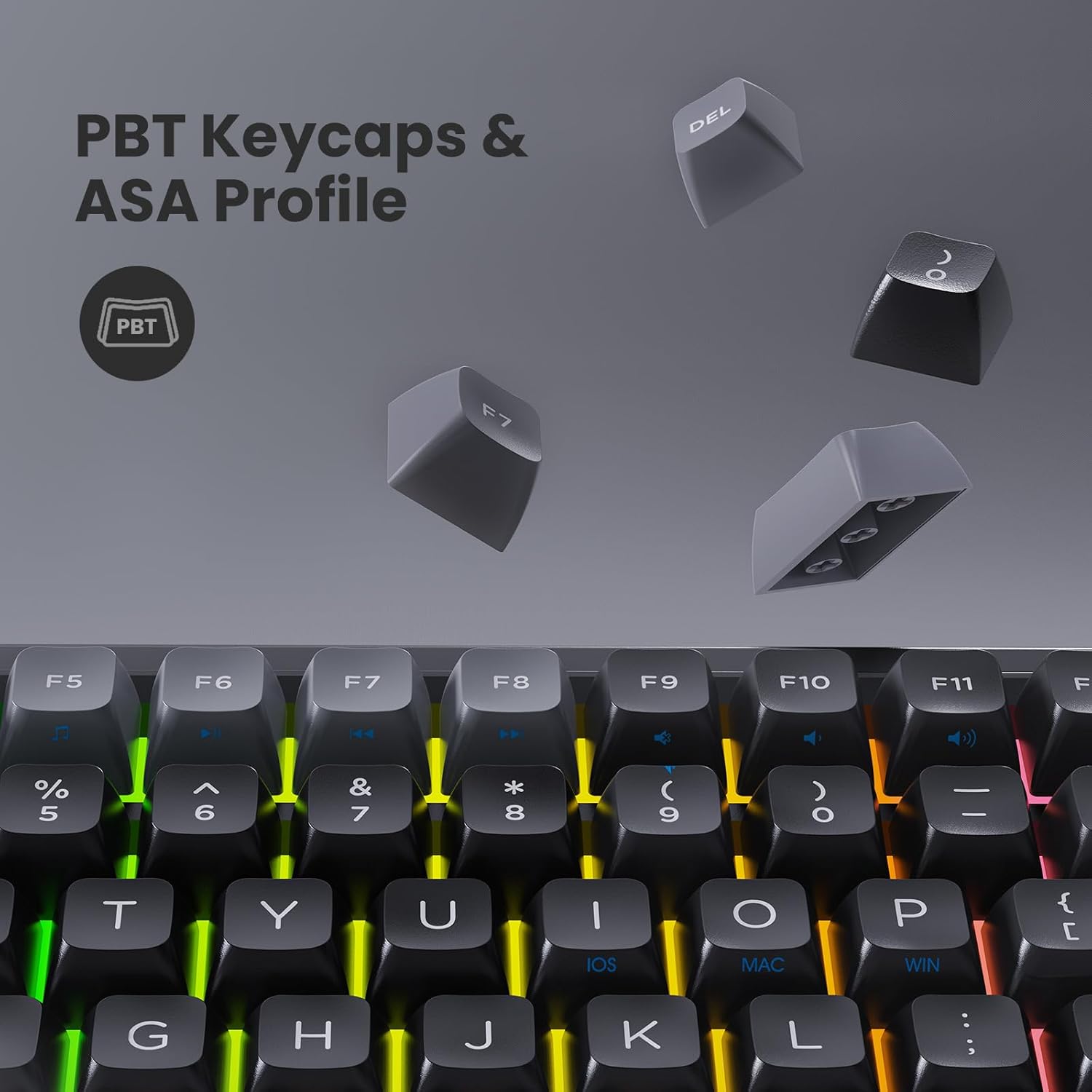
- Double Shot PBT Keycaps & ASA Profile: Durable keycaps designed to prevent long-term grime buildup.
- Double Kick-up Feet: Provides 3 tilt angles for ergonomic comfort.
- Full Keys Anti-Ghosting (N-Key Rollover): Ensures all key presses are registered accurately, even during rapid typing or gaming.
- Specially Tuned Stabilizers: For consistent and smooth key presses on larger keys.



4. സജ്ജീകരണ ഗൈഡ്
4.1. കീബോർഡ് ചാർജ് ചെയ്യുന്നു
Before first use, it is recommended to fully charge the keyboard. Connect the coiled USB Type-C cable to the keyboard's port and the other end to a USB power source (e.g., computer USB port, wall adapter). The TFT LCD will indicate charging status.

4.2. കണക്ഷൻ മോഡുകൾ
The L98 keyboard supports three connection modes: Wired, 2.4GHz Wireless, and Bluetooth.
- വയർഡ് കണക്ഷൻ:
Connect the provided USB Type-C cable directly from the keyboard to your computer's USB port. The keyboard will automatically switch to wired mode.
- 2.4GHz വയർലെസ് കണക്ഷൻ:
Locate the 2.4GHz USB receiver (dongle) usually stored in a slot on the keyboard. Plug the receiver into an available USB port on your computer. Slide the mode switch on the keyboard to the "2.4G" position. The keyboard should connect automatically.
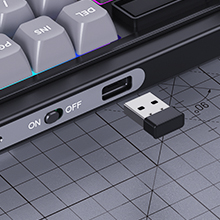
Figure 11: USB 2.4G receiver and mode switch. - ബ്ലൂടൂത്ത് കണക്ഷൻ:
Slide the mode switch on the keyboard to the "BT" position. The keyboard supports up to 3 Bluetooth channels (BT1, BT2, BT3). To pair, press and hold Fn + Q (for BT1), Fn + W (for BT2), or Fn + E (for BT3) until the indicator light flashes rapidly. On your device (PC, tablet, smartphone), go to Bluetooth settings and select "ROYALAXE L98" to pair. Once connected, the indicator light will stop flashing.
4.3. സിസ്റ്റം അനുയോജ്യത
The keyboard supports both Windows and macOS systems. Use the dedicated switch or key combination (refer to quick guide) to toggle between WIN and MAC layouts if necessary.
5. പ്രവർത്തന നിർദ്ദേശങ്ങൾ
5.1. അടിസ്ഥാന കീബോർഡ് പ്രവർത്തനങ്ങൾ
The L98 keyboard functions as a standard 98-key layout keyboard. All keys are anti-ghosting with N-Key Rollover for accurate input.
5.2. RGB ലൈറ്റിംഗ് നിയന്ത്രണം
The keyboard features 22 preset RGB lighting modes. Use the following key combinations to control the lighting:
- എഫ്എൻ + \ |: RGB ലൈറ്റിംഗ് ഇഫക്റ്റുകളിലൂടെ കടന്നുപോകുക.
- എഫ്എൻ + ↑: തെളിച്ചം വർദ്ധിപ്പിക്കുക.
- എഫ്എൻ + ↓: തെളിച്ചം കുറയ്ക്കുക.
- Fn + ←: ലൈറ്റിംഗ് വേഗത കുറയ്ക്കുക.
- എഫ്എൻ + →: ലൈറ്റിംഗ് വേഗത വർദ്ധിപ്പിക്കുക.
- Fn + Del: Switch between monochromatic colors (if applicable to the current mode).
5.3. TFT LCD Customization
The 1.14" TFT LCD can display custom images or GIF animations. To utilize this feature, download the official driver software from the ROYALAXE website. The software allows you to upload and manage content for the LCD screen.
Note: "Music Follow" mode for RGB lighting is unavailable in MAC system.
5.4. ഹോട്ട്-സ്വാപ്പിംഗ് സ്വിച്ചുകൾ
The L98 keyboard is hot-swappable, allowing you to change mechanical switches without soldering. Use the included switch puller to carefully remove existing switches and insert new 5-pin compatible switches. Ensure the pins are aligned correctly before pressing down firmly.
5.5. Changing Keycaps
Use the included keycap puller to gently remove keycaps. Align new keycaps with the switch stem and press down firmly until seated. The keyboard comes with 8 spare keycaps for customization.
6. പരിപാലനം
- വൃത്തിയാക്കൽ: Regularly clean the keyboard with a soft, dry cloth. For deeper cleaning, remove keycaps and use compressed air to clear dust and debris from between switches.
- ബാറ്ററി കെയർ: ബാറ്ററി ലൈഫ് വർദ്ധിപ്പിക്കാൻ, കീബോർഡ് ഇടയ്ക്കിടെ പൂർണ്ണമായും ഡിസ്ചാർജ് ചെയ്യുന്നത് ഒഴിവാക്കുക. ദീർഘനേരം ഉപയോഗിക്കാത്തപ്പോൾ തണുത്തതും വരണ്ടതുമായ സ്ഥലത്ത് സൂക്ഷിക്കുക.
- Switch and Keycap Handling: When hot-swapping switches or changing keycaps, apply gentle, even pressure to avoid damaging the switch pins or keycap stems.
- പൊടി കവർ: കീബോർഡ് ഉപയോഗത്തിലില്ലാത്തപ്പോൾ പൊടി അടിഞ്ഞുകൂടുന്നത് തടയാൻ നൽകിയിരിക്കുന്ന പൊടി കവർ ഉപയോഗിക്കുക.
7. പ്രശ്നപരിഹാരം
| പ്രശ്നം | സാധ്യമായ കാരണം | പരിഹാരം |
|---|---|---|
| കീബോർഡ് പ്രതികരിക്കുന്നില്ല (വയർലെസ്) | Low battery; Incorrect mode selected; USB receiver not connected; Bluetooth not paired. | Charge the keyboard; Ensure mode switch is set to 2.4G or BT; Plug in USB receiver securely; Re-pair Bluetooth device. |
| കീകൾ രജിസ്റ്റർ ചെയ്യുന്നില്ല അല്ലെങ്കിൽ ഇരട്ട ടൈപ്പ് ചെയ്യുന്നില്ല. | Dust/debris under keycap/switch; Faulty switch. | Clean under keycaps; Replace the affected switch using the hot-swap feature. |
| RGB ലൈറ്റിംഗ് പ്രവർത്തിക്കുന്നില്ല | Lighting turned off; Low battery; Software issue. | Check lighting controls (Fn + keys); Charge keyboard; Reinstall driver software. |
| TFT LCD not displaying correctly | സോഫ്റ്റ്വെയർ പ്രശ്നം; തെറ്റായ ക്രമീകരണങ്ങൾ. | Ensure driver software is installed and updated; Check display settings within the software. |
| ബ്ലൂടൂത്ത് കണക്ഷൻ അസ്ഥിരമാണ് | Interference; Distance from device; Multiple devices connected. | Move closer to the device; Ensure no other strong wireless signals are interfering; Disconnect other Bluetooth devices. |
8 സ്പെസിഫിക്കേഷനുകൾ
| ഫീച്ചർ | വിശദാംശങ്ങൾ |
|---|---|
| മോഡൽ നമ്പർ | L98 |
| കണക്റ്റിവിറ്റി ടെക്നോളജി | Bluetooth, 2.4G, USB-C |
| സ്വിച്ചുകൾ | Gateron G Pro Yellow |
| കീകളുടെ എണ്ണം | 98 |
| ബാറ്ററി ശേഷി | 6000 mAh |
| ലൈറ്റിംഗ് | RGB (22 മോഡുകൾ) |
| കീക്യാപ് മെറ്റീരിയൽ | പി.ബി.ടി |
| കീക്യാപ് പ്രോfile | എ.എസ്.എ |
| ഉൽപ്പന്ന അളവുകൾ | 15.8 x 5.9 x 1.4 ഇഞ്ച് |
| ഇനത്തിൻ്റെ ഭാരം | 2.5 പൗണ്ട് |
| അനുയോജ്യമായ സിസ്റ്റങ്ങൾ | വിൻഡോസ്, മാക്, ആൻഡ്രോയിഡ്, ഐഒഎസ് |
9. വാറൻ്റിയും പിന്തുണയും
ROYALAXE products are designed and manufactured to the highest quality standards. For information regarding warranty coverage, technical support, or to download the latest drivers and software, please visit the official ROYALAXE webസൈറ്റ് അല്ലെങ്കിൽ ഉപഭോക്തൃ സേവനവുമായി ബന്ധപ്പെടുക.
Official ROYALAXE Store: ROYALAXE Store on Amazon


