1. ആമുഖം
Thank you for choosing the DH Lifelabs HEPA Air Purifier. This device is designed to provide clean and fresh air in your living spaces, utilizing advanced filtration and ionization technologies. Please read this manual thoroughly before operation to ensure proper use, maintenance, and optimal performance of your air purifier.

Figure 1: DH Lifelabs HEPA Air Purifier with app interface.
2 സുരക്ഷാ വിവരങ്ങൾ
തീപിടുത്തം, വൈദ്യുതാഘാതം അല്ലെങ്കിൽ പരിക്കുകൾ എന്നിവ കുറയ്ക്കുന്നതിന്, ദയവായി ഇനിപ്പറയുന്ന സുരക്ഷാ മുൻകരുതലുകൾ പാലിക്കുക:
- നീക്കുന്നതിനോ വൃത്തിയാക്കുന്നതിനോ അറ്റകുറ്റപ്പണികൾ നടത്തുന്നതിനോ മുമ്പ് എല്ലായ്പ്പോഴും എയർ പ്യൂരിഫയർ അൺപ്ലഗ് ചെയ്യുക.
- Do not operate the unit with a damaged cord or plug. If the cord or plug is damaged, contact customer support.
- എയർ പ്യൂരിഫയർ വെള്ളത്തിൽ നിന്നോ മറ്റ് ദ്രാവകങ്ങളിൽ നിന്നോ അകറ്റി നിർത്തുക. യൂണിറ്റ് വെള്ളത്തിൽ മുക്കരുത്.
- എയർ ഇൻലെറ്റുകളോ ഔട്ട്ലെറ്റുകളോ തടയരുത്. യൂണിറ്റിന് ചുറ്റും ശരിയായ വായുസഞ്ചാരം ഉറപ്പാക്കുക.
- ശാരീരികമോ ഇന്ദ്രിയപരമോ മാനസികമോ ആയ കഴിവുകൾ കുറവുള്ള വ്യക്തികൾ (കുട്ടികൾ ഉൾപ്പെടെ) അല്ലെങ്കിൽ അവരുടെ സുരക്ഷയ്ക്ക് ഉത്തരവാദിയായ ഒരു വ്യക്തി ഉപകരണത്തിൻ്റെ ഉപയോഗത്തെ സംബന്ധിച്ച മേൽനോട്ടമോ നിർദ്ദേശമോ നൽകിയിട്ടില്ലെങ്കിൽ, ഈ ഉപകരണം ഉപയോഗിക്കാൻ ഉദ്ദേശിച്ചുള്ളതല്ല. .
- കുട്ടികൾ ഉപകരണം ഉപയോഗിച്ച് കളിക്കുന്നില്ലെന്ന് ഉറപ്പാക്കാൻ മേൽനോട്ടം വഹിക്കണം.
- Use only DH Lifelabs replacement filters.
3. ഉൽപ്പന്നം കഴിഞ്ഞുview
The DH Lifelabs HEPA Air Purifier combines multiple technologies to ensure comprehensive air purification:
- 3-എസ്tage H13 TrueHEPA Filtration: Includes a Pre-filter, H13 TrueHEPA filter, and Activated Carbon filter to capture 99.97% of airborne particles as small as 0.3 microns.
- Ionizer (Plasma Generator): Generates negative and positive ions to actively break down molecular structures of odors, bacteria, and viruses, eliminating 99.9% of them.
- Smart Air Quality Sensor: Monitors real-time air quality and automatically adjusts fan speed in Auto mode.
- WiFi & Voice Control: Connects to the DH Lifelabs App for remote control and is compatible with Google Home and Amazon Alexa.
- ശാന്തമായ പ്രവർത്തനം: Features a Sleep Mode with noise levels as low as 23dB and a display LED off option.

Figure 2: Internal components and airflow.

ചിത്രം 3: വിശദമായി view 3-S ന്റെtage H13 HEPA Filtration.

Figure 4: PlasmaShield Technology for active air ionization.
4. സജ്ജീകരണം
4.1 അൺബോക്സിംഗും ഫിൽറ്റർ ഇൻസ്റ്റാളേഷനും
- എയർ പ്യൂരിഫയർ അതിന്റെ പാക്കേജിംഗിൽ നിന്ന് ശ്രദ്ധാപൂർവ്വം നീക്കം ചെയ്യുക.
- യൂണിറ്റ് തലകീഴായി തിരിക്കുക. അൺലോക്ക് ചെയ്യാനും നീക്കം ചെയ്യാനും ബേസ് കവർ എതിർ ഘടികാരദിശയിൽ തിരിക്കുക.
- Remove the 3-in-1 HEPA filter, which is typically sealed in a plastic bag for freshness.
- ഫിൽട്ടറിൽ നിന്ന് പ്ലാസ്റ്റിക് പാക്കേജിംഗ് നീക്കം ചെയ്യുക.
- Insert the unwrapped filter back into the unit. Ensure it is seated correctly.
- ബേസ് കവർ മാറ്റി സുരക്ഷിതമായി ലോക്ക് ചെയ്യാൻ ഘടികാരദിശയിൽ തിരിക്കുക.
- Place the air purifier upright on a flat, stable surface.

Figure 5: Filter installation guide.
4.2 പവർ കണക്ഷൻ
- Connect the power adapter to the power port on the back of the air purifier.
- പവർ അഡാപ്റ്റർ ഒരു സാധാരണ ഇലക്ട്രിക്കൽ ഔട്ട്ലെറ്റിലേക്ക് പ്ലഗ് ചെയ്യുക.
5. പ്രവർത്തന നിർദ്ദേശങ്ങൾ
5.1 കൺട്രോൾ പാനൽ ഓവർview

ചിത്രം 6: മുകളിലെ നിയന്ത്രണ പാനൽ.
- പവർ ബട്ടൺ: യൂണിറ്റ് ഓൺ / ഓഫ് ചെയ്യുന്നതിന് അമർത്തുക.
- ഫാൻ വേഗത: Adjusts fan speed (1, 2, 3) or activates Sleep Mode.
- Auto Mode (A): Activates the smart sensor to automatically adjust fan speed based on air quality.
- ടൈമർ: Sets the operating time (2H/4H/8H).
- ലൈറ്റ് മോഡ്: Toggles the display LED ON/OFF.
- വൈഫൈ സൂചകം: വൈഫൈ കണക്ഷൻ നില കാണിക്കുന്നു.
- ഫിൽട്ടർ സൂചകം: Illuminates when filter replacement is needed.
5.2 പ്രവർത്തന രീതികൾ
- യാന്ത്രിക മോഡ്: The air quality sensor continuously monitors the surrounding air. The fan speed will automatically adjust to optimize purification based on detected pollutants. Air quality is indicated by a 3-color LED ring (Blue: Good, Yellow: Moderate, Red: Poor).
- സ്ലീപ്പ് മോഡ്: Reduces fan speed to the lowest setting (23dB) and turns off the display LED for undisturbed rest.
- ടൈമർ പ്രവർത്തനം: Set the purifier to operate for a specific duration (2, 4, or 8 hours) before automatically shutting off.

Figure 7: Smart Sensor Auto Mode indicators.
5.3 WiFi App & Voice Control
Connect your air purifier to the DH Lifelabs App for enhanced control and monitoring:
- Download the "DH Lifelabs" app from your smartphone's app store.
- നിങ്ങളുടെ എയർ പ്യൂരിഫയർ നിങ്ങളുടെ വീട്ടിലെ വൈഫൈ നെറ്റ്വർക്കിലേക്ക് ബന്ധിപ്പിക്കാൻ ആപ്പിലെ നിർദ്ദേശങ്ങൾ പാലിക്കുക.
- Once connected, you can remotely control the unit, adjust settings, and monitor air quality from anywhere.
- The air purifier is compatible with Google Home and Amazon Alexa for hands-free voice control.
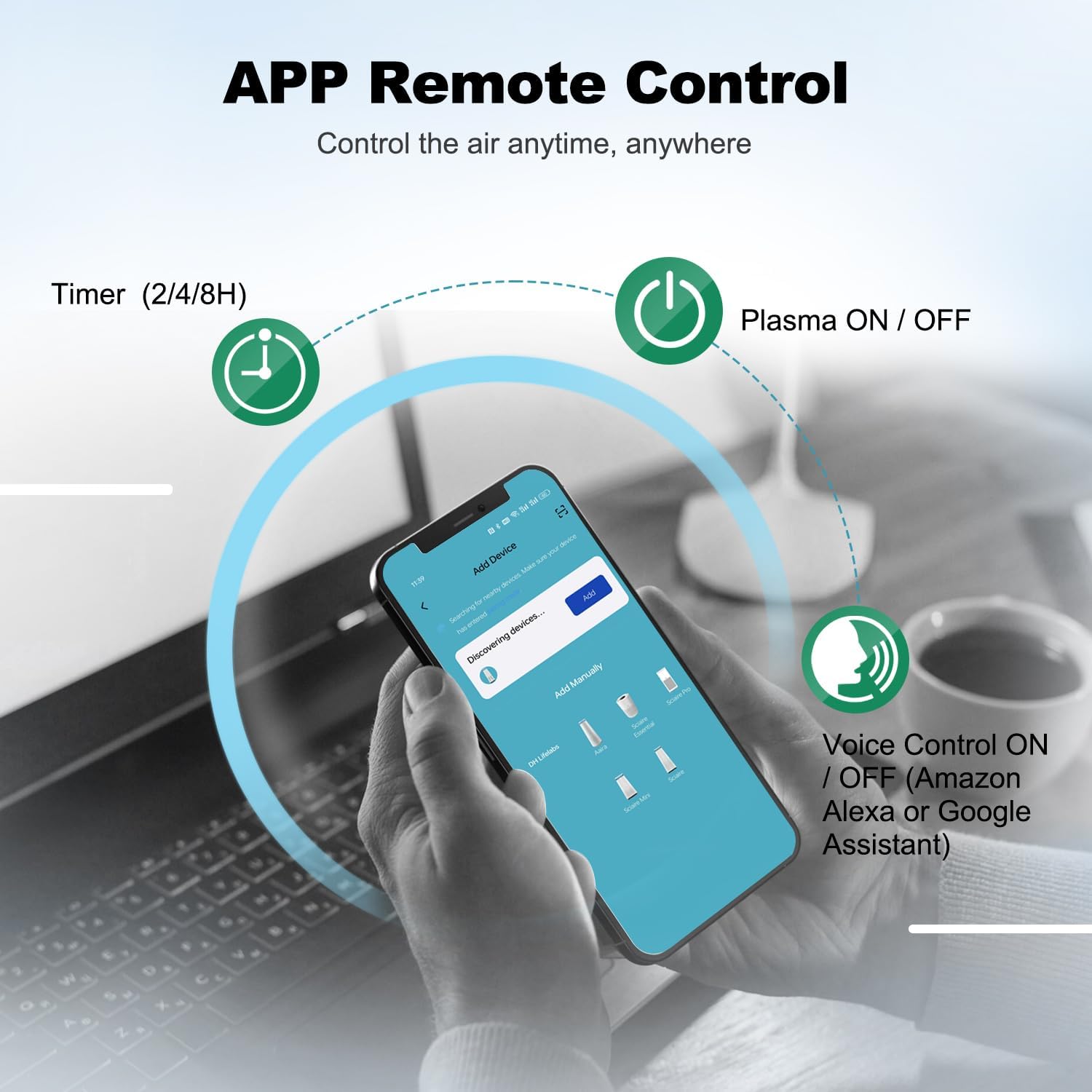
Figure 8: App remote control interface.
6. പരിപാലനം
6.1 ഫിൽട്ടർ മാറ്റിസ്ഥാപിക്കൽ
The filter indicator light on the control panel will illuminate when it's time to replace the filter. Filter life can vary based on usage and air quality.
- പവർ ഔട്ട്ലെറ്റിൽ നിന്ന് എയർ പ്യൂരിഫയർ അൺപ്ലഗ് ചെയ്യുക.
- Turn the unit upside down and remove the base cover.
- പഴയ ഫിൽട്ടർ നീക്കം ചെയ്യുക.
- Insert a new DH Lifelabs 3-in-1 HEPA filter (ensure plastic packaging is removed).
- Replace and lock the base cover.
- യൂണിറ്റ് തിരികെ പ്ലഗ് ഇൻ ചെയ്യുക. ഫിൽട്ടർ ലൈഫ് ഇൻഡിക്കേറ്റർ പുനഃസജ്ജമാക്കാൻ കൺട്രോൾ പാനലിലെ ഫിൽട്ടർ റീസെറ്റ് ബട്ടൺ 3 സെക്കൻഡ് അമർത്തിപ്പിടിക്കുക.
6.2 യൂണിറ്റ് വൃത്തിയാക്കൽ
- എയർ പ്യൂരിഫയറിന്റെ പുറംഭാഗം മൃദുവായതും ഉണങ്ങിയതുമായ തുണി ഉപയോഗിച്ച് തുടയ്ക്കുക.
- ഉരച്ചിലുകളുള്ള ക്ലീനറുകളോ ലായകങ്ങളോ ഉപയോഗിക്കരുത്.
- The pre-filter component of the 3-in-1 filter can be gently vacuumed to extend its life, but the entire filter should be replaced as indicated.
7. പ്രശ്നപരിഹാരം
| പ്രശ്നം | സാധ്യമായ കാരണം | പരിഹാരം |
|---|---|---|
| യൂണിറ്റ് ഓണാക്കുന്നില്ല | No power supply; Filter not installed correctly | Check power connection; Ensure filter is unwrapped and base cover is locked. |
| Poor air purification effect | Filter is dirty; Room size exceeds capacity | Replace filter; Ensure unit is used in a room within its recommended coverage area. |
| അസാധാരണമായ ശബ്ദം | Foreign object in fan; Unit not on a flat surface | Unplug and check for obstructions; Place on a stable, flat surface. |
| Cannot connect to WiFi App | Incorrect WiFi password; Router issues; App not updated | Verify WiFi password; Restart router; Update DH Lifelabs App. |
8 സ്പെസിഫിക്കേഷനുകൾ
- മോഡൽ നമ്പർ: SAHP-21WH12C
- ഉൽപ്പന്ന അളവുകൾ: 9.06"D x 9.06"W x 14.96"H
- ഇനത്തിൻ്റെ ഭാരം: 8.5 പൗണ്ട്
- ഊർജ്ജ സ്രോതസ്സ്: AC
- ഫിൽട്ടർ തരം: 3-എസ്tage H13 TrueHEPA Filter (Pre-filter, H13 TrueHEPA, Activated Carbon)
- കവറേജ് ഏരിയ: Up to 1026 SqFt/hr (214 SqFt, 4.8 air changes/hr)
- ശബ്ദ നില: 23dB (സ്ലീപ്പ് മോഡ്)
- കണക്റ്റിവിറ്റി: WiFi, Google Home, Amazon Alexa
9. ഔദ്യോഗിക ഉൽപ്പന്ന വീഡിയോ
Video 1: DH Lifelabs Sciaire Technology Overview. This video explains the core technology behind the air purifier's operation, including its ionization process.
10. വാറൻ്റിയും പിന്തുണയും
For warranty information, technical support, or any inquiries regarding your DH Lifelabs HEPA Air Purifier, please refer to the official DH Lifelabs webസൈറ്റിൽ ബന്ധപ്പെടുക അല്ലെങ്കിൽ അവരുടെ ഉപഭോക്തൃ സേവനവുമായി നേരിട്ട് ബന്ധപ്പെടുക. വാറന്റി ക്ലെയിമുകൾക്കായി നിങ്ങളുടെ വാങ്ങൽ രസീത് സൂക്ഷിക്കുക.
നിയമപരമായ നിരാകരണം: ഡയറ്ററി സപ്ലിമെൻ്റുകളെക്കുറിച്ചുള്ള പ്രസ്താവനകൾ FDA വിലയിരുത്തിയിട്ടില്ല, അവ ഏതെങ്കിലും രോഗമോ ആരോഗ്യസ്ഥിതിയോ നിർണ്ണയിക്കാനോ ചികിത്സിക്കാനോ സുഖപ്പെടുത്താനോ തടയാനോ ഉദ്ദേശിച്ചുള്ളതല്ല.