ആമുഖം
This manual provides detailed instructions for the setup, operation, and maintenance of your ADAM elements USB-C Hub Stand Pro. This device combines an ergonomic laptop stand with a 6-in-1 multiport USB-C hub, designed to enhance connectivity and comfort for M2/M1 Mac, iPad, and other USB-C compatible laptops.
ഉൽപ്പന്നം കഴിഞ്ഞുview
The ADAM elements USB-C Hub Stand Pro is a versatile accessory that integrates a laptop stand with a powerful USB-C hub. It features a detachable design, allowing the hub to be used independently. The stand offers adjustable height and a 360-degree rotatable base for optimal viewകോണുകൾ.
പ്രധാന സവിശേഷതകൾ:
- 6-in-1 Multiport Hub: Includes USB-C Host, 2x USB-A, USB-C PD, HDMI, and RJ45 Ethernet.
- Ergonomic Laptop Stand: Adjustable elevation up to 29 cm and 180-degree angle.
- 360-ഡിഗ്രി റൊട്ടേഷൻ: Swivel base for flexible viewing.
- 4K@60Hz HDMI ഔട്ട്പുട്ട്: Supports high-resolution video with HDCP 2.2.
- 100W പവർ ഡെലിവറി: USB-C PD port for fast charging.
- Detachable Hub: Use the hub integrated with the stand or as a portable device.
- Durable All-Aluminum Design: Robust construction with anti-slip silicone pads.
- Right-Angle USB-C Cable: Reduces strain and ensures a secure connection.
പോർട്ട് കോൺഫിഗറേഷൻ:
| പോർട്ട് തരം | അളവ് | പ്രവർത്തനക്ഷമത |
|---|---|---|
| USB-C ഹോസ്റ്റ് | 1 | Connects to laptop/device (USB-C 3.1 Gen 2) |
| USB-A | 2 | 5Gbps വരെ ഡാറ്റ കൈമാറ്റം |
| USB-C PD | 1 | Power Delivery Pass-Through charging up to 100W |
| HDMI | 1 | Video output up to 4K@60Hz |
| RJ45 ഇഥർനെറ്റ് | 1 | Network connection (1000 Mbps Max) |

Image: The ADAM elements USB-C Hub Stand Pro, showcasinഅതിന്റെ എർഗണോമിക് ഡിസൈനും സംയോജിത ഹബ്ബും.

ചിത്രം: വിശദമായത് view of the 6 multi-function ports for charging, video, and data transmission.
സജ്ജീകരണ നിർദ്ദേശങ്ങൾ
- ഉപകരണം അൺപാക്ക് ചെയ്യുക: Carefully remove the USB-C Hub Stand Pro from its packaging.
- സ്റ്റാൻഡ് സ്ഥാപിക്കുക: സ്ഥിരതയുള്ള, പരന്ന പ്രതലത്തിൽ സ്റ്റാൻഡ് സ്ഥാപിക്കുക.
- സ്റ്റാൻഡ് ക്രമീകരിക്കുക:
- Gently adjust the stand's arms to your desired height and angle. The stand supports an elevation angle of up to 180 degrees and a height of up to 29 cm.
- The base can be rotated 360 degrees horizontally for optimal viewing.
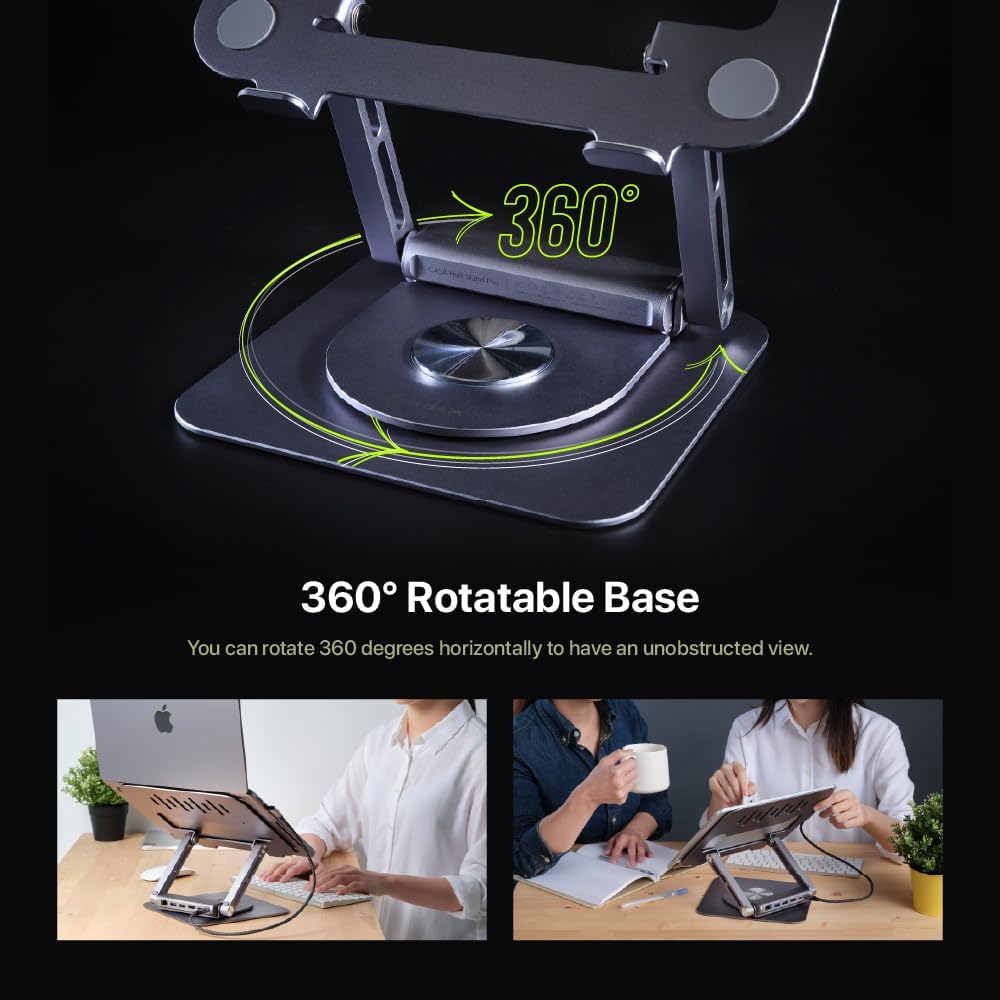
Image: Demonstrating the 360-degree rotatable base for flexible positioning.
- Attach/Detach the Hub:
- The hub is designed to be detachable. To attach, align the hub with the designated slot on the stand and slide it into place until it clicks securely.
- To detach, gently pull the hub away from the stand. This allows for independent use or portability.

Image: The detachable design of the hub, allowing it to be used separately.
- നിങ്ങളുടെ ഉപകരണത്തിലേക്ക് കണക്റ്റുചെയ്യുക: Use the integrated right-angle USB-C cable to connect the hub to your laptop or iPad's USB-C port. Ensure the connection is firm.
- പെരിഫറലുകൾ ബന്ധിപ്പിക്കുക: Plug your desired peripherals (e.g., external monitor, USB drives, Ethernet cable, power adapter) into the corresponding ports on the hub.
പ്രവർത്തന നിർദ്ദേശങ്ങൾ
Using the USB-C Hub:
- പവർ ഡെലിവറി (PD): Connect your laptop's USB-C power adapter to the USB-C PD port on the hub to charge your device while using the hub's other functions. The hub supports up to 100W pass-through charging.
- USB-A പോർട്ടുകൾ: Use the two USB-A ports for connecting USB devices such as keyboards, mice, external hard drives, or flash drives. These ports support data transfer speeds up to 5Gbps.
- HDMI ഔട്ട്പുട്ട്: Connect an external monitor or projector to the HDMI port. The hub supports 4K resolution at 60Hz.
- To enjoy 4K@60Hz resolution, ensure your device supports DisplayPort (DP) 1.4 or higher.
- You can configure your display settings for Mirror Mode (duplicate your primary screen) or Extend Mode (expand your desktop across multiple screens) through your operating system's display settings.

Image: High-resolution 4K@60Hz video output capabilities.

Image: External display options: Mirror Mode and Extended Mode.
- RJ45 ഇഥർനെറ്റ് പോർട്ട്: Connect an Ethernet cable to this port for a stable wired network connection, supporting speeds up to 1000 Mbps.
Using the Laptop Stand:
- എർഗണോമിക് അഡ്ജസ്റ്റ്മെൻ്റ്: Adjust the height and angle of the stand to achieve an ergonomic viewing position, reducing strain on your neck and back.
- 360-ഡിഗ്രി സ്വിവൽ: Rotate the base of the stand to easily share your screen with others or change your viewing angle without moving the entire setup.
- അനുയോജ്യത: The stand is designed to securely hold M2/M1 MacBook series, iPad, and other USB-C laptops. The anti-slip silicone pads ensure stability.

Image: The stand is suitable for MacBook and iPad series.
മെയിൻ്റനൻസ്
- വൃത്തിയാക്കൽ: Use a soft, dry cloth to wipe down the stand and hub. Avoid abrasive cleaners or solvents that may damage the finish.
- സംഭരണം: When not in use, store the device in a cool, dry place. The detachable hub can be stored separately for travel.
- കേബിൾ കെയർ: Ensure the right-angle USB-C cable is not excessively bent or strained to prevent damage.
- ഓവർലോഡിംഗ് ഒഴിവാക്കുക: Do not connect devices that exceed the hub's power capabilities.
ട്രബിൾഷൂട്ടിംഗ്
| പ്രശ്നം | സാധ്യമായ കാരണം | പരിഹാരം |
|---|---|---|
| ബാഹ്യ മോണിറ്ററിൽ ഡിസ്പ്ലേ ഇല്ല. | Incorrect cable connection, incompatible resolution, device not supporting DP 1.4. |
|
| USB ഉപകരണങ്ങൾ തിരിച്ചറിഞ്ഞില്ല. | Loose connection, insufficient power, driver issues. |
|
| PD പോർട്ട് വഴി ലാപ്ടോപ്പ് ചാർജ് ചെയ്യുന്നില്ല. | Power adapter not connected, adapter not powerful enough, faulty cable. |
|
| Ethernet connection unstable or not working. | Loose cable, network issues, driver issues. |
|
സ്പെസിഫിക്കേഷനുകൾ
| ഫീച്ചർ | വിശദാംശങ്ങൾ |
|---|---|
| മോഡൽ നമ്പർ | AAPADHUBSTDPGY |
| ഉൽപ്പന്ന അളവുകൾ | 1.8 x 10.2 x 8.8 ഇഞ്ച് (4.57 x 25.91 x 22.35 സെ.മീ) |
| ഇനത്തിൻ്റെ ഭാരം | 2.3 പൗണ്ട് (1.04 കി.ഗ്രാം) |
| തുറമുഖങ്ങൾ | 1x USB-C Host (USB-C 3.1 Gen 2), 2x USB-A (5Gbps), 1x USB-C PD (up to 100W), 1x HDMI (4K@60Hz), 1x RJ45 Ethernet (1000 Mbps) |
| HDMI റെസല്യൂഷൻ | Up to 4K@60Hz, HDCP 2.2 compatible |
| പവർ ഡെലിവറി | Up to 100W Pass-Through |
| Data Transfer Speed (USB-A) | 5Gbps വരെ |
| ഇഥർനെറ്റ് സ്പീഡ് | 10/100/1000 Mbps |
| മെറ്റീരിയൽ | All-Aluminum |
| അനുയോജ്യമായ ഉപകരണങ്ങൾ | M2/M1 MacBook Series, iPad, USB-C Laptops |
വാറൻ്റിയും പിന്തുണയും
ADAM ELEMENTS products are designed for reliability and performance. For warranty information and technical support, please refer to the official ADAM ELEMENTS webസൈറ്റ് അല്ലെങ്കിൽ അവരുടെ ഉപഭോക്തൃ സേവനവുമായി നേരിട്ട് ബന്ധപ്പെടുക.
For additional support or to inquire about replacement parts, please visit: www.adamelements.com


