1 സുരക്ഷാ വിവരങ്ങൾ
- This product is intended for children aged 3 to 12 years. Adult supervision is recommended during use.
- Do not disassemble or attempt to repair the camera. Contact support if issues arise.
- Keep the camera away from water and excessive moisture to prevent damage.
- ചാർജ് ചെയ്യാൻ നൽകിയിരിക്കുന്ന യുഎസ്ബി കേബിൾ മാത്രം ഉപയോഗിക്കുക.
- The thermal print paper is a consumable item. Ensure replacements are compatible.
2. പാക്കേജ് ഉള്ളടക്കം
നിങ്ങളുടെ പാക്കേജിൽ എല്ലാ ഇനങ്ങളും ഉണ്ടെന്ന് ഉറപ്പാക്കുക:
- 1 x GREENKINDER X6 Kids Instant Print Camera
- 1 x 32 ജിബി മൈക്രോ എസ്ഡി കാർഡ്
- 3 x Rolls of Thermal Print Paper
- 1 x ലാനിയാർഡ്
- 1 x യുഎസ്ബി-സി ചാർജിംഗ് കേബിൾ
- 1 x Cartoon Sticker Set
- 5 x Color Pens
- 1 x ഉപയോക്തൃ മാനുവൽ
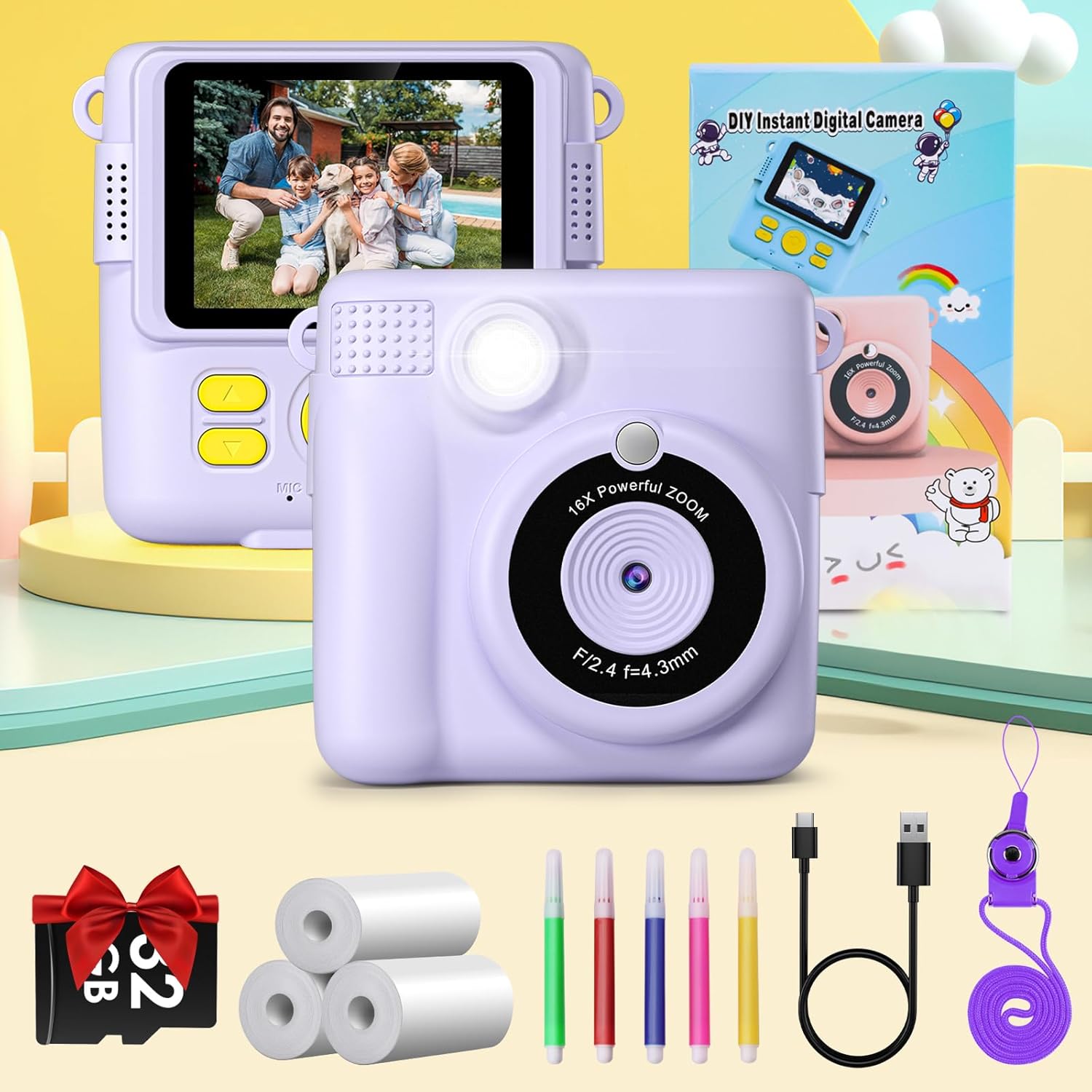
Figure 2.1: Complete package contents of the GREENKINDER X6 camera.
3. ഉൽപ്പന്നം കഴിഞ്ഞുview
ക്യാമറയുടെ ഘടകങ്ങളുമായി പരിചയപ്പെടുക:

ചിത്രം 3.1: മുന്നിലും പിന്നിലും views of the GREENKINDER X6 camera with key features highlighted.
- ലെൻസ്: ഫോട്ടോകളും വീഡിയോകളും പകർത്തുന്നതിനുള്ള പ്രധാന ക്യാമറ ലെൻസ്.
- ഫ്ലാഷ്: കുറഞ്ഞ വെളിച്ചത്തിൽ പ്രകാശം നൽകുന്നു.
- 2.4-ഇഞ്ച് LCD സ്ക്രീൻ: വേണ്ടി viewing photos, videos, and navigating menus.
- നിയന്ത്രണ ബട്ടണുകൾ: Power, Shutter, Navigation (Up/Down/Left/Right), OK/Menu.
- പ്രിന്റ് ഔട്ട്പുട്ട് സ്ലോട്ട്: Where instant prints emerge.
- മൈക്രോ എസ്ഡി കാർഡ് സ്ലോട്ട്: For memory expansion (32GB card included).
- യുഎസ്ബി-സി പോർട്ട്: ചാർജിംഗിനും ഡാറ്റ കൈമാറ്റത്തിനും.
4. സജ്ജീകരണം
4.1 ബാറ്ററി ചാർജ് ചെയ്യുന്നു
The camera is equipped with a 1000mAh lithium-polymer battery. Before first use, fully charge the camera.
- Connect the provided USB-C cable to the camera's USB-C port.
- കേബിളിന്റെ മറ്റേ അറ്റം ഒരു USB പവർ അഡാപ്റ്ററുമായി (ഉൾപ്പെടുത്തിയിട്ടില്ല) അല്ലെങ്കിൽ ഒരു കമ്പ്യൂട്ടറിന്റെ USB പോർട്ടുമായി ബന്ധിപ്പിക്കുക.
- ചാർജിംഗ് ഇൻഡിക്കേറ്റർ ലൈറ്റ് പ്രകാശിക്കും. ചാർജിംഗ് പൂർത്തിയാകുമ്പോൾ അത് ഓഫാകും അല്ലെങ്കിൽ നിറം മാറും.
4.2 മൈക്രോ എസ്ഡി കാർഡ് ചേർക്കൽ
A 32GB MicroSD card is included for storing photos and videos.
- ക്യാമറയുടെ വശത്ത് മൈക്രോ എസ്ഡി കാർഡ് സ്ലോട്ട് കണ്ടെത്തുക.
- സ്വർണ്ണ കോൺടാക്റ്റുകൾ താഴേക്ക് അഭിമുഖമായി വരുന്ന വിധത്തിൽ മൈക്രോ എസ്ഡി കാർഡ് ഇടുക, അങ്ങനെ അത് സ്ഥലത്ത് ക്ലിക്ക് ആകുന്നതുവരെ.
- നീക്കം ചെയ്യാൻ, കാർഡ് ക്ലിക്ക് ആകുന്നതുവരെ സൌമ്യമായി അകത്തേക്ക് തള്ളുക, തുടർന്ന് വിടുക, അപ്പോൾ അത് പുറത്തുവരും.
4.3 പ്രിന്റ് പേപ്പർ ലോഡുചെയ്യുന്നു
The camera uses thermal print paper for instant black and white prints. Three rolls are included.
- Gently push the part of the camera with the lens upwards to open the paper compartment.
- കമ്പാർട്ടുമെന്റിലേക്ക് ഒരു തെർമൽ പ്രിന്റ് പേപ്പർ റോൾ തിരുകുക, പേപ്പർ മുകളിൽ നിന്ന് പുറത്തേക്ക് വരുന്നുണ്ടെന്ന് ഉറപ്പാക്കുക.
- Close the camera by pushing the two parts back together until they click securely.

Figure 4.1: Steps for loading thermal print paper.
5. പ്രവർത്തന നിർദ്ദേശങ്ങൾ
5.1 പവർ ഓൺ/ഓഫ്
- To power on, press and hold the Power button for a few seconds.
- To power off, press and hold the Power button again until the screen turns off.
5.2 Basic Photography and Instant Printing
The camera allows for instant black and white prints using thermal technology.
- ക്യാമറ ഓണാക്കുക.
- 2.4 ഇഞ്ച് എൽസിഡി സ്ക്രീൻ ഉപയോഗിച്ച് നിങ്ങളുടെ ഷോട്ട് ഫ്രെയിം ചെയ്യുക.
- ഒരു ഫോട്ടോ എടുക്കാൻ ഷട്ടർ ബട്ടൺ അമർത്തുക.
- The camera will automatically print the photo in black and white from the output slot.
5.3 വീഡിയോ റെക്കോർഡിംഗ്
Record moments in 1080P resolution.
- Navigate to video mode using the menu buttons.
- റെക്കോർഡിംഗ് ആരംഭിക്കാൻ ഷട്ടർ ബട്ടൺ അമർത്തുക.
- റെക്കോർഡിംഗ് നിർത്താൻ ഷട്ടർ ബട്ടൺ വീണ്ടും അമർത്തുക.

Figure 5.1: Demonstrating 1080P video, time-lapse, and burst shooting features.
5.4 പ്രത്യേക സവിശേഷതകൾ
- 16x ഡിജിറ്റൽ സൂം: Use the navigation buttons to zoom in or out before taking a photo.
- ഫ്ലാഷ്: Activate or deactivate the flash for improved lighting in dark environments.
- സമയദൈർഘ്യം: Set the camera to take photos automatically at intervals of 3, 5, or 10 seconds.
- ബർസ്റ്റ് ഷൂട്ടിംഗ്: Capture multiple photos in quick succession by holding down the shutter button.
- ഗെയിമുകൾ: The camera includes built-in puzzle games for entertainment. Access them via the menu.
- Filters and Frames: Apply various fun filters and decorative frames to your photos before printing or saving.

Figure 5.2: 16x Zoom and Flash functionality.

ചിത്രം 5.3: ഉദാamples of different frames and filters.
5.5 DIY Coloring
After printing black and white photos, use the included color pens to personalize them.

Figure 5.4: DIY coloring of instant prints.
6. പരിപാലനം
6.1 ക്യാമറ വൃത്തിയാക്കൽ
- ക്യാമറ ബോഡി വൃത്തിയാക്കാൻ മൃദുവായതും ഉണങ്ങിയതുമായ തുണി ഉപയോഗിക്കുക.
- For the lens, use a specialized lens cleaning cloth.
- ലിക്വിഡ് ക്ലീനറുകളോ ഉരച്ചിലുകളുള്ള വസ്തുക്കളോ ഉപയോഗിക്കരുത്.
6.2 Storing the Camera
- നേരിട്ട് സൂര്യപ്രകാശം ഏൽക്കാത്ത തണുത്തതും വരണ്ടതുമായ സ്ഥലത്ത് ക്യാമറ സൂക്ഷിക്കുക.
- Remove the MicroSD card if storing for extended periods.
6.3 ബാറ്ററി കെയർ
- Charge the battery regularly, even if the camera is not in frequent use, to maintain battery health.
- ബാറ്ററി ഇടയ്ക്കിടെ പൂർണ്ണമായും ഡിസ്ചാർജ് ചെയ്യുന്നത് ഒഴിവാക്കുക.
6.4 Replacing Print Paper
When the print paper runs out, you can purchase compatible thermal print paper. ഇതിനായി തിരയുക ASIN: B0C52Q298V റീഫില്ലുകൾക്കായി.
7. പ്രശ്നപരിഹാരം
| പ്രശ്നം | സാധ്യമായ കാരണം | പരിഹാരം |
|---|---|---|
| ക്യാമറ ഓണാകുന്നില്ല. | കുറഞ്ഞ ബാറ്ററി. | Charge the camera fully using the provided USB-C cable. |
| ഫോട്ടോകൾ/വീഡിയോകൾ എടുക്കാൻ കഴിയില്ല. | No MicroSD card inserted or card is full. | Insert a MicroSD card or delete old fileസ്ഥലം ശൂന്യമാക്കാൻ s. |
| പ്രിന്റുകൾ ശൂന്യമോ മങ്ങിയതോ ആണ്. | Print paper is incorrectly loaded or has run out. | Check paper orientation and ensure it is loaded correctly. Replace the paper roll if empty. |
| ക്യാമറ മരവിക്കുന്നു അല്ലെങ്കിൽ പ്രതികരിക്കുന്നില്ല. | സോഫ്റ്റ്വെയർ തകരാർ. | പുനരാരംഭിക്കാൻ നിർബന്ധിക്കുന്നതിന് പവർ ബട്ടൺ 10 സെക്കൻഡ് അമർത്തിപ്പിടിക്കുക. |
8 സ്പെസിഫിക്കേഷനുകൾ
| ഫീച്ചർ | വിശദാംശങ്ങൾ |
|---|---|
| ബ്രാൻഡ് | GREENKINDER |
| മോഡൽ | X6 |
| ഉൽപ്പന്ന തരം | Instant Print Camera (DSLR type) |
| നിറം | ലിലാക്ക് |
| സ്ക്രീൻ | 2.4-ഇഞ്ച് എൽസിഡി |
| വീഡിയോ റെസല്യൂഷൻ | 1080p |
| ഫലപ്രദമായ സ്റ്റിൽ റെസല്യൂഷൻ | 12 മെഗാപിക്സലുകൾ |
| ഡിജിറ്റൽ സൂം | 16x |
| കണക്റ്റിവിറ്റി ടെക്നോളജി | USB-C |
| മെമ്മറി | Supports MicroSD card (32GB included) |
| ബാറ്ററി കോമ്പോസിഷൻ | Lithium-polymer (1000mAh) |
| പ്രത്യേക സവിശേഷതകൾ | Time-lapse, Flash, Burst Shooting, Games, Filters, Frames |
| ഇനത്തിൻ്റെ ഭാരം | 250 ഗ്രാം |
| മോഡൽ വർഷം | 2023 |
9. വാറൻ്റിയും പിന്തുണയും
For warranty information or technical support, please refer to the contact details provided with your purchase or visit the official GREENKINDER webസൈറ്റ്. വാങ്ങിയതിന്റെ തെളിവായി നിങ്ങളുടെ വാങ്ങൽ രസീത് സൂക്ഷിക്കുക.


