1. പ്രധാന സുരക്ഷാ നിർദ്ദേശങ്ങൾ
Before operating the PASYOU PT20G treadmill, please read and understand all safety instructions. Keep this manual for future reference.
- ട്രെഡ്മിൽ എപ്പോഴും പരന്നതും സ്ഥിരതയുള്ളതുമായ ഒരു പ്രതലത്തിൽ വയ്ക്കുക.
- Ensure adequate clearance around the treadmill (at least 2 meters behind and 0.6 meters on each side).
- ഓപ്പറേഷൻ സമയത്ത് ട്രെഡ്മില്ലിൽ നിന്ന് കുട്ടികളെയും വളർത്തുമൃഗങ്ങളെയും അകറ്റി നിർത്തുക.
- ഉചിതമായ കായിക പാദരക്ഷകളും വസ്ത്രങ്ങളും ധരിക്കുക.
- Use the safety key clip at all times. In case of emergency, the safety key will stop the treadmill.
- ട്രെഡ്മില്ലിൽ കേടുപാടുകളുണ്ടെങ്കിൽ, അല്ലെങ്കിൽ അത് ശരിയായി പ്രവർത്തിക്കുന്നില്ലെങ്കിൽ, അത് പ്രവർത്തിപ്പിക്കരുത്.
- ഏതെങ്കിലും വ്യായാമ പരിപാടി ആരംഭിക്കുന്നതിന് മുമ്പ് ഒരു ഡോക്ടറെ സമീപിക്കുക.
- പരമാവധി ഉപയോക്തൃ ഭാരം ശേഷി: 120 കിലോഗ്രാം (265 പൗണ്ട്).
2. ഉൽപ്പന്നം കഴിഞ്ഞുview
The PASYOU PT20G Foldable Treadmill is designed for home and office exercise, offering a compact design, powerful motor, and various features to enhance your workout experience.
പ്രധാന സവിശേഷതകൾ:
- സ്പേസ് സേവിംഗ് ഡിസൈൻ: Features a compact and smart folding mechanism for easy storage. Equipped with transport wheels for convenient relocation.
- ശക്തമായ മോട്ടോർ: A robust 2.0 HP motor provides stable performance for walking, jogging, and running.
- Comfortable Experience: Spacious running area (40 x 105 cm) and a high-quality cushioning system with six shock-absorbing rubber pads to reduce impact.
- ക്രമീകരിക്കാവുന്ന ചരിവ്: Manual incline adjustment with three levels to vary workout intensity.
- LED ഡിസ്പ്ലേ: Clear LED display shows real-time data including speed, time, distance, and calories burned.
- സ്മാർട്ട് സവിശേഷതകൾ: Bluetooth connectivity, heart rate monitoring, and compatibility with the Kinomap APP. Includes 15 preset running programs.
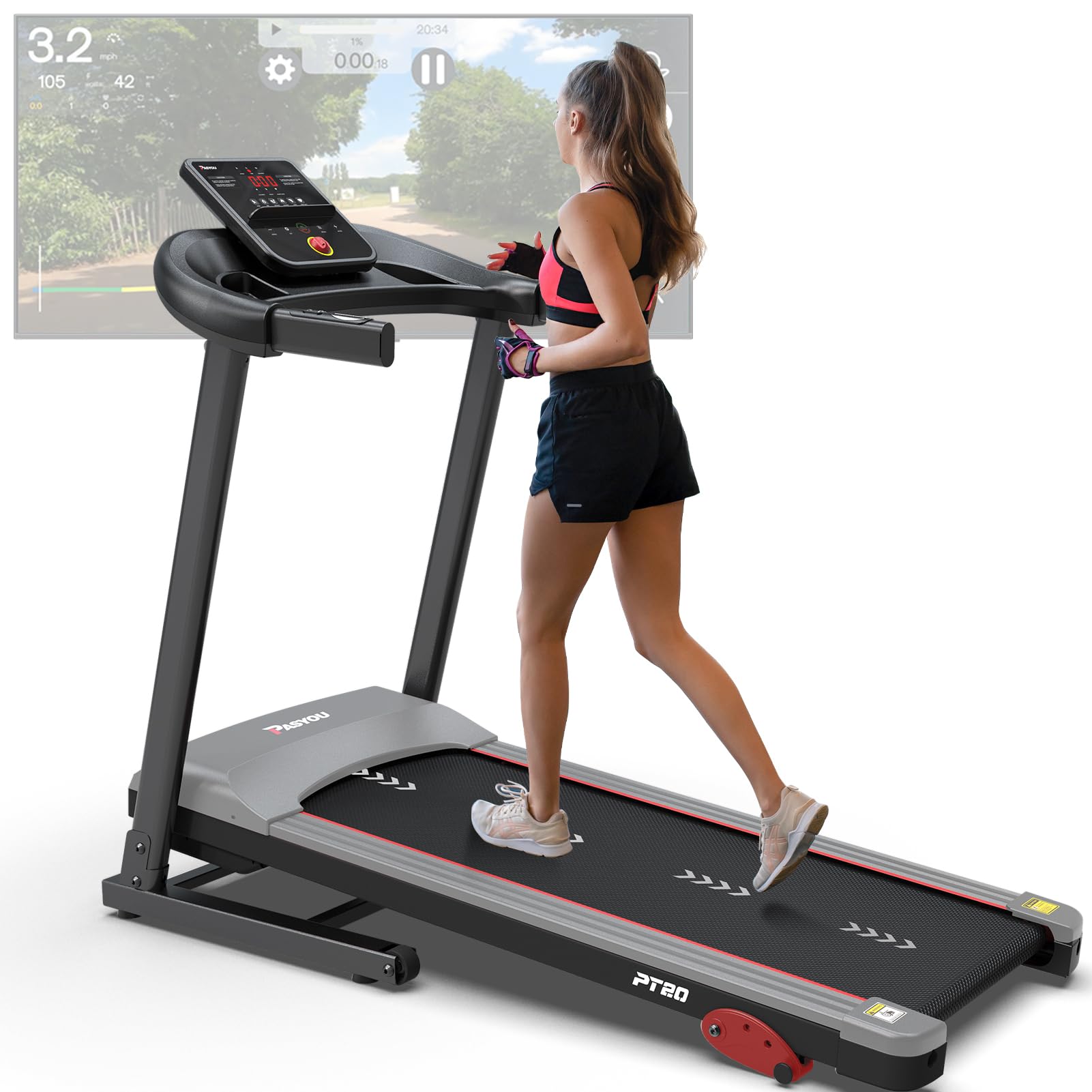
ചിത്രം: കഴിഞ്ഞുview of the PASYOU PT20G treadmill highlighting its 2.0 HP motor, 120kg weight capacity, and speed ranges for various activities (walking, jogging, running), along with 15 built-in programs.
3. അസംബ്ലി നിർദ്ദേശങ്ങൾ
The treadmill requires some assembly. While detailed written instructions may vary, the following general steps apply. Refer to the included pictorial guide for specific component identification and placement.
- ഘടകങ്ങൾ അൺപാക്ക് ചെയ്യുക: Carefully remove all parts from the packaging. Lay them out on a clear, flat surface.
- കുത്തനെയുള്ള പോസ്റ്റുകൾ അറ്റാച്ചുചെയ്യുക: Secure the upright posts to the base frame using the provided bolts and tools.
- കൺസോൾ ഇൻസ്റ്റാൾ ചെയ്യുക: Mount the console onto the top of the upright posts, ensuring all cables are connected correctly.
- Secure Handrails: Attach the handrails to the upright posts.
- അന്തിമ പരിശോധനകൾ: Ensure all bolts are tightened and all connections are secure before plugging in the treadmill.
4. പ്രവർത്തന നിർദ്ദേശങ്ങൾ
4.1 പ്രാരംഭ സജ്ജീകരണവും പവർ ഓണും
- ഒരു ലെവൽ പ്രതലത്തിൽ ട്രെഡ്മിൽ സ്ഥാപിക്കുക.
- ഗ്രൗണ്ടഡ് ഇലക്ട്രിക്കൽ ഔട്ട്ലെറ്റിലേക്ക് പവർ കോർഡ് പ്ലഗ് ചെയ്യുക.
- Attach the safety key to the console and clip the other end to your clothing. The treadmill will not operate without the safety key in place.
- Press the 'START' button on the console to begin.
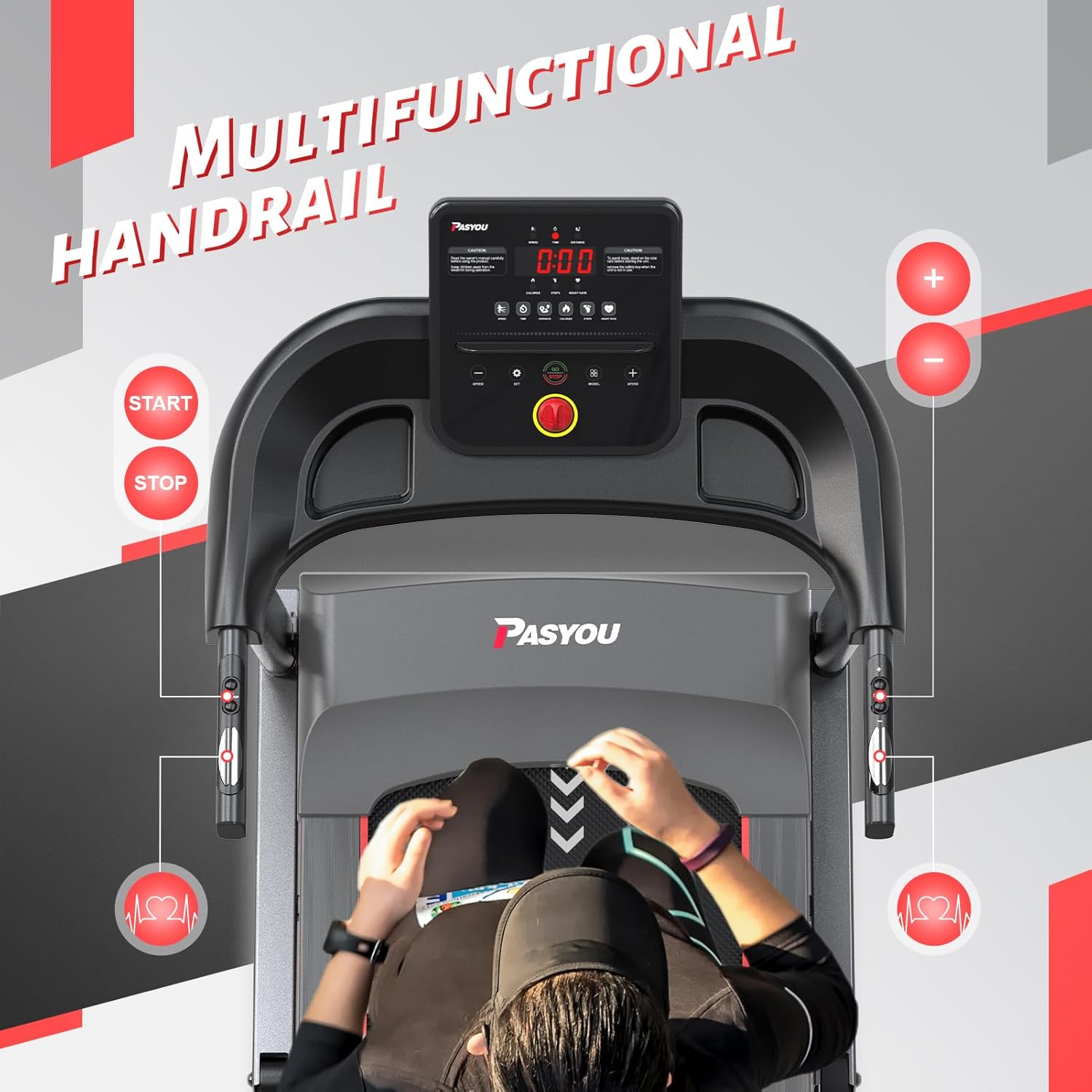
Image: Multifunctional handrail with START/STOP buttons and integrated heart rate sensors.
4.2 വേഗത ക്രമീകരിക്കൽ
- Use the '+' and '-' buttons on the console or handrails to increase or decrease the speed.
- The speed range is typically 1-12 KM/H (approximately 0.6-7.5 MPH).
4.3 Adjusting Incline
The PASYOU PT20G features a manual incline adjustment with three levels. To change the incline:
- Stop the treadmill and unplug it from the power source.
- Locate the incline adjustment pins at the rear of the treadmill deck.
- Lift the deck slightly and adjust the pins to the desired incline level (1, 2, or 3).
- Ensure both sides are set to the same incline level before resuming use.

Image: Illustration of the manual incline adjustment points on the treadmill, demonstrating the three available levels.
4.4 പ്രീസെറ്റ് പ്രോഗ്രാമുകൾ ഉപയോഗിക്കുന്നു
The treadmill includes 15 preset programs designed for various fitness goals.
- Press the 'PROGRAM' button to cycle through the available programs.
- Each program has a predefined speed and duration profile.
- Press 'START' to begin the selected program.

Image: LED display showing metrics like calories, steps, heart rate, distance, time, and speed, along with an icon for 15 programs.
4.5 Bluetooth Connectivity and Kinomap APP
Connect your device via Bluetooth to enhance your workout with fitness apps like Kinomap.
- നിങ്ങളുടെ സ്മാർട്ട്ഫോണിലോ ടാബ്ലെറ്റിലോ ബ്ലൂടൂത്ത് പ്രവർത്തനക്ഷമമാക്കിയിട്ടുണ്ടെന്ന് ഉറപ്പാക്കുക.
- Download and open the Kinomap APP (or other compatible fitness apps).
- Follow the app's instructions to pair with your PASYOU PT20G treadmill.
- Use the integrated phone holder on the console to secure your device.

Image: Treadmill in use with a tablet showing the Kinomap application, demonstrating Bluetooth connectivity for interactive workouts.
4.6 മടക്കലും സംഭരണവും
സ്ഥലം ലാഭിക്കുന്ന സംഭരണത്തിനായി ട്രെഡ്മിൽ എളുപ്പത്തിൽ മടക്കാവുന്നതാണ്.
- ട്രെഡ്മിൽ നിർത്തി പ്ലഗ് ഊരിമാറ്റിയിട്ടുണ്ടെന്ന് ഉറപ്പാക്കുക.
- Carefully lift the running deck until it locks into the upright position.
- Use the transport wheels to move the folded treadmill to your desired storage location.
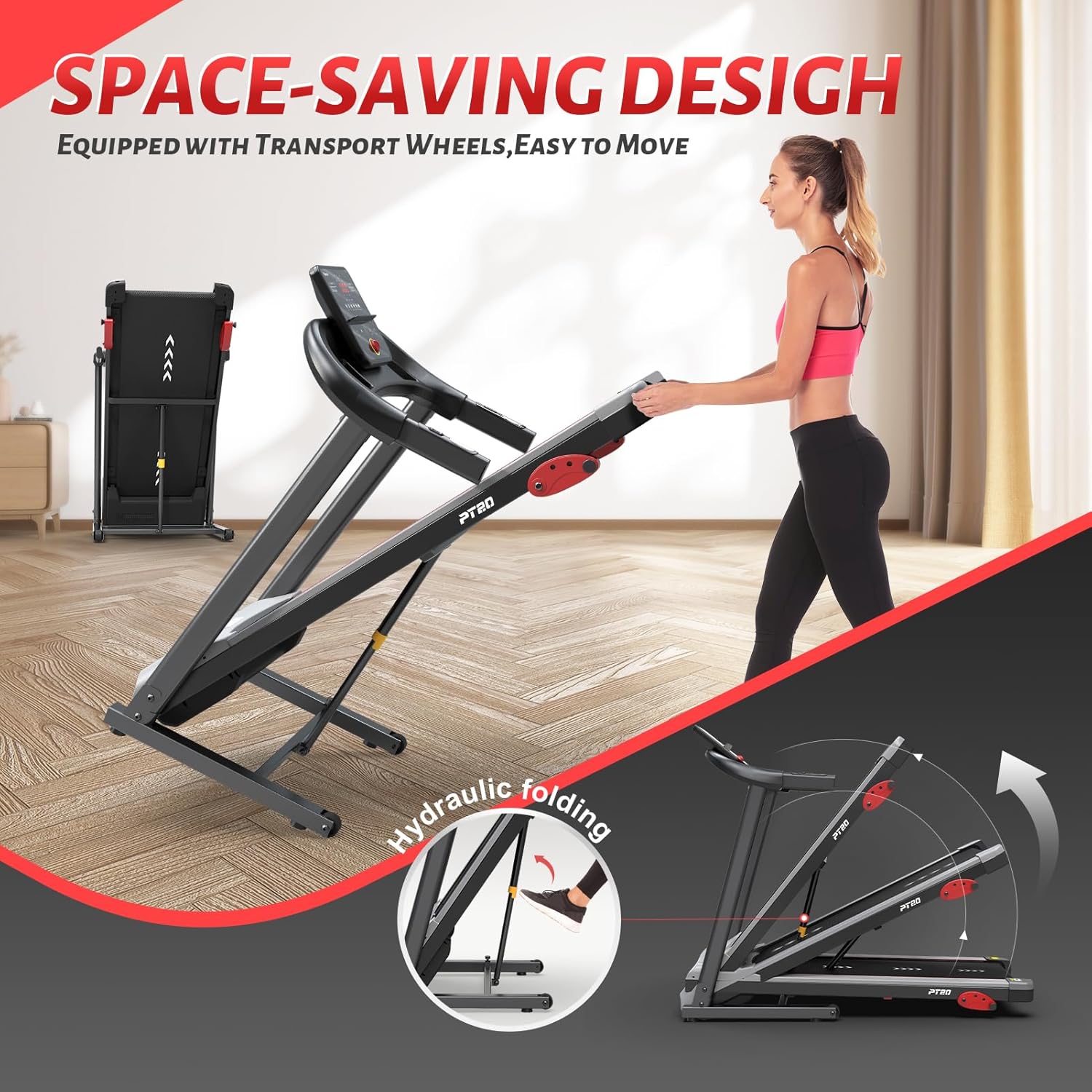
Image: The treadmill in its folded position, demonstrating its space-saving design and ease of movement with transport wheels.
5. പരിപാലനം
പതിവ് അറ്റകുറ്റപ്പണികൾ നിങ്ങളുടെ ട്രെഡ്മില്ലിന്റെ ദീർഘായുസ്സും മികച്ച പ്രകടനവും ഉറപ്പാക്കുന്നു.
- വൃത്തിയാക്കൽ: പരസ്യം ഉപയോഗിച്ച് ട്രെഡ്മില്ലിന്റെ പ്രതലങ്ങൾ തുടയ്ക്കുകamp ഓരോ ഉപയോഗത്തിനു ശേഷവും തുണി ഉപയോഗിക്കുക. അബ്രസിവ് ക്ലീനറുകൾ ഒഴിവാക്കുക.
- ബെൽറ്റ് ലൂബ്രിക്കേഷൻ: Periodically lubricate the running belt according to the instructions provided with your lubricant. This typically involves applying silicone lubricant under the belt.
- ബെൽറ്റ് ടെൻഷനും അലൈൻമെന്റും: Check the running belt tension and alignment regularly. Adjust if the belt slips or drifts to one side. Refer to the specific instructions in your assembly guide for adjustment points.
- മോട്ടോർ കവർ: Periodically remove the motor cover and vacuum any dust or debris that may have accumulated. Ensure the treadmill is unplugged before doing so.
6. പ്രശ്നപരിഹാരം
If you encounter issues with your treadmill, refer to the following common troubleshooting steps:
- ട്രെഡ്മിൽ ഇനിപ്പറയുന്നവ ഓണാക്കുന്നില്ല:
- പവർ കോർഡ് ഒരു ഗ്രൗണ്ടഡ് ഔട്ട്ലെറ്റിൽ സുരക്ഷിതമായി പ്ലഗ് ചെയ്തിട്ടുണ്ടോ എന്ന് പരിശോധിക്കുക.
- Ensure the safety key is correctly placed on the console.
- Verify the power switch (if present) is in the 'ON' position.
- Running belt slips or stops:
- The running belt may need lubrication.
- The running belt may be too loose and require tension adjustment.
- പ്രവർത്തന സമയത്ത് അസാധാരണമായ ശബ്ദങ്ങൾ:
- Check for loose parts or debris under the running belt.
- ട്രെഡ്മിൽ ഒരു നിരപ്പായ പ്രതലത്തിലാണെന്ന് ഉറപ്പാക്കുക.
- Lubricate the running belt if it's dry.
- Inaccurate display readings:
- Ensure all console cables are securely connected.
- For heart rate, ensure hands are firmly placed on the sensors.
ഈ പരിഹാരങ്ങൾ പരീക്ഷിച്ചതിനുശേഷവും പ്രശ്നം നിലനിൽക്കുകയാണെങ്കിൽ, ദയവായി ഉപഭോക്തൃ പിന്തുണയുമായി ബന്ധപ്പെടുക.
7 സ്പെസിഫിക്കേഷനുകൾ
| ഫീച്ചർ | സ്പെസിഫിക്കേഷൻ |
|---|---|
| മോഡൽ നമ്പർ | PT20G |
| ബ്രാൻഡ് | പാസ്യു |
| മോട്ടോർ കുതിരശക്തി | 2.0 എച്ച്.പി |
| വേഗത പരിധി | 1 - 12 KM/H (approx. 0.6 - 7.5 MPH) |
| പരമാവധി ഉപയോക്തൃ ഭാരം | 120 കി.ഗ്രാം (265 പൗണ്ട്) |
| Running Area (L x W) | 105 സെ.മീ x 40 സെ.മീ (41.3 x 15.7 ഇഞ്ച്) |
| ഇൻക്ലൈൻ ലെവലുകൾ | 3 (Manual Adjustment) |
| ഡിസ്പ്ലേ തരം | എൽഇഡി |
| പ്രോഗ്രാമുകൾ | 15 പ്രീസെറ്റ് പ്രോഗ്രാമുകൾ |
| കണക്റ്റിവിറ്റി | Bluetooth, Kinomap APP compatible |
| പ്രധാന മെറ്റീരിയൽ | അലോയ് സ്റ്റീൽ |
| ഉൽപ്പന്ന അളവുകൾ (L x W x H) | 116.8 x 66 x 129.5 സെ.മീ (46 x 26 x 51 ഇഞ്ച്) |
| മടക്കിയ അളവുകൾ (L x W x H) | 58.4 x 33 x 64.5 cm (23 x 13 x 25.4 in) - Note: This value seems inconsistent with other dimensions, please refer to the product for exact folded dimensions. |
| ഉൽപ്പന്ന ഭാരം | 39.01 കി.ഗ്രാം (86 പൗണ്ട്) |
| ഉൾപ്പെടുത്തിയ ഘടകങ്ങൾ | പവർ കോർഡ് |
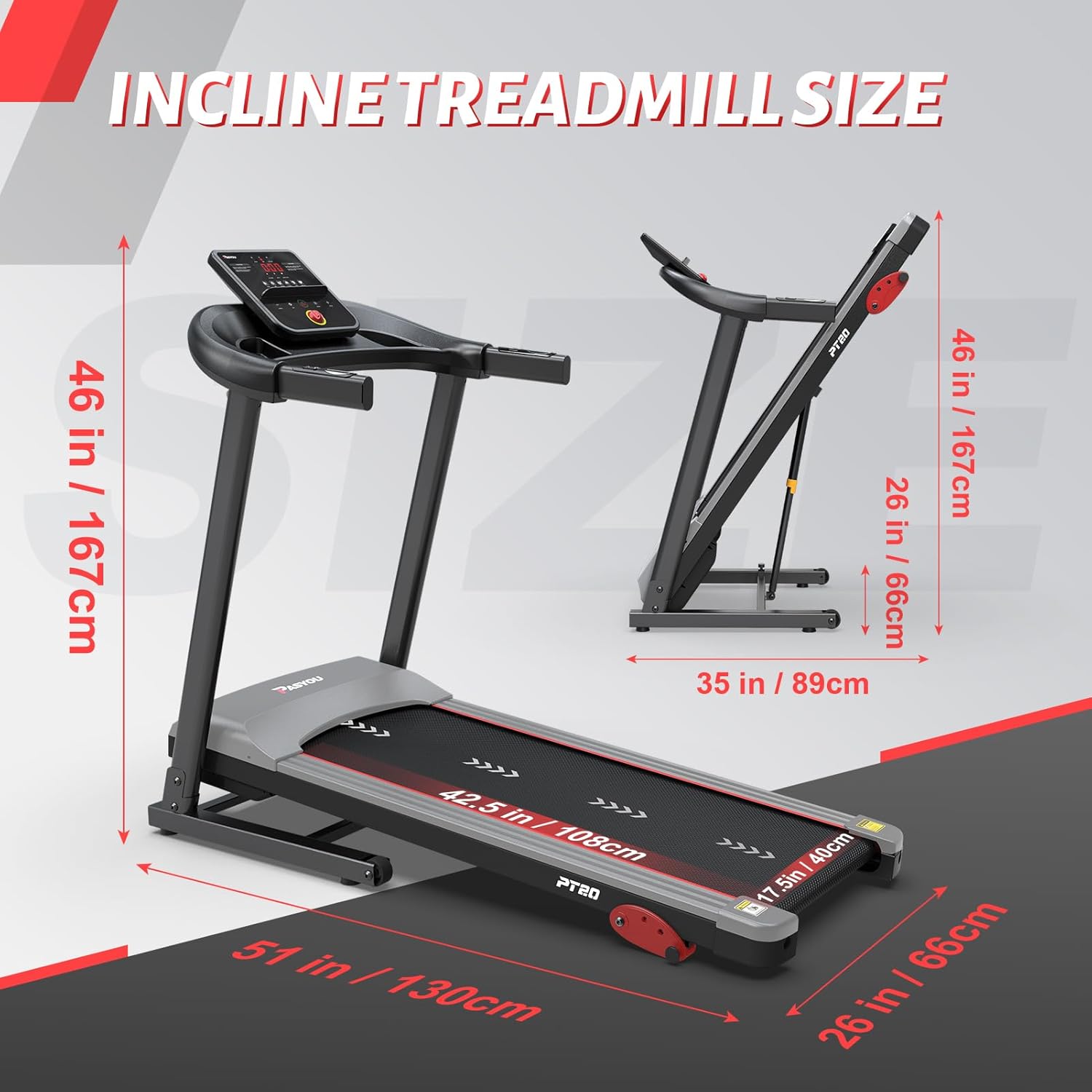
Image: Detailed dimensions of the treadmill, including height, width, and length.
8. വാറൻ്റിയും പിന്തുണയും
നൽകിയിരിക്കുന്ന ഉൽപ്പന്ന ഡാറ്റയിൽ ഉൽപ്പന്ന വാറന്റി, ഉപഭോക്തൃ പിന്തുണ എന്നിവയെക്കുറിച്ചുള്ള വിവരങ്ങൾ ലഭ്യമല്ല. ഉൽപ്പന്ന പാക്കേജിംഗോ നിർമ്മാതാവിന്റെ ഔദ്യോഗിക വിലാസമോ പരിശോധിക്കുക. webവാറന്റി കവറേജിനെക്കുറിച്ചും സഹായത്തിനായി ഉപഭോക്തൃ സേവനവുമായി എങ്ങനെ ബന്ധപ്പെടാം എന്നതിനെക്കുറിച്ചും വിശദാംശങ്ങൾക്ക് സൈറ്റ് സന്ദർശിക്കുക.


