ആമുഖം
The Wainlux JL3 is a versatile and high-precision laser engraving and cutting machine designed for a wide range of materials. Featuring advanced compressed spot laser technology, it delivers a focused and accurate beam for detailed engraving and efficient cutting. Its robust and modular design ensures ease of assembly, maintenance, and upgrades, making it suitable for both beginners and experienced users. This manual provides essential information for safe operation, setup, and maintenance of your JL3 laser engraver.
സുരക്ഷാ വിവരങ്ങൾ
Operating a laser engraving machine involves potential risks. Please read and understand all safety warnings before use.
- നേത്ര സംരക്ഷണം: Always wear the provided laser safety goggles when the machine is in operation. Direct exposure to the laser beam can cause severe eye damage.
- വെൻ്റിലേഷൻ: Ensure adequate ventilation in your workspace. Laser engraving can produce smoke, fumes, and odors, which may be harmful if inhaled.
- അഗ്നി അപകടം: Some materials are flammable when exposed to a laser. Do not leave the machine unattended during operation. Keep a fire extinguisher nearby.
- മെറ്റീരിയൽ അനുയോജ്യത: Only engrave or cut materials specified as safe for laser processing. Avoid materials that produce toxic fumes or are highly reflective.
- കുട്ടികളും വളർത്തുമൃഗങ്ങളും: ഓപ്പറേഷൻ ഏരിയയിൽ നിന്ന് കുട്ടികളെയും വളർത്തുമൃഗങ്ങളെയും അകറ്റി നിർത്തുക.
- വൈദ്യുതി വിതരണം: Use only the recommended power adapter. Disconnect power before performing any maintenance or assembly.

Image: The Wainlux JL3 laser engraver shown with a pair of laser safety goggles, emphasizing the importance of eye protection during operation.
പാക്കേജ് ഉള്ളടക്കം
പാക്കേജ് തുറക്കുമ്പോൾ, എല്ലാ ഘടകങ്ങളും ഉണ്ടെന്നും കേടുപാടുകൾ സംഭവിച്ചിട്ടില്ലെന്നും ദയവായി പരിശോധിക്കുക.
- Wainlux JL3 Laser Engraving Machine Frame (pre-assembled modules)
- Laser Module (40W fixed-focus)
- പവർ അഡാപ്റ്റർ
- USB കേബിൾ
- USB Stick (containing software and drivers)
- സുരക്ഷാ കണ്ണടകൾ
- ഉപയോക്തൃ മാനുവൽ (ഈ പ്രമാണം)
- Small material samples for testing (e.g., wood, acrylic)
- Assembly Tools (screws, wrenches, etc.)
സജ്ജീകരണവും അസംബ്ലിയും
The JL3 laser engraver is designed for easy assembly with most components pre-installed. Follow these steps to set up your machine:
- അൺപാക്ക് ചെയ്യുന്നു: പാക്കേജിംഗിൽ നിന്ന് എല്ലാ ഘടകങ്ങളും ശ്രദ്ധാപൂർവ്വം നീക്കം ചെയ്യുക.
- ഫ്രെയിം അസംബ്ലി: The main frame consists of stainless steel and acrylic components. Connect the frame sections as per the diagrams in the quick start guide (usually included with the machine). Ensure all screws are tightened securely.
- ലേസർ മൊഡ്യൂൾ ഇൻസ്റ്റാളേഷൻ: Mount the laser module onto the designated carriage on the X-axis. Ensure it is firmly attached and the cables are properly connected. The lifting frame allows for flexible adjustment of engraving distance.
- കേബിൾ കണക്ഷനുകൾ: Connect the power adapter to the machine and a suitable power outlet. Connect the USB cable from the machine to your computer if using a wired connection.
- സോഫ്റ്റ്വെയർ ഇൻസ്റ്റാളേഷൻ: Insert the provided USB stick into your computer. Install the self-developed application or other compatible software like LaserGRBL or LightBurn. Follow the on-screen instructions for installation.

Image: A fully assembled Wainlux JL3 laser engraving machine, ready for operation, demonstrating its robust frame and laser module.
ചിത്രം: വിശദമായ ഒരു ചിത്രം view of the laser module, highlighting its smoke-proof design and the ultra-fine compressed spot technology for precise engraving.
പ്രവർത്തന നിർദ്ദേശങ്ങൾ
The Wainlux JL3 offers flexible operation modes and wide material compatibility.
സോഫ്റ്റ്വെയറും കണക്റ്റിവിറ്റിയും
- പിന്തുണയ്ക്കുന്ന സോഫ്റ്റ്വെയർ: The machine is compatible with LaserGRBL and LightBurn. A self-developed application is also provided on the USB stick, ideal for beginners.
- കണക്റ്റിവിറ്റി: Supports wireless data transfer via Bluetooth and wired connection via USB.
- ഓപ്പറേറ്റിംഗ് സിസ്റ്റങ്ങൾ: Compatible with Windows 7/8/10, Mac, iOS, and Android.
- File ഫോർമാറ്റുകൾ: Supports JPEG, BMP, GIF, PLT, PNG, DXF, JPG, XJ, and HPGL engraving file ഫോർമാറ്റുകൾ.

Image: Illustration showing the Wainlux JL3's compatibility with various operating systems (Windows, Android, iOS/Mac OS) and connectivity options (USB, Bluetooth, Offline Use).
കൊത്തുപണി, മുറിക്കൽ പ്രക്രിയ
- മെറ്റീരിയൽ പ്ലേസ്മെൻ്റ്: Place the material to be engraved or cut within the engraving area (370 x 410 mm or 16.12 x 15.75 inches).
- ഫോക്കസ് അഡ്ജസ്റ്റ്മെന്റ്: Use the lifting frame to adjust the laser module's height to achieve optimal focus on the material surface.
- ഡിസൈൻ തയ്യാറാക്കൽ: നിങ്ങളുടെ ഡിസൈൻ ലോഡ് ചെയ്യുക file into the chosen software. Adjust parameters such as laser power, speed, and number of passes according to the material and desired outcome.
- പ്രവർത്തനം ആരംഭിക്കുക: സോഫ്റ്റ്വെയറിൽ നിന്ന് കൊത്തുപണി അല്ലെങ്കിൽ മുറിക്കൽ പ്രക്രിയ ആരംഭിക്കുക. പ്രവർത്തന സമയത്ത് മെഷീൻ സൂക്ഷ്മമായി നിരീക്ഷിക്കുക.
The JL3 features an improved motion algorithm and increased motor speed, reaching up to 300mm/s for faster engraving. Its 0.05mm engraving accuracy ensures high-quality results.

Image: Demonstrates the ultra-fine laser engraving capabilities of the JL3, highlighting its 80mm/s engraving speed and 0.05mm engraving accuracy with an example of detailed fur engraving.
പിന്തുണയ്ക്കുന്ന മെറ്റീരിയലുകൾ
The JL3 can engrave and cut a wide variety of materials, including but not limited to:
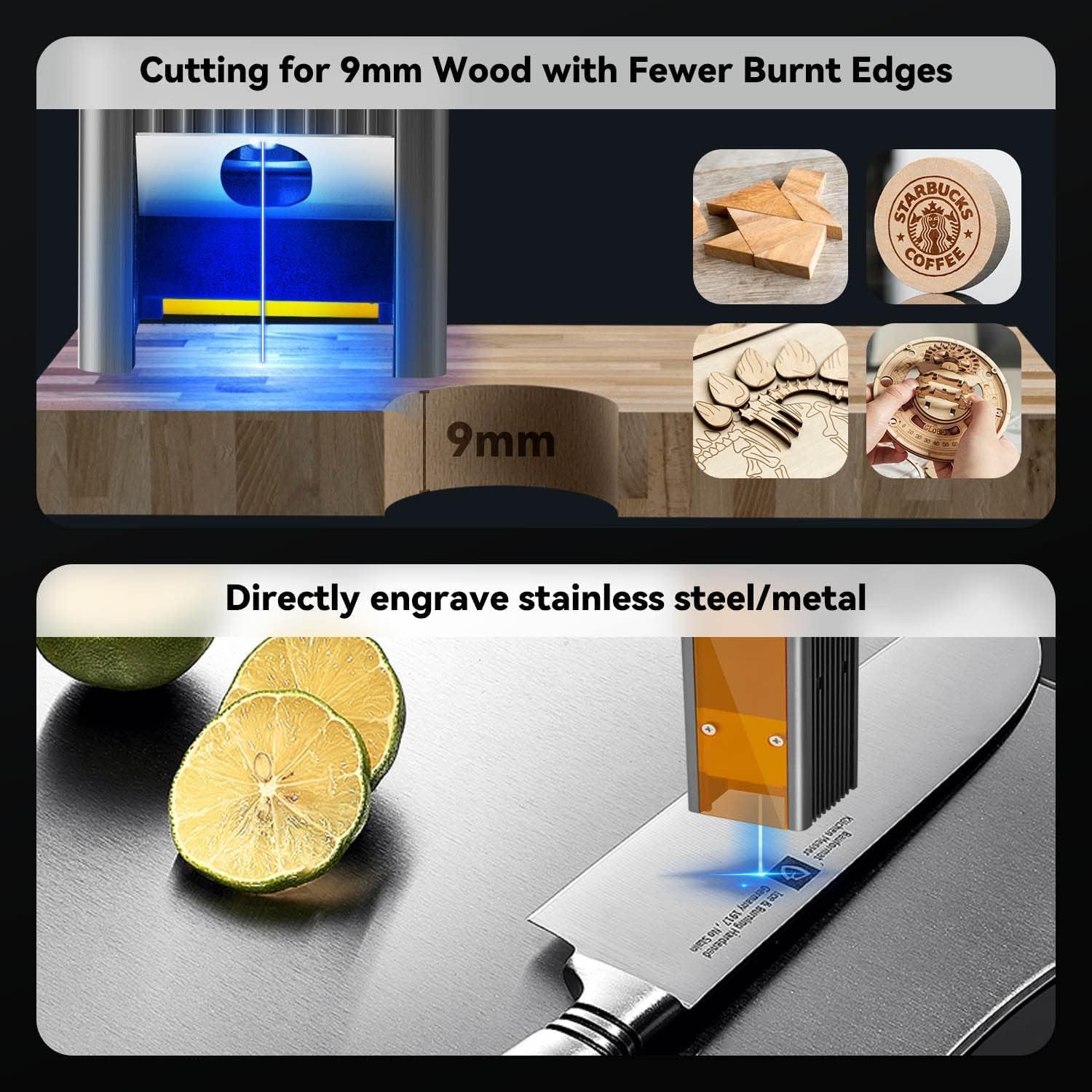
- Wood (e.g., 9mm pine boards)
- മുള
- തുകൽ
- അക്രിലിക്
- സ്റ്റെയിൻലെസ്സ് സ്റ്റീൽ
- Other Metals (e.g., aluminum oxide)
- സർക്യൂട്ട് ബോർഡുകൾ
- ഗ്ലാസ്
- പേപ്പർ, കാർഡ്ബോർഡ്
- തുണിത്തരങ്ങൾ

Image: Visual representation of the JL3's capability to cut 9mm wood with minimal burnt edges and directly engrave stainless steel/metal surfaces.
മെയിൻ്റനൻസ്
Regular maintenance ensures optimal performance and extends the lifespan of your JL3 laser engraver.
- ലെൻസ് വൃത്തിയാക്കൽ: Periodically clean the laser lens with a soft, lint-free cloth and lens cleaning solution. A dirty lens can reduce laser power and engraving quality.
- മെഷീൻ വൃത്തിയാക്കൽ: Wipe down the machine frame and rails to remove dust and debris. Keep the engraving area clear.
- ലൂബ്രിക്കേഷൻ: Apply a small amount of lubricant to the guide rails and moving parts as needed to ensure smooth operation.
- ഫേംവെയർ അപ്ഡേറ്റുകൾ: Check for and install any available firmware updates to ensure your machine has the latest features and performance improvements.
ട്രബിൾഷൂട്ടിംഗ്
നിങ്ങൾ നേരിട്ടേക്കാവുന്ന പൊതുവായ പ്രശ്നങ്ങളെ ഈ വിഭാഗം അഭിസംബോധന ചെയ്യുന്നു.
| പ്രശ്നം | സാധ്യമായ കാരണം | പരിഹാരം |
|---|---|---|
| ലേസർ ജ്വലിക്കുന്നില്ല അല്ലെങ്കിൽ ദുർബലമായ ഔട്ട്പുട്ട് | Loose cable connection, dirty lens, incorrect focus, low power setting. | Check all connections. Clean the laser lens. Adjust focus. Increase laser power in software. |
| മെഷീൻ കമ്പ്യൂട്ടറുമായി ബന്ധിപ്പിക്കുന്നില്ല. | Incorrect USB port, driver issue, Bluetooth not paired. | Try a different USB port. Reinstall drivers. Ensure Bluetooth is enabled and paired correctly. |
| Engraving quality is poor/inconsistent | തെറ്റായ വേഗത/പവർ ക്രമീകരണങ്ങൾ, പരന്നതല്ലാത്ത മെറ്റീരിയൽ, വൃത്തികെട്ട ലെൻസ്, അയഞ്ഞ ബെൽറ്റുകൾ. | Adjust speed and power settings. Ensure material is flat and secured. Clean lens. Check and tighten belts. |
| Machine makes unusual noises | Lack of lubrication, debris on rails, loose components. | Lubricate rails. Clean rails. Check for and tighten any loose screws. |
സ്പെസിഫിക്കേഷനുകൾ
| ഫീച്ചർ | വിശദാംശങ്ങൾ |
|---|---|
| മോഡലിൻ്റെ പേര് | JL3 |
| ബ്രാൻഡ് | Wainlux |
| ലേസർ പവർ | 5W (Optical Output), 40W (Machine Power) |
| കൊത്തുപണി ഏരിയ | 370 x 410 മിമി (ഏകദേശം 16.12 x 15.75 ഇഞ്ച്) |
| കൊത്തുപണി കൃത്യത | 0.05 മി.മീ |
| കൊത്തുപണി വേഗത | 300 mm/s വരെ |
| കണക്റ്റിവിറ്റി | USB, ബ്ലൂടൂത്ത് |
| അനുയോജ്യമായ ഓപ്പറേറ്റിംഗ് സിസ്റ്റങ്ങൾ | Windows 7/8/10, Mac, iOS, Android |
| പിന്തുണച്ചു File ഫോർമാറ്റുകൾ | JPEG, BMP, GIF, PLT, PNG, DXF, JPG, XJ, HPGL |
| ഉൽപ്പന്ന അളവുകൾ | 60.5 x 60.3 x 15.6 സെ.മീ |
| ഇനത്തിൻ്റെ ഭാരം | 2.65 കി.ഗ്രാം |
| ഫ്രെയിം മെറ്റീരിയൽ | സ്റ്റെയിൻലെസ്സ് സ്റ്റീൽ, അക്രിലിക് |
വാറൻ്റിയും പിന്തുണയും
Wainlux provides comprehensive support for your JL3 laser engraving machine.
- വാറൻ്റി: A two-year warranty service is provided for machines purchased directly from the Wainlux manufacturer.
- സാങ്കേതിക സഹായം: Our after-sales team is available to respond to your email inquiries within 24 hours.
- റിട്ടേണുകൾ: We support unreasonable returns for 30 days, including replacement of spare parts and replacement of new machines (for non-human caused failures).
For technical assistance or warranty claims, please contact Wainlux customer support through the contact information provided on their official webസൈറ്റ് അല്ലെങ്കിൽ നിങ്ങളുടെ വാങ്ങൽ പ്ലാറ്റ്ഫോം.


