1. ആമുഖം
Thank you for choosing the Vaorlo M-F8 Bluetooth 5.2 Wireless Ear Hook Earphones. These earphones are designed for sports and business use, offering a secure fit, high-fidelity audio, and advanced features like low latency and intelligent noise cancellation. Please read this manual carefully before using the product to ensure proper operation and maintenance.
2. പാക്കേജ് ഉള്ളടക്കം
പാക്കേജിൽ ഇനിപ്പറയുന്ന ഇനങ്ങൾ ഉണ്ടോ എന്ന് പരിശോധിക്കുക:
- 1 x Vaorlo M-F8 Wireless Ear Hook Headset
- 1 x ചാർജിംഗ് കേബിൾ (USB)
- 1 x ഉപയോക്തൃ മാനുവൽ
- 1 x ചാർജിംഗ് കേസ്
ഏതെങ്കിലും ഇനങ്ങൾ നഷ്ടപ്പെട്ടാലോ കേടുപാടുകൾ സംഭവിച്ചാലോ, ദയവായി നിങ്ങളുടെ റീട്ടെയിലറെ ബന്ധപ്പെടുക.
3. ഉൽപ്പന്നം കഴിഞ്ഞുview
The Vaorlo M-F8 earphones feature an ergonomic ear-hook design for a secure and comfortable fit, especially during physical activity. They incorporate advanced audio technology for clear sound and effective noise reduction.

Figure 3.1: Vaorlo M-F8 Wireless Earphone (White model shown). This image displays the overall design of the earphone, highlighting its ear-hook structure and the main body with a control button and LED indicator.
3.1 പ്രധാന സവിശേഷതകൾ
- ബ്ലൂടൂത്ത് 5.2: Provides stable and low-latency wireless connection up to 10 meters.
- Ear-hook Design: Ergonomic and anti-falling lug type, ensuring a secure fit during sports and active use.
- IPX4 വാട്ടർപ്രൂഫ്: Resistant to splashes and sweat, suitable for workouts.
- ഇന്റലിജന്റ് നോയ്സ് റദ്ദാക്കൽ: Optimizes sound clarity for HD calls and reduces ambient noise.
- High-Definition Surround Sound: Equipped with a 13mm high-quality moving coil unit and composite diaphragm for rich bass and clear treble.
- നീണ്ട ബാറ്ററി ലൈഫ്: Up to 20 hours of music/talk time on a single charge.

Figure 3.2: Ergonomic Anti-Falling Lug Type Design. This image illustrates how the ear-hook design conforms to the human auricle, dispersing pressure points for a stable and secure fit, preventing the earphone from falling during movement.

Figure 3.3: High-Definition Surround Sound Quality Components. This diagram shows the internal structure of the earphone, highlighting the 13mm high-quality moving coil unit, composite diaphragm subwoofer for powerful bass, and metal diaphragm high-frequency speaker for delicate treble.
4. സജ്ജീകരണവും ജോടിയാക്കലും
4.1 ഇയർഫോണുകൾ ചാർജ് ചെയ്യുന്നു
Before first use, fully charge the earphones. Connect the provided USB charging cable to the charging port on the earphone and to a USB power source (e.g., computer, wall adapter). The LED indicator will show charging status and turn off or change color when fully charged.
- Charging time: Approximately 60 minutes.
- കേടുപാടുകൾ തടയാൻ ചാർജിംഗ് പോർട്ട് വരണ്ടതാണെന്ന് ഉറപ്പാക്കുക.
4.2 പവർ ഓൺ/ഓഫ്
- പവർ ഓൺ: Press and hold the multi-function button for approximately 3 seconds until the LED indicator flashes.
- പവർ ഓഫ്: LED ഇൻഡിക്കേറ്റർ ഓഫാകുന്നതുവരെ മൾട്ടി-ഫംഗ്ഷൻ ബട്ടൺ ഏകദേശം 5 സെക്കൻഡ് അമർത്തിപ്പിടിക്കുക.
4.3 ബ്ലൂടൂത്ത് ജോടിയാക്കൽ
To pair the earphones with your device for the first time:
- ഇയർഫോണുകൾ ഓഫാക്കിയിട്ടുണ്ടെന്ന് ഉറപ്പാക്കുക.
- Press and hold the multi-function button for about 5-7 seconds until the LED indicator flashes red and blue alternately, indicating pairing mode.
- നിങ്ങളുടെ സ്മാർട്ട്ഫോണിലോ ബ്ലൂടൂത്ത് പ്രവർത്തനക്ഷമമാക്കിയ ഉപകരണത്തിലോ, ബ്ലൂടൂത്ത് പ്രവർത്തനക്ഷമമാക്കുക.
- ഇതിനായി തിരയുക available devices and select "M-F8" from the list.
- Once connected, the LED indicator will typically flash blue slowly or turn off, and you will hear a confirmation tone.
- The earphones will automatically reconnect to the last paired device when powered on, if Bluetooth is enabled on the device.
5. പ്രവർത്തന നിർദ്ദേശങ്ങൾ
5.1 മ്യൂസിക് പ്ലേബാക്ക്
- പ്ലേ/താൽക്കാലികമായി നിർത്തുക: Short press the multi-function button once.
- അടുത്ത ഗാനം: മൾട്ടി-ഫംഗ്ഷൻ ബട്ടൺ രണ്ടുതവണ അമർത്തുക.
- മുൻ ഗാനം: മൾട്ടി-ഫംഗ്ഷൻ ബട്ടൺ മൂന്ന് തവണ അമർത്തുക.
5.2 കോൾ മാനേജ്മെന്റ്
- ഉത്തരം/അവസാന കോൾ: Short press the multi-function button once during an incoming call or active call.
- കോൾ നിരസിക്കുക: ഇൻകമിംഗ് കോൾ വരുമ്പോൾ മൾട്ടി-ഫംഗ്ഷൻ ബട്ടൺ ഏകദേശം 2 സെക്കൻഡ് അമർത്തിപ്പിടിക്കുക.
5.3 വോയ്സ് അസിസ്റ്റന്റ്
- വോയ്സ് അസിസ്റ്റന്റിനെ സജീവമാക്കുക: Press and hold the multi-function button for approximately 1 second (or as per device specific instruction) to activate your device's voice assistant (e.g., Siri, Google Assistant).
5.4 നോയ്സ് റദ്ദാക്കൽ
The M-F8 earphones feature intelligent noise cancellation for improved call clarity and an immersive listening experience. This technology actively reduces ambient noise.

Figure 5.1: Intelligent Noise Reduction for HD Calls. This image shows the earphone being worn, illustrating the concept of deep noise reduction technology that optimizes sound clarity during calls.
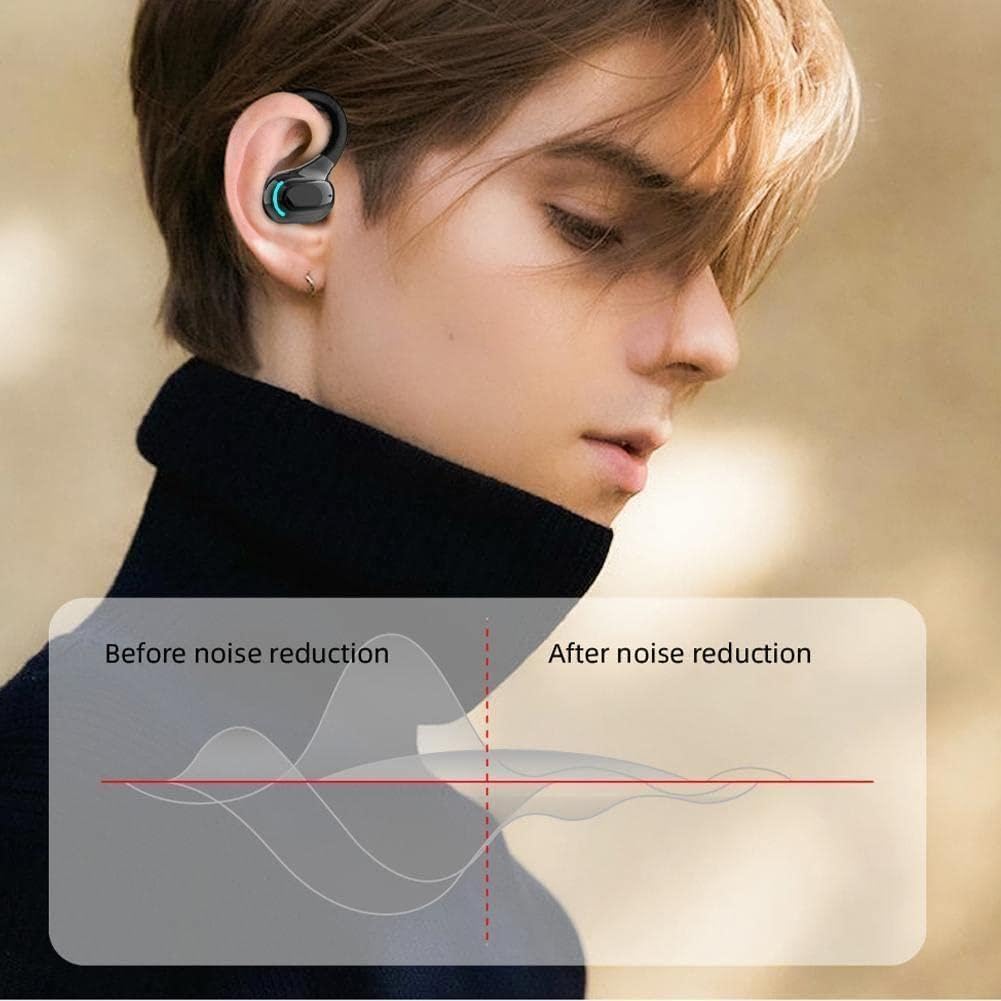
Figure 5.2: Noise Reduction Performance Comparison. This graph visually represents the effect of noise reduction, showing a significant decrease in ambient noise levels after the noise reduction feature is applied.
6. പരിപാലനവും പരിചരണവും
- വൃത്തിയാക്കൽ: Use a soft, dry, lint-free cloth to clean the earphones. Do not use abrasive cleaners, alcohol, or chemical solvents.
- ജല പ്രതിരോധം: The earphones are IPX4 waterproof, meaning they are resistant to splashing water and sweat. Do not submerge them in water or expose them to heavy rain. Ensure the charging port is dry before charging.
- സംഭരണം: Store the earphones in a cool, dry place, away from extreme temperatures and direct sunlight. When not in use for extended periods, charge them periodically to maintain battery health.
- ആഘാതങ്ങൾ ഒഴിവാക്കുക: Do not drop, hit, or apply excessive force to the earphones, as this may damage internal components.
7. പ്രശ്നപരിഹാരം
| പ്രശ്നം | സാധ്യമായ കാരണം | പരിഹാരം |
|---|---|---|
| പവർ ഓണാക്കാൻ കഴിയില്ല | കുറഞ്ഞ ബാറ്ററി | ഇയർഫോണുകൾ പൂർണ്ണമായും ചാർജ് ചെയ്യുക. |
| ഉപകരണവുമായി ജോടിയാക്കാൻ കഴിയില്ല | Earphones not in pairing mode; Bluetooth off on device; too far from device. | Ensure earphones are in pairing mode (flashing red/blue). Turn on Bluetooth on your device. Move earphones closer to your device (within 10m). |
| ശബ്ദമില്ല | Volume too low; not connected; incorrect audio output selected. | Increase volume on both earphones and device. Reconnect earphones. Check audio output settings on your device. |
| ഇടവിട്ടുള്ള കണക്ഷൻ | തടസ്സം; ഉപകരണത്തിൽ നിന്ന് വളരെ അകലെ; ബാറ്ററി കുറവാണ്. | Move away from sources of interference (Wi-Fi routers, other Bluetooth devices). Move closer to your device. Charge the earphones. |
8 സ്പെസിഫിക്കേഷനുകൾ
| ഫീച്ചർ | വിശദാംശങ്ങൾ |
|---|---|
| ഉൽപ്പന്നത്തിൻ്റെ പേര് | എം-എഫ്8 |
| ഭാരം | 3.5g (per earphone) |
| മെറ്റീരിയൽ | ABS silicone |
| ബ്ലൂടൂത്ത് പതിപ്പ് | V5.2 |
| ട്രാൻസ്മിഷൻ ദൂരം | 10മീ |
| ബാറ്ററി ശേഷി | 75mAh |
| ചാർജിംഗ് സമയം | 60 മിനിറ്റ് |
| സ്റ്റാൻഡ്ബൈ സമയം | 200 മണിക്കൂർ |
| Play/Talk Time | 20 മണിക്കൂർ |
| ചാർജിംഗ് രീതി | USB ചാർജിംഗ് |
| വാട്ടർപ്രൂഫ് റേറ്റിംഗ് | IPX4 |
| ശബ്ദ നിയന്ത്രണം | സജീവ നോയ്സ് റദ്ദാക്കൽ |
9. വാറൻ്റിയും പിന്തുണയും
This product is manufactured by Generic. For warranty information and technical support, please refer to the documentation provided at the point of purchase or contact your retailer. Please retain your proof of purchase for any warranty claims.
For further assistance, please visit the manufacturer's or retailer's support webസൈറ്റ്.


