ആമുഖം
വാങ്ങിയതിന് നന്ദി.asing the Denver KMS-20B Karaoke Speaker. This manual provides essential information for the safe and efficient operation of your device. Please read these instructions carefully before use and retain them for future reference.
പ്രധാനപ്പെട്ട സുരക്ഷാ വിവരങ്ങൾ
- മഴ, ഈർപ്പം, അല്ലെങ്കിൽ തീവ്രമായ താപനില എന്നിവയിൽ ഉപകരണം തുറന്നുകാട്ടരുത്.
- ശക്തമായ ആഘാതങ്ങൾക്ക് ഉപകരണം ഇടുകയോ ഇടുകയോ ചെയ്യുന്നത് ഒഴിവാക്കുക.
- ഉപകരണം സ്വയം ഡിസ്അസംബ്ലിംഗ് ചെയ്യാനോ നന്നാക്കാനോ ശ്രമിക്കരുത്. എല്ലാ സേവനങ്ങളും യോഗ്യതയുള്ള ഉദ്യോഗസ്ഥരെ ഏൽപ്പിക്കുക.
- താപ സ്രോതസ്സുകളിൽ നിന്നും നേരിട്ടുള്ള സൂര്യപ്രകാശത്തിൽ നിന്നും ഉപകരണം അകറ്റി നിർത്തുക.
- നിർദ്ദിഷ്ട ചാർജിംഗ് കേബിളും പവർ അഡാപ്റ്ററും മാത്രം ഉപയോഗിക്കുക.
- പ്രാദേശിക നിയന്ത്രണങ്ങൾ അനുസരിച്ച് ബാറ്ററികൾ ഉത്തരവാദിത്തത്തോടെ സംസ്കരിക്കുക.
പാക്കേജ് ഉള്ളടക്കം
പാക്കേജിൽ എല്ലാ ഇനങ്ങളും ഉണ്ടെന്ന് ഉറപ്പാക്കുക:
- Denver KMS-20B Karaoke Speaker
- ദ്രുത ആരംഭ ഗൈഡ്
- Power Cable (USB Type A)
ഉൽപ്പന്നം കഴിഞ്ഞുview
Familiarize yourself with the components and controls of your Denver KMS-20B Karaoke Speaker.
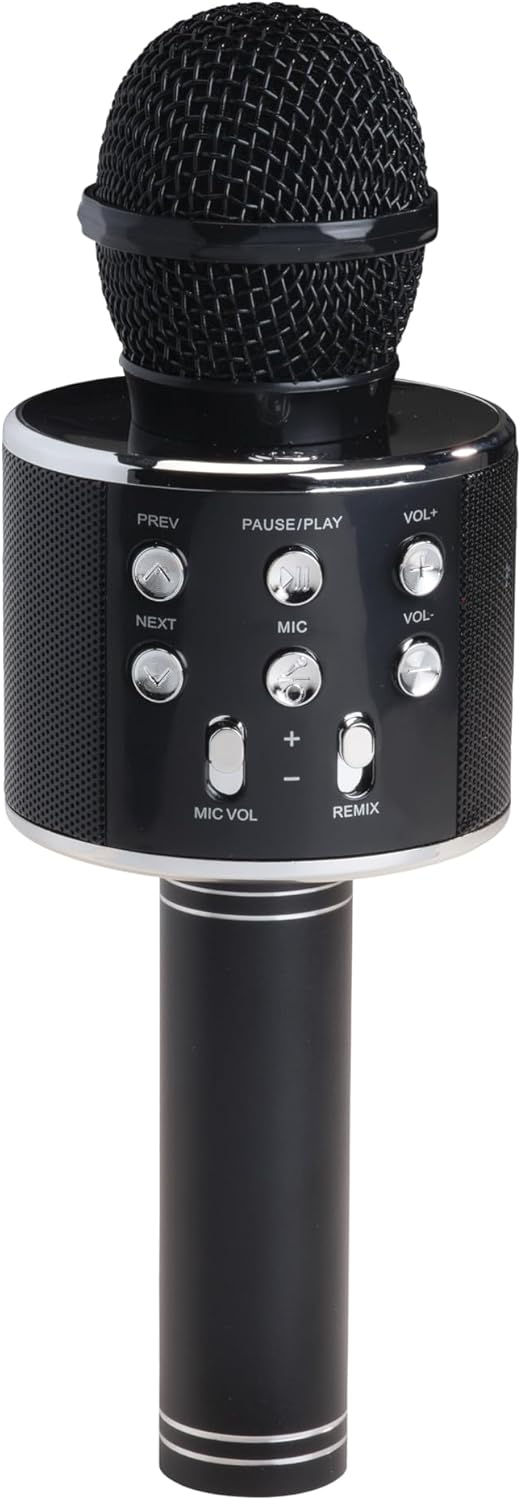
ചിത്രം 1: മുൻഭാഗം View. This image displays the main body of the karaoke speaker, featuring the microphone grille at the top and the central control panel with various buttons for playback and volume adjustments.
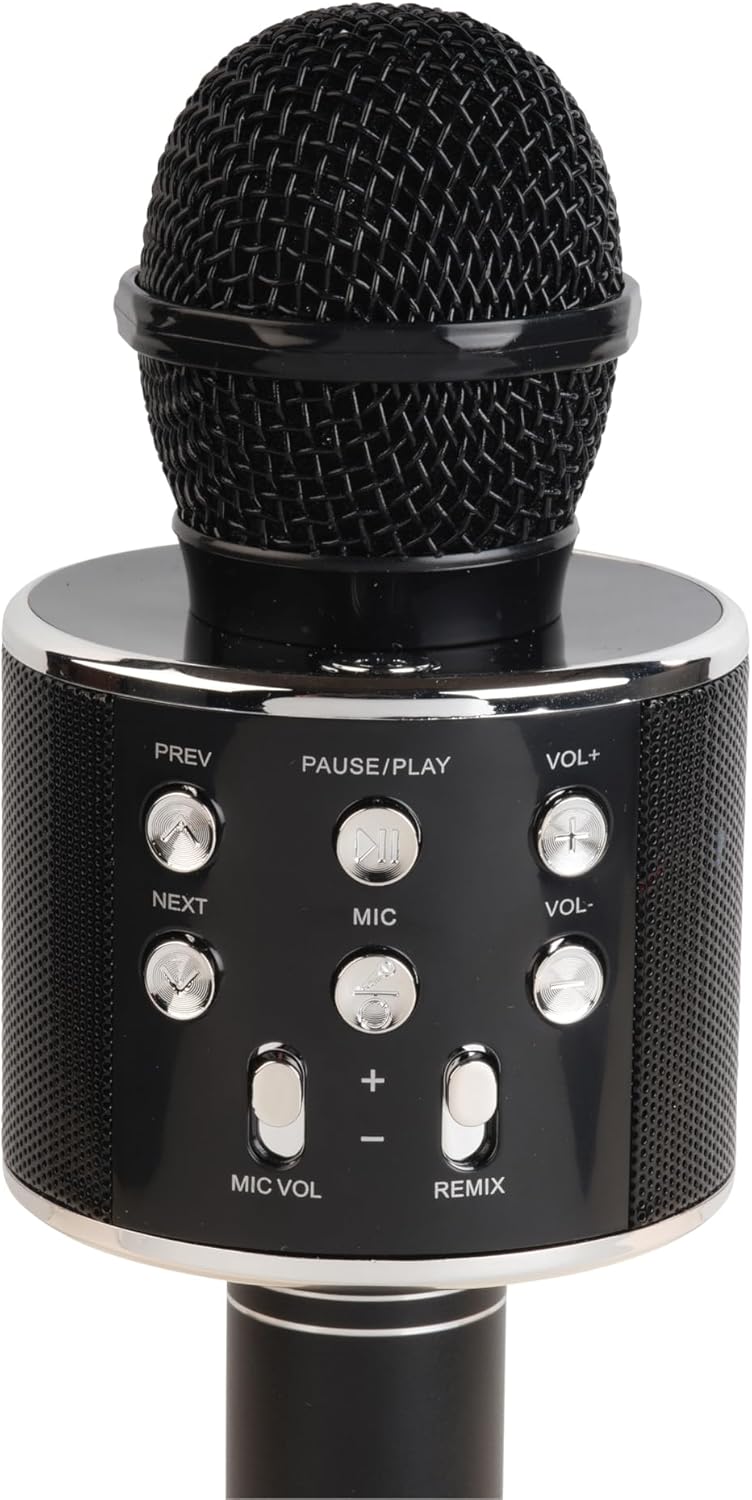
Figure 2: Control Panel Detail. A closer look at the control panel, highlighting buttons such as PREV, NEXT, PAUSE/PLAY, VOL+, VOL-, MIC, MIC VOL, and REMIX. The power button is also visible.

Figure 3: Bottom Ports. This image shows the bottom section of the speaker handle, revealing the charging port (5V 0.5A), a USB port, and a 3.5mm headphone jack for external connections.
നിയന്ത്രണ പാനൽ പ്രവർത്തനങ്ങൾ:
- പവർ ബട്ടൺ: സ്പീക്കർ ഓൺ/ഓഫ് ചെയ്യാൻ അമർത്തിപ്പിടിക്കുക.
- താൽക്കാലികമായി നിർത്തുക/പ്ലേ ചെയ്യുക: സംഗീതം പ്ലേ ചെയ്യാനോ താൽക്കാലികമായി നിർത്താനോ അമർത്തുക.
- PREV (Previous): മുമ്പത്തെ ട്രാക്കിലേക്ക് പോകാൻ അമർത്തുക.
- അടുത്തത്: അടുത്ത ട്രാക്കിലേക്ക് പോകാൻ അമർത്തുക.
- VOL+ (വോളിയം കൂട്ടുക): സ്പീക്കർ വോളിയം വർദ്ധിപ്പിക്കാൻ അമർത്തുക.
- VOL- (വോളിയം ഡൗൺ): സ്പീക്കർ വോളിയം കുറയ്ക്കാൻ അമർത്തുക.
- MIC: Press to activate/deactivate the microphone.
- മൈക്ക് വോളിയം (+/-): മൈക്രോഫോൺ വോളിയം ക്രമീകരിക്കുന്നു.
- റീമിക്സ്: Activates/deactivates the echo effect for the microphone.
തുറമുഖങ്ങൾ:
- Charging Port (5V 0.5A): ആന്തരിക ബാറ്ററി ചാർജ് ചെയ്യുന്നതിന്.
- USB പോർട്ട്: For playing music from a USB flash drive.
- 3.5 എംഎം ഹെഡ്ഫോൺ ജാക്ക്: ഹെഡ്ഫോണുകളോ ബാഹ്യ ഓഡിയോ ഉപകരണങ്ങളോ ബന്ധിപ്പിക്കുന്നതിന്.
സജ്ജമാക്കുക
1. സ്പീക്കറിൽ നിന്ന് നിരക്ക് ഈടാക്കുന്നു
- Connect the provided power cable to the charging port (5V 0.5A) on the speaker.
- Connect the other end of the cable to a compatible USB power adapter (not included) or a USB port on a computer.
- The charging indicator (if present) will illuminate during charging and turn off or change color when fully charged.
- ആദ്യ ഉപയോഗത്തിന് മുമ്പ് പൂർണ്ണമായി ചാർജ് ചെയ്യാൻ ഏകദേശം 2-3 മണിക്കൂർ അനുവദിക്കുക.
2. പവർ ഓൺ/ഓഫ്
- To turn ON: Press and hold the Power button until the indicator light illuminates and you hear an audible prompt.
- To turn OFF: Press and hold the Power button again until the indicator light turns off and you hear an audible prompt.
3. ബ്ലൂടൂത്ത് ജോടിയാക്കൽ
- Ensure the speaker is powered on. It will automatically enter Bluetooth pairing mode, indicated by a flashing LED light and an audible prompt.
- നിങ്ങളുടെ മൊബൈൽ ഉപകരണത്തിൽ (സ്മാർട്ട്ഫോൺ, ടാബ്ലെറ്റ് മുതലായവ), ബ്ലൂടൂത്ത് പ്രവർത്തനക്ഷമമാക്കി ലഭ്യമായ ഉപകരണങ്ങൾക്കായി തിരയുക.
- Select "KMS-20B" from the list of found devices.
- Once successfully paired, the LED indicator will stop flashing, and you will hear a confirmation sound.
- The speaker will automatically connect to the last paired device when powered on, if it is within range and Bluetooth is enabled.
പ്രവർത്തന നിർദ്ദേശങ്ങൾ
Music Playback (Bluetooth/USB)
- ബ്ലൂടൂത്ത്: After successful pairing, start playing music on your connected device. The audio will stream through the KMS-20B speaker.
- USB: MP3 ഓഡിയോ അടങ്ങിയ ഒരു USB ഫ്ലാഷ് ഡ്രൈവ് ഇടുക. files into the USB port. The speaker will automatically detect and begin playing music from the drive.
- താൽക്കാലികമായി നിർത്തുക/പ്ലേ ചെയ്യുക: Press this button to pause or resume music playback.
- മുൻകൂർ/അടുത്തത്: Press these buttons to skip to the previous or next track.
- വോൾ+/വോൾ-: Press these buttons to adjust the main speaker volume.
മൈക്രോഫോൺ ഉപയോഗം
- Activating Microphone: അമർത്തുക എം.ഐ.സി button to turn on the microphone function. Press it again to turn off.
- മൈക്രോഫോൺ വോളിയം: ഉപയോഗിക്കുക മൈക്ക് വോളിയം (+/-) മൈക്രോഫോണിന്റെ ഔട്ട്പുട്ട് വോളിയം കൂട്ടാനോ കുറയ്ക്കാനോ ഉള്ള ബട്ടണുകൾ.
- Echo Effect (REMIX): അമർത്തുക റീമിക്സ് button to activate or deactivate the echo effect for your voice. This adds a reverberation effect, common in karaoke.
മെയിൻ്റനൻസ്
- വൃത്തിയാക്കൽ: സ്പീക്കറിന്റെ പുറംഭാഗം വൃത്തിയാക്കാൻ മൃദുവായതും ഉണങ്ങിയതുമായ തുണി ഉപയോഗിക്കുക. അബ്രസീവ് ക്ലീനറുകളോ ലായകങ്ങളോ ഉപയോഗിക്കരുത്.
- സംഭരണം: ദീർഘനേരം ഉപയോഗിക്കാത്തപ്പോൾ, സ്പീക്കർ തണുത്തതും വരണ്ടതുമായ സ്ഥലത്ത് സൂക്ഷിക്കുക, നേരിട്ടുള്ള സൂര്യപ്രകാശത്തിൽ നിന്നും കടുത്ത താപനിലയിൽ നിന്നും അകറ്റി നിർത്തുക.
- ബാറ്ററി കെയർ: ബാറ്ററി ലൈഫ് വർദ്ധിപ്പിക്കുന്നതിന്, പതിവായി ഉപയോഗിക്കുന്നില്ലെങ്കിലും, കുറഞ്ഞത് മൂന്ന് മാസത്തിലൊരിക്കലെങ്കിലും സ്പീക്കർ പൂർണ്ണമായും ചാർജ് ചെയ്യുക.
ട്രബിൾഷൂട്ടിംഗ്
| പ്രശ്നം | സാധ്യമായ കാരണം | പരിഹാരം |
|---|---|---|
| സ്പീക്കർ ഓണാക്കുന്നില്ല. | കുറഞ്ഞ ബാറ്ററി. | സ്പീക്കർ പൂർണ്ണമായും ചാർജ് ചെയ്യുക. |
| ബ്ലൂടൂത്ത് വഴി ജോടിയാക്കാൻ കഴിയില്ല. | Bluetooth is off on your device; speaker is not in pairing mode; too far from device. | Ensure Bluetooth is enabled on your device. Power cycle the speaker to enter pairing mode. Move device closer to speaker (within 10 meters). |
| സ്പീക്കറിൽ നിന്ന് ശബ്ദമില്ല. | Volume too low; device not connected; incorrect input source. | Increase speaker and device volume. Ensure Bluetooth is connected or USB is properly inserted. |
| മൈക്രോഫോൺ പ്രവർത്തിക്കുന്നില്ല. | Microphone function is off; MIC VOL is too low. | Press the MIC button to activate. Increase MIC VOL. |
സ്പെസിഫിക്കേഷനുകൾ
- മോഡൽ: KMS-20B
- ബ്രാൻഡ്: ഡെൻവർ
- കണക്റ്റിവിറ്റി: Bluetooth, USB Type A, 3.5mm Jack
- ഊർജ്ജ സ്രോതസ്സ്: ബാറ്ററി-പവർ
- ബാറ്ററി തരം: ലിഥിയം-അയൺ (റീചാർജ് ചെയ്യാവുന്നത്)
- ചാർജിംഗ് ഇൻപുട്ട്: 5V 0.5A (via USB Type A)
- അളവുകൾ: 7.8 x 7.8 x 23 സെ.മീ (ഏകദേശം 3.07 x 3.07 x 9.06 ഇഞ്ച്)
- ഭാരം: 340 ഗ്രാം (ഏകദേശം 0.75 പൗണ്ട്)
- ഉൾപ്പെടുത്തിയ ഘടകങ്ങൾ: Quick Start Guide, Power Cable
വാറൻ്റിയും പിന്തുണയും
വാറന്റി വിവരങ്ങൾക്കും സാങ്കേതിക പിന്തുണയ്ക്കും, ദയവായി നിങ്ങളുടെ ഉൽപ്പന്നത്തിൽ ഉൾപ്പെടുത്തിയിരിക്കുന്ന വാറന്റി കാർഡ് പരിശോധിക്കുക അല്ലെങ്കിൽ ഔദ്യോഗിക ഡെൻവർ സന്ദർശിക്കുക. webസൈറ്റ്. വാങ്ങിയതിന്റെ തെളിവായി നിങ്ങളുടെ വാങ്ങൽ രസീത് സൂക്ഷിക്കുക.


