ആമുഖം
Thank you for choosing the Dripex Adjustable Electric Standing Desk. This manual provides detailed instructions for the assembly, operation, maintenance, and troubleshooting of your new desk. Please read this manual thoroughly before use to ensure proper function and safety. Keep this manual for future reference.

Image: The Dripex 43-inch Adjustable Electric Standing Desk, showcasing its clean white design and integrated control panel.
പ്രധാനപ്പെട്ട സുരക്ഷാ വിവരങ്ങൾ
- ഉപയോഗിക്കുന്നതിന് മുമ്പ് എല്ലാ ഘടകങ്ങളും സുരക്ഷിതമായി ഉറപ്പിച്ചിട്ടുണ്ടെന്ന് ഉറപ്പാക്കുക.
- മേശയിൽ ഓവർലോഡ് കയറ്റരുത്. പരമാവധി ഭാരം 176 പൗണ്ട് (80 കിലോഗ്രാം) ആണ്.
- ജോലി സമയത്ത് കുട്ടികളെയും വളർത്തുമൃഗങ്ങളെയും മേശയിൽ നിന്ന് അകറ്റി നിർത്തുക.
- Ensure there are no obstructions in the desk's path when adjusting height.
- മേശപ്പുറത്ത് ഇരിക്കുകയോ നിൽക്കുകയോ ചെയ്യരുത്.
- വൃത്തിയാക്കുന്നതിനോ അറ്റകുറ്റപ്പണികൾ നടത്തുന്നതിനോ മുമ്പ് വൈദ്യുതി വിച്ഛേദിക്കുക.
- നൽകിയിരിക്കുന്ന പവർ അഡാപ്റ്റർ മാത്രം ഉപയോഗിക്കുക.
പാക്കേജ് ഉള്ളടക്കം
അസംബ്ലി ആരംഭിക്കുന്നതിന് മുമ്പ് എല്ലാ ഭാഗങ്ങളും ഉണ്ടെന്ന് ഉറപ്പാക്കുക:
- Desktop (43x24 inches)
- ഡെസ്ക് കാലുകളും ഫ്രെയിം ഘടകങ്ങളും
- നിയന്ത്രണ പാനൽ
- പവർ അഡാപ്റ്ററും കേബിളും
- കപ്പ് ഹോൾഡർ
- ഹെഡ്ഫോൺ ഹുക്ക്
- അസംബ്ലി ഹാർഡ്വെയർ (സ്ക്രൂകൾ, ഉപകരണങ്ങൾ)
- ഉപയോക്തൃ മാനുവൽ
അസംബ്ലി നിർദ്ദേശങ്ങൾ
Assembly typically involves a simple 4-step process. Follow the included graphical instructions for detailed steps. Ensure you have adequate space and a clean work area.
- ഡെസ്ക്ടോപ്പിൽ കാലുകൾ ഘടിപ്പിക്കുക: Carefully place the desktop upside down on a soft, clean surface. Attach the leg frames to the pre-drilled holes on the desktop using the provided screws.
- Install Crossbar and Motor: Connect the crossbar between the two leg frames. Install the electric motor and connect it to the leg mechanisms as per the diagram.
- Mount Control Panel and Accessories: Attach the control panel to the underside of the desktop in the desired position. Install the cup holder and headphone hook.
- Cable Management and Power Connection: Route all cables neatly and secure them. Connect the power adapter to the control panel and then to a power outlet.
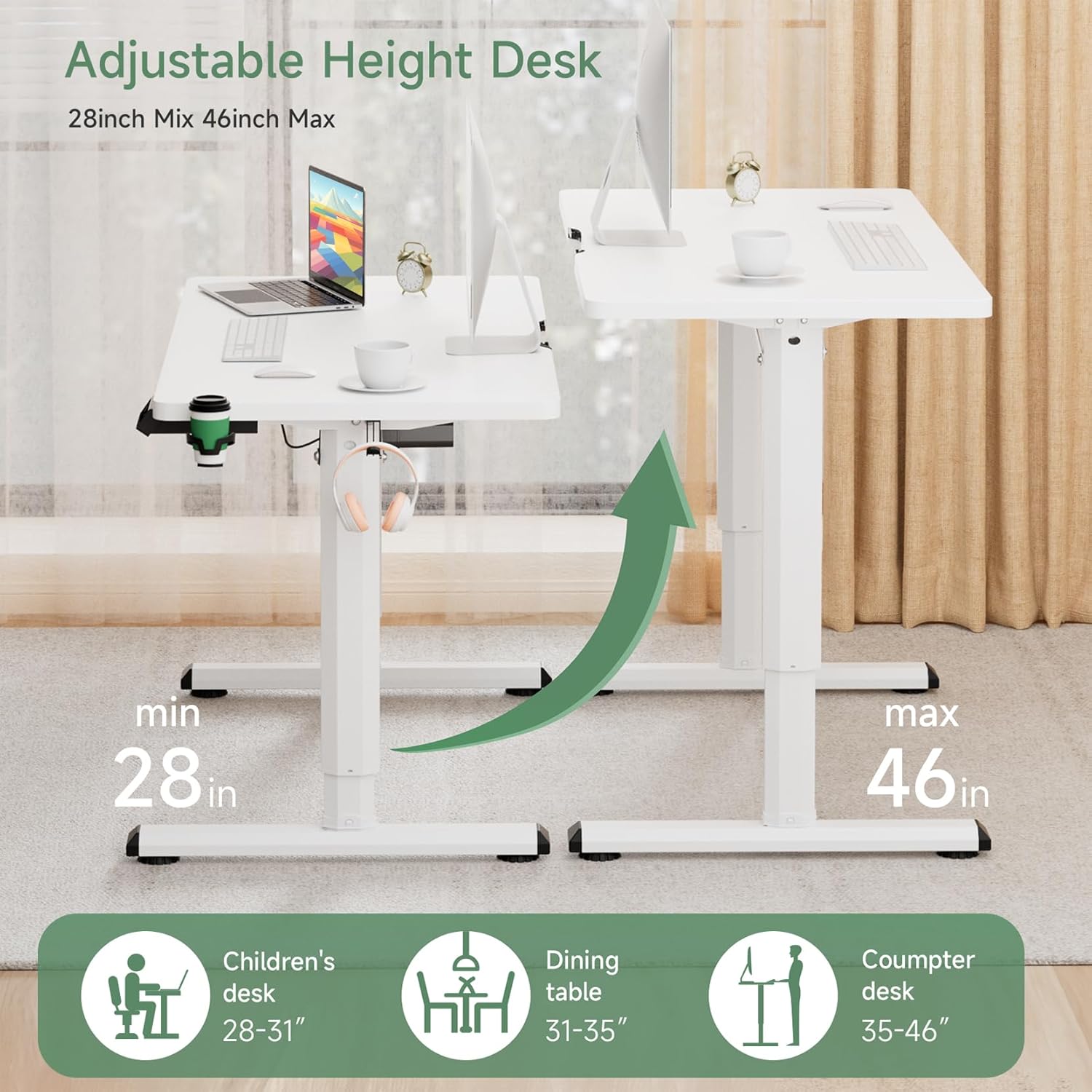
Image: Visual representation of the desk's adjustable height range and versatile applications.
പ്രവർത്തന നിർദ്ദേശങ്ങൾ
നിയന്ത്രണ പാനൽ ഓവർview

Image: The intelligent control panel for height adjustment and memory functions.
- മുകളിലേക്കും താഴേക്കുമുള്ള അമ്പടയാളങ്ങൾ (▲ / ▼): Press and hold to manually adjust the desk height up or down.
- Sitting/Standing Presets (👧 / 👦): These buttons allow you to save and recall preferred sitting and standing heights.
- പുന SE സജ്ജമാക്കുക: Used to reset the desk's system, typically after initial setup or troubleshooting.
ഉയരം ക്രമീകരിക്കുന്നു
To adjust the desk height, press and hold the Up (▲) or Down (▼) arrow button until the desk reaches your desired height. Release the button to stop the movement.
മെമ്മറി പ്രീസെറ്റുകൾ സജ്ജമാക്കുന്നു
The control panel features dedicated buttons for saving sitting and standing heights. To set a preset:
- Adjust the desk to your desired sitting height using the Up/Down arrows.
- Press and hold the Sitting preset button (👧) for 3 seconds until you hear a beep or see a confirmation on the display (if available).
- Repeat the process for your desired standing height using the Standing preset button (👦).
Once set, a short press on the respective preset button will automatically move the desk to the saved height.
ഡെസ്ക് പുനഃസജ്ജമാക്കുന്നു
If the desk encounters an error or does not move smoothly, a reset may be required:
- അമർത്തിപ്പിടിക്കുക പുനഃസജ്ജമാക്കുക ഏകദേശം 3-5 സെക്കൻഡ് നേരത്തേക്ക് ബട്ടൺ അമർത്തിപ്പിടിക്കുക.
- The desk will move to its lowest position and then slightly back up, indicating a successful reset.
- Release the button once the reset sequence is complete.
Anti-Collision Feature
The desk is equipped with an anti-collision system. If the desk encounters an obstruction during height adjustment, it will automatically stop and reverse slightly to prevent damage. Remove any obstructions before resuming operation.
പ്രധാന സവിശേഷതകൾ
- എർഗണോമിക് ഡിസൈൻ: Promotes alternating between sitting and standing to reduce physical stress and improve concentration.
- Wide Height Adjustment Range: Electrically adjustable from 28.7 inches to 46.46 inches to suit various user heights and activities.
- Robust Motor System: Features a high-quality motor for smooth, reliable, and quiet height adjustments.
- സ്ഥിരമായ നിർമ്മാണം: Industrial-grade steel frame and diamond-shaped legs provide excellent stability and support up to 176 lbs.
- വിശാലമായ ഡെസ്ക്ടോപ്പ്: A 43x24 inch desktop offers ample space for monitors, laptops, and other office essentials.
- സംയോജിത ആക്സസറികൾ: Includes a convenient cup holder and headphone hook for an organized workspace.

Image: The desk's high-quality motor system ensures smooth and efficient height adjustments.

Image: Demonstrating the unique benefit of alternating between sitting and standing for improved comfort and posture.

ചിത്രം: വിശദമായത് view of the desk's thoughtful features, including cable management, accessories, and design elements.
പരിപാലനവും പരിചരണവും
To ensure the longevity and optimal performance of your Dripex standing desk, follow these simple maintenance guidelines:
- വൃത്തിയാക്കൽ: പരസ്യം ഉപയോഗിച്ച് ഡെസ്ക്ടോപ്പും ഫ്രെയിമും തുടയ്ക്കുകamp തുണി. ഫിനിഷിന് കേടുവരുത്തുന്ന കഠിനമായ രാസവസ്തുക്കളോ അബ്രാസീവ് ക്ലീനറുകളോ ഒഴിവാക്കുക.
- പതിവ് പരിശോധനകൾ: എല്ലാ സ്ക്രൂകളും ബോൾട്ടുകളും ഇറുകിയതാണെന്ന് ഉറപ്പാക്കാൻ ഇടയ്ക്കിടെ പരിശോധിക്കുക. ആവശ്യമെങ്കിൽ മുറുക്കുക.
- കേബിൾ മാനേജുമെന്റ്: Keep cables organized to prevent snagging during height adjustments.
ട്രബിൾഷൂട്ടിംഗ്
If you encounter any issues with your desk, refer to the table below for common problems and solutions:
| പ്രശ്നം | സാധ്യമായ കാരണം | പരിഹാരം |
|---|---|---|
| ഡെസ്ക് അനങ്ങുന്നില്ല. | പവർ കേബിൾ വിച്ഛേദിക്കപ്പെട്ടു; ഓവർലോഡ്; മോട്ടോർ തകരാർ. | Check power connections. Reduce weight on desk. Perform a system reset. |
| മേശ അസമമായി നീങ്ങുന്നു അല്ലെങ്കിൽ അസാധാരണമായ ശബ്ദങ്ങൾ ഉണ്ടാക്കുന്നു. | Loose connections; Obstruction; Uneven load. | Check all assembly screws. Remove obstructions. Distribute weight evenly. Perform a system reset. |
| Preset heights are not working. | Presets not properly saved; System error. | Re-save the preset heights following the instructions. Perform a system reset. |
| ആന്റി-കൊളിഷൻ ഫീച്ചർ ഇടയ്ക്കിടെ പ്രവർത്തനക്ഷമമാകുന്നു. | Obstruction in path; Sensitivity setting (if applicable). | Ensure clear path during movement. If issue persists, contact support. |
ഉൽപ്പന്ന സവിശേഷതകൾ
| ഫീച്ചർ | സ്പെസിഫിക്കേഷൻ |
|---|---|
| ബ്രാൻഡ് | ഡ്രിപെക്സ് |
| മോഡൽ നമ്പർ | ക്രമീകരിക്കാവുന്ന ഇലക്ട്രിക് സ്റ്റാൻഡിംഗ് ഡെസ്ക് |
| Desktop Dimensions (D x W) | 24" x 43" |
| ഉയരം ക്രമീകരിക്കൽ ശ്രേണി | 28.7" മുതൽ 46.46" വരെ |
| പരമാവധി ഭാരം ശേഷി | 176 പൗണ്ട് (80 കി.ഗ്രാം) |
| അടിസ്ഥാന മെറ്റീരിയൽ | അലോയ് സ്റ്റീൽ |
| ലിഫ്റ്റിംഗ് മെക്കാനിസം | ഇലക്ട്രിക് |
| ഇനത്തിൻ്റെ ഭാരം | 48.5 പൗണ്ട് |
| ഉൾപ്പെടുത്തിയ ഘടകങ്ങൾ | Cup Holder, Headphone Hook |

Image: Dimensions of the 43-inch desktop, providing ample വർക്ക്സ്പെയ്സ്.
വാറൻ്റിയും പിന്തുണയും
Dripex is committed to providing high-quality products. For warranty information, technical support, or any questions regarding your Adjustable Electric Standing Desk, please refer to the contact information provided with your purchase or visit the official Dripex webസൈറ്റ്. പിന്തുണയുമായി ബന്ധപ്പെടുമ്പോൾ നിങ്ങളുടെ മോഡൽ നമ്പറും വാങ്ങൽ തീയതിയും തയ്യാറായി വയ്ക്കുക.


