1. ആമുഖവും അവസാനവുംview
The Xiegu DE-19 is an external expansion adapter specifically designed to enhance the functionality of Xiegu G90, G106, and XPA125B transceivers. It serves as a crucial link for connecting these radio devices to a personal computer, enabling advanced control and data communication capabilities, particularly for digital modes.
This unit integrates a USB interface, an isolation and amplification unit, and dedicated interface units tailored for compatibility with the specified Xiegu models. Its design prioritizes ease of connection and reliable performance for various amateur radio applications.
2. ഉൽപ്പന്ന സവിശേഷതകൾ
- മെച്ചപ്പെടുത്തിയ പ്രകടനം: Seamlessly integrates with G90, G106, and XPA125B models for improved functionality.
- സൗകര്യപ്രദമായ കണക്റ്റിവിറ്റി: Features a built-in USB interface for direct PC connection, simplifying control and data communication.
- Integrated Units: Includes isolation and amplification units, along with specific interface units for optimal compatibility.
- ഉയർന്ന നിലവാരമുള്ള നിർമ്മാണം: Manufactured with durable materials to ensure long-lasting performance and stable connections.
- ബഹുമുഖ അനുയോജ്യത: Functions as an external adapter for a range of Xiegu transceivers, offering flexibility for amateur radio setups.
3. പാക്കേജ് ഉള്ളടക്കം
പാക്കേജ് തുറക്കുമ്പോൾ, താഴെ പറയുന്ന എല്ലാ ഇനങ്ങളും ഉണ്ടെന്ന് ദയവായി ഉറപ്പാക്കുക:
- Xiegu DE-19 Data Interface Expansion Card Unit
- USB Cable (Type-A to Micro-B)
- CIV Cable (3.5mm to 3.5mm audio jack)
- ACC Cable (8-pin mini-DIN to 3.5mm audio jack)

ചിത്രം 3.1: The Xiegu DE-19 unit displayed alongside its included USB, CIV, and ACC connection cables.
4. സജ്ജീകരണ ഗൈഡ്
Follow these steps to properly set up your Xiegu DE-19 with your compatible transceiver and computer.
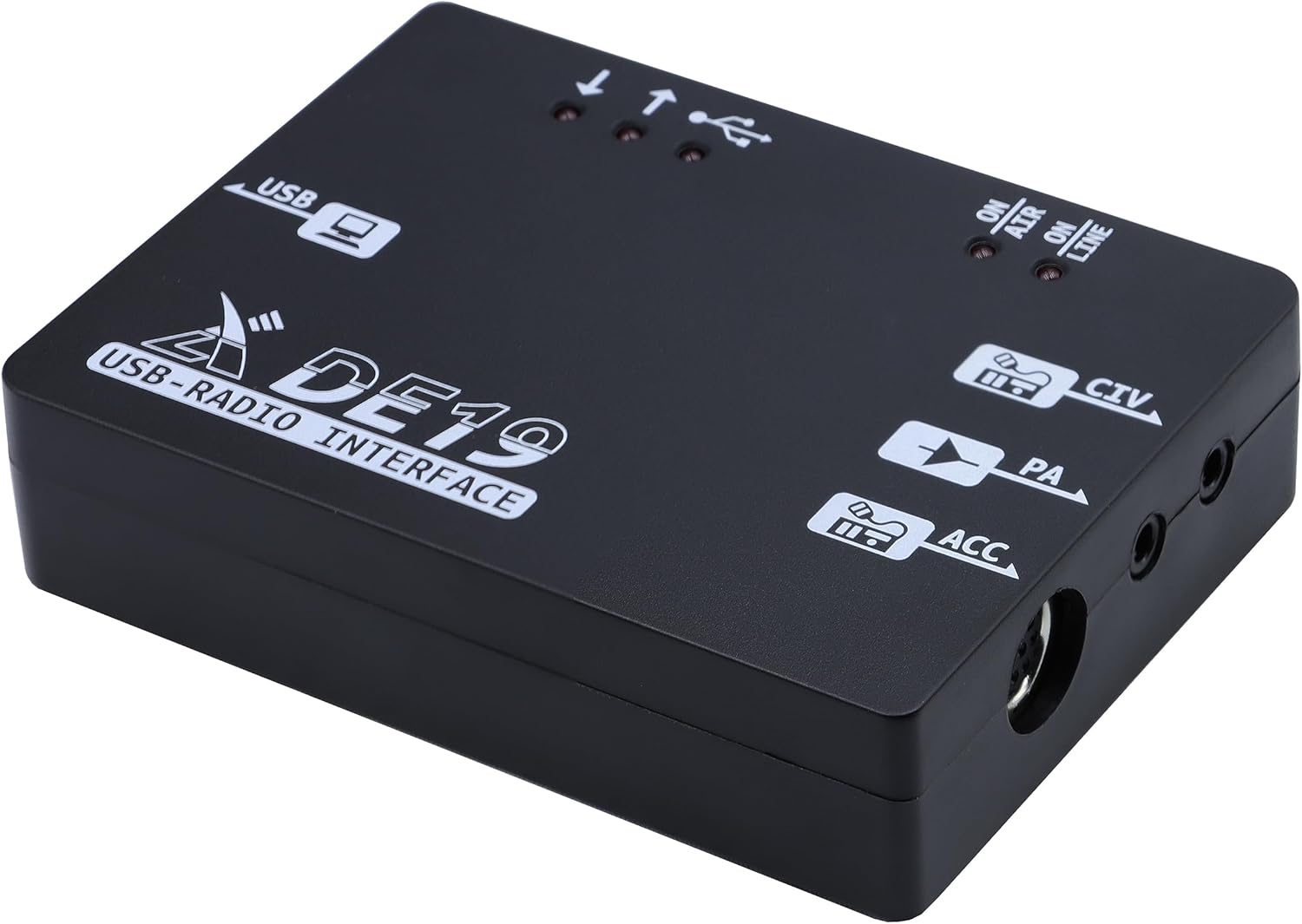
4.1. ഘടക ഐഡന്റിഫിക്കേഷൻ

ചിത്രം 4.1: മുകളിൽ view of the DE-19 showing USB port, LED indicators, CIV, PA, and ACC labels.

ചിത്രം 4.2: ക്ലോസ് അപ്പ് view of the DE-19's USB port and the three LED indicators for USB activity.

ചിത്രം 4.3: ക്ലോസ് അപ്പ് view of the DE-19's CIV (3.5mm), PA (3.5mm), and ACC (8-pin mini-DIN) ports.
4.2. കണക്ഷൻ ഘട്ടങ്ങൾ
- Connect to Transceiver:
- For Xiegu G90/G106: Connect the supplied CIV cable (3.5mm to 3.5mm) from the DE-19's 'CIV' port to the 'CIV' port on your G90/G106 transceiver.
- For Xiegu XPA125B: Connect the supplied ACC cable (8-pin mini-DIN to 3.5mm) from the DE-19's 'ACC' port to the 'ACC' port on your XPA125B ampജീവൻ.
- For audio input/output (e.g., for digital modes), connect the appropriate audio cables (not always included, may require separate purchase) from your transceiver's audio out/in ports to the corresponding audio input/output on the DE-19 (if available and required for your specific setup). The DE-19 primarily handles CAT and PTT.
- പിസിയിലേക്ക് കണക്റ്റുചെയ്യുക: Connect the supplied USB cable from the DE-19's 'USB' port to an available USB port on your computer.
- പവർ ഓൺ: Ensure your transceiver and computer are powered on. The DE-19 draws power directly from the USB connection.
ചിത്രം 4.4: The DE-19 unit with USB, CIV, and ACC cables connected, illustrating typical setup.
4.3. ഡ്രൈവർ ഇൻസ്റ്റാളേഷൻ
Upon connecting the DE-19 to your computer via USB, the necessary drivers (typically for a virtual COM port and USB audio device) should install automatically on most modern operating systems (Windows 10/11, macOS, Linux). If automatic installation fails, please visit the official Xiegu webസൈറ്റ് (www.xiegu.eu or www.radioddity.com/collections/xiegu for Radioddity distribution) to download and manually install the latest drivers for the DE-19.
5. പ്രവർത്തന നിർദ്ദേശങ്ങൾ
Once the DE-19 is physically connected and drivers are installed, you can begin using it with your PC software.
5.1. എൽഇഡി സൂചകങ്ങൾ
- USB Activity LEDs (3 LEDs): These indicators illuminate to show data transmission and reception activity over the USB connection. A blinking light indicates active data flow.
- ON AIR LED: This LED illuminates when the transceiver is transmitting (PTT activated).
- ON LINE LED: This LED indicates that the DE-19 is powered on and communicating with the connected transceiver.
5.2. സോഫ്റ്റ്വെയർ കോൺഫിഗറേഷൻ
The DE-19 provides a virtual COM port for CAT control and a USB audio device for digital mode sound card functionality. You will need to configure your amateur radio software (e.g., WSJT-X, FLdigi, Ham Radio Deluxe, etc.) to use these interfaces:
- Identify COM Port: In your computer's Device Manager (Windows) or System Information (macOS/Linux), locate the newly installed virtual COM port associated with the DE-19. Note its COM port number.
- Identify Audio Device: Similarly, identify the USB audio device (often named something like 'USB Audio CODEC') provided by the DE-19.
- Configure CAT Control: In your radio control software, select the identified COM port for CAT control and set the baud rate to match your transceiver's settings (refer to your transceiver's manual).
- Configure PTT: PTT (Push-To-Talk) can typically be configured via CAT commands or DTR/RTS lines on the virtual COM port. Select the appropriate method in your software.
- Configure Audio: In your digital mode software, select the DE-19's USB audio device for both input (receive) and output (transmit) audio. Adjust audio levels within the software and your operating system for optimal performance.
6. പരിപാലനം
To ensure the longevity and optimal performance of your Xiegu DE-19, follow these simple maintenance guidelines:
- വൃത്തിയാക്കൽ: Use a soft, dry cloth to clean the exterior of the unit. Avoid using harsh chemicals, solvents, or abrasive materials.
- സംഭരണം: When not in use for extended periods, store the DE-19 in a cool, dry place, away from direct sunlight and extreme temperatures.
- കണക്ഷനുകൾ: Periodically check all cable connections to ensure they are secure and free from damage. Avoid bending cables sharply or putting strain on the connectors.
- പരിസ്ഥിതി: Operate the DE-19 in a stable environment, free from excessive dust, moisture, or vibrations.
7. പ്രശ്നപരിഹാരം
If you encounter issues with your DE-19, refer to the following common problems and solutions:
| പ്രശ്നം | സാധ്യമായ കാരണം | പരിഹാരം |
|---|---|---|
| DE-19 not recognized by PC | Loose USB connection, missing/corrupt drivers, faulty USB port. | Ensure USB cable is securely connected. Try a different USB port on your PC. Reinstall drivers from the Xiegu webസൈറ്റ്. |
| No CAT control or data communication | Incorrect COM port selected in software, incorrect baud rate, transceiver not configured for CAT, incorrect cabling. | Verify COM port and baud rate settings in your software match Device Manager and transceiver. Check CIV/ACC cable connections. Ensure transceiver's CAT settings are enabled. |
| No audio for digital modes | Incorrect audio device selected in software, audio levels too low/high, transceiver audio settings. | Select the DE-19's USB audio device for input/output in your digital mode software. Adjust audio levels in both software and OS. Check transceiver's audio output settings. |
| ON AIR LED not illuminating during transmit | PTT not configured correctly, faulty PTT line. | Verify PTT settings in your software (CAT PTT or DTR/RTS). Check ACC cable connection to XPA125B if applicable. |
8 സ്പെസിഫിക്കേഷനുകൾ
| ഫീച്ചർ | വിശദാംശങ്ങൾ |
|---|---|
| മോഡൽ നമ്പർ | Xiegu DE-19 |
| അനുയോജ്യമായ ഉപകരണങ്ങൾ | Xiegu G90, G106, XPA125B |
| ഹാർഡ്വെയർ ഇന്റർഫേസ് | USB |
| അളവുകൾ (പാക്കേജ്) | 6.14 x 4.96 x 1.73 ഇഞ്ച് (ഏകദേശം) |
| ഇനത്തിൻ്റെ ഭാരം | 8.8 ഔൺസ് (ഏകദേശം) |
| ആദ്യം ലഭ്യമായത് | ഓഗസ്റ്റ് 1, 2023 |
9. വാറൻ്റിയും പിന്തുണയും
Xiegu products typically come with a standard manufacturer's warranty. For specific warranty terms and conditions, please refer to the documentation included with your purchase or visit the official Xiegu website. For technical support, troubleshooting assistance, or service inquiries, please contact Xiegu customer support through their official channels or your authorized dealer.
Official Xiegu Webസൈറ്റ്: www.xiegu.eu


