1. ആമുഖം
This manual provides detailed instructions for the installation, setup, and operation of your SONOFF Matter Smart Light Switch M5-3C-120W 3-Gang. This smart wall switch integrates with Matter, allowing seamless control through various smart home ecosystems including Alexa, Google Home, and SmartThings. It features 2.4GHz WiFi connectivity, requiring a neutral wire for installation. Please read this manual thoroughly before installation and use to ensure proper function and safety.

ചിത്രം 1.1: മുൻഭാഗം view of the SONOFF Matter Smart Light Switch M5-3C-120W 3-Gang.

ചിത്രം 1.2: കഴിഞ്ഞുview of Matter compatibility with various smart home platforms.
2 സുരക്ഷാ വിവരങ്ങൾ
മുന്നറിയിപ്പ്: Risk of electric shock. Installation should be performed by a qualified electrician. Always turn off power at the circuit breaker before installing or servicing the switch. Ensure all wiring is compliant with local electrical codes.
- ഈ ഉപകരണം ഇൻഡോർ ഉപയോഗത്തിനായി മാത്രം രൂപകൽപ്പന ചെയ്തിട്ടുള്ളതാണ്.
- Do not install with wet hands or when standing on wet or damp പ്രതലങ്ങൾ.
- Ensure the power supply is disconnected before any installation, maintenance, or removal procedures.
- A neutral wire is required for the operation of this smart switch. Verify its presence in your electrical box before proceeding.
- The device is FCC certified, ensuring safety and reliability.

Image 2.1: Illustration of the switch's internal design, highlighting high temperature resistance and safe disassembly features.
3. പാക്കേജ് ഉള്ളടക്കം
പാക്കേജ് തുറക്കുമ്പോൾ, എല്ലാ ഇനങ്ങളും അവിടെയുണ്ടെന്നും കേടുപാടുകൾ സംഭവിച്ചിട്ടില്ലെന്നും ഉറപ്പാക്കുക:
- SONOFF Matter Smart Light Switch (M5-3C-120W) x 1
- ദ്രുത ഗൈഡ് x 1
- സ്ക്രൂകൾ x 2

ചിത്രം 3.1: മുൻഭാഗം view of the product packaging.

ചിത്രം 3.2: പിന്നിലേക്ക് view of the product packaging, detailing specifications and features.
4. ഇൻസ്റ്റലേഷൻ
പ്രധാനപ്പെട്ടത്: Installation requires working with electrical wiring. If you are not comfortable with electrical work, consult a qualified electrician.
4.1 പ്രീ-ഇൻസ്റ്റലേഷൻ പരിശോധന
- ന്യൂട്രൽ വയർ പരിശോധിക്കുക: This smart switch requires a neutral wire (typically white or gray) in your electrical box. Without a neutral wire, the switch cannot be installed.
- പവർ ഓഫ്: Locate your circuit breaker panel and turn off the power to the switch you are replacing. Confirm the power is off using a voltagഇ ടെസ്റ്റർ.
- Existing Switch Removal: Carefully remove the faceplate and unscrew the existing switch from the wall box. Disconnect the wires, noting their connections.
4.2 വയറിംഗ് നിർദ്ദേശങ്ങൾ
The SONOFF M5-3C-120W switch has terminals for Line (Live), Load, and Neutral wires. Refer to the diagram below for typical wiring connections.
- Line (L): Connect the incoming live wire from your electrical supply.
- Load (L1, L2, L3): Connect the wires going to your light fixtures. Each gang corresponds to a load terminal.
- ന്യൂട്രൽ (N): Connect the neutral wire from your electrical supply.
- ഗ്രൗണ്ട് (GND): Connect the ground wire (if present in your wall box) to the switch's ground terminal.
4.3 ഫിസിക്കൽ ഇൻസ്റ്റലേഷൻ
- After wiring, carefully push the switch into the wall box.
- Secure the switch to the wall box using the provided screws.
- സ്വിച്ചിലേക്ക് ഫെയ്സ്പ്ലേറ്റ് അറ്റാച്ചുചെയ്യുക.
- Restore power at the circuit breaker. The switch's indicator light should illuminate.

Image 4.1: Compatibility with standard US wall boxes and detailed product dimensions.
5. സജ്ജീകരണവും ജോടിയാക്കലും
The SONOFF M5-3C-120W supports Matter protocol for broad compatibility.
5.1 Initial Setup with eWeLink App (Optional)
While Matter allows direct integration, you can also use the eWeLink app for initial setup or additional features.
- eWeLink ആപ്പ് ഡൗൺലോഡ് ചെയ്യുക: ഇതിനായി തിരയുക നിങ്ങളുടെ സ്മാർട്ട്ഫോണിന്റെ ആപ്പ് സ്റ്റോറിൽ (ഗൂഗിൾ പ്ലേ സ്റ്റോർ അല്ലെങ്കിൽ ആപ്പിൾ ആപ്പ് സ്റ്റോർ) "eWeLink" ഡൗൺലോഡ് ചെയ്ത് ഇൻസ്റ്റാൾ ചെയ്യുക.
- രജിസ്റ്റർ ചെയ്യുക/ലോഗിൻ ചെയ്യുക: ആപ്പ് തുറന്ന് ഒരു അക്കൗണ്ട് സൃഷ്ടിക്കുക അല്ലെങ്കിൽ നിങ്ങൾക്ക് ഇതിനകം ഒന്ന് ഉണ്ടെങ്കിൽ ലോഗിൻ ചെയ്യുക.
- ഉപകരണം ചേർക്കുക: Follow the in-app instructions to add a new device. The switch should enter pairing mode automatically after power-up.
5.2 Pairing with Matter Ecosystems
To integrate with Matter-compatible hubs (e.g., Apple Home, Google Home, Alexa, SmartThings), follow these general steps:
- Ensure your Matter-compatible hub (e.g., HomePod, Apple TV 4K, Google Nest Hub, Amazon Echo device) is set up and online.
- Open the respective smart home app (Apple Home, Google Home, Alexa, SmartThings).
- Initiate the "Add Device" or "Add Accessory" process within the app.
- Scan the Matter QR code located on the device or its packaging, or manually enter the pairing code.
- ജോടിയാക്കൽ പ്രക്രിയ പൂർത്തിയാക്കാൻ ഓൺ-സ്ക്രീൻ നിർദ്ദേശങ്ങൾ പാലിക്കുക.
6. പ്രവർത്തന നിർദ്ദേശങ്ങൾ
6.1 മാനുവൽ നിയന്ത്രണം
Press the physical buttons on the switch to manually turn connected lights on or off.
6.2 ആപ്പ് റിമോട്ട് കൺട്രോൾ
Use the eWeLink app or your preferred Matter-compatible smart home app to control the switch remotely.
- ഓൺ/ഓഫ് നിയന്ത്രണം: Tap the respective button in the app to toggle the light on or off.
- ഷെഡ്യൂളിംഗ്: Set custom schedules and timers for automatic light control.
- ലൂപ്പ് ടൈമർ: Configure lights to cycle on and off at specified intervals.
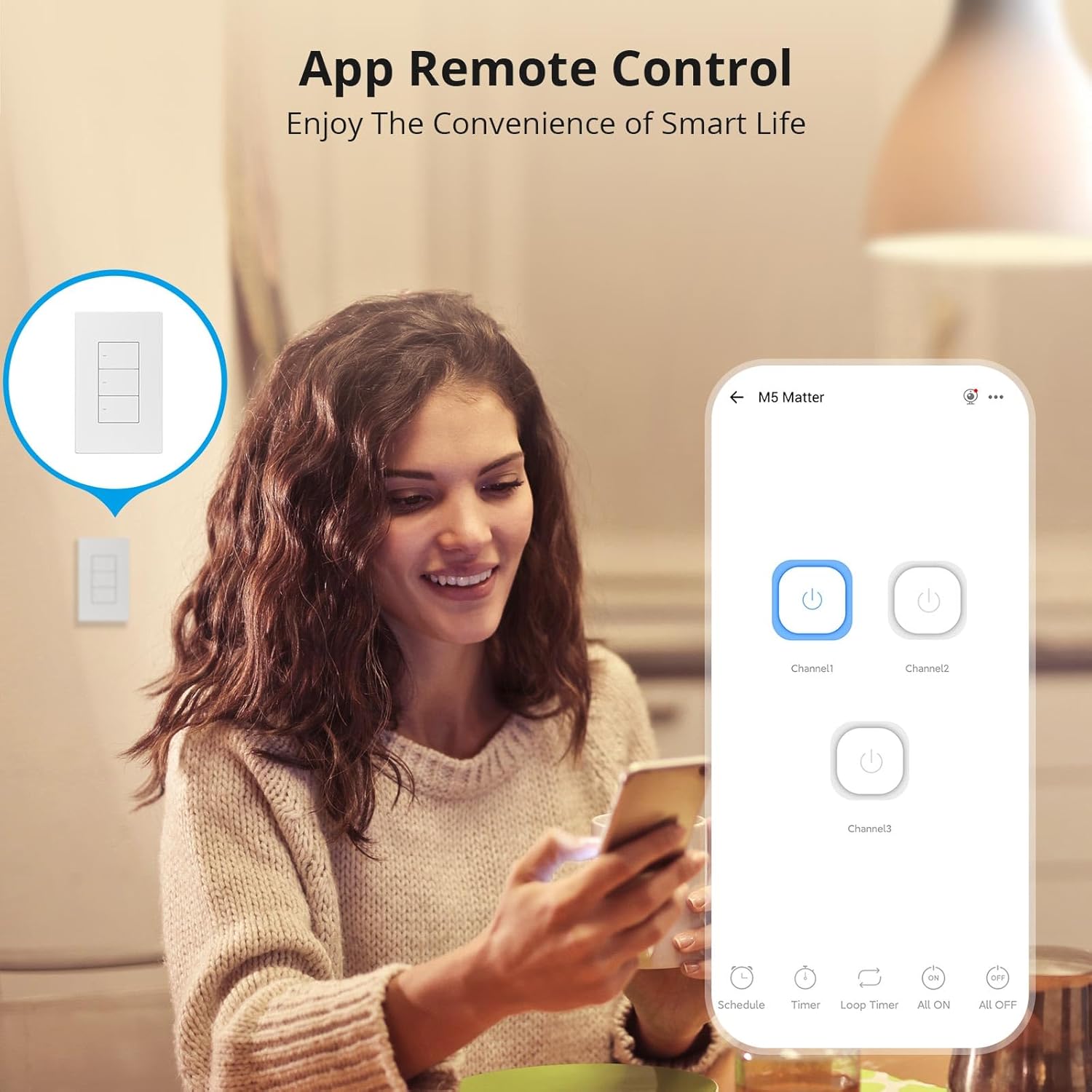
Image 6.1: Remote control via the eWeLink app interface.

ചിത്രം 6.2: ഉദാample of setting scheduled on/off times for automated lighting.
6.3 ശബ്ദ നിയന്ത്രണം
Once integrated with Alexa, Google Home, or other voice assistants, you can control your lights using voice commands.
- Example: "Alexa, turn off the living room light."
- Example: "Hey Google, turn on the kitchen lights."

Image 6.3: Voice control in action with a smart speaker.
6.4 Smart Scenes
Create smart scenes to automate actions based on specific conditions or other smart devices.
- Example: Link with a door sensor (e.g., SONOFF DW2-WiFi) to automatically turn on lights when a door opens.

Image 6.4: Smart scene example: lights activate upon door opening.
6.5 Two-Way Control (with SONOFF R5)
The SONOFF M5 switch can be paired with a SONOFF R5 Scene Controller for two-way or multi-way control without complex wiring.

Image 6.5: Two-way control setup using an M5 switch and an R5 scene controller.
6.6 LED ഇൻഡിക്കേറ്റർ ക്രമീകരണം
The LED indicator on the switch buttons can be adjusted for brightness via the eWeLink app to suit your preference, especially for locating the switch in the dark or minimizing disturbance during sleep.

Image 6.6: App interface for adjusting LED indicator brightness.
7. പരിപാലനം
To maintain the performance and appearance of your smart switch:
- Clean the surface with a soft, dry cloth. Do not use abrasive cleaners or solvents.
- Ensure the switch is kept free from dust and moisture.
- Do not attempt to disassemble the switch beyond what is described in the safety section, as this may void the warranty and pose a safety risk.
8. പ്രശ്നപരിഹാരം
If you encounter issues with your SONOFF Matter Smart Light Switch, refer to the following common problems and solutions:
- Switch is unresponsive / No power:
- Check the circuit breaker to ensure power is restored to the switch.
- Verify that the neutral wire is correctly connected.
- എല്ലാ വയറിംഗ് കണക്ഷനുകളും സുരക്ഷിതമാണെന്ന് ഉറപ്പാക്കുക.
- Cannot connect to WiFi / Drops connection frequently:
- Ensure your WiFi network is 2.4GHz. This device does not support 5GHz WiFi.
- Check the distance between the switch and your WiFi router. Obstructions can weaken the signal.
- നിങ്ങളുടെ വൈഫൈ റൂട്ടർ പുനരാരംഭിക്കുക.
- Perform a factory reset on the switch (refer to the quick guide for specific steps) and attempt pairing again.
- Cannot pair with Matter / Smart Home App:
- Ensure your Matter-compatible hub is online and within range.
- Verify that the Matter QR code or pairing code is entered correctly.
- Check for any firmware updates for your Matter hub or the smart switch.
- Try resetting the switch and initiating the pairing process again.
- Lights flicker or do not turn off completely:
- This can sometimes occur with low-wattage LED bulbs. Ensure your bulbs are compatible with smart switches.
- Verify the load connected does not exceed the maximum wattagഇ സ്പെസിഫിക്കേഷനുകളിൽ വ്യക്തമാക്കിയിട്ടുണ്ട്.
9 സ്പെസിഫിക്കേഷനുകൾ
| ഫീച്ചർ | വിശദാംശങ്ങൾ |
|---|---|
| മോഡൽ | M5-3C-120W |
| ഉൽപ്പന്ന അളവുകൾ | 4.72 x 2.91 x 1.63 ഇഞ്ച് |
| ഇനത്തിൻ്റെ ഭാരം | 8.08 ഔൺസ് |
| ഓപ്പറേഷൻ മോഡ് | ഓൺ-ഓഫ് |
| നിലവിലെ റേറ്റിംഗ് | 6 Amps |
| ഓപ്പറേറ്റിംഗ് വോളിയംtage | 100-240 വോൾട്ട് എസി |
| ബന്ധപ്പെടാനുള്ള തരം | സാധാരണയായി അടച്ചിരിക്കുന്നു |
| കണക്റ്റർ തരം | Clamp |
| അതിതീവ്രമായ | സ്ക്രൂ |
| സർക്യൂട്ട് തരം | 1-വഴി |
| ആക്യുവേറ്റർ തരം | പുഷ് ബട്ടൺ |
| വൈഫൈ | IEEE 802.11 b / g / n 2.4GHz |
| Casing മെറ്റീരിയൽ | പിസി V0 + സിആർഎസ് |
| പ്രവർത്തന താപനില | -10°C മുതൽ 40°C വരെ |
| സർട്ടിഫിക്കേഷൻ | CE/FCC/ISED |
| Max. Load (per gang) | 3-Gang: 1320W (440W/Gang) |
10. വാറൻ്റിയും പിന്തുണയും
SONOFF products are designed and manufactured to the highest quality standards. For warranty information and technical support, please refer to the official SONOFF webസൈറ്റിൽ ബന്ധപ്പെടുകയോ അവരുടെ ഉപഭോക്തൃ സേവനവുമായി നേരിട്ട് ബന്ധപ്പെടുകയോ ചെയ്യുക. വാറന്റി ക്ലെയിമുകൾക്കുള്ള വാങ്ങലിന്റെ തെളിവായി നിങ്ങളുടെ വാങ്ങൽ രസീത് സൂക്ഷിക്കുക.
നിർമ്മാതാവ്: സോനോഫ്
Webസൈറ്റ്: sonoff.tech
സേവന ഇമെയിൽ: support@itead.cc


