1. ഉൽപ്പന്നം കഴിഞ്ഞുview
The ROOFULL External CD DVD Drive is a multifunctional device designed to provide comprehensive disc reading and writing capabilities, along with expanded connectivity options for modern laptops and computers. This 8-in-1 unit supports various disc formats and offers high-speed data transfer, making it an essential accessory for users without built-in optical drives or those requiring additional USB and card reader ports.

Figure 1.1: ROOFULL External CD DVD Drive and accessories.
2. ബോക്സിൽ എന്താണുള്ളത്?
- 1 x ROOFULL External CD/DVD Drive (RF40-SU)
- 1 x USB Power Supply Cord
- 1 x ഉപയോക്തൃ മാനുവൽ

Figure 2.1: Package contents of the ROOFULL External CD DVD Drive.
3. സവിശേഷതകൾ
- 8-ഇൻ-1 മൾട്ടിഫങ്ഷണാലിറ്റി: Functions as a CD/DVD-ROM reader, CD/DVD burner, writer, rewriter, ripper, and recorder.
- True USB 3.0 & Dual Connectors: Supports up to 5 Gbps high-speed transfer with a full 9-wire cable and dedicated controller chip. Includes both USB Type-A and Type-C connectors for broad compatibility without adapters.
- Built-in Hub & SD Card Reader: Features multiple USB 3.0/2.0 Type-A ports and integrated SD/microSD card readers for connecting peripherals and importing media.
- വിശാലമായ അനുയോജ്യത: Supports Windows 11/10/8.1/7/Vista/XP, Linux PCs, and Apple MacBook Pro, Air, iMac, Mac Studio, and Mac Mini with macOS 10.16 or later.
- പ്ലഗ് & പ്ലേ: No manual driver installation required; automatically recognized by compatible systems.
- Slim & Portable Design: എളുപ്പമുള്ള ഗതാഗതത്തിനും സംഭരണത്തിനും ഒതുക്കമുള്ളതും ഭാരം കുറഞ്ഞതുമാണ്.

Figure 3.1: Key features of the ROOFULL External CD DVD Drive.

Figure 3.2: Illustration of True USB 3.0 technology.
4 അനുയോജ്യത
The ROOFULL RF40-SU is designed for broad compatibility with various operating systems and devices:
- പിന്തുണയ്ക്കുന്ന ഓപ്പറേറ്റിംഗ് സിസ്റ്റങ്ങൾ: Windows 11, 10, 8.1, 7, Vista, XP; Linux OS; macOS 10.16 and later (for Apple MacBook Pro, Air, iMac, Mac Studio, Mac Mini).
- പിന്തുണയ്ക്കുന്ന ഉപകരണങ്ങൾ: Laptops, Desktops, All-in-one PCs.
- Unsupported Devices: Chromebooks (ChromeOS), smartphones, TVs, iPads, tablets, projectors, trucks, cars, some Surface models, Blu-ray/4K discs.

ചിത്രം 4.1: വിവിധ ഓപ്പറേറ്റിംഗ് സിസ്റ്റങ്ങളുമായുള്ള വിശാലമായ അനുയോജ്യത.
5. സജ്ജീകരണം
Follow these steps for initial setup of your ROOFULL External CD DVD Drive:
- ഡ്രൈവ് അൺപാക്ക് ചെയ്യുക: Remove the drive and all accessories from the packaging.
- ഡാറ്റ കേബിൾ കണ്ടെത്തുക: The main data cable is conveniently stored underneath the drive. Gently pull it out from its slot.
- നിങ്ങളുടെ ഉപകരണത്തിലേക്ക് കണക്റ്റുചെയ്യുക: Plug the data cable into an available USB port on your laptop or computer. The cable features both USB Type-A and Type-C connectors for versatile connection.
- Power Supply (if needed): If your computer's USB port cannot provide sufficient power, connect the included USB power supply cord to the drive's USB-C power port (not data port) and plug the other end into a USB power source (e.g., power bank, wall adapter).
- യാന്ത്രിക തിരിച്ചറിയൽ: The drive should be automatically recognized by your operating system. No manual driver installation is typically required.

Figure 5.1: Connecting the drive to a laptop.
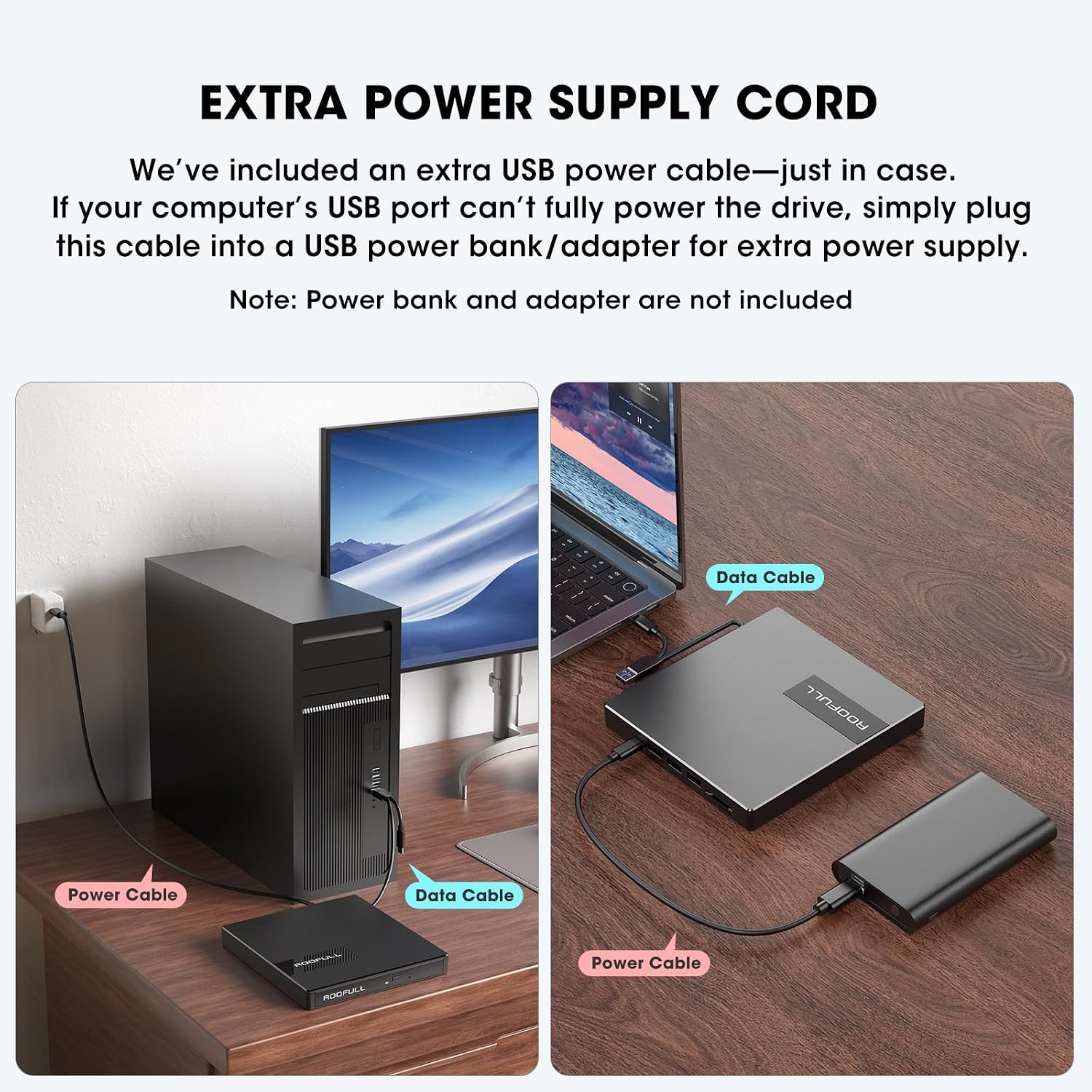
Figure 5.2: Using the extra power supply cord for stable operation.
DVD Region Code Setting
When inserting a DVD for the first time, your system may prompt you to select a DVD region. It is crucial to select the correct region corresponding to your DVD discs. Note that you can typically change the drive's region a limited number of times (e.g., 5 times). Refer to the map below for common DVD regions:

Figure 5.3: DVD Region Code Map.
| മേഖല | Geographical Area |
|---|---|
| മേഖല 1 | കാനഡ, യുണൈറ്റഡ് സ്റ്റേറ്റ്സ് |
| മേഖല 2 | ജപ്പാൻ, യൂറോപ്പ്, ദക്ഷിണാഫ്രിക്ക, മിഡിൽ ഈസ്റ്റ് |
| മേഖല 3 | തെക്കുകിഴക്കൻ ഏഷ്യ, കിഴക്കൻ ഏഷ്യ (ഹോങ്കോങ്ങ് ഉൾപ്പെടെ) |
| മേഖല 4 | ഓസ്ട്രേലിയ, ന്യൂസിലാൻഡ്, പസഫിക് ദ്വീപുകൾ, മധ്യ അമേരിക്ക, മെക്സിക്കോ, ദക്ഷിണ അമേരിക്ക |
| മേഖല 5 | കിഴക്കൻ യൂറോപ്പ്, റഷ്യ, ഇന്ത്യൻ ഉപഭൂഖണ്ഡം, ആഫ്രിക്ക, ഉത്തര കൊറിയ, മംഗോളിയ |
| മേഖല 6 | ചൈന |
| മേഖല 7 | വ്യക്തമാക്കാത്ത പ്രത്യേക ഉപയോഗത്തിനായി കരുതിവച്ചിരിക്കുന്നു |
| മേഖല 8 | വ്യോമ, സമുദ്ര യാത്രകൾ |
6. പ്രവർത്തിക്കുന്നു
Using the CD/DVD Drive
- Open the Disc Tray: ഡിസ്ക് ട്രേ തുറക്കാൻ ഡ്രൈവിന്റെ മുൻവശത്തുള്ള എജക്റ്റ് ബട്ടൺ അമർത്തുക.
- ഡിസ്ക് ചേർക്കുക: നിങ്ങളുടെ സിഡി അല്ലെങ്കിൽ ഡിവിഡി ശ്രദ്ധാപൂർവ്വം ട്രേയിൽ വയ്ക്കുക, അത് സ്പിൻഡിൽ മധ്യത്തിലാണെന്ന് ഉറപ്പാക്കുക.
- ട്രേ അടയ്ക്കുക: ട്രേ ഷട്ട് ക്ലിക്ക് ചെയ്യുന്നതുവരെ ഡ്രൈവിലേക്ക് പതുക്കെ തള്ളുക.
- ആക്സസ് ഉള്ളടക്കം: Your computer will typically recognize the disc automatically. Use your preferred media player software (e.g., Windows Media Player, VLC, iTunes) to play music CDs, movie DVDs, or access data discs. For burning or ripping, dedicated software is required (e.g., BurnAware, Nero, HandBrake).

Figure 6.1: Front panel features including Tray Loading Design, Indicator Light, Ejection Button, and Forced Ejection Hole.
Video 6.1: Official demonstration of the ROOFULL External CD DVD Drive, showing connection, disc insertion, and basic functions.
Using USB Ports and SD/TF Card Slots
The drive features additional ports for enhanced connectivity:
- യുഎസ്ബി 3.0 പോർട്ട്: Located on the side, this port can be used for high-speed data transfer with USB 3.0 devices.
- 3 x USB 2.0 പോർട്ടുകൾ: These ports allow you to connect various USB peripherals such as wired mice, keyboards, flash drives, or 2.4G receivers.
- SD Card Slot & Micro-SD (TF) Card Slot: Insert your SD or microSD cards to import photos, videos, or access other data. Note that SD and TF cards cannot be used simultaneously.

ചിത്രം 6.2: വശം view showing USB ports, SD/TF card slots, and USB-C power port.
7. പരിപാലനം
- വൃത്തിയാക്കൽ: Use a soft, dry cloth to clean the exterior of the drive. Do not use liquid cleaners or abrasive materials.
- ഡിസ്ക് പരിചരണം: Always handle discs by their edges to avoid fingerprints and scratches. Store discs in protective cases when not in use.
- സംഭരണം: When not in use, store the drive in a cool, dry place. Ensure the data cable is neatly tucked into its storage slot underneath the drive.
- ആഘാതം ഒഴിവാക്കുക: Protect the drive from drops or impacts, as this can damage internal components.
8. പ്രശ്നപരിഹാരം
- ഡ്രൈവ് തിരിച്ചറിയാൻ കഴിഞ്ഞിട്ടില്ല: Ensure the data cable is securely connected to both the drive and your computer. Try a different USB port. If using a desktop PC, connect to a rear USB port on the motherboard for a more stable power supply. If power is an issue, use the included extra power supply cord.
- Disc Not Reading/Burning: Check if the disc is clean and free of scratches. Ensure the disc is correctly placed on the tray. Verify that you have the necessary software installed for playing, burning, or ripping discs.
- Tray Cannot Be Opened via Button (macOS): Due to macOS limitations, the tray button may not function after playing or burning a disc. To eject a disc on a Mac, right-click the disc icon on your desktop and select "Eject," or go to "File" > "Eject" from the menu bar in the active application.
- No Power/Intermittent Operation: Connect the extra USB power supply cord to the drive and a reliable USB power source. Some USB ports (especially on older laptops or front panel desktop ports) may not provide enough power.
- മന്ദഗതിയിലുള്ള ട്രാൻസ്ഫർ വേഗത: Ensure you are connected to a USB 3.0 port on your computer for optimal speed. Verify that the data cable is fully inserted.
- SD/TF Card Not Detected: Ensure only one card (either SD or TF) is inserted at a time, as they cannot be used simultaneously. Reinsert the card firmly.
9 സ്പെസിഫിക്കേഷനുകൾ
| ഫീച്ചർ | വിശദാംശങ്ങൾ |
|---|---|
| ബ്രാൻഡ് | റൂഫൾ |
| മോഡൽ നമ്പർ | RF40-SU |
| ഒപ്റ്റിക്കൽ ഡ്രൈവ് തരം | CD-ROM, CD-R, CD+/-RW, DVD-ROM, DVD+/-R, DVD+/-RW |
| ഒപ്റ്റിക്കൽ സ്റ്റോറേജ് റൈറ്റ് വേഗത | Max 24xCD / 8xDVD |
| ഹാർഡ്വെയർ ഇന്റർഫേസ് | യുഎസ്ബി 3.0 ടൈപ്പ് എ, യുഎസ്ബി 3.0 ടൈപ്പ് സി |
| USB 3.0 പോർട്ടുകളുടെ എണ്ണം | 1 |
| ഓപ്പറേറ്റിംഗ് സിസ്റ്റം അനുയോജ്യത | Windows 11/10/8/7, Mac, Linux |
| ഹാർഡ്വെയർ പ്ലാറ്റ്ഫോം | ലാപ്ടോപ്പ്, പി.സി |
| ഇനത്തിൻ്റെ ഭാരം | 10.6 ഔൺസ് |
| ഉൽപ്പന്ന അളവുകൾ (LxWxH) | 5.6 x 5.6 x 0.6 ഇഞ്ച് |
| മാതൃരാജ്യം | ചൈന |
10. വാറണ്ടിയും പിന്തുണയും
ROOFULL is committed to producing quality external CD/DVD-RW drives and offers comprehensive after-sales service.
- വാറൻ്റി: The product comes with up to 2 years of comprehensive after-sales service.
- സാങ്കേതിക സഹായം: If you experience any issues or require technical assistance, please contact ROOFULL customer support. Contact information can typically be found on the product packaging or the official ROOFULL webസൈറ്റ്.
- സൗജന്യമായി മാറ്റിസ്ഥാപിക്കൽ: In case of product issues covered under warranty, a free replacement may be provided.


