1 പ്രധാനപ്പെട്ട സുരക്ഷാ വിവരങ്ങൾ
Please read this manual carefully before using the Midea M9 Robot Vacuum Cleaner and retain it for future reference. Adhere to all safety warnings and instructions to prevent injury or damage.
- 8 വയസ്സും അതിനുമുകളിലും പ്രായമുള്ള കുട്ടികൾക്കും ശാരീരികമോ ഇന്ദ്രിയപരമോ മാനസികമോ ആയ കഴിവുകൾ കുറഞ്ഞവർക്കും അനുഭവപരിചയവും അറിവും ഇല്ലാത്തവർക്കും സുരക്ഷിതമായ രീതിയിൽ ഉപകരണം ഉപയോഗിക്കുന്നതുമായി ബന്ധപ്പെട്ട മേൽനോട്ടമോ നിർദ്ദേശമോ നൽകുകയും അപകടസാധ്യതകൾ മനസ്സിലാക്കുകയും ചെയ്തിട്ടുണ്ടെങ്കിൽ ഈ ഉപകരണം ഉപയോഗിക്കാൻ കഴിയും. .
- കുട്ടികൾ ഉപകരണം ഉപയോഗിച്ച് കളിക്കുന്നില്ലെന്ന് ഉറപ്പാക്കാൻ മേൽനോട്ടം വഹിക്കണം.
- മേൽനോട്ടമില്ലാതെ കുട്ടികൾ വൃത്തിയാക്കലും ഉപയോക്തൃ പരിപാലനവും നടത്തരുത്.
- നിർമ്മാതാവ് നൽകുന്ന യഥാർത്ഥ പവർ അഡാപ്റ്റർ മാത്രം ഉപയോഗിക്കുക.
- Do not use the robot vacuum in wet environments or near water.
- Ensure the charging base is placed on a level surface against a wall, with clear space around it.
- Remove any loose cables, small objects, or fragile items from the cleaning area before operation.
2. പാക്കേജ് ഉള്ളടക്കം
Verify that all items are present in the package. If any components are missing or damaged, contact customer support.
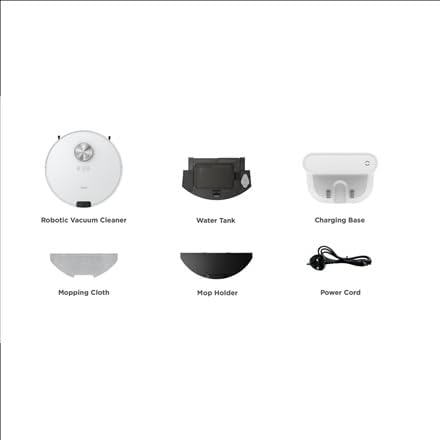
ചിത്രം: കഴിഞ്ഞുview of the Midea M9 Robot Vacuum Cleaner's package contents. This image displays the main robotic vacuum cleaner unit, a water tank, a charging base, a mopping cloth, a mop holder, and a power cord.
- റോബോട്ടിക് വാക്വം ക്ലീനർ
- വാട്ടർ ടാങ്ക്
- ചാർജിംഗ് ബേസ്
- മോപ്പിംഗ് തുണി
- മോപ്പ് ഹോൾഡർ
- പവർ കോർഡ്
3. ഉൽപ്പന്നം കഴിഞ്ഞുview
3.1 ടോപ്പ് View
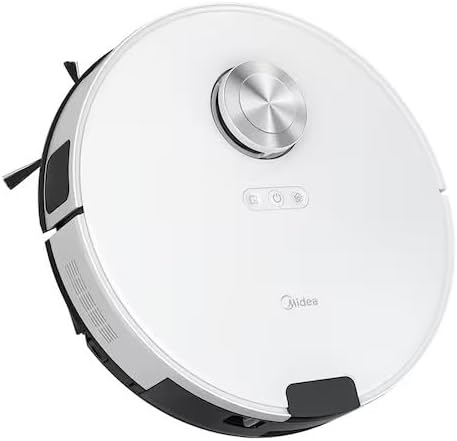
ചിത്രം: മുകളിൽ view of the Midea M9 Robot Vacuum Cleaner. This image shows the circular design of the robot, with a central LiDAR navigation sensor tower, power button, and other control indicators on its surface.
The top of the Midea M9 features the LiDAR navigation sensor, which allows the robot to map your home and navigate efficiently. It also includes control buttons for starting/pausing cleaning and returning to the charging base.
3.2 താഴെ View

ചിത്രം: താഴെ view of the Midea M9 Robot Vacuum Cleaner. This image displays the two side brushes, the main rolling brush, the driving wheels, and the mopping pad attachment area.
The underside of the robot houses the main rolling brush, two side brushes for edge cleaning, driving wheels, and cliff sensors to prevent falls. The mopping pad attachment area is also visible.
4. സജ്ജീകരണം
4.1 ചാർജിംഗ് ബേസ് പ്ലേസ്മെന്റ്
- Place the charging base against a wall on a hard, level surface.
- ചാർജിംഗ് ബേസിന്റെ ഇരുവശത്തും കുറഞ്ഞത് 0.5 മീറ്റർ (1.6 അടി) വ്യക്തമായ ഇടവും മുന്നിൽ 1.5 മീറ്റർ (4.9 അടി) അകലവും ഉണ്ടെന്ന് ഉറപ്പാക്കുക.
- Connect the power cord to the charging base and plug it into a power outlet.
4.2 പ്രാരംഭ ചാർജിംഗ്
- Place the robot vacuum onto the charging base, ensuring the charging contacts align.
- Allow the robot to charge completely before its first use. This typically takes 4-6 hours. The indicator light on the robot will change to indicate a full charge.
4.3 ആപ്പ് കണക്ഷൻ (ഓപ്ഷണൽ)
- Download the Midea Smart app from your mobile device's app store.
- Follow the in-app instructions to connect your Midea M9 Robot Vacuum Cleaner to your home Wi-Fi network. This enables advanced features like remote control, scheduling, and cleaning mode selection.
5. പ്രവർത്തന നിർദ്ദേശങ്ങൾ
5.1 വൃത്തിയാക്കൽ ആരംഭിക്കൽ/നിർത്തൽ
- ആരംഭിക്കാൻ: Press the power button on the robot or use the Midea Smart app. The robot will begin cleaning in Auto mode.
- താൽക്കാലികമായി നിർത്താൻ: Press the power button again during cleaning.
- To Stop/Return to Base: Press and hold the power button for a few seconds, or use the 'Return to Base' function in the app.
5.2 ക്ലീനിംഗ് മോഡുകൾ
The Midea M9 offers various cleaning modes:
- യാന്ത്രിക മോഡ്: The robot intelligently navigates and cleans your entire home.
- സ്പോട്ട് മോഡ്: Cleans a specific area more intensely. Place the robot in the center of the dirty area and activate Spot mode via the app.
- എഡ്ജ് മോഡ്: The robot cleans along walls and furniture edges. Activate via the app.
5.3 മോപ്പിംഗ് ഫംഗ്ഷൻ
- Fill the water tank with clean water. Do not use detergents or cleaning solutions not approved by Midea.
- Attach the mopping cloth to the mop holder, then slide the mop holder with the cloth onto the water tank.
- Insert the assembled water tank and mop holder into the robot.
- The robot will automatically switch to mopping mode or combined vacuuming and mopping.
6. പരിപാലനം
പതിവ് അറ്റകുറ്റപ്പണികൾ ഒപ്റ്റിമൽ പ്രകടനം ഉറപ്പാക്കുകയും നിങ്ങളുടെ റോബോട്ട് വാക്വമിന്റെ ആയുസ്സ് വർദ്ധിപ്പിക്കുകയും ചെയ്യുന്നു.
6.1 ഡസ്റ്റ്ബിൻ, വാട്ടർ ടാങ്ക് വൃത്തിയാക്കൽ
- ഓരോ ഉപയോഗത്തിനും ശേഷം ഡസ്റ്റ്ബിൻ ശൂന്യമാക്കുക.
- Rinse the dustbin and filter with water as needed, ensuring they are completely dry before reinstallation.
- Empty and clean the water tank after each mopping session to prevent mold and odors.
6.2 ബ്രഷ് ക്ലീനിംഗ്
- പ്രധാന ബ്രഷ്: Remove the main brush cover and lift out the brush. Use the cleaning tool to remove hair and debris. Clean weekly.
- സൈഡ് ബ്രഷുകൾ: Check for tangled hair or debris. Remove and clean as needed. Replace if worn or damaged. Clean monthly.
6.3 സെൻസർ ക്ലീനിംഗ്
- Wipe the cliff sensors, wall sensors, and charging contacts with a clean, dry cloth monthly to ensure proper function.
7. പ്രശ്നപരിഹാരം
നിങ്ങൾക്ക് പ്രശ്നങ്ങൾ നേരിടുകയാണെങ്കിൽ, ഇനിപ്പറയുന്ന പൊതുവായ പ്രശ്നങ്ങളും പരിഹാരങ്ങളും പരിശോധിക്കുക:
| പ്രശ്നം | സാധ്യമായ കാരണം | പരിഹാരം |
|---|---|---|
| റോബോട്ട് ചാർജ് ചെയ്യുന്നില്ല | Charging contacts are dirty; Power adapter not connected; Robot not properly aligned with base. | Clean charging contacts; Ensure power adapter is plugged in; Realign robot on charging base. |
| റോബോട്ട് ഇടയ്ക്കിടെ കുടുങ്ങുന്നു | Loose cables or small objects on the floor; Robot stuck on high thresholds. | Clear obstacles from cleaning path; Use virtual walls or no-go zones in the app. |
| മോശം ക്ലീനിംഗ് പ്രകടനം | മാലിന്യക്കൂമ്പാരം നിറഞ്ഞു; ബ്രഷുകൾ കുരുങ്ങി; ഫിൽറ്റർ അടഞ്ഞുപോയി. | മാലിന്യക്കുപ്പി ശൂന്യമാക്കുക; പ്രധാന, വശങ്ങളിലെ ബ്രഷുകൾ വൃത്തിയാക്കുക; ഫിൽട്ടർ വൃത്തിയാക്കുക അല്ലെങ്കിൽ മാറ്റിസ്ഥാപിക്കുക. |
| റോബോട്ടിന് Wi-Fi-യിലേക്ക് കണക്റ്റ് ചെയ്യാൻ കഴിയില്ല | Incorrect Wi-Fi password; Router too far; Only supports 2.4GHz Wi-Fi. | Verify password; Move robot closer to router; Ensure router is set to 2.4GHz. |
8 സ്പെസിഫിക്കേഷനുകൾ
| ഫീച്ചർ | വിശദാംശങ്ങൾ |
|---|---|
| ബ്രാൻഡ് | മിഡിയ |
| മോഡലിൻ്റെ പേര് | Midea M9 |
| അളവുകൾ (L x W x H) | 32 x 32 x 10 സെ.മീ |
| ഭാരം | 4 കിലോഗ്രാം |
| പ്രത്യേക സവിശേഷതകൾ | Smart mapping, Portable |
| ഉപരിതല ശുപാർശ | പരവതാനി |
9. വാറൻ്റിയും പിന്തുണയും
For warranty information and technical support, please refer to the warranty card included with your product or visit the official Midea webസൈറ്റ്. വാങ്ങിയതിന്റെ തെളിവായി നിങ്ങളുടെ വാങ്ങൽ രസീത് സൂക്ഷിക്കുക.


