1. ആമുഖം
This manual provides instructions for the setup, operation, and maintenance of your Ceybo 06-519W37-TY01X Remote Control. This remote is designed for seamless compatibility with various JVC HD LED Smart TV models, offering intuitive control over your television's functions and quick access to popular streaming services.

ചിത്രം 1: മുന്നിലും പിന്നിലും view of the Ceybo 06-519W37-TY01X Remote Control, showcasing its ergonomic design and battery compartment.
2. സജ്ജീകരണം
2.1 ബാറ്ററി ഇൻസ്റ്റാളേഷൻ
- റിമോട്ട് കൺട്രോളിന്റെ പിൻഭാഗത്ത് ബാറ്ററി കമ്പാർട്ട്മെന്റ് കണ്ടെത്തുക.
- ബാറ്ററി കവർ തുറക്കാൻ താഴേക്ക് സ്ലൈഡ് ചെയ്യുക.
- കമ്പാർട്ടുമെന്റിനുള്ളിലെ അടയാളപ്പെടുത്തലുകളുമായി പോസിറ്റീവ് (+), നെഗറ്റീവ് (-) ടെർമിനലുകൾ ശരിയായി വിന്യസിക്കുന്നുണ്ടെന്ന് ഉറപ്പാക്കാൻ രണ്ട് (2) AAA ബാറ്ററികൾ (ഉൾപ്പെടുത്തിയിട്ടില്ല) ഇടുക.
- ബാറ്ററി കവർ അതിന്റെ സ്ഥാനത്ത് ക്ലിക്ക് ആകുന്നതുവരെ മുകളിലേക്ക് സ്ലൈഡുചെയ്ത് മാറ്റിസ്ഥാപിക്കുക.

Image 2: The back of the remote control with the battery compartment open, illustrating the correct placement for two AAA batteries.
2.2 പ്രാരംഭ ഉപയോഗം
The Ceybo 06-519W37-TY01X Remote Control is designed for immediate use with compatible JVC Smart TVs. No programming or pairing is required. Once batteries are installed, the remote is ready to operate your television.

Image 3: The remote control, emphasizing that no programming is needed for operation.
3. പ്രവർത്തന നിർദ്ദേശങ്ങൾ
The remote control features a standard layout for easy navigation and control of your JVC Smart TV.
3.1 അടിസ്ഥാന പ്രവർത്തനങ്ങൾ
- പവർ ബട്ടൺ (⬤): ടിവി ഓണാക്കുകയോ ഓഫാക്കുകയോ ചെയ്യുന്നു.
- നമ്പർ ബട്ടണുകൾ (0-9): ചാനലുകൾ നേരിട്ട് തിരഞ്ഞെടുക്കുക.
- ശബ്ദം കൂട്ടുക/കുറയ്ക്കുക (VOL +/-): ശബ്ദ നില ക്രമീകരിക്കുന്നു.
- ചാനൽ മുകളിലേക്കും/താഴേക്കും (CH +/-): ടിവി ചാനൽ മാറ്റുന്നു.
- നിശബ്ദ ബട്ടൺ (🔇): ടിവി ശബ്ദം നിശബ്ദമാക്കുകയോ അൺമ്യൂട്ട് ചെയ്യുകയോ ചെയ്യുന്നു.
- നാവിഗേഷൻ പാഡ് (മുകളിലേക്ക്, താഴേക്ക്, ഇടത്, വലത്, ശരി): മെനുകളിലൂടെ നാവിഗേറ്റ് ചെയ്ത് തിരഞ്ഞെടുപ്പുകൾ സ്ഥിരീകരിക്കുന്നു.
- ഉറവിട ബട്ടൺ: ഇൻപുട്ട് ഉറവിടങ്ങൾ തിരഞ്ഞെടുക്കുന്നു (HDMI, AV, മുതലായവ).
- എക്സിറ്റ് ബട്ടൺ: നിലവിലുള്ള മെനുവിൽ നിന്നോ ആപ്ലിക്കേഷനിൽ നിന്നോ പുറത്തുകടക്കുന്നു.
- വിവര ബട്ടൺ: നിലവിലെ പ്രോഗ്രാമിനെക്കുറിച്ചോ ഇൻപുട്ടിനെക്കുറിച്ചോ ഉള്ള വിവരങ്ങൾ പ്രദർശിപ്പിക്കുന്നു.
3.2 കുറുക്കുവഴി ബട്ടണുകൾ
The remote includes dedicated buttons for quick access to popular streaming applications:
- Netflix Button: Launches the Netflix application directly.
- YouTube ബട്ടൺ: Launches the YouTube application directly.

ചിത്രം 4: വിശദമായ view of the remote control, showing the dedicated Netflix and YouTube shortcut buttons for quick access.
4 അനുയോജ്യത
This Ceybo 06-519W37-TY01X Remote Control is compatible with the following JVC HD LED Smart TV models:
- S139H
- S140FS
- SI49FSC
- SI50US
- SI55FS
- SI65FS
- Sl32HS
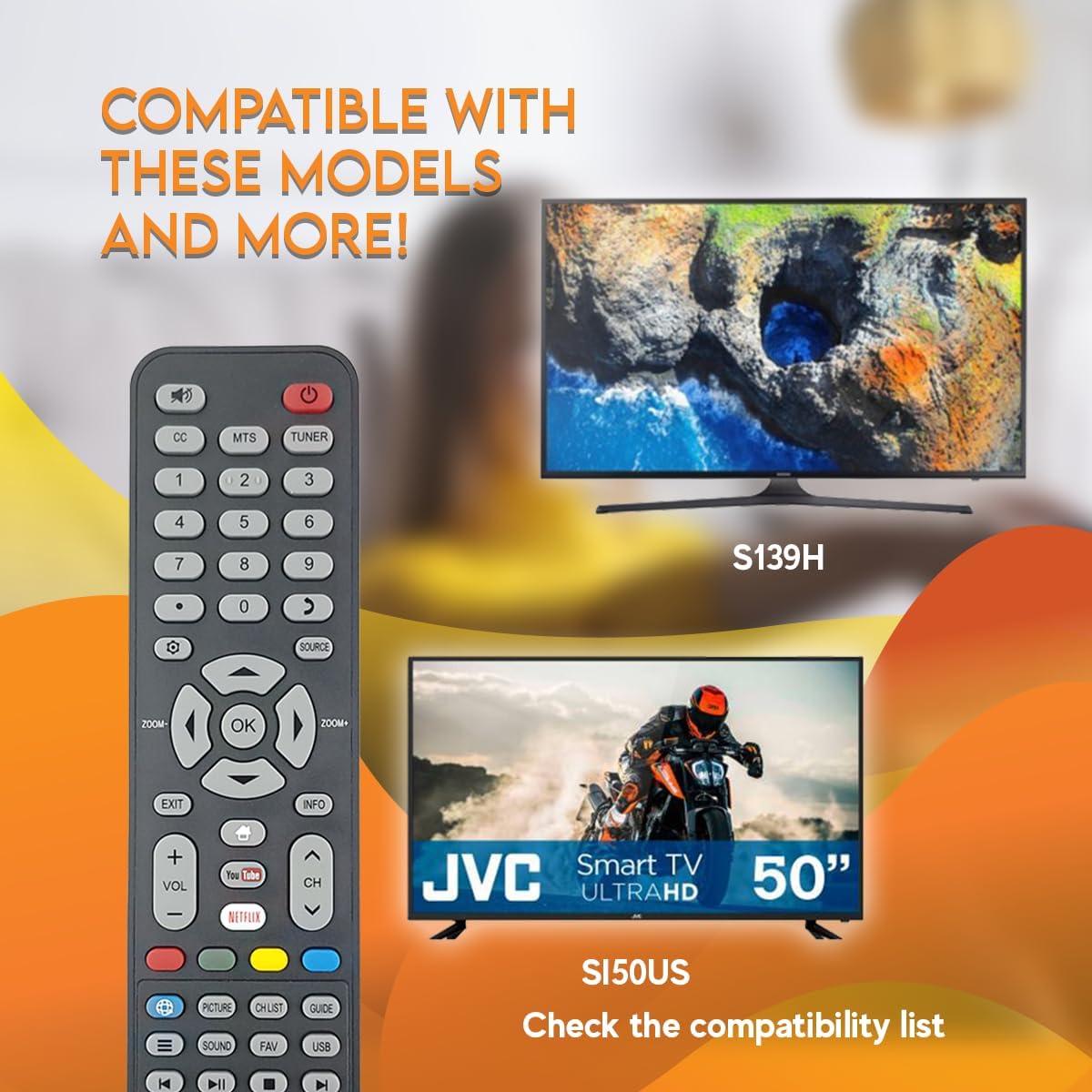
Image 5: The remote control displayed with examples of compatible JVC TV models, such as S139H and SI50US.
5. പരിപാലനം
5.1 വൃത്തിയാക്കൽ
നിങ്ങളുടെ റിമോട്ട് കൺട്രോൾ വൃത്തിയാക്കാൻ, മൃദുവായതും ഉണങ്ങിയതുമായ ഒരു തുണി ഉപയോഗിക്കുക. കഠിനമായ അഴുക്കിന്, ചെറുതായി dampതുണിയിൽ വെള്ളം അല്ലെങ്കിൽ നേരിയതും ഉരച്ചിലുകൾ ഇല്ലാത്തതുമായ ഒരു ക്ലീനർ ഉപയോഗിക്കുക. കഠിനമായ രാസവസ്തുക്കളോ ഉരച്ചിലുകളുള്ള വസ്തുക്കളോ ഉപയോഗിക്കുന്നത് ഒഴിവാക്കുക, കാരണം ഇവ റിമോട്ടിന്റെ ഉപരിതലത്തിനോ ആന്തരിക ഘടകങ്ങളോ കേടുവരുത്തും.
5.2 ബാറ്ററി മാറ്റിസ്ഥാപിക്കൽ
Replace batteries when the remote's response becomes sluggish or stops working. Always replace both AAA batteries at the same time with new ones. Do not mix old and new batteries, or different types of batteries.
6. പ്രശ്നപരിഹാരം
- റിമോട്ട് പ്രതികരിക്കുന്നില്ല:
- ശരിയായ പോളാരിറ്റിയോടെ ബാറ്ററികൾ ശരിയായി ചേർത്തിട്ടുണ്ടോയെന്ന് പരിശോധിക്കുക.
- പഴയ ബാറ്ററികൾ പുതിയവ ഉപയോഗിച്ച് മാറ്റിസ്ഥാപിക്കുക.
- റിമോട്ട് കൺട്രോളിനും ടിവിയുടെ ഇൻഫ്രാറെഡ് സെൻസറിനും ഇടയിൽ വ്യക്തമായ ഒരു കാഴ്ച രേഖ ഉണ്ടെന്ന് ഉറപ്പാക്കുക. തടസ്സങ്ങൾ സിഗ്നലിനെ തടസ്സപ്പെടുത്തിയേക്കാം.
- റിമോട്ട് ടിവിയിലേക്ക് നേരിട്ട് ചൂണ്ടിയിട്ടുണ്ടെന്ന് ഉറപ്പാക്കുക.
- പ്രവർത്തിക്കാത്ത പ്രത്യേക ബട്ടണുകൾ:
- Clean the remote control, especially around the unresponsive buttons, to remove any dirt or debris that might be causing interference.
- If only certain buttons are not working after checking batteries and line of sight, the remote may be faulty and require replacement.
7 സ്പെസിഫിക്കേഷനുകൾ
| ഫീച്ചർ | വിശദാംശങ്ങൾ |
|---|---|
| മോഡൽ നമ്പർ | 06-519W37-TY01X |
| ബ്രാൻഡ് | സിബോ |
| അനുയോജ്യമായ ഉപകരണങ്ങൾ | JVC HD LED Smart Televisions |
| കണക്റ്റിവിറ്റി ടെക്നോളജി | ഇൻഫ്രാറെഡ് (IR) |
| പവർ ഉറവിടം | 2 x AAA ബാറ്ററികൾ (ഉൾപ്പെടുത്തിയിട്ടില്ല) |
| പ്രത്യേക ഫീച്ചർ | Ergonomic Design, Quick Access Buttons (Netflix, YouTube) |
8. വാറൻ്റിയും പിന്തുണയും
For warranty information or technical support, please refer to the documentation provided with your purchase or contact the seller directly. Keep your proof of purchase for any warranty claims.


