Navitel AR202NV

NAVITEL AR202NV Dash Cam

ഉപയോക്തൃ മാനുവൽ

ആമുഖം

This manual provides comprehensive instructions for the installation, operation, maintenance, and troubleshooting of your NAVITEL AR202NV Front Facing Dash Cam. Designed to record your journeys in Full HD, this device features a 140-degree wide viewing angle, advanced night vision capabilities, parking mode, and a G-Sensor for enhanced security.

ഫ്രണ്ട് view of the NAVITEL AR202NV Dash Cam

ചിത്രം 1: മുൻഭാഗം view of the NAVITEL AR202NV Dash Cam, showing the lens and compact design.

പാക്കേജ് ഉള്ളടക്കം

പാക്കേജിൽ എല്ലാ ഇനങ്ങളും ഉണ്ടെന്ന് ഉറപ്പാക്കുക:

Note: A microSD card (up to 64GB) is required for recording and is not included in the package.

സജ്ജമാക്കുക

  1. മൈക്രോ എസ്ഡി കാർഡ് ചേർക്കുക: Locate the microSD card slot on the dash cam. Gently insert a Class 10 or higher microSD card (up to 64GB) with the contacts facing the correct direction until it clicks into place.
    മുകളിൽ view of the NAVITEL AR202NV Dash Cam showing ports

    ചിത്രം 2: മുകളിൽ view of the dash cam, highlighting the USB port and indicating the location for the microSD card slot.

  2. ഡാഷ് ക്യാം മൗണ്ട് ചെയ്യുന്നു:
    • Clean the windshield surface where you intend to mount the dash cam.
    • Attach the car mount to the dash cam.
    • Securely affix the mount to the windshield, ensuring it does not obstruct your view. Position the camera centrally for optimal recording.
  3. പവർ കണക്ഷൻ: Connect the car charger to the dash cam's USB port and plug the other end into your vehicle's 12V power outlet (cigarette lighter socket).

    The device will automatically power on and begin recording when the vehicle's ignition is turned on, provided it is connected to the power supply.

  4. പ്രാരംഭ സജ്ജീകരണം: Upon first power-on, you may need to set the date, time, and language. Follow the on-screen prompts using the device's buttons.

പ്രവർത്തന നിർദ്ദേശങ്ങൾ

അടിസ്ഥാന റെക്കോർഡിംഗ്

Once powered on and connected to the vehicle's ignition, the NAVITEL AR202NV will automatically start recording in a continuous loop. Older files will be overwritten by new recordings when the microSD card is full. Video is recorded in Full HD (1920x1080) at 30 frames per second using H.264 compression for efficient storage.

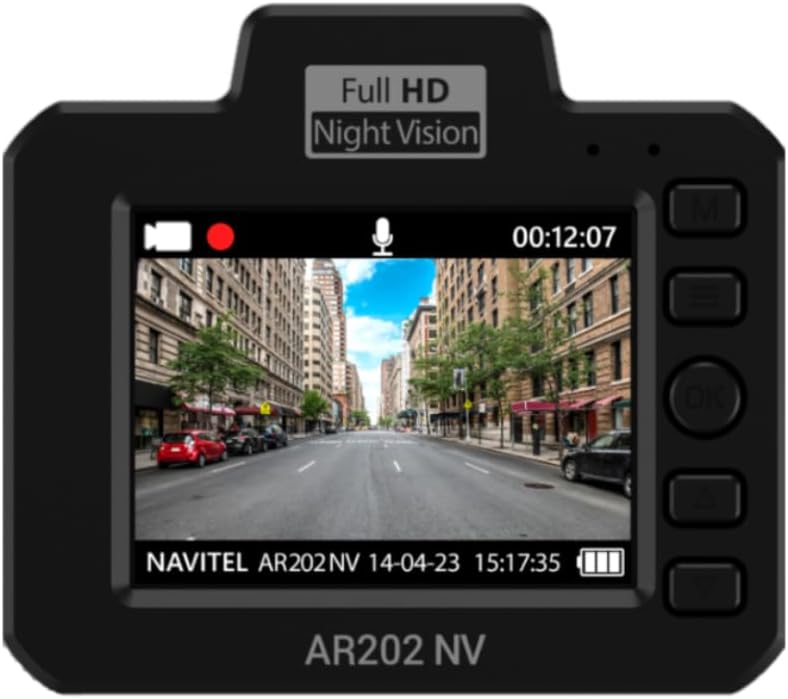
പിൻഭാഗം view of the NAVITEL AR202NV Dash Cam showing the screen displaying live footage

ചിത്രം 3: പിൻഭാഗം view of the dash cam, showing the display screen with live video feed and control buttons.

Illustration of the 140-degree wide camera angle of the NAVITEL AR202NV Dash Cam

Figure 4: Visual representation of the 140-degree wide viewing angle, capturing a broad perspective of the road.

നൈറ്റ് വിഷൻ

The dash cam is equipped with an advanced GC2053 sensor and a 4-layer glass lens, ensuring high-quality video recordings even in low-light conditions or at night.

Image illustrating the night vision capability of the NAVITEL AR202NV Dash Cam

Figure 5: Depiction of the dash cam's enhanced night vision performance in dark environments.

Parking Mode and G-Sensor

The Parking Mode feature allows the dash cam to detect vibrations and automatically begin recording even when the vehicle is parked and the ignition is off. This is enabled by the built-in G-Sensor, which detects sudden impacts or movements. These event-triggered recordings are typically protected from being overwritten.

Illustration of the G-sensor detecting an impact while parked

Figure 6: Visual explanation of the G-sensor's function in detecting impacts during parking mode.

File മാനേജ്മെൻ്റ്

എല്ലാ വീഡിയോയും files are recorded in loop mode and stored on the microSD card. The H.264 compression standard ensures high quality while minimizing file size. Important files triggered by the G-Sensor or manually locked will be protected from loop recording overwrites.

ലേക്ക് view or edit video files on a Windows computer, you can use the Navitel DVR Player program.

ചിത്രീകരണം files under protection with H.264 codec

Figure 7: Diagram showing how video files are protected and stored using H.264 compression.

Screenshot of Navitel DVR Player software on a laptop

Figure 8: Screenshot demonstrating the Navitel DVR Player interface for viewing and managing dash cam footagഒരു കമ്പ്യൂട്ടറിൽ ഇ.

മെയിൻ്റനൻസ്

ട്രബിൾഷൂട്ടിംഗ്

പ്രശ്നംസാധ്യമായ കാരണംപരിഹാരം
ഡാഷ് ക്യാം പവർ ഓൺ ചെയ്യുന്നില്ല.No power supply; faulty cable/charger; vehicle's 12V outlet is off.Check power connection; ensure vehicle ignition is on; try a different power outlet or charger.
റെക്കോർഡിംഗ് നിർത്തുകയോ മരവിപ്പിക്കുകയോ ചെയ്യുന്നു.MicroSD card error; card full; incompatible card; faulty card.Format the microSD card; replace with a new Class 10 (or higher) microSD card (up to 64GB).
മോശം വീഡിയോ നിലവാരം.Dirty lens; low light conditions; incorrect settings.Clean the lens; ensure proper lighting (Night Vision is automatic); check video resolution settings.
പാർക്കിംഗ് മോഡ് സജീവമാകുന്നില്ല.G-Sensor sensitivity too low; no power supply when parked.Adjust G-Sensor sensitivity in settings; ensure continuous power supply for parking mode if required.
Files are being overwritten.Normal loop recording; G-Sensor not triggered for protected files.This is normal for loop recording. Ensure G-Sensor is active for impact protection. Manually lock important fileആവശ്യമെങ്കിൽ s.

സ്പെസിഫിക്കേഷനുകൾ

ഫീച്ചർവിശദാംശങ്ങൾ
മോഡലിൻ്റെ പേര്AR202NV
വീഡിയോ ക്യാപ്ചർ റെസല്യൂഷൻ1080p (Full HD 1920x1080) at 30 FPS
Viewing ആംഗിൾ140 ഡിഗ്രി
പ്രത്യേക സവിശേഷതകൾNight Vision, Parking Mode, G-Sensor
സെൻസർGC2053
ലെൻസ്4-layer glass lens
വീഡിയോ കംപ്രഷൻH.264
സംഭരണംMicroSD card up to 64GB (Class 10 or higher recommended)
കണക്റ്റിവിറ്റി ടെക്നോളജിUSB
മൗണ്ടിംഗ് തരംവിൻഡ്ഷീൽഡ് മ .ണ്ട്
നിറംകറുപ്പ്
നിർമ്മാതാവ്Navitel

വാറൻ്റിയും പിന്തുണയും

For detailed warranty information, please refer to the warranty card included with your product or visit the official Navitel webസൈറ്റ്. വാറന്റി നിബന്ധനകളും വ്യവസ്ഥകളും പ്രദേശത്തിനനുസരിച്ച് വ്യത്യാസപ്പെടാം.

Should you encounter any issues not covered in the troubleshooting section or require further assistance, please contact Navitel customer support. Contact details can typically be found on the official Navitel webസൈറ്റ് അല്ലെങ്കിൽ നിങ്ങളുടെ ഉൽപ്പന്ന പാക്കേജിംഗിൽ.

Navitel brand logo

Figure 9: The official Navitel brand logo.

അനുബന്ധ രേഖകൾ - AR202NV

പ്രീview NAVITEL R3 User Manual: Installation, Features, and Specifications
Comprehensive user manual for the NAVITEL R3 dash cam, covering installation, device layout, specifications, button functions, and operational features.
പ്രീview NAVITEL R10 ഡാഷ് കാം ഉപയോക്തൃ മാനുവൽ
NAVITEL R10 ഡാഷ് കാമിനായുള്ള സമഗ്രമായ ഉപയോക്തൃ മാനുവൽ, ഇൻസ്റ്റാളേഷൻ, ഉപകരണ ലേഔട്ട്, സ്പെസിഫിക്കേഷനുകൾ, ബട്ടൺ ഫംഗ്ഷനുകൾ, ആപ്പ് ഇന്റഗ്രേഷൻ, ഡിജിറ്റൽ സ്പീഡ് സവിശേഷതകൾ എന്നിവ ഉൾക്കൊള്ളുന്നു. നിങ്ങളുടെ ഡാഷ് കാമിന്റെ കഴിവുകൾ എങ്ങനെ പ്രവർത്തിപ്പിക്കാമെന്നും പരമാവധി പ്രയോജനപ്പെടുത്താമെന്നും മനസ്സിലാക്കുക.
പ്രീview NAVITEL R250 ഡ്യുവൽ യൂസർ മാനുവൽ: ഇൻസ്റ്റലേഷൻ, ഫീച്ചറുകൾ, പ്രവർത്തനം
NAVITEL R250 ഡ്യുവൽ ഡാഷ് കാമിനായുള്ള സമഗ്രമായ ഉപയോക്തൃ മാനുവൽ, ഇൻസ്റ്റലേഷൻ ഗൈഡുകൾ, ഉപകരണ സവിശേഷതകൾ, ബട്ടൺ ഫംഗ്‌ഷനുകൾ, ഒപ്റ്റിമൽ ഉപയോഗത്തിനായി പ്രവർത്തന വിശദാംശങ്ങൾ എന്നിവ ഉൾക്കൊള്ളുന്നു.
പ്രീview NAVITEL MR450 GPS ഉപയോക്തൃ മാനുവൽ - സമഗ്ര ഗൈഡ്
NAVITEL MR450 GPS ഡിജിറ്റൽ വീഡിയോ റെക്കോർഡറിനായുള്ള ഔദ്യോഗിക ഉപയോക്തൃ മാനുവൽ. ഇൻസ്റ്റാളേഷൻ, സവിശേഷതകൾ, സ്പെസിഫിക്കേഷനുകൾ, GPS, പാർക്കിംഗ് മോഡ്, ആപ്പ് കണക്റ്റിവിറ്റി എന്നിവയെക്കുറിച്ച് അറിയുക.
പ്രീview NAVITEL R66 2K യൂസർ മാനുവൽ - ഹൈ-ഡെഫനിഷൻ ഡാഷ്‌ക്യാം
NAVITEL R66 2K പോർട്ടബിൾ വീഡിയോ റെക്കോർഡറിനായുള്ള സമഗ്രമായ ഉപയോക്തൃ മാനുവൽ. അതിന്റെ ഹൈ-ഡെഫനിഷൻ റെക്കോർഡിംഗ്, നൈറ്റ് വിഷൻ, ജി-സെൻസർ, പാർക്കിംഗ് മോഡ്, ഇൻസ്റ്റാളേഷൻ, പ്രവർത്തനം എന്നിവയെക്കുറിച്ച് അറിയുക.
പ്രീview NAVITEL AR202 NV ഉപയോക്തൃ മാനുവൽ
NAVITEL AR202 NV പോർട്ടബിൾ വീഡിയോ റെക്കോർഡറിനായുള്ള ഉപയോക്തൃ മാനുവൽ. ഉപകരണത്തിന്റെ സവിശേഷതകൾ, സവിശേഷതകൾ, ഇൻസ്റ്റാളേഷൻ, ബട്ടൺ പ്രവർത്തനങ്ങൾ എന്നിവയെക്കുറിച്ചുള്ള വിവരങ്ങൾ ഈ ഗൈഡ് നൽകുന്നു.