1. ആമുഖം
The JONSBO C6 Handle Mini MATX Mesh PC Case is a compact and versatile chassis designed for building small form factor desktop computers. Its mesh panel design on all sides ensures optimal airflow, while the tool-free disassembly feature simplifies component installation and maintenance. The integrated handle provides convenient portability for users who frequently move their systems.

ചിത്രം 1: മുൻഭാഗം view of the JONSBO C6 Handle Mini MATX Mesh PC Case.
2. ഉൽപ്പന്ന സവിശേഷതകൾ
- കോംപാക്റ്റ് ഡിസൈൻ: Micro ATX mesh chassis with a small footprint, ideal for desktop setups.
- ഒപ്റ്റിമൽ എയർഫ്ലോ: All sides feature a mesh design to promote efficient heat dissipation.
- Tool-Free Access: Upper cover and side panels can be opened without tools for easy assembly and maintenance.
- മദർബോർഡ് അനുയോജ്യത: Supports ITX and M-ATX motherboards.
- ബഹുമുഖ സംഭരണം: Accommodates one 3.5-inch HDD or two 2.5-inch SSDs.
- ഫ്രണ്ട് I/O പോർട്ടുകൾ: Includes 1x Type-C (20PIN), 1x USB 3.0, and 1x Audio+MIC (2-in-1) for convenient connectivity.
- ഘടക പിന്തുണ: 185mm വരെയുള്ള ATX PSU-കളെയും, 75mm വരെയുള്ള CPU കൂളറുകളെയും, 200-255mm വരെയുള്ള GPU-കളെയും പിന്തുണയ്ക്കുന്നു.
- ഫാൻ സ്ഥാനങ്ങൾ: Dedicated fan mounts on the top (120mm/140mm*1), bottom (120mm/140mm*1), and front (120mm*1 or HDD).
- പോർട്ടബിൾ ഹാൻഡിൽ: Equipped with an adjustable carrying handle for easy transportation.

Figure 2: The adjustable handle on the top of the C6 Handle case.
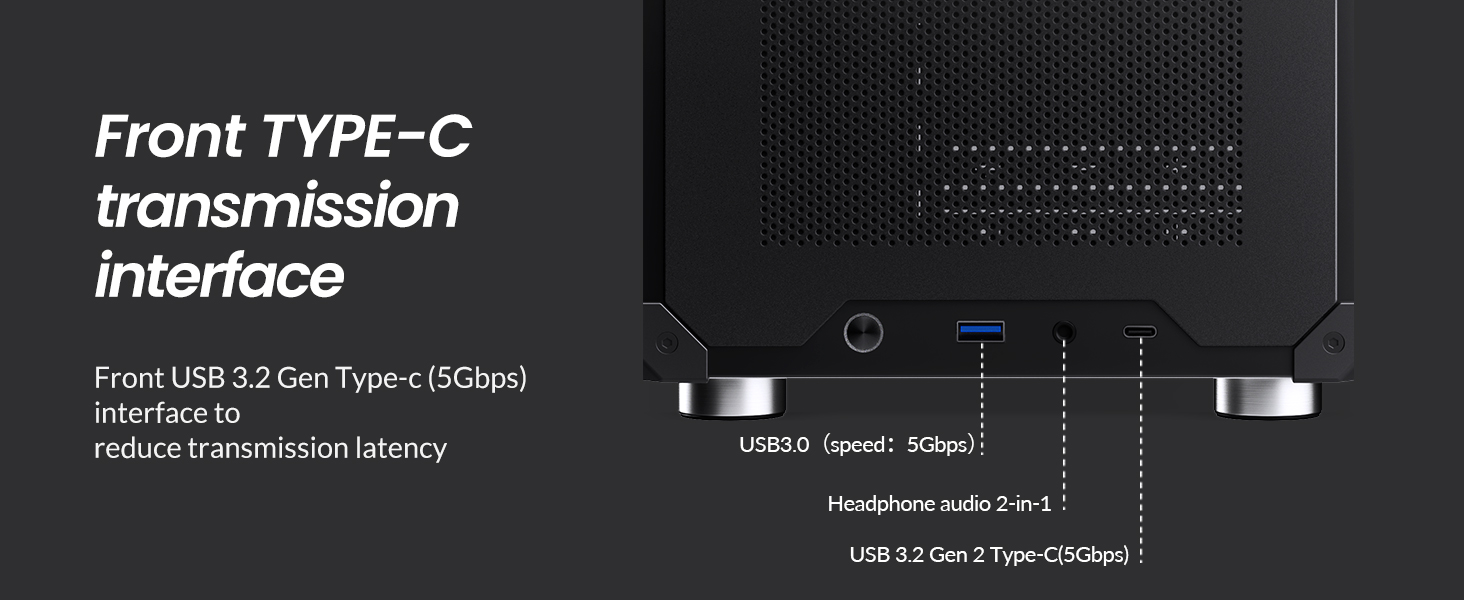
Figure 3: Front I/O panel with USB 3.0, USB Type-C, and audio ports.
3 സ്പെസിഫിക്കേഷനുകൾ
| സ്പെസിഫിക്കേഷൻ | വിശദാംശങ്ങൾ |
|---|---|
| മോഡൽ നമ്പർ. | C6 ഹാൻഡിൽ |
| അളവുകൾ (W x D x H) | 202mm x 266mm x 295.2mm (including footpad) |
| മെറ്റീരിയൽ | 0.7 എംഎം സ്റ്റീൽ പ്ലേറ്റ് |
| അനുയോജ്യമായ മദർബോർഡ് | ഐടിഎക്സ് / എം-എടിഎക്സ് |
| ഡ്രൈവ് ബേകൾ | 1x 3.5" HDD or 2x 2.5" SSD |
| ഫ്രണ്ട് ഇൻ്റർഫേസ് | 1x Type-C (20PIN), 1x USB 3.0, 1x Audio + 1x MIC (2-in-1) |
| പരമാവധി PSU ദൈർഘ്യം | ATX ≤ 185mm |
| പരമാവധി സിപിയു കൂളർ ഉയരം | ≤ 75 മിമി |
| പരമാവധി GPU ദൈർഘ്യം | 200-255mm (Note: If GPU is in 2nd slot and thickness exceeds 48mm, length limit is 200mm) |
| ആരാധക പിന്തുണ | Top: 1x 120mm or 1x 140mm (Optional) Bottom: 1x 120mm or 1x 140mm Front: 1x 120mm or HDD |
| മൊത്തം ഭാരം | 2.30 കി.ഗ്രാം (5.07 പൗണ്ട്) |
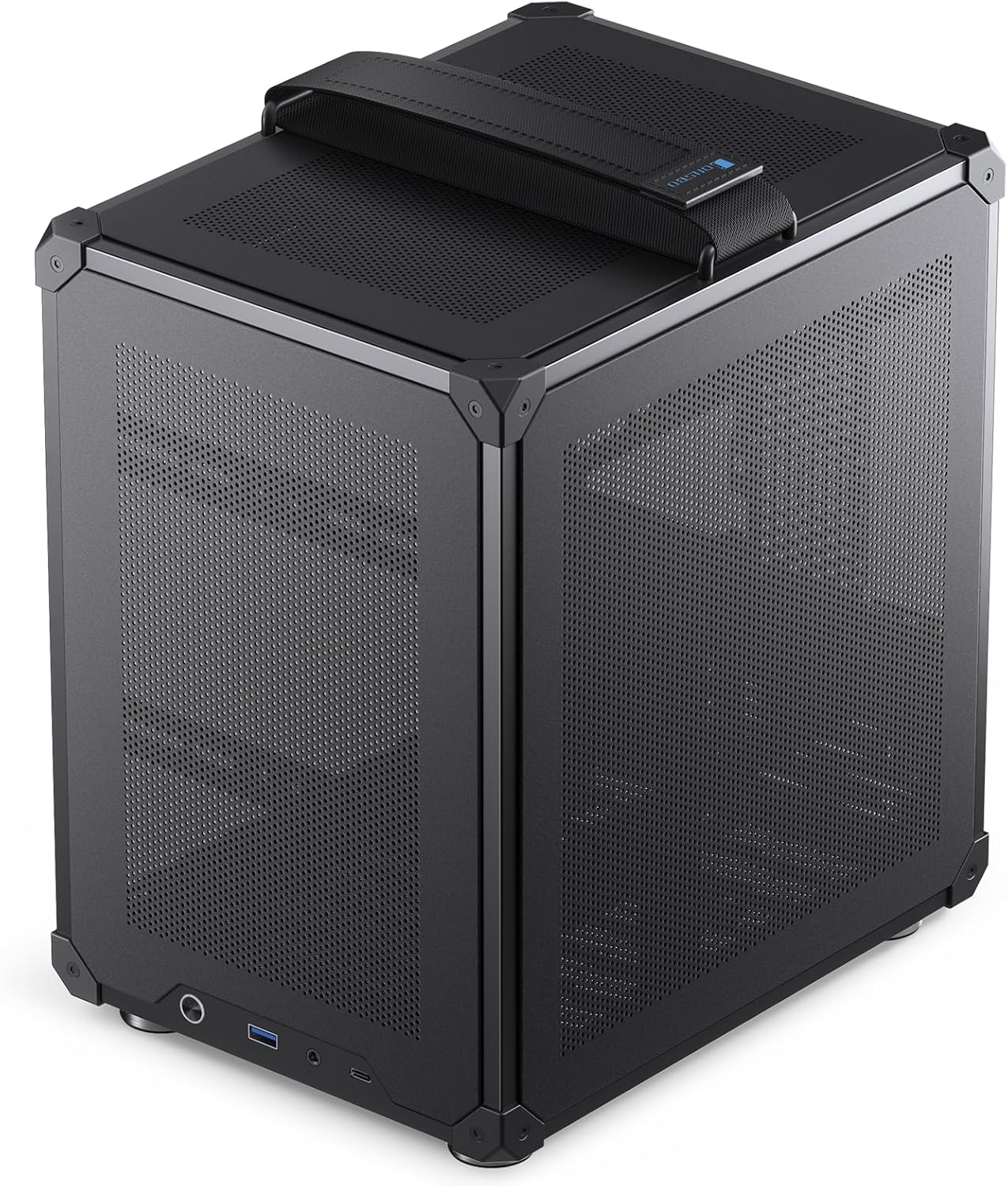
Figure 4: Case dimensions (10.5" W x 8" D x 11.6" H).

Figure 5: Summary of JONSBO C6 Handle specifications.
4. സജ്ജീകരണ ഗൈഡ്
This section provides instructions for installing components into your JONSBO C6 Handle PC Case. Ensure all power is disconnected before beginning installation.
4.1. Tool-Free Disassembly
The C6 case features a tool-free design for easy access to internal components.
- മുകളിലെ കവർ നീക്കം ചെയ്യുക: Press the clip at the rear of the top cover to automatically pop it up.
- സൈഡ് പാനലുകൾ നീക്കം ചെയ്യുക: Once the top cover is removed, the front panel and left/right side panels can be easily detached from the inside of the case.

ചിത്രം 6: പൊട്ടിത്തെറിച്ചു view demonstrating tool-free panel removal.

Figure 7: Instructions for opening the upper cover and side panels, and accessing the bottom air filter.
4.2. മദർബോർഡ് ഇൻസ്റ്റാളേഷൻ
The C6 case supports both ITX and M-ATX motherboards.
- Align your ITX (170x170mm) or M-ATX (245x245mm) motherboard with the standoffs inside the chassis.
- Secure the motherboard using appropriate screws.
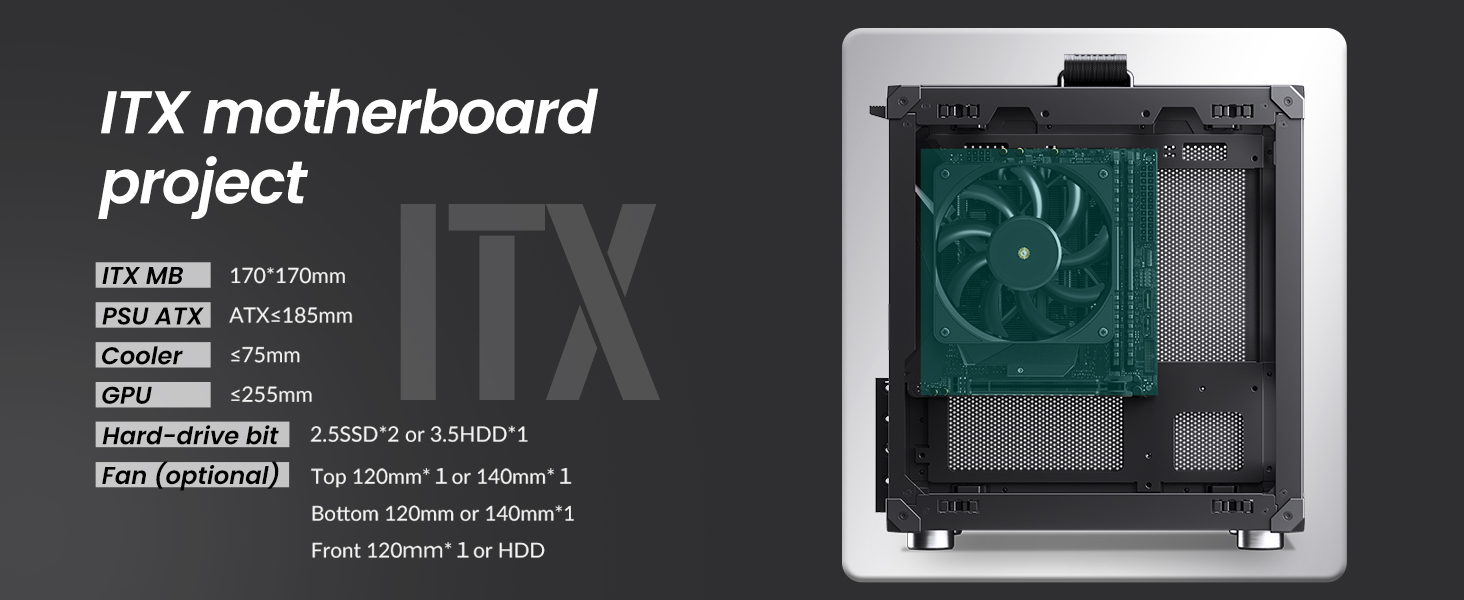
Figure 8: ITX motherboard installation reference.
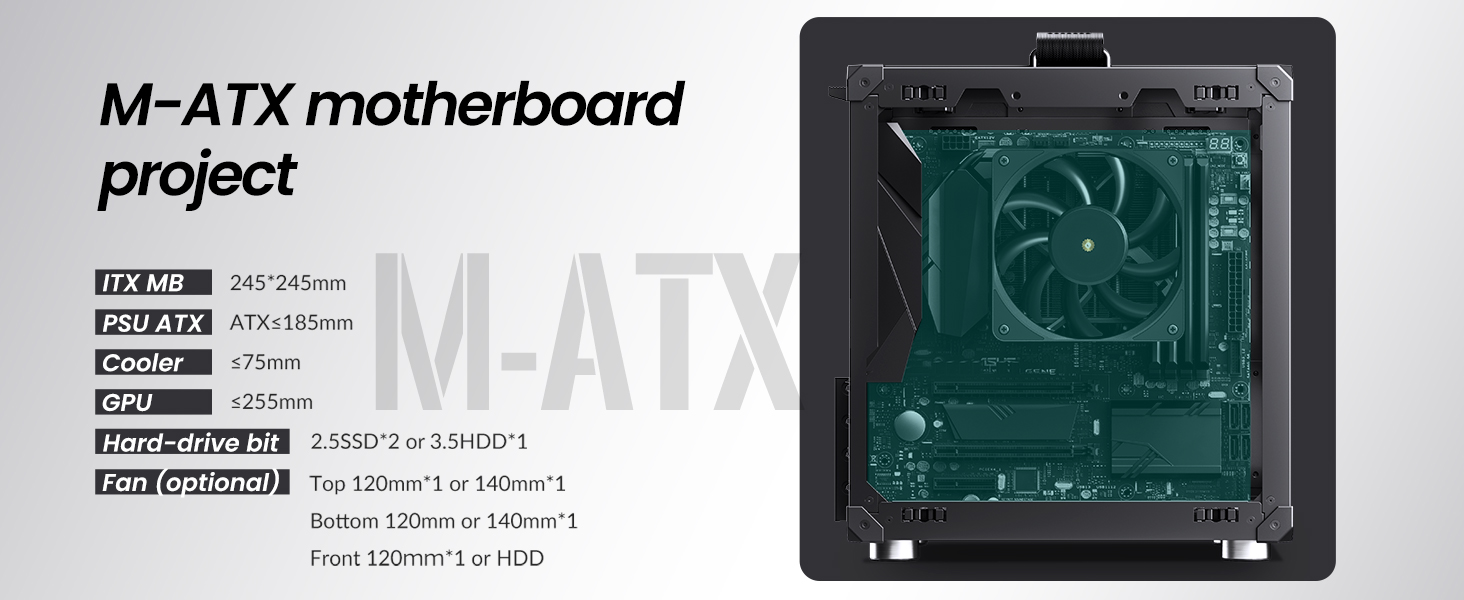
Figure 9: M-ATX motherboard installation reference.
4.3. പവർ സപ്ലൈ യൂണിറ്റ് (പിഎസ്യു) ഇൻസ്റ്റാളേഷൻ
The case supports standard ATX PSUs with a maximum length of 185mm.
- Slide the ATX PSU into its designated bay at the top-front of the chassis.
- കേസിന്റെ പിൻഭാഗത്ത് നിന്ന് സ്ക്രൂകൾ ഉപയോഗിച്ച് PSU സുരക്ഷിതമാക്കുക.
4.4. ഗ്രാഫിക്സ് കാർഡ് (GPU) ഇൻസ്റ്റലേഷൻ
Install your graphics card into the PCI-E slot. The case supports GPUs with lengths between 200mm and 255mm. Note that if the GPU is installed in the second PCI-E slot and its thickness exceeds 48mm, the maximum supported length is 200mm.
4.5. സിപിയു കൂളർ ഇൻസ്റ്റലേഷൻ
Ensure your CPU cooler has a maximum height of 75mm to fit within the chassis.
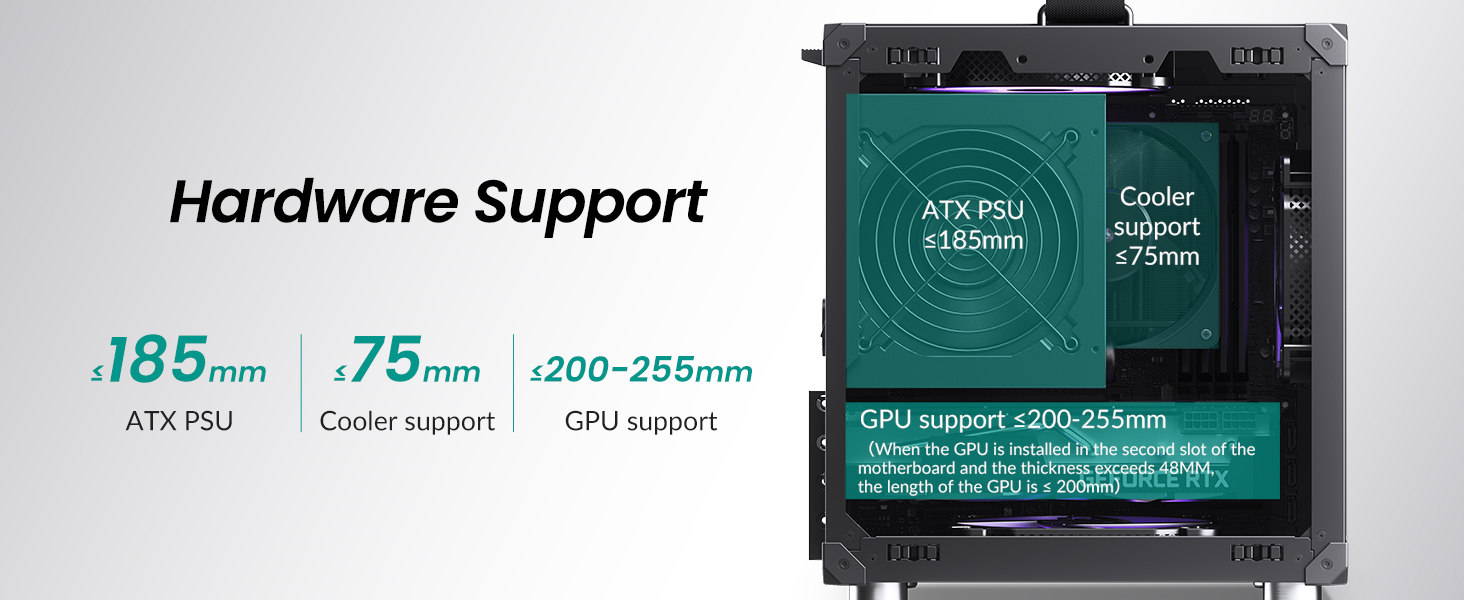
Figure 10: Hardware support limits for PSU, CPU cooler, and GPU.
4.6. സ്റ്റോറേജ് ഡ്രൈവ് ഇൻസ്റ്റാളേഷൻ
The case supports either one 3.5-inch HDD or two 2.5-inch SSDs.
- For 3.5" HDD: Install the drive in the designated front position.
- For 2.5" SSDs: Mount up to two SSDs in the designated locations.

Figure 11: Hard drive installation options.
4.7. ഫാൻ ഇൻസ്റ്റലേഷൻ
Install cooling fans in the following positions:
- മുകളിൽ: 1x 120mm or 1x 140mm fan (optional).
- താഴെ: 1x 120mm or 1x 140mm fan.
- മുൻഭാഗം: 1x 120mm fan or a 3.5" HDD.
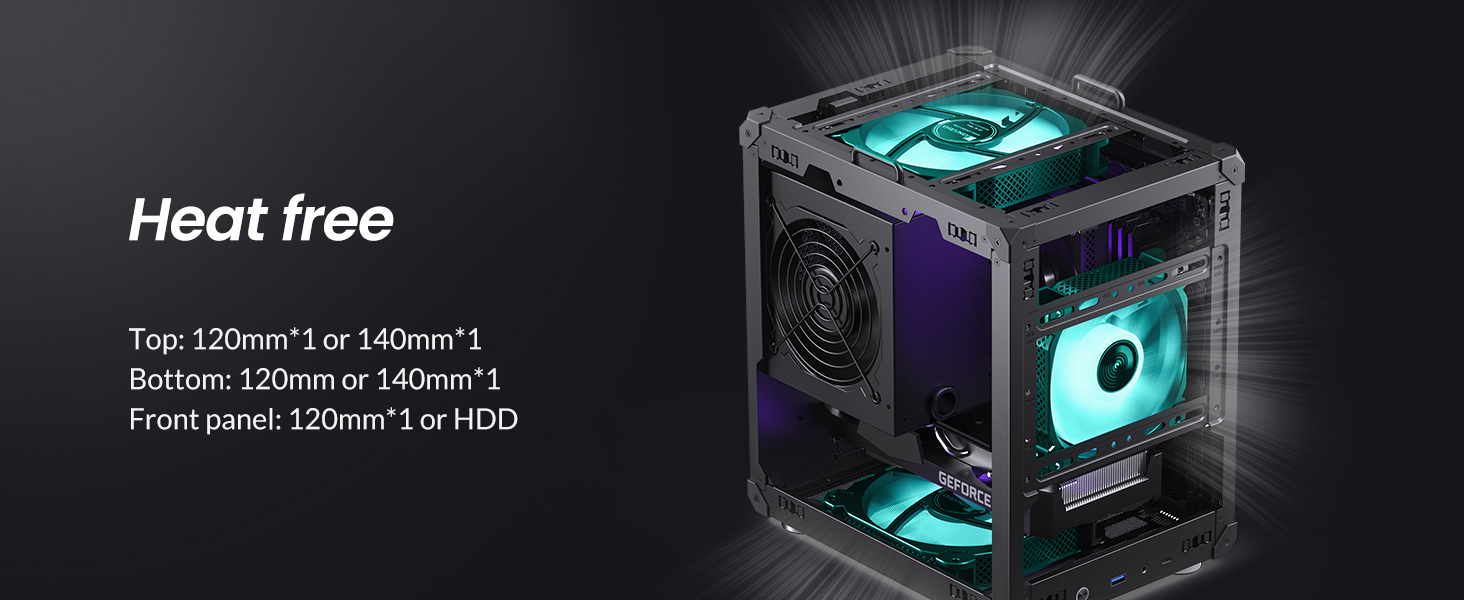
Figure 12: Recommended fan positions for effective cooling.
4.8. അസംബ്ലി വീഡിയോ ഗൈഡ്
Video 1: An official JONSBO video demonstrating the features and assembly process of the C6 mini MATX mesh case, including tool-free panel removal and component installation.
5. പ്രവർത്തന നിർദ്ദേശങ്ങൾ
After successfully assembling your PC within the JONSBO C6 Handle case, connect all necessary peripherals (monitor, keyboard, mouse, power cable). Press the power button on the front I/O panel to start your system. The mesh design ensures continuous airflow during operation, contributing to stable component temperatures.
6. പരിപാലനം
Regular maintenance helps ensure the longevity and performance of your PC. The C6 case is designed for easy cleaning.
- പൊടി നീക്കം: Periodically remove the top and side panels (refer to Section 4.1) to clean accumulated dust from internal components and fan filters. A soft brush or compressed air is recommended.
- താഴെയുള്ള എയർ ഫിൽറ്റർ: The bottom panel includes a convenient air filter that can be disassembled and cleaned to maintain optimal intake airflow.
7. പ്രശ്നപരിഹാരം
നിങ്ങളുടെ പിസി ബിൽഡിൽ പ്രശ്നങ്ങൾ നേരിടുകയാണെങ്കിൽ, ഇനിപ്പറയുന്ന പൊതുവായ ട്രബിൾഷൂട്ടിംഗ് ഘട്ടങ്ങൾ പരിഗണിക്കുക:
- ശക്തിയില്ല: Ensure the PSU is properly connected to the wall outlet and the motherboard. Check the power switch on the PSU.
- ഡിസ്പ്ലേ ഇല്ല: Verify that the monitor is connected to the graphics card (not the motherboard's integrated graphics, unless intended) and that the GPU is seated correctly.
- ഘടകം കണ്ടെത്തിയില്ല: Re-seat the component (RAM, GPU, storage drives) and check all power and data cables.
- അമിത ചൂടാക്കൽ: Confirm all fans are spinning correctly and are oriented for proper airflow. Ensure the CPU cooler is securely mounted.
- അയഞ്ഞ കണക്ഷനുകൾ: Double-check all internal cables, including front panel connectors, for secure connections.
8. വാറൻ്റിയും പിന്തുണയും
വാറന്റി വിവരങ്ങൾക്കും സാങ്കേതിക പിന്തുണയ്ക്കും, ദയവായി ഔദ്യോഗിക JONSBO കാണുക. webനിങ്ങളുടെ പ്രാദേശിക റീട്ടെയിലറെ ബന്ധപ്പെടുക അല്ലെങ്കിൽ സൈറ്റിൽ ബന്ധപ്പെടുക. വാറന്റി ക്ലെയിമുകൾക്കായി നിങ്ങളുടെ വാങ്ങിയതിന്റെ തെളിവ് സൂക്ഷിക്കുക.