1. ആമുഖം
Thank you for choosing the ALLmeter Pinless Moisture Meter Model ALL019-DEFBA. This device is designed for non-invasive measurement of moisture content in various materials such as wood, walls, drywall, and masonry. Its advanced technology ensures accurate readings without causing damage to surfaces. This manual provides detailed instructions for the proper use, maintenance, and troubleshooting of your moisture meter to ensure optimal performance and longevity.
2 പ്രധാനപ്പെട്ട സുരക്ഷാ വിവരങ്ങൾ
- ഉപകരണം പ്രവർത്തിപ്പിക്കുന്നതിന് മുമ്പ് എല്ലാ നിർദ്ദേശങ്ങളും ശ്രദ്ധാപൂർവ്വം വായിക്കുക.
- ഉപകരണം തുറക്കാനോ പരിഷ്ക്കരിക്കാനോ ശ്രമിക്കരുത്. ഉള്ളിൽ ഉപയോക്തൃ-സേവനയോഗ്യമായ ഭാഗങ്ങളില്ല.
- Keep the device away from water and high humidity to prevent damage.
- ഉപകരണത്തെ തീവ്രമായ താപനിലയിലോ നേരിട്ടുള്ള സൂര്യപ്രകാശത്തിലോ ദീർഘനേരം തുറന്നുകാട്ടുന്നത് ഒഴിവാക്കുക.
- ബാറ്ററി ചോർച്ച തടയാൻ ഉപകരണം ദീർഘനേരം ഉപയോഗിക്കുന്നില്ലെങ്കിൽ ബാറ്ററികൾ നീക്കം ചെയ്യുക.
- പ്രാദേശിക നിയന്ത്രണങ്ങൾ അനുസരിച്ച് ബാറ്ററികളും ഉപകരണവും നശിപ്പിക്കുക.
3. പാക്കേജ് ഉള്ളടക്കം
താഴെ ലിസ്റ്റ് ചെയ്തിരിക്കുന്ന എല്ലാ ഇനങ്ങളും നിങ്ങളുടെ പാക്കേജിൽ ഉൾപ്പെടുത്തിയിട്ടുണ്ടെന്ന് ഉറപ്പാക്കുക:
- ALLmeter Pinless Moisture Meter (Model ALL019-DEFBA)
- AAA Batteries (3 pieces)
- ഉപയോക്തൃ മാനുവൽ
- ക്യാരി പൗച്ച്

Image 3.1: The ALLmeter Pinless Moisture Meter package contents, showing the meter, three AAA batteries, a user manual, and a gray carry pouch.
4. ഉൽപ്പന്നം കഴിഞ്ഞുview
4.1 ഉപകരണ ലേayട്ട്

ചിത്രം 4.1.1: മുൻഭാഗം view of the ALLmeter Pinless Moisture Meter, highlighting its ergonomic design, large LCD display, and central control panel.
4.2 നിയന്ത്രണ ബട്ടണുകൾ
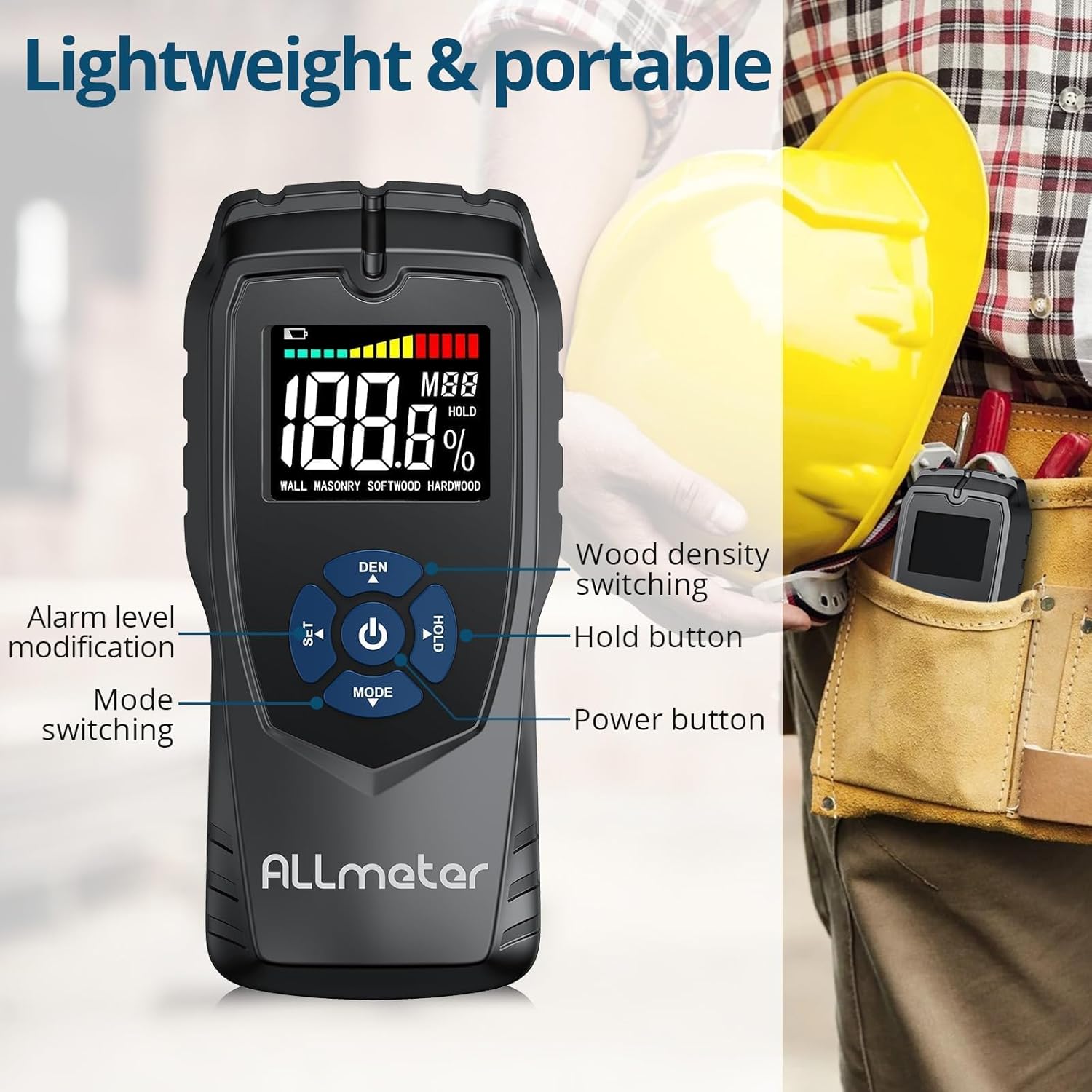
ചിത്രം 4.2.1: വിശദമായത് view of the control buttons on the ALLmeter Pinless Moisture Meter. These include SET (for alarm level modification), DEN (for wood density switching), Power, HOLD, and MODE (for switching measurement modes).
- പവർ ബട്ടൺ (⑂): ഉപകരണം ഓണാക്കാനോ ഓഫാക്കാനോ അമർത്തുക.
- MODE Button (▼): Press to cycle through different measurement modes (WALL, MASONRY, SOFTWOOD, HARDWOOD).
- SET Button (▲): Used to adjust alarm levels or other settings.
- DEN Button (▲): Used to switch between different wood density grades when in wood measurement modes.
- ഹോൾഡ് ബട്ടൺ: ഡിസ്പ്ലേയിലെ നിലവിലെ റീഡിംഗ് മരവിപ്പിക്കുന്നു. റിലീസ് ചെയ്യാൻ വീണ്ടും അമർത്തുക.
4.3 ഡിസ്പ്ലേ ഘടകങ്ങൾ

Image 4.3.1: The LCD display of the ALLmeter Pinless Moisture Meter, indicating low battery, moisture bar display, moisture value, wood density grade (MBB), data hold symbol (HOLD), and current measuring mode.
- കുറഞ്ഞ ബാറ്ററി സൂചന: Icon appears when battery power is low.
- Moisture Bar Display: Graphical representation of moisture level.
- Moisture Value: Digital display of the measured moisture percentage.
- Wood Density Grade (MBB): Indicates the selected wood density setting.
- Data Hold Symbol (HOLD): Appears when the HOLD function is active.
- Measuring Mode Indication: Displays the currently selected material mode (e.g., WALL, MASONRY, SOFTWOOD, HARDWOOD).
5. സജ്ജീകരണം
5.1 ബാറ്ററി ഇൻസ്റ്റാളേഷൻ
- ഉപകരണത്തിന്റെ പിൻഭാഗത്ത് ബാറ്ററി കമ്പാർട്ട്മെന്റ് കവർ കണ്ടെത്തുക.
- കമ്പാർട്ട്മെന്റ് തുറക്കാൻ കവർ സ്ലൈഡ് ചെയ്യുകയോ അൺക്ലിപ്പ് ചെയ്യുകയോ ചെയ്യുക.
- Insert three (3) AAA batteries, ensuring correct polarity (+/-) as indicated inside the compartment.
- ബാറ്ററി കമ്പാർട്ട്മെന്റ് കവർ സുരക്ഷിതമായി മാറ്റിസ്ഥാപിക്കുക.
6. പ്രവർത്തന നിർദ്ദേശങ്ങൾ
6.1 പവർ ഓൺ/ഓഫ്
- To turn on: Press the Power button (⑂). The display will illuminate.
- To turn off: Press and hold the Power button (⑂) for approximately 2 seconds. The device also features an auto power-off function to conserve battery life after a period of inactivity.
6.2 Selecting Measurement Mode
- After powering on, press the MODE button (▼) repeatedly to cycle through the available material modes: WALL, MASONRY, SOFTWOOD, HARDWOOD.
- Select the mode that corresponds to the material you intend to measure.
6.3 ഒരു അളവ് എടുക്കുന്നു
- Ensure the correct measurement mode is selected.
- Place the back of the meter (the sensing plate area) flat against the surface of the material you wish to measure. Ensure full contact.
- The moisture reading will be displayed instantly on the LCD screen.
- Move the meter across the surface to check for variations in moisture content.
6.4 ഹോൾഡ് ഫംഗ്ഷൻ
- While taking a measurement, press the HOLD button to freeze the current reading on the display. This is useful for reading measurements in hard-to-reach areas.
- Press the HOLD button again to release the reading and resume live measurement.
6.5 Audible Alarm Settings
- The device features an audible alarm that activates when the measured moisture level exceeds a preset threshold for the selected material.
- To adjust the alarm threshold, press the SET button (▲). Follow the on-screen prompts to increase or decrease the alarm percentage.
6.6 Wood Density Adjustment (DEN)
- When in SOFTWOOD or HARDWOOD mode, the DEN button (▲) can be used to cycle through different wood density grades (MBB) for more accurate readings based on the specific wood type. Refer to wood density charts for your material.
7. Measurement Modes and Ranges
The ALLmeter Pinless Moisture Meter provides distinct measurement ranges and visual indicators for different moisture levels across various materials.

Image 7.1: The visual moisture alarm system and a table detailing the 'Dry', 'Mid', and 'Wet' moisture percentage ranges for Wall, Masonry, Softwood, and Hardwood materials.
7.1 Moisture Level Indicators
- പച്ച: Indicates a Dry moisture level.
- മഞ്ഞ: Indicates a Mid-range moisture level.
- ചുവപ്പ്: Indicates a Wet moisture level, potentially requiring attention.
7.2 Measurement Ranges by Material
| മെഷർമെൻ്റ് മോഡ് | ഉണക്കുക | മിഡ് | ആർദ്ര |
|---|---|---|---|
| മതിൽ | <8% | 8-11.9% | ≥12% |
| മേസൺറി | <17% | 17-19.9% | ≥20% |
| സോഫ്റ്റ്വേഡ് | <13% | 13-17.9% | ≥18% |
| ഹാർഡ് വുഡ് | <12% | 12-15.9% | ≥16% |
7.3 Non-Invasive Measurement Principle
The ALLmeter Pinless Moisture Meter utilizes advanced inductive surveying technology. This method allows for moisture detection without penetrating the material surface, preventing damage. Unlike destructive surveying methods that require pins or probes, the pinless meter provides quick and clean readings.

Image 7.3.1: A visual comparison between inductive (pinless) surveying, which leaves no marks, and destructive (pin-type) surveying, which creates small holes in the material.
7.4 Multiple Applications
This moisture meter is versatile and suitable for a wide range of applications in home inspection, construction, and woodworking:

ചിത്രം 7.4.1: ഉദാamples of the meter's application on various materials including walls, masonry, softwood, and hardwood.
8. പരിപാലനം
- വൃത്തിയാക്കൽ: മൃദുവായതും ഉണങ്ങിയതുമായ തുണി ഉപയോഗിച്ച് ഉപകരണം തുടയ്ക്കുക. അബ്രസീവ് ക്ലീനറുകളോ ലായകങ്ങളോ ഉപയോഗിക്കരുത്.
- സംഭരണം: Store the meter in its carry pouch in a cool, dry place when not in use. Avoid areas with extreme temperatures or high humidity.
- ബാറ്ററി മാറ്റിസ്ഥാപിക്കൽ: ഡിസ്പ്ലേയിൽ ബാറ്ററി കുറവാണെന്ന് കാണിക്കുമ്പോൾ ബാറ്ററികൾ മാറ്റി സ്ഥാപിക്കുക.
9. പ്രശ്നപരിഹാരം
| പ്രശ്നം | സാധ്യമായ കാരണം | പരിഹാരം |
|---|---|---|
| ഉപകരണം പവർ ഓണാക്കുന്നില്ല | മരിച്ചതോ തെറ്റായി ഇൻസ്റ്റാൾ ചെയ്തതോ ആയ ബാറ്ററികൾ | ബാറ്ററി പോളാരിറ്റി പരിശോധിക്കുക; പുതിയ AAA ബാറ്ററികൾ ഉപയോഗിച്ച് മാറ്റിസ്ഥാപിക്കുക. |
| കൃത്യമല്ലാത്ത വായനകൾ | Incorrect measurement mode selected; poor contact with surface; device malfunction. | Ensure correct mode is selected for the material; press the meter firmly and flat against the surface; if problem persists, contact customer support. |
| Display is blank or flickering | ബാറ്ററി കുറവാണ്; ഉപകരണത്തിന്റെ തകരാറ്. | Replace batteries; if problem persists, contact customer support. |
| കേൾക്കാവുന്ന അലാറം പ്രവർത്തിക്കുന്നില്ല | Alarm disabled or volume too low; device malfunction. | Check alarm settings using the SET button; ensure moisture level exceeds threshold; if problem persists, contact customer support. |
10 സാങ്കേതിക സവിശേഷതകൾ
| സ്പെസിഫിക്കേഷൻ | മൂല്യം |
|---|---|
| മോഡൽ നമ്പർ | ALL019-DEFBA |
| ബ്രാൻഡ് | ALLമീറ്റർ |
| അളക്കൽ തത്വം | Pinless, Inductive |
| Sensing Depth | 5 സെ.മീ |
| Sensing Plate Size | 5 x 6 സെ.മീ |
| കൃത്യത | ±4% |
| പ്രദർശിപ്പിക്കുക | LCD Color Display with Analog Bar |
| പവർ ഉറവിടം | 3 x AAA ബാറ്ററികൾ |
| യാന്ത്രിക പവർ-ഓഫ് | അതെ |
| കേൾക്കാവുന്ന അലാറം | അതെ |
| ഇനത്തിൻ്റെ ഭാരം | 231 ഗ്രാം (0.23 കിലോഗ്രാം) |
| പാക്കേജ് അളവുകൾ | 19.4 x 8.8 x 4.2 സെ.മീ |
11. വാറണ്ടിയും ഉപഭോക്തൃ പിന്തുണയും
For warranty information, technical assistance, or customer support, please refer to the contact details provided with your purchase documentation or visit the official ALLmeter website. Please have your model number (ALL019-DEFBA) and purchase date available when contacting support.

