1. ആമുഖം
This manual provides detailed instructions for the MEIZE D115A Android 13 Tablet. Please read this manual thoroughly before using your device to ensure proper operation and to maximize its features. Keep this manual for future reference.
The MEIZE D115A tablet features a powerful Octa-Core processor, 10.1-inch HD screen, Android 13 operating system, and comes with essential accessories to enhance your user experience.
2. ബോക്സിൽ എന്താണുള്ളത്?
പാക്കേജിൽ എല്ലാ ഇനങ്ങളും ഉണ്ടെന്ന് ഉറപ്പാക്കുക:
- MEIZE D115A Android 13 Tablet
- ബ്ലൂടൂത്ത് കീബോർഡ്
- വയർലെസ് മൗസ്
- Touch Pen (Stylus)
- സംരക്ഷണ കേസ്
- പവർ അഡാപ്റ്റർ
- USB കേബിൾ

Image: The MEIZE D115A tablet displayed with its complete set of accessories, including the Bluetooth keyboard, wireless mouse, stylus, charging cable, power adapter, and protective case.
3. ഉപകരണ ലേഔട്ട്
നിങ്ങളുടെ ടാബ്ലെറ്റിന്റെ ഭൗതിക ഘടകങ്ങളുമായി പരിചയപ്പെടുക:

Image: A detailed diagram illustrating the location of the front camera, flash, rear camera, headphone jack, Micro SD slot, Type-C port, volume buttons, power button, and speakers on the MEIZE D115A tablet.
- മുൻ ക്യാമറ: തിരശ്ചീനമായി പിടിക്കുമ്പോൾ മുകളിലെ മധ്യഭാഗത്തായി സ്ഥിതിചെയ്യുന്നു, വീഡിയോ കോളുകൾക്കും സെൽഫികൾക്കും ഉപയോഗിക്കുന്നു.
- പിൻ ക്യാമറ: Located on the back, equipped with a flash for photography and video recording.
- പവർ ബട്ടൺ: ടാബ്ലെറ്റ് ഓൺ/ഓഫ് ആക്കാനോ ഉറങ്ങാൻ/ഉണർത്താനോ ഉപയോഗിക്കുന്നു.
- വോളിയം ബട്ടണുകൾ: ഓഡിയോ വോളിയം ക്രമീകരിക്കുക.
- ടൈപ്പ്-സി പോർട്ട്: ചാർജിംഗിനും ഡാറ്റ കൈമാറ്റത്തിനും.
- മൈക്രോ എസ്ഡി സ്ലോട്ട്: Insert a Micro SD card for expanded storage (up to 512GB).
- 3.5 എംഎം ഹെഡ്ഫോൺ ജാക്ക്: വയർഡ് ഹെഡ്ഫോണുകൾ ബന്ധിപ്പിക്കുക.
- സ്പീക്കറുകൾ: ഓഡിയോ ഔട്ട്പുട്ട് നൽകുക.
4. സജ്ജീകരണം
4.1 പ്രാരംഭ പവർ ഓൺ
- അമർത്തിപ്പിടിക്കുക പവർ ബട്ടൺ സ്ക്രീൻ കത്തിക്കുന്നതുവരെ.
- Follow the on-screen prompts to select your language, region, and accept the terms and conditions.
4.2 വൈഫൈ കണക്ഷൻ
- പോകുക ക്രമീകരണങ്ങൾ > നെറ്റ്വർക്കും ഇൻ്റർനെറ്റും > വൈഫൈ.
- വൈഫൈ ടോഗിൾ ചെയ്യുക On.
- ലിസ്റ്റിൽ നിന്ന് നിങ്ങൾക്ക് ആവശ്യമുള്ള നെറ്റ്വർക്ക് തിരഞ്ഞെടുത്ത് ആവശ്യപ്പെടുകയാണെങ്കിൽ പാസ്വേഡ് നൽകുക.

Image: The tablet screen showing a graphic indicating support for both 5G and 2.4G Wi-Fi networks, ensuring stable and fast internet connectivity.
4.3 ഗൂഗിൾ അക്കൗണ്ട് സജ്ജീകരണം
Sign in with your Google account to access the Google Play Store, Gmail, and other Google services. If you don't have one, you can create one during this step.
4.4 ആക്സസറി കണക്ഷൻ
The MEIZE D115A tablet comes with a Bluetooth keyboard, wireless mouse, and stylus for enhanced functionality.
- Bluetooth Keyboard: Turn on the keyboard and enable Bluetooth on your tablet (Settings > Connected devices > Bluetooth). Select the keyboard from the available devices and follow pairing instructions.
- വയർലെസ് മൗസ്: Insert the USB receiver from the mouse into the OTG adapter, then plug the OTG adapter into the tablet's Type-C port. The mouse should connect automatically.
- സ്റ്റൈലസ്: The stylus is a passive input device and does not require pairing. Simply use it to interact with the screen.

Image: A user operating the MEIZE D115A tablet with the connected Bluetooth keyboard and wireless mouse, demonstrating its capability as a portable workstation.
5. നിങ്ങളുടെ ടാബ്ലെറ്റ് പ്രവർത്തിപ്പിക്കൽ
5.1 അടിസ്ഥാന നാവിഗേഷൻ
- സ്പർശിക്കുക: ഒരു ആപ്പ് തുറക്കാൻ ഒരു ഐറ്റം തിരഞ്ഞെടുക്കാനോ ഐക്കണിൽ ടാപ്പ് ചെയ്യാനോ.
- സ്വൈപ്പ്: Move your finger across the screen to scroll through pages or content.
- പിഞ്ച്: ചിത്രങ്ങൾ സൂം ഇൻ ചെയ്യാനോ ഔട്ട് ചെയ്യാനോ രണ്ട് വിരലുകൾ ഉപയോഗിക്കുക, web പേജുകൾ.
- ഹോം സ്ക്രീൻ: നിങ്ങളുടെ ആപ്പുകൾക്കും വിജറ്റുകൾക്കുമുള്ള കേന്ദ്ര ഹബ്.
5.2 അപേക്ഷകൾ
- ആപ്പുകൾ ഇൻസ്റ്റാൾ ചെയ്യുന്നു: ഗൂഗിൾ പ്ലേ സ്റ്റോറിൽ നിന്ന് ആപ്ലിക്കേഷനുകൾ ഡൗൺലോഡ് ചെയ്യുക.
- ആപ്പുകൾ കൈകാര്യം ചെയ്യൽ: പോകുക ക്രമീകരണങ്ങൾ > ആപ്പുകൾ വരെ view, manage, or uninstall applications.

Image: The tablet screen displaying numerous application icons and media content, illustrating the ample 128GB internal storage and 16GB RAM (8GB physical + 8GB virtual) for diverse usage.
5.3 സ്റ്റോറേജ് മാനേജ്മെൻ്റ്
The tablet comes with 128GB of internal storage. You can expand this by inserting a Micro SD card (up to 512GB) into the dedicated slot. To manage storage, go to ക്രമീകരണങ്ങൾ > സംഭരണം.
5.4 ക്യാമറ ഉപയോഗം
ടാബ്ലെറ്റിൽ 13MP പിൻ ക്യാമറയും 8MP മുൻ ക്യാമറയും ഉണ്ട്.
- തുറക്കുക ക്യാമറ അപ്ലിക്കേഷൻ.
- Tap the shutter button to take photos or switch to video mode for recording.
- വീഡിയോ കോളുകൾക്കും സെൽഫികൾക്കും മുൻ ക്യാമറ ഉപയോഗിക്കുക.
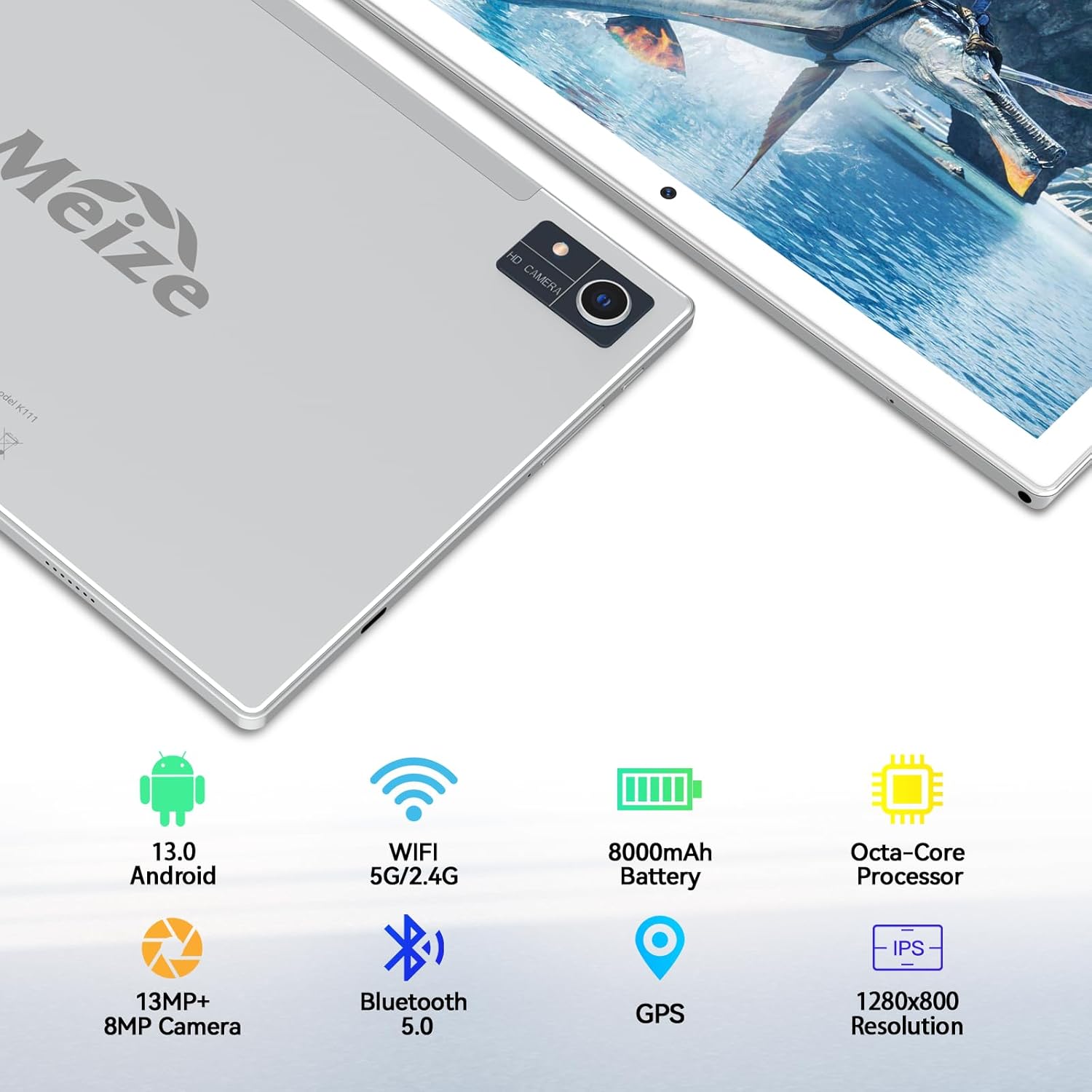
Image: An infographic highlighting the tablet's camera specifications, showing a 13MP rear camera and an 8MP front camera, alongside other key features.
5.5 ബാറ്ററി മാനേജ്മെൻ്റ്
The 8000mAh battery provides extended usage times. To optimize battery life:
- സ്ക്രീൻ തെളിച്ചം ക്രമീകരിക്കുക.
- പശ്ചാത്തലത്തിൽ പ്രവർത്തിക്കുന്ന ഉപയോഗിക്കാത്ത ആപ്ലിക്കേഷനുകൾ അടയ്ക്കുക.
- ഉപയോഗത്തിലില്ലാത്തപ്പോൾ വൈഫൈ അല്ലെങ്കിൽ ബ്ലൂടൂത്ത് ഓഫാക്കുക.

Image: A visual representation of the tablet's 8000mAh battery, indicating approximate usage durations: 10 hours for videos, 8 hours for games, and 12 hours for music playback.
6. പരിപാലനം
- വൃത്തിയാക്കൽ: ടാബ്ലെറ്റിന്റെ സ്ക്രീനും ബോഡിയും വൃത്തിയാക്കാൻ മൃദുവായ, ലിന്റ് രഹിത തുണി ഉപയോഗിക്കുക. ഉരച്ചിലുകൾ ഉള്ള വസ്തുക്കളോ കഠിനമായ രാസവസ്തുക്കളോ ഒഴിവാക്കുക.
- സോഫ്റ്റ്വെയർ അപ്ഡേറ്റുകൾ: സിസ്റ്റം അപ്ഡേറ്റുകൾക്കായി പതിവായി പരിശോധിക്കുക ക്രമീകരണങ്ങൾ > സിസ്റ്റം > സിസ്റ്റം അപ്ഡേറ്റ് മികച്ച പ്രകടനവും സുരക്ഷയും ഉറപ്പാക്കാൻ.
- ഡാറ്റ ബാക്കപ്പ്: Periodically back up important data to a cloud service or external storage device to prevent data loss.
7. പ്രശ്നപരിഹാരം
7.1 ടാബ്ലെറ്റ് ഓണാക്കുന്നില്ല
- ടാബ്ലെറ്റ് ചാർജ്ജ് ചെയ്തിട്ടുണ്ടെന്ന് ഉറപ്പാക്കുക. അത് പവർ അഡാപ്റ്ററുമായി ബന്ധിപ്പിച്ച് വീണ്ടും പവർ ഓൺ ചെയ്യാൻ ശ്രമിക്കുന്നതിന് മുമ്പ് കുറച്ച് മിനിറ്റ് കാത്തിരിക്കുക.
- Press and hold the Power Button for at least 10-15 seconds to perform a forced restart.
7.2 വൈഫൈ കണക്ഷൻ പ്രശ്നങ്ങൾ
- നിങ്ങളുടെ വൈഫൈ റൂട്ടറും ടാബ്ലെറ്റും പുനരാരംഭിക്കുക.
- വൈഫൈ ക്രമീകരണങ്ങളിൽ നെറ്റ്വർക്ക് മറന്ന് വീണ്ടും കണക്റ്റുചെയ്യുക.
- നിങ്ങൾ വൈഫൈ സിഗ്നലിന്റെ പരിധിയിലാണെന്ന് ഉറപ്പാക്കുക.
7.3 മന്ദഗതിയിലുള്ള പ്രകടനം
- ഉപയോഗിക്കാത്ത ആപ്ലിക്കേഷനുകൾ അടയ്ക്കുക.
- Clear cache for frequently used apps (Settings > Apps > [App Name] > Storage & cache > Clear cache).
- Consider performing a factory reset if performance issues persist (കുറിപ്പ്: This will erase all data on the tablet. Back up your data first).
8 സ്പെസിഫിക്കേഷനുകൾ
| ഫീച്ചർ | സ്പെസിഫിക്കേഷൻ |
|---|---|
| ബ്രാൻഡ് | MEIZE |
| മോഡൽ നമ്പർ | D115A |
| ഓപ്പറേറ്റിംഗ് സിസ്റ്റം | ആൻഡ്രോയിഡ് 13 |
| സ്ക്രീൻ വലിപ്പം | 10.1 ഇഞ്ച് |
| സ്ക്രീൻ റെസല്യൂഷൻ | 1280 x 800 പിക്സലുകൾ |
| പ്രോസസ്സർ | Octa-Core, 2 GHz |
| റാം | 8 GB (expandable to 16GB with virtual RAM) |
| ആന്തരിക സംഭരണം | 128 ജിബി |
| വികസിപ്പിക്കാവുന്ന സംഭരണം | 512 ജിബി വരെ (മൈക്രോ എസ്ഡി) |
| പിൻ ക്യാമറ | 13 എം.പി |
| മുൻ ക്യാമറ | 8 എം.പി |
| ബാറ്ററി ശേഷി | 8000 mAh |
| ശരാശരി ബാറ്ററി ലൈഫ് | 10 Hours (video), 8 Hours (gaming), 12+ Hours (music) |
| വയർലെസ് തരം | 802.11ac (5G/2.4G വൈഫൈ) |
| ബ്ലൂടൂത്ത് | ബ്ലൂടൂത്ത് 5.0 |
| അളവുകൾ (LxWxH) | 10 x 7 x 0.3 ഇഞ്ച് |
| ഇനത്തിൻ്റെ ഭാരം | 2.94 പൗണ്ട് |
9. വാറൻ്റിയും പിന്തുണയും
MEIZE is committed to customer satisfaction. If you encounter any issues with your product, please contact our professional support team. We are dedicated to providing excellent service and assistance.
For support inquiries, please refer to the contact information provided with your product packaging or visit the official MEIZE webസൈറ്റ്.