1. ആമുഖം
Thank you for choosing the KAIWEETS KGM01 Metal Detector. This professional-grade metal detector is designed for both adults and beginners, featuring an intuitive HD screen, 6 distinct detection modes, an advanced DSP chip, and an IP68 waterproof search coil. It is equipped with essential accessories including headphones, a collapsible shovel, and a storage bag, making it ideal for various outdoor treasure hunting activities. This manual provides detailed instructions for assembly, operation, maintenance, and troubleshooting to ensure optimal performance and a rewarding experience.

Figure 1.1: KAIWEETS KGM01 Metal Detector and included accessories.
2 സുരക്ഷാ വിവരങ്ങൾ
Please read and understand all safety warnings before using the metal detector. Failure to follow these instructions may result in injury or damage to the device.
- കുട്ടികൾക്ക് ലഭ്യമാകാതെ സൂക്ഷിക്കുക.
- Avoid contact with skin and eyes when handling batteries or internal components.
- The control box is അല്ല waterproof. Ensure it remains dry to prevent damage.
- Do not use the metal detector indoors due to potential interference from household electronics and structures.
- Always be aware of your surroundings when metal detecting, especially near roads, power lines, or private property.
- Obtain necessary permissions before detecting on private land.
- Exercise caution when digging to avoid damaging underground utilities or historical artifacts.
3. പാക്കേജ് ഉള്ളടക്കം
നിങ്ങളുടെ പാക്കേജിൽ എല്ലാ ഇനങ്ങളും ഉണ്ടെന്ന് ഉറപ്പാക്കുക:
- KAIWEETS KGM01 Metal Detector Unit (Control Box, Adjustable Stem, Search Coil)
- ഹെഡ്ഫോണുകൾ
- Collapsible Shovel
- സ്റ്റോറേജ് ബാഗ്
- Two 9V Batteries
- ഉപയോക്തൃ മാനുവൽ (ഈ പ്രമാണം)
4. സജ്ജീകരണവും അസംബ്ലിയും
Follow these steps to assemble your KAIWEETS KGM01 Metal Detector:
- സെർച്ച് കോയിൽ അറ്റാച്ചുചെയ്യുക: Connect the search coil to the lower stem. Ensure it is securely fastened with the provided knob.
- തണ്ട് കൂട്ടിച്ചേർക്കുക: Connect the middle stem to the lower stem and then to the upper stem. Use the quick-lock mechanisms to secure the sections. The stem is adjustable from 29 to 44 inches.
- നിയന്ത്രണ ബോക്സ് മൌണ്ട് ചെയ്യുക: Slide the control box onto the top of the upper stem until it clicks into place.
- കേബിൾ ബന്ധിപ്പിക്കുക: Wrap the search coil cable around the stem and plug the connector into the port on the control box. Ensure a snug fit.
- ബാറ്ററികൾ ഇൻസ്റ്റാൾ ചെയ്യുക: Open the battery compartment on the control box and insert the two 9V batteries, observing the correct polarity. Close the compartment securely.
- Attach Armrest: The armrest is pre-attached to the upper stem. Adjust it for comfortable use by sliding it along the stem.

Figure 4.1: Securely attach the search coil.

Figure 4.2: Adjust the stem length for comfortable use.
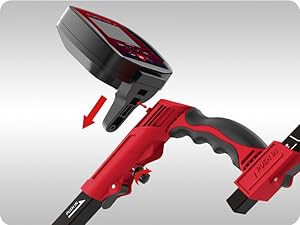
Figure 4.3: Securely attach the control box.
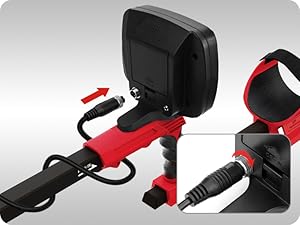
Figure 4.4: Connect the search coil cable.
5 ഓപ്പറേറ്റിംഗ് മോഡുകൾ
The KAIWEETS KGM01 Metal Detector features 6 distinct operating modes to optimize your search for various metal targets. Use the 'MODE' button to cycle through them.
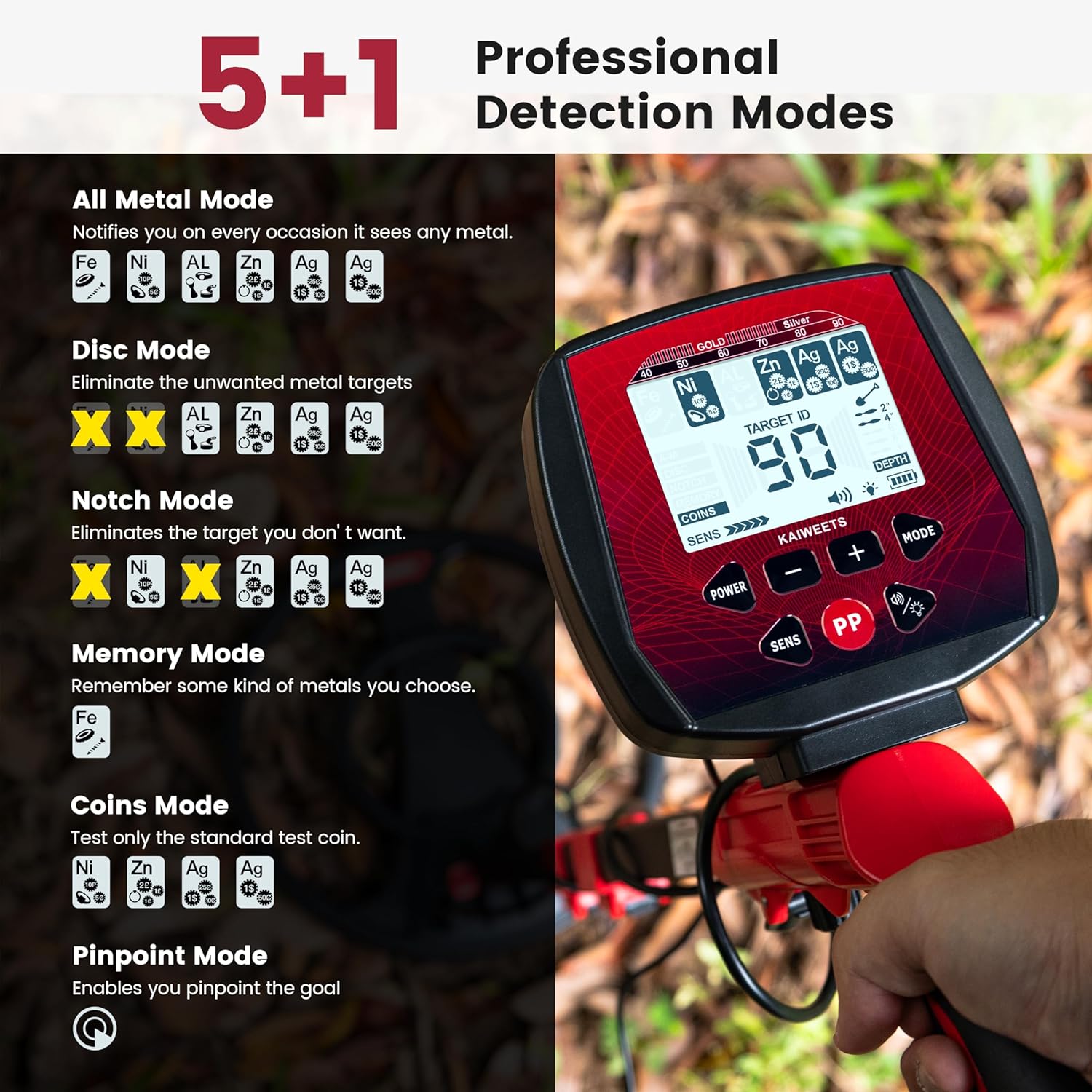
ചിത്രം 5.1: ഓവർview of the 6 detection modes.
- All Metal Mode: Detects all types of metal targets. This mode is ideal for general searching when you want to find any metal object. The detector will respond to 6 kinds of metal targets.
- ഡിസ്ക് മോഡ്: Allows you to eliminate unwanted metal targets sequentially. This is useful for filtering out junk metal.
- നോച്ച് മോഡ്: Customize the removal of unwanted metal targets. Press 'MODE' to select NOTCH, then use the (-) or (+) buttons to select the target to be notched. The cursor around the selected target will flash, and the target name will disappear.
- മെമ്മറി മോഡ്: Detects only the memorized metal target. The detector will only respond to the specific metal type you choose to remember.
- നാണയ മോഡ്: Specifically designed to detect only coins.
- പിൻപോയിന്റ് മോഡ്: Accurately locates the target. Press the 'PP' button to activate this mode, which helps narrow down the exact location of a detected object.

Figure 5.2: All Metal Mode detects all metal types.

Figure 5.3: Disc and Notch Modes for target discrimination.

Figure 5.4: Memory Mode allows focusing on desired metal types.

Figure 5.5: Coins Mode is optimized for finding coins.

Figure 5.6: Pinpoint Mode assists in exact target retrieval.
Video: Metal Detector Modes and Pinpoint
Video 5.1: This video demonstrates the various detection modes and the pinpointing function of the KAIWEETS KGM01 Metal Detector, showing how to switch between modes and accurately locate targets.
6. സവിശേഷതകളും പ്രവർത്തനങ്ങളും
6.1 Intuitive LCD Display
The user-friendly LCD display provides essential information at a glance, making it easy for beginners to identify targets. It shows digital readings, image icons, and sound indicators. The backlight function allows for effective treasure hunting in low light or nighttime conditions.

Figure 6.1: The LCD display with backlight for clear visibility.
The display provides:
- Metal target type (e.g., Iron, Nickel, Aluminum, Zinc, Silver)
- Target ID (numerical identification)
- Depth indication (2", 4", 6", 8"+)
- സെൻസിറ്റിവിറ്റി ലെവൽ
- ഓപ്പറേറ്റിംഗ് മോഡ്
- ബാറ്ററി ലെവൽ ഇൻഡിക്കേറ്റർ

Figure 6.2: Target ID chart for common metals.
6.2 IP68 Waterproof Search Coil
The 12-inch search coil is IP68 waterproof, allowing for effective detection in shallow water, such as beaches or streams. This enables scanning larger and deeper areas up to 11.8 inches.
NOTE: The control box is NOT waterproof and must be kept dry at all times.

Figure 6.3: The IP68 waterproof search coil allows for underwater detection.
6.3 Adjustable & Ergonomic Design
The detector features a 5-level sensitivity adjustment to counteract interference and locate targets faster. Its adjustable stem (29-44 inches) makes it suitable for users of various heights, including adults and children. The ergonomic armrest design enhances comfort during extended use. The foldable design ensures easy portability and storage.

Figure 6.4: Key features of the adjustable and ergonomic design.
6.4 Advanced DSP Chip & Anti-Interference
Equipped with an advanced DSP chip and ground balancing device, the KGM01 effectively eliminates mineralization reaction and other disturbances, ensuring more accurate target identification and stable detection signals.

Figure 6.5: The DSP chip provides strong anti-interference capabilities.
7. പരിപാലനം
Proper maintenance will extend the life of your metal detector:
- വൃത്തിയാക്കൽ: After each use, wipe down the search coil and stem with a damp cloth. Ensure the control box is clean and dry. Do not use abrasive cleaners or solvents.
- സംഭരണം: Store the detector in a cool, dry place when not in use. Remove batteries if storing for extended periods to prevent leakage.
- ബാറ്ററി കെയർ: Always use fresh, high-quality 9V batteries. Replace batteries when the low battery indicator appears on the display.
- കേബിൾ മാനേജുമെന്റ്: Avoid sharp bends or kinks in the search coil cable. Secure it properly along the stem to prevent damage.
8. പ്രശ്നപരിഹാരം
നിങ്ങളുടെ മെറ്റൽ ഡിറ്റക്ടറിൽ പ്രശ്നങ്ങൾ നേരിടുകയാണെങ്കിൽ, ഇനിപ്പറയുന്ന പൊതുവായ പ്രശ്നങ്ങളും പരിഹാരങ്ങളും പരിശോധിക്കുക:
| പ്രശ്നം | സാധ്യമായ കാരണം | പരിഹാരം |
|---|---|---|
| ശക്തിയില്ല | മരിച്ചതോ തെറ്റായി ഇൻസ്റ്റാൾ ചെയ്തതോ ആയ ബാറ്ററികൾ | Replace batteries with new 9V batteries, ensuring correct polarity. |
| Constant false signals / Chatter | High sensitivity setting, electromagnetic interference, mineralized ground | Reduce sensitivity. Move away from power lines, cell phones, or other electronic devices. Use ground balancing feature. |
| മോശം കണ്ടെത്തൽ ആഴം | Low battery, incorrect mode, highly mineralized ground | Replace batteries. Switch to 'All Metal' mode. Adjust ground balance. |
| കൃത്യമല്ലാത്ത ലക്ഷ്യ ഐഡി | Multiple targets, target size/orientation, interference | Use Pinpoint mode to isolate targets. Sweep slowly and consistently. Reduce sensitivity if necessary. |
| ഹെഡ്ഫോണുകളിൽ നിന്ന് ശബ്ദമില്ല | Headphones unplugged, volume too low, faulty headphones | Ensure headphones are fully plugged in. Increase volume. Test with different headphones if available. |
If the problem persists after trying these solutions, please contact KAIWEETS customer support for further assistance.
9 സ്പെസിഫിക്കേഷനുകൾ
| ഫീച്ചർ | സ്പെസിഫിക്കേഷൻ |
|---|---|
| ബ്രാൻഡ് | കൈവീറ്റ്സ് |
| മോഡൽ നമ്പർ | KGM01-H |
| നിറം | ചുവപ്പ് |
| മെറ്റീരിയൽ | പ്ലാസ്റ്റിക്, മെറ്റൽ |
| പവർ ഉറവിടം | Battery Powered (2 x 9V batteries included) |
| ഇനത്തിൻ്റെ ഭാരം | 5.3 പൗണ്ട് (ഏകദേശം 2.4 കിലോഗ്രാം) |
| ഉൽപ്പന്ന അളവുകൾ (L x W x H) | 16.9" x 12" x 5.9" (ഏകദേശം 42.9cm x 30.5cm x 15cm) |
| വിപുലീകരിച്ച ദൈർഘ്യം | 44 ഇഞ്ച് (ഏകദേശം 111.8 സെ.മീ) |
| ക്രമീകരിക്കാവുന്ന നീളം | Yes (29-44 inches) |
| അന്താരാഷ്ട്ര സംരക്ഷണ റേറ്റിംഗ് | IP68 (സെർച്ച് കോയിൽ മാത്രം) |
| ശുപാർശ ചെയ്യുന്ന ഉപയോഗങ്ങൾ | മെറ്റൽ ഡിറ്റക്ഷൻ |
| ഡിസ്പ്ലേ തരം | എൽസിഡി |
| Number of Programs/Modes | 6 ഡിറ്റക്ഷൻ മോഡുകൾ |
| Max Detection Depth | Up to 11.8 inches (approx. 30 cm) |
10. വാറൻ്റിയും പിന്തുണയും
KAIWEETS offers 36 months of product service for the KGM01 Metal Detector. If you have any questions, concerns, or require technical assistance, please contact KAIWEETS customer support. Provide your model number (KGM01-H) and purchase details for efficient service.
For support, visit the official KAIWEETS website or contact their customer service channels as provided with your product packaging.


