1. ആമുഖം
The Topcon TP-L6B Pipe Laser is a precision instrument designed for accurate pipe laying, trenching, sewer, mining, and tunneling projects. Its compact design, extended battery life, and advanced mobile application integration enhance operational efficiency and safety on job sites. This manual provides essential information for the proper setup, operation, maintenance, and troubleshooting of your TP-L6B Pipe Laser.
2. ഉൽപ്പന്ന സവിശേഷതകൾ
- Up to 60-hour battery life for extended operation.
- Compact design allows for flexible setup in confined spaces and tighter invert measurements.
- Mobile application for Android devices enables remote display, configuration, and adjustments, improving safety by reducing the need to enter manholes.
- Multi-use battery system compatible with other Topcon job site equipment.
- Includes RC-500 remote control with a range of 600 feet.
- Wide grade range of -15% to 40% for diverse project requirements.
- Class II laser with 4.5 mW output.
3. സജ്ജീകരണം
Proper setup is crucial for accurate measurements and safe operation. Follow these steps to prepare your TP-L6B Pipe Laser for use.
3.1 അൺപാക്കിംഗും പരിശോധനയും
- Carefully remove the TP-L6B Pipe Laser and all accessories from its packaging.
- Inspect the unit for any signs of damage that may have occurred during shipping. If damage is found, contact your supplier immediately.
- പാക്കിംഗ് ലിസ്റ്റിൽ ലിസ്റ്റ് ചെയ്തിരിക്കുന്ന എല്ലാ ഘടകങ്ങളും ഉണ്ടെന്ന് ഉറപ്പാക്കുക.
3.2 ബാറ്ററി ഇൻസ്റ്റാളേഷനും ചാർജിംഗും
- The TP-L6B uses a rechargeable NiMH battery. Ensure the battery is fully charged before initial use.
- Locate the battery compartment, typically secured by a latch or screw mechanism.
- Insert the charged battery, ensuring correct polarity. Close and secure the compartment.
- Refer to the separate battery charger manual for detailed charging instructions.
3.3 Initial Placement and Leveling
Place the pipe laser on a stable, level surface or mount it securely within the pipe. The integrated adjustable legs assist in initial positioning.
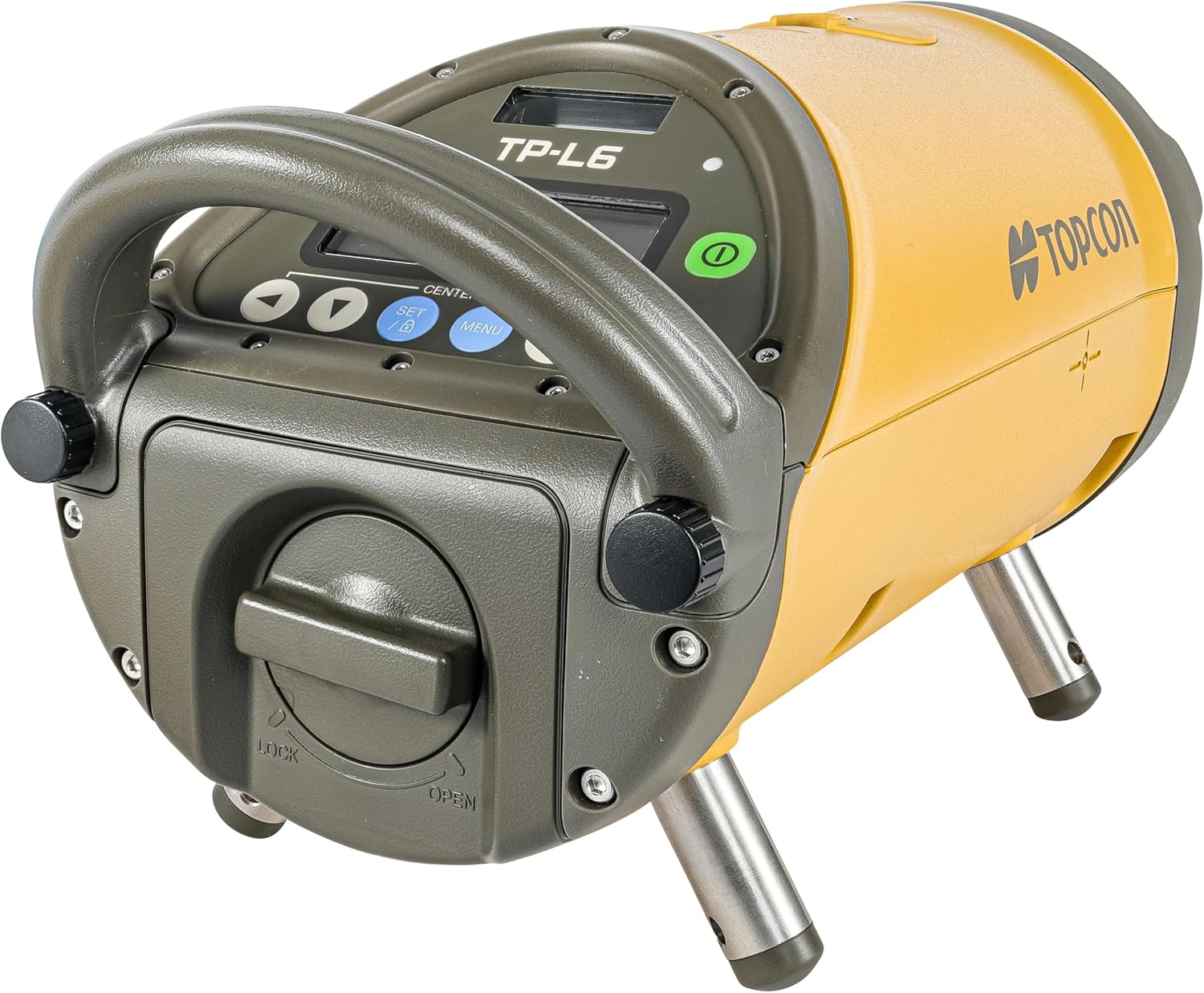
This image displays the Topcon TP-L6B Pipe Laser, a compact yellow and gray device with a sturdy handle, a digital control panel, and two adjustable metal legs for stable positioning.
4. പ്രവർത്തന നിർദ്ദേശങ്ങൾ
This section outlines the basic steps for operating the TP-L6B Pipe Laser.
4.1 പവർ ഓൺ/ഓഫ്
- To power on the unit, press and hold the green power button located on the control panel until the display illuminates.
- പവർ ഓഫ് ചെയ്യാൻ, ഡിസ്പ്ലേ ഓഫാകുന്നതുവരെ പവർ ബട്ടൺ വീണ്ടും അമർത്തിപ്പിടിക്കുക.
4.2 നിയന്ത്രണ പാനൽ ഉപയോഗിക്കുന്നു
The control panel features a digital display and several buttons for direct control:
- അമ്പടയാള ബട്ടണുകൾ: Used to adjust grade, line, or other settings.
- SET/B Button: Confirms selections or accesses specific settings.
- മെനു ബട്ടൺ: Navigates through the laser's menu options.
- CENTER Button: Automatically centers the laser beam.
4.3 Remote Control (RC-500) Operation
The RC-500 remote control allows for convenient adjustments from a distance of up to 600 feet. Ensure the remote has fresh batteries and is pointed towards the laser's receiver window.
- Use the remote's buttons to adjust grade, line, and access menu functions without physically interacting with the unit.
- The remote can control the laser's grade range from -15% to 40%.
4.4 Mobile App Integration
The Topcon TP-L6B can be controlled and monitored via a dedicated mobile application for Android devices. This app provides a visual interface for settings and adjustments, enhancing safety and ease of use.
- Download the official Topcon TP-L6B app from the Android app store.
- നിങ്ങളുടെ മൊബൈൽ ഉപകരണത്തിന്റെ ബ്ലൂടൂത്ത് പ്രവർത്തനക്ഷമമാക്കിയിട്ടുണ്ടെന്ന് ഉറപ്പാക്കുക.
- Open the app and follow the on-screen instructions to pair with your TP-L6B unit.
- Once connected, you can remotely configure settings, monitor status, and make adjustments.
5. പരിപാലനം
Regular maintenance ensures the longevity and accuracy of your TP-L6B Pipe Laser.
5.1 വൃത്തിയാക്കൽ
- After each use, wipe down the exterior of the unit with a soft, damp തുണി.
- Do not use abrasive cleaners or solvents, as these can damage the housing or display.
- Keep the laser aperture clean and free of dust or debris to maintain beam clarity. Use a soft, lint-free cloth for this purpose.
5.2 ബാറ്ററി കെയർ
- Always fully charge the battery before storage if the unit will not be used for an extended period.
- തണുത്തതും വരണ്ടതുമായ സ്ഥലത്ത് ബാറ്ററികൾ സൂക്ഷിക്കുക.
- ബാറ്ററി ലൈഫ് കുറയ്ക്കാൻ സാധ്യതയുള്ള തീവ്രമായ താപനില ഒഴിവാക്കുക.
5.3 സംഭരണം
When not in use, store the TP-L6B Pipe Laser in its original carrying case in a dry, temperature-controlled environment to protect it from dust, moisture, and impact.
6. പ്രശ്നപരിഹാരം
This section provides solutions to common issues you might encounter with your TP-L6B Pipe Laser.
6.1 Laser Not Powering On
- ബാറ്ററി പരിശോധിക്കുക: ബാറ്ററി പൂർണ്ണമായും ചാർജ്ജ് ചെയ്തിട്ടുണ്ടെന്നും ശരിയായി ഇൻസ്റ്റാൾ ചെയ്തിട്ടുണ്ടെന്നും ഉറപ്പാക്കുക.
- പവർ ബട്ടൺ: Confirm the power button is pressed and held sufficiently.
6.2 റിമോട്ട് കൺട്രോൾ പ്രതികരിക്കുന്നില്ല
- ബാറ്ററി: Replace the batteries in the RC-500 remote control.
- വീക്ഷണരേഖ: Ensure there is a clear line of sight between the remote and the laser's receiver.
- ദൂരം: Verify you are within the 600-foot operating range.
6.3 കൃത്യമല്ലാത്ത വായനകൾ
- സ്ഥിരത: Ensure the laser is placed on a stable surface and is not subject to vibrations.
- കാലിബ്രേഷൻ: If persistent inaccuracies occur, the unit may require professional calibration. Contact Topcon support.
- തടസ്സങ്ങൾ: Check for any obstructions in the laser beam path.
For issues not covered here, please refer to the official Topcon support resources or contact customer service.
7 സ്പെസിഫിക്കേഷനുകൾ
| സ്പെസിഫിക്കേഷൻ | വിശദാംശങ്ങൾ |
|---|---|
| ബ്രാൻഡ് | ടോപ്കോൺ |
| മോഡൽ നമ്പർ | 1034437-05 |
| ഇനത്തിൻ്റെ ഭാരം | 15 പൗണ്ട് |
| മെറ്റീരിയൽ | മെറ്റൽ, പ്ലാസ്റ്റിക് |
| ഓപ്പറേഷൻ മോഡ് | ഓട്ടോമാറ്റിക് |
| പവർ ഉറവിടം | ബാറ്ററി പവർ |
| വാട്ട്tage | 4.5 മില്ലിവാട്ട് |
| ബാറ്ററി തരം | NiMH (included) |
| ലേസർ ക്ലാസ് | ക്ലാസ് II |
| ഗ്രേഡ് റേഞ്ച് | -15% മുതൽ 40% വരെ |
| റിമോട്ട് കൺട്രോൾ റേഞ്ച് | 600 Feet (RC-500) |
| മൊബൈൽ ആപ്പ് അനുയോജ്യത | Android ഉപകരണങ്ങൾ |
8. വാറൻ്റിയും പിന്തുണയും
For information regarding product warranty, service, or technical support, please refer to the warranty card included with your product or visit the official Topcon website. Contacting Topcon customer service directly will provide the most accurate and up-to-date support information.


