ഉൽപ്പന്നം കഴിഞ്ഞുview
The Abask Dash Cam J05Pro is a high-performance car camera system designed to record both the road ahead and the vehicle's interior. Featuring true 4K front recording and 1080P interior recording, it provides clear video evidence for various driving situations. Equipped with advanced features like infrared night vision, 24-hour parking monitoring, G-sensor, and built-in WiFi for app control, it offers comprehensive security and convenience.
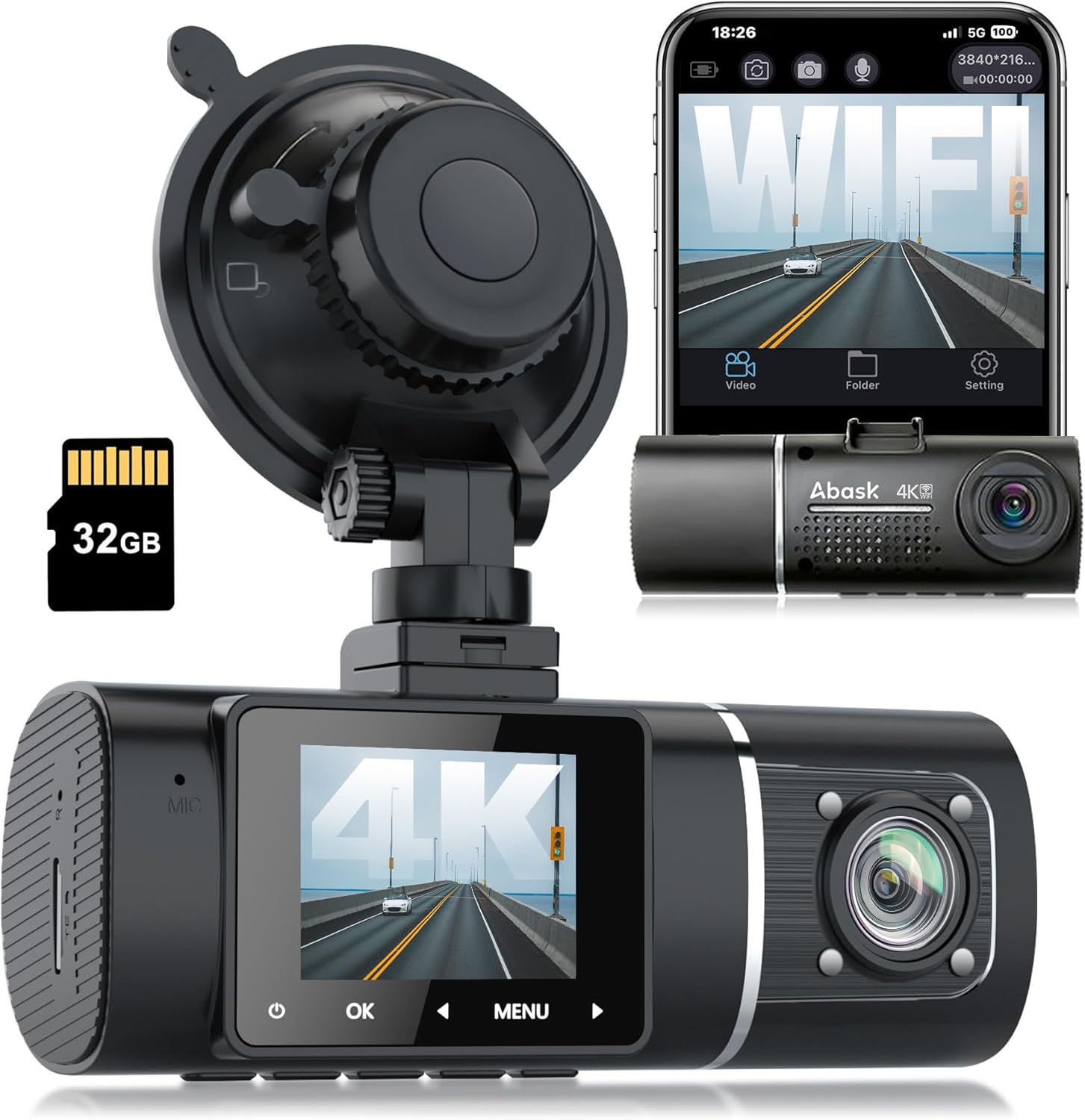
Figure 1: Abask Dash Cam J05Pro with included accessories.
പ്രധാന സവിശേഷതകൾ:
- True 4K Front + 1080P Interior UHD Video: Simultaneously records high-resolution video and audio for both front (4K 3840*2160) and interior (1080P 1920*1080) views.
- Built-in WiFi & APP Control: Connects to the dedicated LuckyCam app for live viewing, settings management, and direct video download/sharing on Android/iOS devices.
- Super Infrared Night Vision: Utilizes 4K recording, HDR technology, and 4 inconspicuous infrared lights for clear video capture in low-light conditions, especially for the interior camera.
- 24-Hour Parking Surveillance and Motion Detection: Automatically begins recording if disturbances are detected while parked. Requires hardwiring to the fuse box for continuous operation.
- Automatic Storage, G-Sensor & Loop Recording: In the event of an accident, the G-sensor automatically locks and saves video evidence. Loop recording overwrites unlocked older footagതുടർച്ചയായ റെക്കോർഡിംഗ് ഉറപ്പാക്കാൻ ഇ.
- Total 310° Wide-Angle Field of View: ഒരു സമഗ്രത നൽകുന്നു view with 170° for the front camera and 140° for the interior camera.
ബോക്സിൽ എന്താണുള്ളത്
പാക്കേജ് തുറക്കുമ്പോൾ, ഇനിപ്പറയുന്ന എല്ലാ ഇനങ്ങളും ഉൾപ്പെടുത്തിയിട്ടുണ്ടെന്ന് ദയവായി ഉറപ്പാക്കുക:
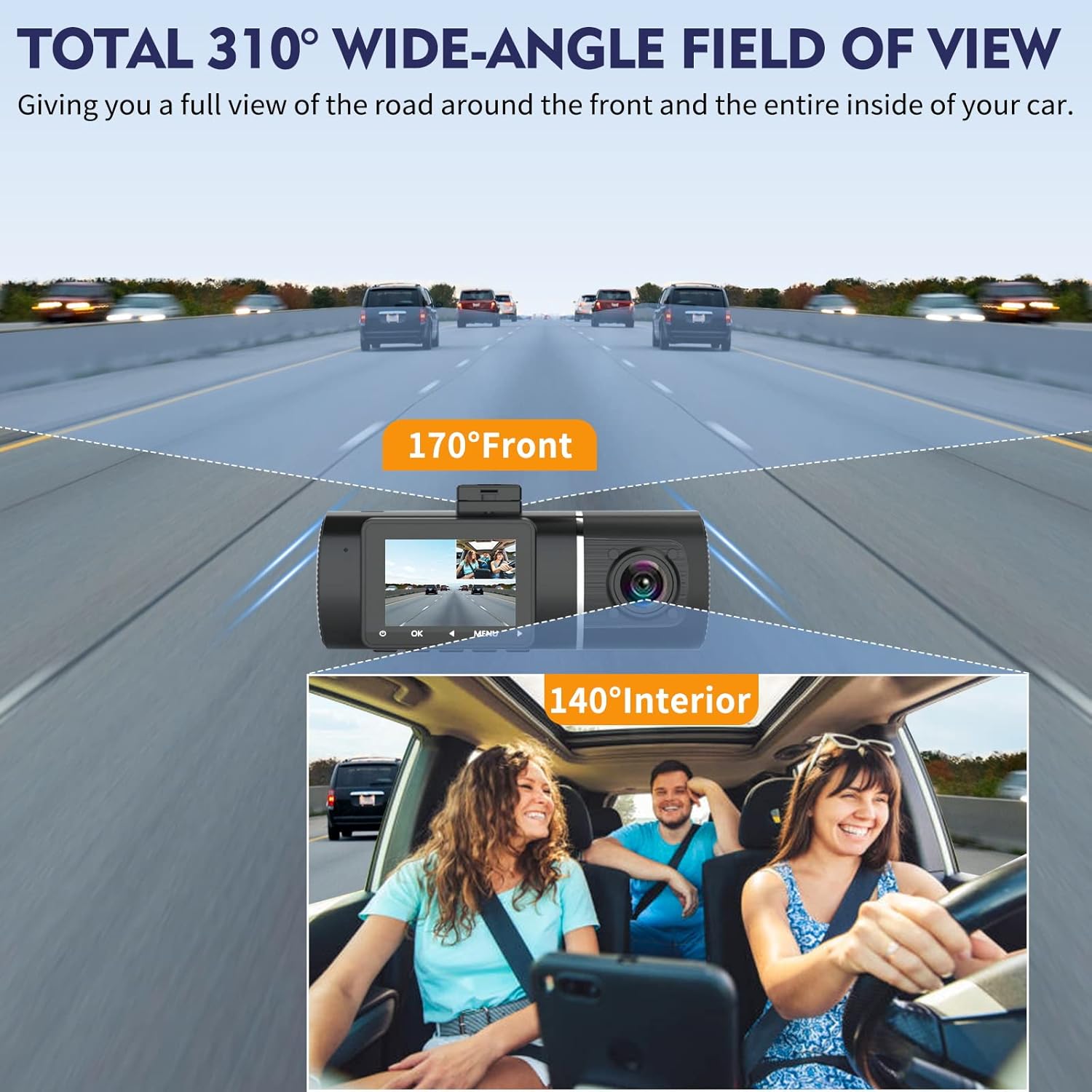
Figure 2: All components included in the Abask Dash Cam package.
- Abask Dash Cam J05Pro Unit
- സക്ഷൻ കപ്പ് മ .ണ്ട്
- 32GB മൈക്രോ SD കാർഡ് (പ്രീ-ഇൻസ്റ്റാൾ ചെയ്തതോ പ്രത്യേകം)
- Car Charger (connects to cigarette lighter)
- യുഎസ്ബി ഡാറ്റ കേബിൾ
- Wiring Tool (plastic 'crowbar' for cable routing)
- Cable Clips (for neat cable management)
- ഉപയോക്തൃ മാനുവൽ
ഉൽപ്പന്നം കഴിഞ്ഞുview വീഡിയോ:
വീഡിയോ 1: ഒരു സംക്ഷിപ്ത വിവരണംview of the Abask J05 Pro Dash Cam, highlighting its dual camera setup and WiFi connectivity.
സജ്ജീകരണ ഗൈഡ്
1. ഡാഷ് കാം മൌണ്ട് ചെയ്യുന്നു
- Clean the windshield area where you intend to mount the dash cam. Ensure it is free from dust and grease.
- Attach the suction cup mount to the dash cam unit.
- Press the suction cup firmly against the windshield and twist the locking mechanism to secure it. Position the dash cam to ensure a clear view for both the front and interior cameras, without obstructing your driving view.

Figure 3: Proper mounting of the dash cam on the windshield.
2. പവർ കണക്ഷൻ
- Insert the car charger into your vehicle's cigarette lighter socket.
- Connect the other end of the car charger cable to the dash cam's power input port.
- Route the power cable neatly along the edge of the windshield and dashboard using the provided cable clips and wiring tool to avoid obstructing your view അല്ലെങ്കിൽ വാഹന നിയന്ത്രണങ്ങളിൽ ഇടപെടൽ.
- നിങ്ങളുടെ വാഹനത്തിന്റെ ഇഗ്നിഷൻ ഓണാക്കുമ്പോൾ ഡാഷ്ക്യാം യാന്ത്രികമായി ഓണാകുകയും റെക്കോർഡിംഗ് ആരംഭിക്കുകയും ചെയ്യും.

Figure 4: Recommended cable routing for a tidy installation.
3. Initial Setup (Memory Card & Language)
The dash cam comes with a 32GB Micro SD card. It supports up to 128GB cards. For optimal performance, it is recommended to format the memory card before first use and periodically thereafter.
- ഡാഷ് ക്യാം ഓണാക്കിയിട്ടുണ്ടെന്ന് ഉറപ്പാക്കുക.
- അമർത്തുക മെനു ക്രമീകരണങ്ങൾ ആക്സസ് ചെയ്യുന്നതിനുള്ള ബട്ടൺ.
- Navigate through the menu using the arrow buttons (< ഒപ്പം >) to find "Format" and "Language" options.
- Select "Format" and confirm to clear the memory card.
- Select "Language" and choose your preferred language (e.g., English).
- Set the correct Date/Time in the settings menu.
Operation Instructions Video:
Video 2: Detailed instructions on operating the J05Pro Dash Cam, including initial setup and menu navigation.
പ്രവർത്തന നിർദ്ദേശങ്ങൾ
1. അടിസ്ഥാന പ്രവർത്തനം
- സ്വയമേവ ഓൺ/ഓഫ്: The dash cam is designed to power on and off automatically with your vehicle's ignition.
- ലൂപ്പ് റെക്കോർഡിംഗ്: The dash cam continuously records video in short segments (e.g., 1, 3, or 5 minutes). When the memory card is full, it automatically overwrites the oldest unlocked footage.
- ജി-സെൻസർ (എമർജൻസി ലോക്ക്): In the event of a sudden impact or collision, the built-in G-sensor will automatically detect the event and lock the current video segment, preventing it from being overwritten by loop recording. This footage is saved as important evidence.
- മാനുവൽ ലോക്ക്: You can manually lock the current recording by pressing the OK button during recording.

Figure 5: G-sensor and Loop Recording functionality.
2. WiFi & App Control (LuckyCam)
The built-in WiFi allows you to connect your dash cam to your smartphone via the LuckyCam app for convenient control and access to recordings.
- Download the "LuckyCam" app from the App Store (iOS) or Google Play Store (Android).
- On the dash cam, navigate to the WiFi settings and turn WiFi "On". The WiFi name (SSID) and password will be displayed on the dash cam screen.
- On your smartphone, go to Wi-Fi settings, find the dash cam's WiFi network (e.g., "J05PROxxxx"), and connect using the displayed password.
- Open the LuckyCam app. You can now view the live feed, playback recorded videos, download videos to your phone, and adjust dash cam settings directly from the app.
- Videos downloaded to your smartphone can be easily shared on social media.

Figure 6: LuckyCam App interface for dash cam control.

Figure 7: WiFi & App Control with QR codes for app download.
WiFi Connection and App Usage Video:
Video 3: Demonstrates how to connect the dash cam to the LuckyCam app via WiFi and use its features.
വിപുലമായ സവിശേഷതകൾ
1. True 4K Front + 1080P Interior Video
The dash cam records simultaneously with a 4K (3840x2160) resolution for the front camera and 1080P (1920x1080) for the interior camera. This dual-channel recording ensures comprehensive coverage.
- മുൻ ക്യാമറ ആംഗിൾ: 170° wide angle, capturing multiple lanes of traffic.
- Interior Camera Angle: 140° wide angle, providing a clear view of the cabin.
- മൊത്തം കവറേജ്: Combined 310° field of view for maximum situational awareness.

Figure 8: Wide-angle coverage of the dash cam.

Figure 9: Comparison of 4K front and 1080P cabin video quality.
2. Super Infrared Night Vision
Equipped with HDR (High Dynamic Range) technology and 4 infrared (IR) lights for the interior camera, the dash cam delivers clear and detailed video even in challenging low-light conditions or complete darkness.

Figure 10: Night Vision technology for enhanced clarity.
3. 24-Hour Parking Monitoring & Motion Detection
This feature allows the dash cam to monitor your vehicle even when it's parked and the engine is off. If motion or impact is detected, the camera will automatically start recording.
- സജീവമാക്കൽ: To enable 24-hour parking monitoring, the dash cam must be properly hardwired to the vehicle's fuse box (hardwire kit not included).
- പ്രയോജനങ്ങൾ: Provides security against vandalism, hit-and-runs, or other incidents while your vehicle is unattended.

Figure 11: 24-Hour Parking Monitoring in action.
മെയിൻ്റനൻസ്
- ലെൻസ് ക്ലീനിംഗ്: Regularly clean the camera lenses with a soft, lint-free cloth to ensure clear video quality. Avoid abrasive materials or harsh chemicals.
- മെമ്മറി കാർഡ് മാനേജ്മെന്റ്: Format the Micro SD card every 2-4 weeks to prevent data corruption and ensure optimal recording performance. Back up any important footagഫോർമാറ്റ് ചെയ്യുന്നതിന് മുമ്പ്.
- താപനില നിയന്ത്രണം: Avoid exposing the dash cam to extreme temperatures (both hot and cold) for prolonged periods, as this can affect battery life and component longevity.
- ഫേംവെയർ അപ്ഡേറ്റുകൾ: Check the official ABASK website or LuckyCam app periodically for any available firmware updates to improve performance and add new features.
ട്രബിൾഷൂട്ടിംഗ്
| പ്രശ്നം | സാധ്യമായ കാരണം | പരിഹാരം |
|---|---|---|
| ഡാഷ് ക്യാം പവർ ഓൺ ചെയ്യുന്നില്ല. | No power from car charger; faulty cable; dead battery. | Check car charger connection and vehicle's cigarette lighter. Try a different USB cable. Ensure vehicle ignition is on. |
| വീഡിയോ footage മങ്ങിയതോ അവ്യക്തമോ ആണ്. | വൃത്തികെട്ട ലെൻസ്; ലെൻസിൽ ഇപ്പോഴും സംരക്ഷണ ഫിലിം; തെറ്റായ റെസല്യൂഷൻ ക്രമീകരണങ്ങൾ. | Clean the camera lenses. Remove any protective film. Check video resolution settings in the menu or app. |
| ആപ്പിലെ വൈഫൈ കണക്ഷൻ പ്രശ്നങ്ങൾ. | Incorrect WiFi password; app not updated; dash cam WiFi off. | Verify WiFi password on dash cam screen. Ensure app is updated. Turn dash cam WiFi off and on again. Stay within 10 meters of the dash cam. |
| "Memory Card Full" error or not recording. | Memory card full; card not formatted; incompatible card. | Format the Micro SD card. Ensure loop recording is enabled. Use a Class 10 or higher Micro SD card (up to 128GB). |
| Parking monitor not working. | Not hardwired; parking monitor setting off. | Ensure the dash cam is properly hardwired to the vehicle's fuse box. Check parking monitor settings in the menu. |
സ്പെസിഫിക്കേഷനുകൾ
| ഫീച്ചർ | വിശദാംശങ്ങൾ |
|---|---|
| ഉൽപ്പന്ന അളവുകൾ | 5.61 x 4.31 x 2.72 ഇഞ്ച് |
| ഇനത്തിൻ്റെ ഭാരം | 12.1 ഔൺസ് |
| ഇനം മോഡൽ നമ്പർ | ജെ05പ്രോ |
| കണക്റ്റിവിറ്റി ടെക്നോളജികൾ | വൈഫൈ |
| പ്രത്യേക സവിശേഷതകൾ | Night Vision, 24H Parking Monitoring, Motion Sensor, G-Sensor, Loop Recording, HDR |
| വീഡിയോ ക്യാപ്ചർ റെസല്യൂഷൻ | Front: 2160p (4K), Interior: 1080p |
| ഉൾപ്പെടുത്തിയ ഘടകങ്ങൾ | Dash Cam Unit, Suction Cup Mount, 32GB Memory Card, Car Charger, USB Data Cable, Wiring Tool, Cable Clips |
| മൗണ്ടിംഗ് തരം | വിൻഡ്ഷീൽഡ് മ .ണ്ട് |
| പരമാവധി SD കാർഡ് പിന്തുണ | 128 ജിബി വരെ |
വാറൻ്റിയും പിന്തുണയും
ABASK products are designed and manufactured to the highest quality standards. This product is covered by a limited warranty from the date of purchase. Please refer to the warranty card included in your package for specific terms and conditions.
For technical support, troubleshooting assistance, or warranty claims, please contact ABASK customer service through the following channels:
- ഇമെയിൽ: Refer to your product packaging or the official ABASK webഏറ്റവും പുതിയ കോൺടാക്റ്റ് ഇമെയിലിനുള്ള സൈറ്റ്.
- ഓൺലൈൻ പിന്തുണ: Visit the ABASK official webപതിവുചോദ്യങ്ങൾ, പിന്തുണാ ലേഖനങ്ങൾ, കോൺടാക്റ്റ് ഫോമുകൾ എന്നിവയ്ക്കുള്ള സൈറ്റ്.
Please have your product model number (J05Pro) and purchase details ready when contacting support.


