ആമുഖം
This manual provides comprehensive instructions for the installation, operation, and maintenance of your Beetronics 19VG7M 19-Inch Full HD IPS Monitor. Designed for professional and continuous use, this industrial-grade display offers exceptional visual clarity, versatile connectivity, and robust construction. Please read this manual thoroughly before using the monitor to ensure proper setup and optimal performance.

ചിത്രം 1: മുൻഭാഗം view of the Beetronics 19VG7M Monitor.
പാക്കേജ് ഉള്ളടക്കം
സജ്ജീകരണവുമായി മുന്നോട്ടുപോകുന്നതിനുമുമ്പ്, പാക്കേജിൽ എല്ലാ ഘടകങ്ങളും ഉണ്ടെന്ന് ദയവായി ഉറപ്പാക്കുക:
- Beetronics 19VG7M Monitor
- പവർ സപ്ലൈ & കോർഡ്
- റിമോട്ട് കൺട്രോൾ
- Flush Mounting Brackets (if applicable)
- Desktop & Surface Mounting Stand
- ഉപയോക്തൃ മാനുവൽ (ഈ പ്രമാണം)
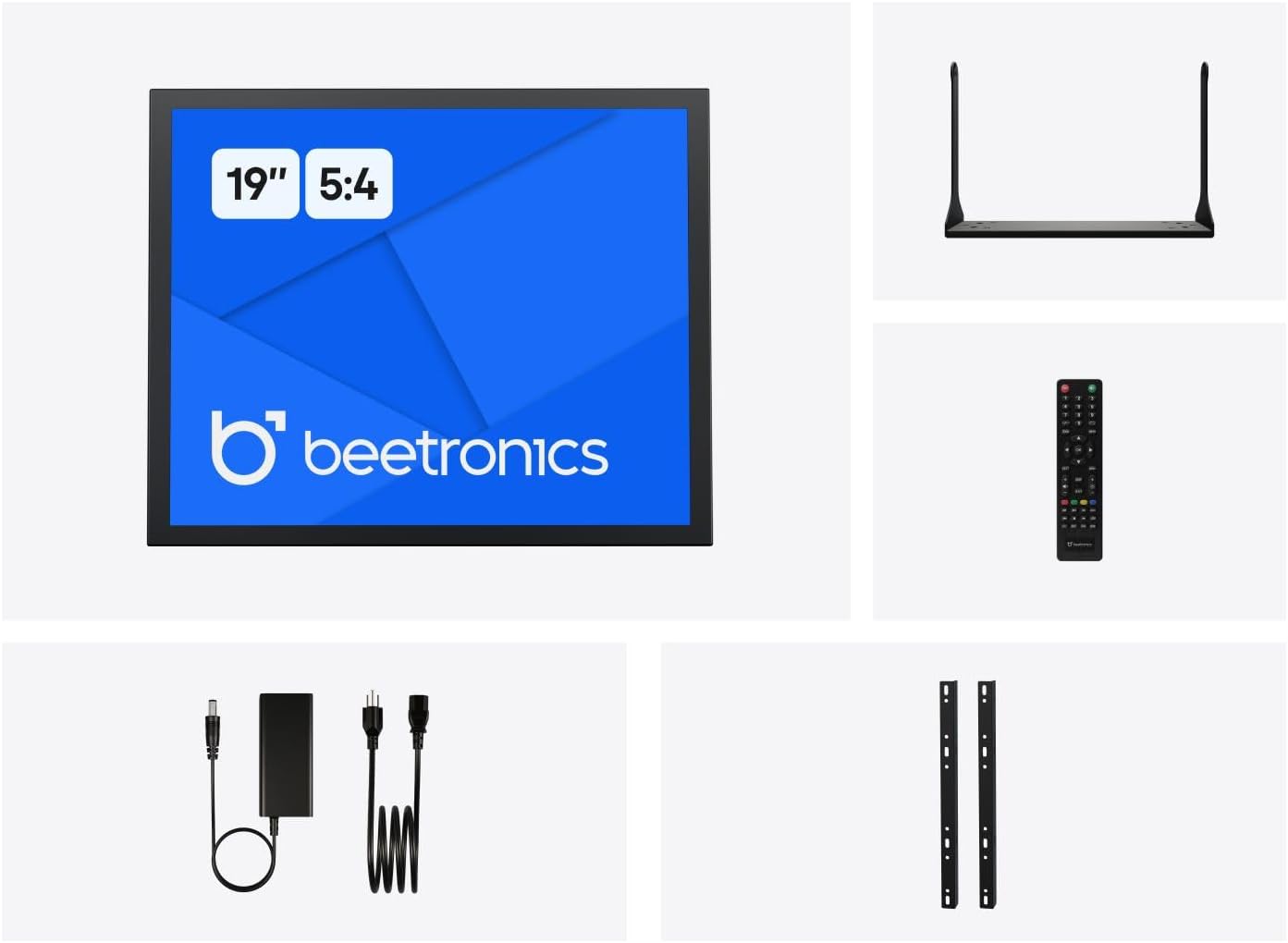
Figure 2: Included accessories with the Beetronics 19VG7M Monitor.
സജ്ജമാക്കുക
1 മൗണ്ടിംഗ് ഓപ്ഷനുകൾ
The 19VG7M monitor offers flexible mounting solutions, including a collapsible desktop stand and VESA 100mm compatibility for wall or arm mounting.
Desktop Stand Installation:
- പോറലുകൾ ഏൽക്കാതിരിക്കാൻ മോണിറ്റർ മൃദുവായതും വൃത്തിയുള്ളതുമായ ഒരു പ്രതലത്തിൽ ശ്രദ്ധാപൂർവ്വം മുഖം താഴേക്ക് വയ്ക്കുക.
- Attach the desktop stand to the designated mounting points on the rear of the monitor using the provided screws. Ensure it is securely fastened.
- മോണിറ്റർ സുസ്ഥിരവും പരന്നതുമായ പ്രതലത്തിൽ സ്ഥാപിക്കുക.
VESA Wall/Arm Mounting:
- If the desktop stand is attached, remove it.
- Align the VESA 100mm mounting holes on the back of the monitor with your VESA-compatible wall mount or arm.
- Secure the monitor to the mount using appropriate VESA screws (M4 x 10mm recommended, not always included with monitor).

Figure 3: Monitor dimensions with desktop stand.
2. കേബിളുകൾ ബന്ധിപ്പിക്കുന്നു
The 19VG7M monitor features a variety of input ports located on the rear, facing downwards for neat cable management. Ensure the monitor and all connected devices are powered off before making connections.

Figure 4: Downward-facing input ports.
- എച്ച്ഡിഎംഐ: Connect an HDMI cable from your source device (e.g., computer, media player) to the HDMI port on the monitor.
- വി.ജി.എ: Connect a VGA cable from your source device to the VGA port on the monitor.
- BNC: For professional video applications, connect a BNC cable to the BNC input.
- RCA (AV): Use RCA cables for composite video and stereo audio input. Connect the yellow plug for video, and red/white for audio.
- USB: (If applicable for touch functionality or specific peripherals, consult product specifications for exact USB function).
- ശക്തി: Connect the provided power supply to the DC input port on the monitor, then plug the power cord into a wall outlet. The monitor supports a wide input voltage range of 9-36 Volts.

ചിത്രം 5: പിൻ പാനൽ മുകളിൽview with control buttons and ports.
പ്രവർത്തന നിർദ്ദേശങ്ങൾ
1. പവർ ഓൺ/ഓഫ്
അമർത്തുക ഓൺ/ഓഫ് button located on the rear panel or on the remote control to power the monitor on or off. The power indicator light will illuminate when the monitor is on.
2. ഇൻപുട്ട് തിരഞ്ഞെടുക്കൽ
To switch between different video inputs (HDMI, VGA, BNC, RCA):
- അമർത്തുക ഓട്ടോ button on the rear panel or the ഇൻപുട്ട് റിമോട്ട് കൺട്രോളിലെ ബട്ടൺ.
- ഉപയോഗിക്കുക + or - buttons to navigate through the available inputs.
- അമർത്തുക മെനു button or wait a few seconds to confirm your selection.
3. ഓൺ-സ്ക്രീൻ ഡിസ്പ്ലേ (OSD) മെനു
The OSD menu allows you to adjust various display settings. To access and navigate the OSD menu:
- അമർത്തുക മെനു button on the rear panel or remote control to open the OSD menu.
- ഉപയോഗിക്കുക + or - മെനു ഓപ്ഷനുകളിലൂടെ നാവിഗേറ്റ് ചെയ്യാനുള്ള ബട്ടണുകൾ.
- അമർത്തുക മെനു button again to enter a sub-menu or confirm a setting.
- To exit the OSD menu, navigate to the "Exit" option or press the മെനു button repeatedly until the menu disappears.
സാധാരണ OSD ക്രമീകരണങ്ങൾ:
- ചിത്രം: Adjust brightness, contrast, color temperature, and aspect ratio (e.g., 5:4).
- ഓഡിയോ: Control volume and mute settings.
- OSD ക്രമീകരണങ്ങൾ: OSD ഭാഷ, സുതാര്യത, സമയപരിധി എന്നിവ ക്രമീകരിക്കുക.
- പുന et സജ്ജമാക്കുക: ഫാക്ടറി സ്ഥിരസ്ഥിതി ക്രമീകരണങ്ങൾ പുന ore സ്ഥാപിക്കുക.
The monitor also supports a fully dimmable backlight, which can be adjusted via the OSD menu or dedicated dimmer controls if available.
മെയിൻ്റനൻസ്
Proper maintenance ensures the longevity and optimal performance of your Beetronics monitor.
മോണിറ്റർ വൃത്തിയാക്കൽ:
- വൃത്തിയാക്കുന്നതിന് മുമ്പ് എല്ലായ്പ്പോഴും മോണിറ്റർ ഓഫ് ചെയ്ത് പവർ ഔട്ട്ലെറ്റിൽ നിന്ന് അൺപ്ലഗ് ചെയ്യുക.
- സ്ക്രീൻ: മൃദുവായ, ലിൻ്റ് രഹിത തുണി ഉപയോഗിക്കുകampened with water or a non-abrasive, monitor-specific cleaning solution. Do not spray liquid directly onto the screen.
- Casing: Wipe the metal housing with a soft, dry cloth. Avoid using harsh chemicals, abrasives, or solvents, as they may damage the finish.
പൊതു പരിചരണം:
- മോണിറ്ററിലോ അതിന്റെ കേബിളുകളിലോ ഭാരമുള്ള വസ്തുക്കൾ വയ്ക്കുന്നത് ഒഴിവാക്കുക.
- മോണിറ്ററിലെ വെന്റിലേഷൻ തുറസ്സുകൾ തടയരുത്.
- Keep the monitor away from direct sunlight, excessive heat, and high humidity.
- If the monitor will not be used for an extended period, it is recommended to unplug it from the power source.
ട്രബിൾഷൂട്ടിംഗ്
നിങ്ങളുടെ മോണിറ്ററിൽ പ്രശ്നങ്ങൾ നേരിടുകയാണെങ്കിൽ, ഇനിപ്പറയുന്ന പൊതുവായ പ്രശ്നങ്ങളും പരിഹാരങ്ങളും പരിശോധിക്കുക:
| പ്രശ്നം | സാധ്യമായ കാരണം | പരിഹാരം |
|---|---|---|
| സ്ക്രീനിൽ ചിത്രമൊന്നുമില്ല |
|
|
| ചിത്രം വളരെ ഇരുണ്ടതാണ്/തെളിച്ചമുള്ളതാണ് അല്ലെങ്കിൽ നിറങ്ങൾ തെറ്റാണ്. |
|
|
| ഓഡിയോ ഇല്ല |
|
|
| Monitor flickering or unstable image |
|
|
If the problem persists after trying these solutions, please contact Beetronics customer support.
സ്പെസിഫിക്കേഷനുകൾ
Key technical specifications for the Beetronics 19VG7M 19-Inch Full HD IPS Monitor:
| മോഡൽ നമ്പർ | 19VG7M |
| സ്ക്രീൻ വലിപ്പം | 19 ഇഞ്ച് |
| വീക്ഷണാനുപാതം | 5:4 |
| റെസലൂഷൻ | 1280 x 1024 (പൂർണ്ണ HD) |
| പാനൽ തരം | ഐ.പി.എസ് |
| Viewing ആംഗിൾ | 178° (തിരശ്ചീനമായി/ലംബമായി) |
| തെളിച്ചം | 470 കാൻഡല |
| ഇൻപുട്ട് വോളിയംtage | 9-36 വോൾട്ട് (ഡിസി) |
| ഇൻപുട്ട് പോർട്ടുകൾ | HDMI, VGA, BNC, RCA (AV), USB |
| ഉൽപ്പന്ന അളവുകൾ (L x W x H) | 1.6 x 16.1 x 15.2 ഇഞ്ച് (സ്റ്റാൻഡ് ഇല്ലാതെ) |
| ഇനത്തിൻ്റെ ഭാരം | 3.3 പൗണ്ട് |
| നിർമ്മാതാവ് | Beetronics |
| സ്ക്രീൻ ഉപരിതലം | മാറ്റ് |

Figure 6: Internal components and key features.
വാറൻ്റിയും പിന്തുണയും
വാറൻ്റി വിവരങ്ങൾ
The Beetronics 19VG7M monitor comes with a solid 2 വർഷത്തെ വാറൻ്റി, ensuring reliability and peace of mind. This warranty covers defects in materials and workmanship under normal use. Please retain your proof of purchase for warranty claims.
For detailed warranty terms and conditions, please refer to the official Beetronics webസൈറ്റ് അല്ലെങ്കിൽ ഉപഭോക്തൃ പിന്തുണയുമായി ബന്ധപ്പെടുക.
ഉപഭോക്തൃ പിന്തുണ
If you require technical assistance, have questions about your product, or need to initiate a warranty claim, please contact Beetronics customer support:
- Webസൈറ്റ്: Visit the official Beetronics webപതിവുചോദ്യങ്ങൾ, പിന്തുണാ ഉറവിടങ്ങൾ, കോൺടാക്റ്റ് ഫോമുകൾ എന്നിവയ്ക്കുള്ള സൈറ്റ്. www.beetronics.com
- ഇമെയിൽ: Refer to the Beetronics webഏറ്റവും പുതിയ പിന്തുണ ഇമെയിൽ വിലാസത്തിനായുള്ള സൈറ്റ്.
- ഫോൺ: Refer to the Beetronics webപ്രാദേശിക പിന്തുണാ ഫോൺ നമ്പറുകൾക്കായുള്ള സൈറ്റ്.
When contacting support, please have your monitor's model number (19VG7M) and purchase information readily available.