1. ആമുഖം
This manual provides comprehensive instructions for the Cuifati H310 LGA 1151 Micro ATX DDR4 Motherboard, covering installation, operation, maintenance, troubleshooting, and detailed technical specifications. Please read this manual thoroughly before installing or operating your motherboard to ensure proper functionality and longevity.
പ്രധാന സവിശേഷതകൾ:
- Wide CPU Compatibility: Supports 8th and 9th generation Intel Core CPUs (LGA 1151 socket).
- Dual Channel DDR4 Memory: Features two DDR4 DIMM slots, supporting up to 32GB total memory at speeds of 1066, 1333, and 1600MHz.
- സ്ഥിരമായ പവർ സപ്ലൈ: Equipped with a three-phase power supply and all solid-state capacitors for reliable power delivery to motherboard components.
- High-Speed Chipset: Utilizes the Intel H310 chipset for stable and efficient performance across various computing tasks.
- സംയോജിത ഗ്രാഫിക്സ്: Includes an integrated graphics processor with DVI, HDMI, and VGA display ports for multi-monitor setups.

ചിത്രം 1: മുകളിൽ നിന്ന് താഴേക്ക് view of the Cuifati H310 LGA 1151 Micro ATX DDR4 Motherboard.
2. സജ്ജീകരണവും ഇൻസ്റ്റാളേഷനും
Follow these steps carefully to install your Cuifati H310 motherboard and its components.
2.1 മദർബോർഡ് ലേayട്ട്

Figure 2: Detailed layout of the Cuifati H310 motherboard with key components labeled, including power connectors, memory slots, PCIe slots, and I/O interfaces.
2.2 സിപിയു ഇൻസ്റ്റലേഷൻ
- മദർബോർഡിൽ LGA 1151 CPU സോക്കറ്റ് കണ്ടെത്തുക.
- Gently push down the load lever and pull it away from the socket to open the CPU retention frame.
- Align the triangular mark on your Intel LGA 1151 CPU with the corresponding mark on the socket. Carefully place the CPU into the socket without forcing it.
- റിട്ടൻഷൻ ഫ്രെയിം അടച്ച് ലോഡ് ലിവർ അതിന്റെ ലോക്ക് ചെയ്ത സ്ഥാനത്തേക്ക് തിരികെ തള്ളുക.
- നിർമ്മാതാവിന്റെ നിർദ്ദേശങ്ങൾക്കനുസൃതമായി നിങ്ങളുടെ സിപിയു കൂളർ ഇൻസ്റ്റാൾ ചെയ്യുക.

ചിത്രം 3: ക്ലോസപ്പ് view of the LGA 1151 CPU socket on the motherboard, ready for CPU installation.
2.3 മെമ്മറി (റാം) ഇൻസ്റ്റലേഷൻ
- രണ്ട് DDR4 DIMM സ്ലോട്ടുകൾ കണ്ടെത്തുക.
- മെമ്മറി സ്ലോട്ടിന്റെ രണ്ടറ്റത്തും ക്ലിപ്പുകൾ തുറക്കുക.
- DIMM സ്ലോട്ടിലെ കീ ഉപയോഗിച്ച് DDR4 മെമ്മറി മൊഡ്യൂളിലെ നോച്ച് വിന്യസിക്കുക.
- ക്ലിപ്പുകൾ ശരിയായി സ്ഥാപിക്കുന്നതുവരെ മെമ്മറി മൊഡ്യൂൾ സ്ലോട്ടിലേക്ക് ദൃഢമായി തിരുകുക. രണ്ട് ക്ലിപ്പുകളും പൂർണ്ണമായും അടച്ചിട്ടുണ്ടെന്ന് ഉറപ്പാക്കുക.

Figure 4: Illustration highlighting the DDR4 memory slots, supporting dual-channel architecture.
2.4 Storage Device Installation (SATA)
- Locate the four SATA 3.0 (6Gb/s) ports on the motherboard.
- ഒരു SATA ഡാറ്റ കേബിളിന്റെ ഒരറ്റം മദർബോർഡിലെ ഒരു SATA പോർട്ടുമായി ബന്ധിപ്പിക്കുക.
- SATA ഡാറ്റ കേബിളിന്റെ മറ്റേ അറ്റം നിങ്ങളുടെ SATA ഹാർഡ് ഡ്രൈവിലേക്കോ SSD-യിലേക്കോ ബന്ധിപ്പിക്കുക.
- നിങ്ങളുടെ പവർ സപ്ലൈ യൂണിറ്റിൽ (പിഎസ്യു) നിന്ന് ഒരു SATA പവർ കേബിൾ സ്റ്റോറേജ് ഉപകരണത്തിലേക്ക് ബന്ധിപ്പിക്കുക.
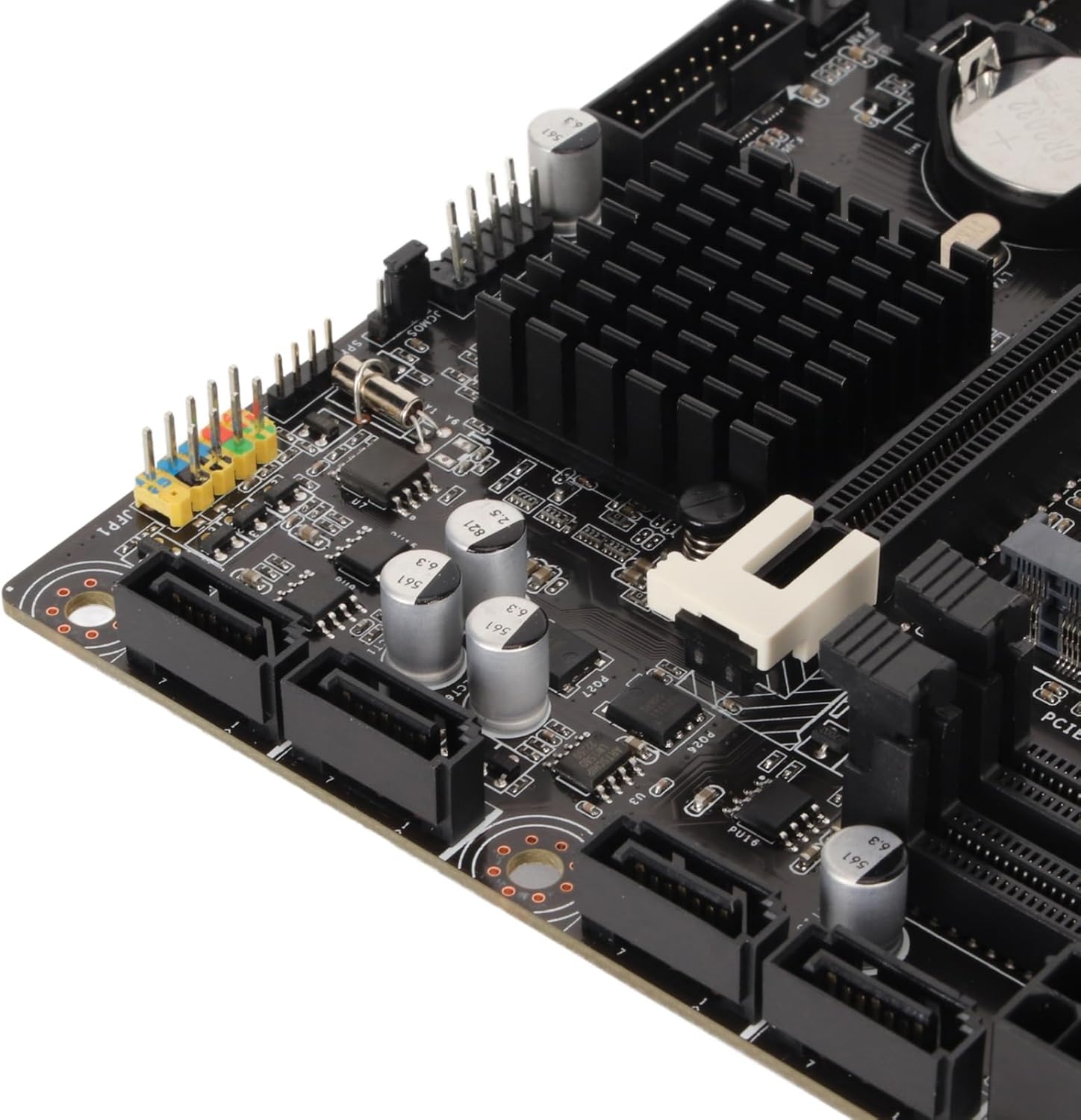
ചിത്രം 5: ക്ലോസപ്പ് view of the four SATA 3.0 ports on the motherboard, used for connecting storage devices.
2.5 ഗ്രാഫിക്സ് കാർഡ് (PCIe) ഇൻസ്റ്റാളേഷൻ
- Locate the PCIe x16 slot (the longest PCIe slot).
- നിങ്ങളുടെ പിസി കേസിൽ നിന്ന് അനുബന്ധ എക്സ്പാൻഷൻ സ്ലോട്ട് കവർ നീക്കം ചെയ്യുക.
- Align your graphics card with the PCIe x16 slot and press down firmly until it is securely seated and the retention clip locks.
- ഒരു സ്ക്രൂ ഉപയോഗിച്ച് ഗ്രാഫിക്സ് കാർഡ് പിസി കേസിൽ ഉറപ്പിക്കുക.
- Connect any necessary PCIe power cables from your PSU to the graphics card.
2.6 ബന്ധിപ്പിക്കുന്ന പവർ
- Connect the 24-pin ATX main power connector from your PSU to the motherboard.
- Connect the 8-pin ATX 12V power connector from your PSU to the motherboard.
2.7 I/O Shield Installation
Before mounting the motherboard into your PC case, ensure you install the I/O shield into the case's rear opening. This protects the rear ports and prevents dust ingress.

Figure 6: Rear I/O panel of the Cuifati H310 motherboard, showing various ports including USB, LAN, and audio jacks.
3. പ്രവർത്തന നിർദ്ദേശങ്ങൾ
3.1 ആദ്യ ബൂട്ടും ബയോസ് സജ്ജീകരണവും
- നിങ്ങളുടെ പിസി അസംബിൾ ചെയ്ത ശേഷം, ഒരു മോണിറ്റർ, കീബോർഡ്, മൗസ് എന്നിവ ബന്ധിപ്പിക്കുക.
- Power on your system. During startup, repeatedly press the DEL key (or as indicated on screen) to enter the BIOS/UEFI setup.
- In the BIOS, configure settings such as boot order, date/time, and enable XMP for your RAM if applicable. Save changes and exit.
- Install your operating system (e.g., Windows 10) from a bootable USB drive or DVD.
3.2 ഡ്രൈവർ ഇൻസ്റ്റലേഷൻ
After installing your operating system, install the necessary drivers for your motherboard components. These typically include chipset drivers, audio drivers, LAN drivers, and integrated graphics drivers. Drivers can usually be found on the Cuifati support website or on an included driver CD/USB drive.
3.3 Integrated Graphics Output
The motherboard supports multiple display outputs (DVI, HDMI, VGA). You can connect up to three monitors simultaneously using these ports, provided your CPU has integrated graphics capabilities.

ചിത്രം 7: ക്ലോസപ്പ് view of the DVI, HDMI, and USB ports on the rear I/O panel.
4. പരിപാലനം
- ഇത് വൃത്തിയായി സൂക്ഷിക്കുക: Regularly clean your PC case and motherboard to prevent dust buildup, which can lead to overheating and component failure. Use compressed air to gently remove dust.
- ബയോസ് അപ്ഡേറ്റുകൾ: Periodically check the Cuifati website for BIOS updates. BIOS updates can improve system stability, compatibility, and performance. Follow the update instructions carefully.
- ഡ്രൈവർ അപ്ഡേറ്റുകൾ: പുതിയ സോഫ്റ്റ്വെയറുമായും ഹാർഡ്വെയറുമായും ഒപ്റ്റിമൽ പ്രകടനവും അനുയോജ്യതയും ഉറപ്പാക്കാൻ നിങ്ങളുടെ ഡ്രൈവറുകൾ അപ്ഡേറ്റ് ചെയ്ത് സൂക്ഷിക്കുക.
5. പ്രശ്നപരിഹാരം
നിങ്ങളുടെ മദർബോർഡിൽ പ്രശ്നങ്ങൾ നേരിടുകയാണെങ്കിൽ, ഇനിപ്പറയുന്ന പൊതുവായ ട്രബിൾഷൂട്ടിംഗ് ഘട്ടങ്ങൾ പരിഗണിക്കുക:
- പവർ ഇല്ല/ബൂട്ട് ഇല്ല:
- എല്ലാ പവർ കേബിളുകളും (24-പിൻ ATX, 8-പിൻ ATX 12V) സുരക്ഷിതമായി ബന്ധിപ്പിച്ചിട്ടുണ്ടെന്ന് ഉറപ്പാക്കുക.
- Verify your PSU is switched on and functioning correctly.
- Check front panel connections (power button, reset button).
- ഡിസ്പ്ലേ ഇല്ല:
- Confirm your monitor is connected to the correct graphics output (integrated or dedicated GPU).
- Reseat your graphics card and RAM modules.
- If using a dedicated GPU, ensure it is properly powered.
- സിസ്റ്റം അസ്ഥിരത/ക്രാഷുകൾ:
- സിപിയു, ജിപിയു താപനിലകൾ പരിശോധിക്കുക.
- Ensure RAM modules are correctly installed and compatible.
- ബയോസും ഡ്രൈവറുകളും അപ്ഡേറ്റ് ചെയ്യുക.
- BIOS Q-Flash Plus Button: The motherboard features a BIOS Q-Flash Plus button on the rear I/O panel, allowing you to update the BIOS without a CPU, RAM, or graphics card installed. Refer to the manufacturer's website for detailed instructions on using this feature.
6 സ്പെസിഫിക്കേഷനുകൾ
| ഫീച്ചർ | വിശദാംശങ്ങൾ |
|---|---|
| ബ്രാൻഡ് | ക്യൂഫാറ്റി |
| സിപിയു സോക്കറ്റ് | LGA 1151 |
| അനുയോജ്യമായ പ്രോസസ്സറുകൾ | Intel Core i3/i5/i7/i9 8th/9th Gen |
| ചിപ്സെറ്റ് തരം | ഇൻ്റൽ H310 |
| റാം മെമ്മറി ടെക്നോളജി | DDR4 |
| മെമ്മറി ക്ലോക്ക് സ്പീഡ് | 1600 MHz (Supports 1066, 1333, 1600MHz) |
| പരമാവധി റാം ശേഷി | Up to 32GB (2 x 16GB DIMM slots) |
| അനുയോജ്യമായ ഉപകരണങ്ങൾ | പേഴ്സണൽ കമ്പ്യൂട്ടർ |
| പ്ലാറ്റ്ഫോം | വിൻഡോസ് 10 |
| സംഭരണ ഇന്റർഫേസുകൾ | 4 x SATA 3.0 (6Gb/s) ports |
| ഔട്ട്പുട്ടുകൾ പ്രദർശിപ്പിക്കുക | DVI, HDMI, VGA |
| യുഎസ്ബി പോർട്ടുകൾ (പിൻവശം) | 4 x USB 2.0, 2 x USB 3.2 Gen 1, 1 x USB 3.2 Gen 2, 1 x USB 3.2 Gen 1 Type-C |
| ലാൻ | 1 x ജിഗാബൈറ്റ് ഇഥർനെറ്റ് |
| ഓഡിയോ | സംയോജിത ഹൈ ഡെഫനിഷൻ ഓഡിയോ |
| ഇനത്തിൻ്റെ ഭാരം | 1.13 പൗണ്ട് |
| പാക്കേജ് അളവുകൾ | 10.24 x 7.87 x 1.97 ഇഞ്ച് |
| മോഡൽ നമ്പർ | Cuifati0ohk6rbtdm |
7. വാറൻ്റിയും പിന്തുണയും
For warranty information, technical support, and the latest driver/BIOS downloads, please visit the official Cuifati webസൈറ്റ്. വാറൻ്റി ക്ലെയിമുകൾക്കായി നിങ്ങളുടെ വാങ്ങൽ രസീത് സൂക്ഷിക്കുക.
For additional product information and visual guides, please refer to the product overview വീഡിയോ താഴെ:
വീഡിയോ 1: ഔദ്യോഗിക ഉൽപ്പന്നം അവസാനിച്ചുview for the Cuifati H310 Motherboard. This video provides a visual guide to the motherboard's features and components.


