1. ഉൽപ്പന്നം കഴിഞ്ഞുview
The Waveshare Industrial Grade Serial Server is a versatile device data acquisitor and IoT gateway designed for robust industrial environments. It integrates multiple functionalities including a serial server, Modbus gateway, MQTT gateway, and serial port to HTTPD Client. Equipped with RS232, RS485, WiFi, and Ethernet interfaces, this module facilitates seamless communication such as serial port to WiFi, serial port to Ethernet, and Ethernet to WiFi.
പ്രധാന സവിശേഷതകളിൽ ഇവ ഉൾപ്പെടുന്നു:
- Multi-functional Integration: Combines serial server, Modbus gateway, MQTT gateway, and serial port to HTTPD Client.
- ഫ്ലെക്സിബിൾ കണക്റ്റിവിറ്റി: Supports RS232, RS485, WiFi, and Ethernet interfaces for diverse application scenarios.
- വൈഡ് പവർ ഇൻപുട്ട്: Onboard multiple power supply interfaces supporting 6~36V wide range power supply, with optional PoE function.
- വ്യാവസായിക ഗ്രേഡ് ഡിസൈൻ: Features a durable metal case, supporting both wall-mount and rail-mount installations for easy integration into industrial setups.
- അപേക്ഷകൾ: Ideal for data acquisition, IoT gateway solutions, safety & security IoT, and intelligent instrument monitoring.

Figure 1: Waveshare Industrial Grade Serial Server
2. പാക്കേജ് ഉള്ളടക്കം
താഴെ ലിസ്റ്റ് ചെയ്തിരിക്കുന്ന എല്ലാ ഇനങ്ങളും നിങ്ങളുടെ പാക്കേജിൽ ഉൾപ്പെടുത്തിയിട്ടുണ്ടെന്ന് ഉറപ്പാക്കുക. ഏതെങ്കിലും ഇനങ്ങൾ നഷ്ടപ്പെട്ടിട്ടുണ്ടെങ്കിലോ കേടായിട്ടുണ്ടെങ്കിലോ, ദയവായി നിങ്ങളുടെ വിൽപ്പനക്കാരനെ ബന്ധപ്പെടുക.

ചിത്രം 2: പാക്കേജ് ഉള്ളടക്കം
- Waveshare Industrial Grade Serial Server Unit
- വൈഫൈ ആൻ്റിന
- Wall-mount/Rail-mount Bracket
- സ്ക്രൂഡ്രൈവർ
- മൗണ്ടിംഗ് സ്ക്രൂകൾ (4x)
Note: The power supply is not included. A 12V power adapter is recommended for use if not utilizing PoE.
3 സ്പെസിഫിക്കേഷനുകൾ
Detailed technical specifications for the Waveshare Industrial Grade Serial Server.

ചിത്രം 3: ഉൽപ്പന്ന സ്പെസിഫിക്കേഷനുകൾ കഴിഞ്ഞുview
| ഫീച്ചർ | വിശദാംശങ്ങൾ |
|---|---|
| മോഡൽ നമ്പർ | RS232/485 TO W-FI POE ETH (B) |
| ബ്രാൻഡ് | വേവ്ഷെയർ |
| സീരിയൽ ഇന്റർഫേസുകൾ | RS232, RS485 |
| നെറ്റ്വർക്ക് ഇൻ്റർഫേസുകൾ | WiFi (802.11n), Ethernet (10/100 Mbps) |
| പവർ ഇൻപുട്ട് | DC 6~36V (Screw Terminal or DC 5.5 port), PoE (802.3af standard) |
| ഓപ്പറേറ്റിംഗ് മോഡുകൾ | Serial Server, Modbus Gateway, MQTT Gateway, Serial to HTTPD Client, Transparent Transmission, AP, STA, AP+STA, Router, Bridge |
| ബ ud ഡ്രേറ്റ് | 300 ~ 115200 bps |
| പ്രവർത്തന താപനില | -40°C ~ 85°C |
| കേസ് മെറ്റീരിയൽ | Industrial Grade Metal |
| മൗണ്ടിംഗ് ഓപ്ഷനുകൾ | Wall-mount, Rail-mount |
4. സജ്ജീകരണ ഗൈഡ്
4.1 ഫിസിക്കൽ ഇൻസ്റ്റലേഷൻ
The device supports both wall-mount and rail-mount installations. Use the provided bracket and screws to secure the unit in your desired location. Ensure adequate ventilation around the device.
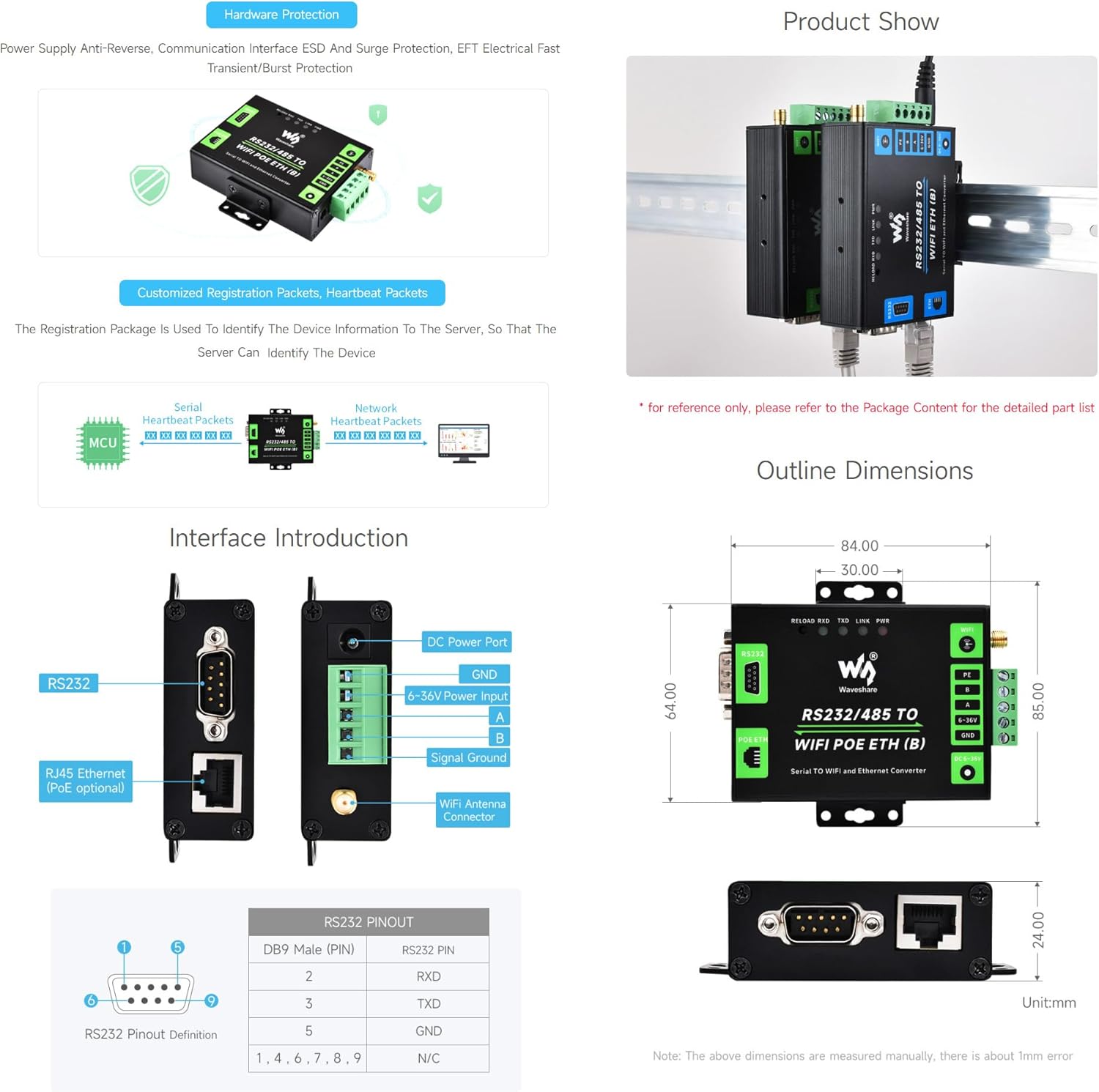
Figure 4: Interface Introduction and Dimensions
4.2 പവർ കണക്ഷൻ
The device offers flexible power options:
- PoE (പവർ ഓവർ ഇഥർനെറ്റ്): If your network infrastructure supports 802.3af PoE, connect an Ethernet cable from a PoE-enabled switch or injector to the device's RJ45 Ethernet port. This will power the device and provide network connectivity simultaneously.
- ഡിസി പവർ ഇൻപുട്ട്: Alternatively, connect a DC power adapter (6~36V recommended, 12V typical) to the DC 5.5 power port or use the screw terminal for direct wiring. Ensure correct polarity when using the screw terminal (GND and 6-36V).

Figure 5: Multi Power Supply Methods
4.3 Serial Port Connection (RS232/RS485)
- RS232: Connect your RS232 device to the DB9 male connector. Refer to the pinout diagram (Figure 4) for correct wiring.
- RS485: Connect your RS485 device to the A and B terminals on the screw terminal block. Ensure proper A/B polarity for communication.
4.4 Network Connection (Ethernet/WiFi)
- ഇഥർനെറ്റ്: Connect an Ethernet cable from your network switch or router to the RJ45 Ethernet port.
- വൈഫൈ: Screw the provided WiFi antenna onto the SMA connector. The device can operate in various WiFi modes (AP, STA, AP+STA) which are configured via the web interface or serial commands.
5. ഓപ്പറേറ്റിംഗ് മോഡുകളും കോൺഫിഗറേഷനും
The Waveshare Serial Server supports a variety of operating modes to suit different application needs. Configuration is primarily done via a web interface or AT commands through the serial port.
5.1 പ്രാരംഭ ആക്സസും കോൺഫിഗറേഷനും
To access the device's web interface for configuration:
- Ensure the device is powered on and connected to your network (via Ethernet or WiFi).
- The default IP address for the WiFi interface is typically 10.10.100.254. Ensure your computer is on the same subnet for initial access.
- എ തുറക്കുക web browser and enter the device's IP address (e.g.,
http://10.10.100.254). - Log in using the default credentials (refer to the full manual or product documentation for default username/password, if any).
- ൽ നിന്ന് web interface, you can configure network settings (IP address, subnet, gateway), serial port parameters (baud rate, data bits, parity, stop bits), and select the desired operating mode.
Note: Some advanced configurations or troubleshooting may require using specific software tools (e.g., SSCOM) or AT commands via a serial terminal. Refer to the manufacturer's detailed documentation for comprehensive AT command sets.
5.2 Supported Operating Modes
The device supports various modes for data transmission and network integration:
- Transparent Transmission Mode: Allows direct, transparent data transfer between serial and network interfaces (TCP Server, TCP Client, UDP Server, UDP Client).
- Modbus Gateway: Converts Modbus RTU/ASCII to Modbus TCP, enabling Modbus devices to communicate over Ethernet/WiFi.
- MQTT Gateway: Facilitates communication with MQTT brokers, allowing serial data to be published to or subscribed from MQTT topics.
- Serial Port to HTTPD Client: Enables the device to send serial data to an HTTP server via HTTP POST/GET requests.
- വൈഫൈ മോഡുകൾ:
- AP മോഡ്: The device acts as an Access Point, allowing other WiFi devices to connect to it.
- STA മോഡ്: The device connects to an existing WiFi network as a client.
- AP+STA Mode: The device operates as both an Access Point and a client simultaneously.
- Wired + Wireless Networking Applications: Supports APLAN, APWAN, Router, and Bridge modes for complex network setups.

Figure 6: Transmission and Wireless Networking Modes
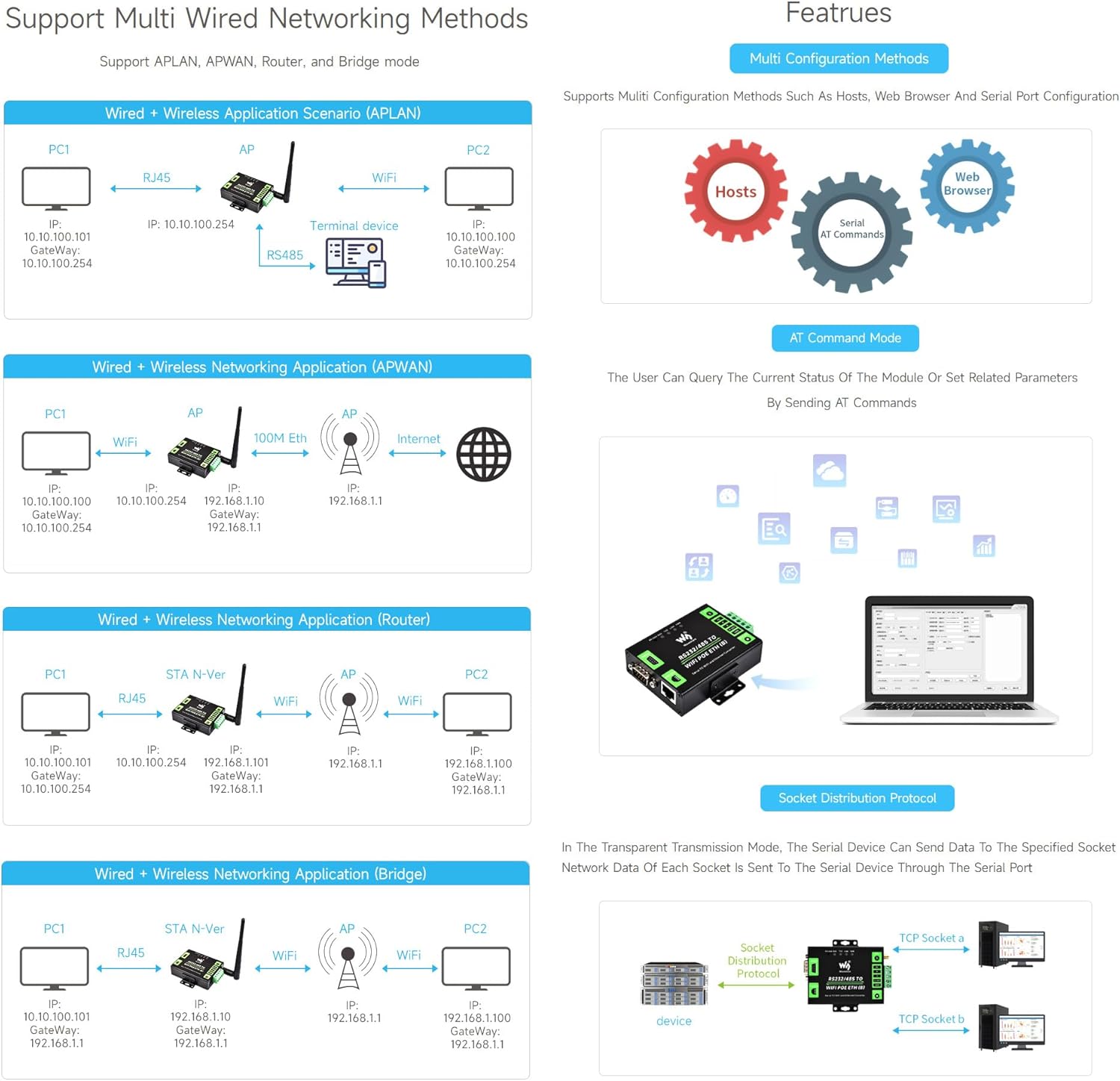
Figure 7: Wired and Wireless Networking Methods
6. പരിപാലനം
To ensure optimal performance and longevity of your Waveshare Industrial Grade Serial Server, follow these maintenance guidelines:
- വൃത്തിയാക്കൽ: Periodically clean the device's exterior with a soft, dry cloth. Avoid using liquid cleaners or solvents.
- ഫേംവെയർ അപ്ഡേറ്റുകൾ: Check the Waveshare official website for any available firmware updates. Keeping the firmware updated can improve performance, add new features, and resolve potential issues. Follow the provided instructions carefully when performing updates.
- പരിസ്ഥിതി വ്യവസ്ഥകൾ: Ensure the device operates within its specified temperature and humidity ranges (-40°C ~ 85°C, 5-95% relative humidity). Avoid exposing the device to excessive dust, moisture, or direct sunlight.
- കേബിൾ മാനേജുമെന്റ്: Ensure all connected cables (serial, Ethernet, power) are securely fastened and not under strain to prevent accidental disconnections or damage.
7. പ്രശ്നപരിഹാരം
This section addresses common issues you might encounter with the Waveshare Industrial Grade Serial Server.
| പ്രശ്നം | സാധ്യമായ കാരണം / പരിഹാരം |
|---|---|
| ഉപകരണം ഓണാക്കുന്നില്ല. |
|
| ആക്സസ് ചെയ്യാൻ കഴിയില്ല web ഇൻ്റർഫേസ്. |
|
| Serial communication issues. |
|
| WiFi connectivity problems. |
|
8. വാറൻ്റിയും പിന്തുണയും
Waveshare products typically come with a standard manufacturer's warranty. For specific warranty terms and conditions, please refer to the documentation provided with your purchase or visit the official Waveshare webസൈറ്റ്.
For technical support, troubleshooting assistance, or to download the latest drivers and firmware, please visit the Waveshare official support page or contact their customer service directly. When contacting support, please have your product model number (RS232/485 TO W-FI POE ETH (B)) and purchase details ready.
ഔദ്യോഗിക വേവ്ഷെയർ Webസൈറ്റ്: www.waveshare.com


