1. ആമുഖം
This manual provides essential information for setting up, operating, maintaining, and troubleshooting your HP Pro Tower 290 G9 Desktop Computer. Designed for efficiency and performance, this system is equipped with a 12th Gen Intel Core i3-12100 processor, integrated Intel UHD Graphics 730, and runs on Windows 11 Pro. It offers robust connectivity and ample storage options to support various computing needs.
2. ബോക്സിൽ എന്താണുള്ളത്?
Your HP Pro Tower 290 G9 package includes the following items:
- HP Pro Tower 290 G9 Desktop Computer
- HP 125 Wired Keyboard with Numeric Keypad (Black, English layout)
- HP 125 Wired USB Mouse (Black)
- പവർ അഡാപ്റ്റർ
3. ഉൽപ്പന്നം കഴിഞ്ഞുview
3.1. ഫ്രണ്ട് View

This image displays the HP Pro Tower 290 G9 desktop computer from an angled front perspective, highlighting its compact tower design and accessible front ports.
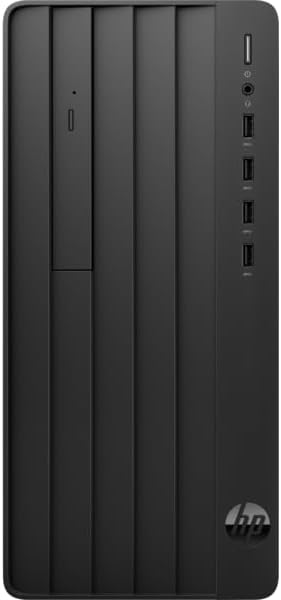
ഒരു നേർരേഖാ മുന്നണി view of the HP Pro Tower 290 G9, showcasing the slim DVD-Writer drive, power button, headphone/microphone combo jack, and four USB Type-A ports.
3.2. പിൻഭാഗം View

The back panel of the HP Pro Tower 290 G9 is displayed, revealing the HDMI, VGA, line in/out, RJ-45 Ethernet, and four USB 2.0 ports, along with the power connector.
3.3. അളവുകൾ

This diagram provides the physical dimensions of the HP Pro Tower 290 G9 (11.97 inches deep, 6.12 inches wide, 13.28 inches high) along with the included HP 125 wired USB keyboard and mouse.
- അളവുകൾ (L x W x H): 11.92 x 6.10 x 13.27 ഇഞ്ച്
- ഭാരം: 10.5 പൗണ്ട് മുതൽ ആരംഭിക്കുന്നു
4. സജ്ജീകരണ നിർദ്ദേശങ്ങൾ
Follow these steps for initial setup of your HP Pro Tower 290 G9:
- ഘടകങ്ങൾ അൺപാക്ക് ചെയ്യുക: Carefully remove the desktop, keyboard, mouse, and power adapter from their packaging.
- പെരിഫറലുകൾ ബന്ധിപ്പിക്കുക: Connect the wired keyboard and mouse to the available USB ports on the front or rear of the computer.
- മോണിറ്റർ ബന്ധിപ്പിക്കുക: Connect your monitor to the desktop using an HDMI or VGA cable. Ensure the monitor is also connected to a power source.
- പവർ ബന്ധിപ്പിക്കുക: Plug the power adapter into the desktop's power connector and then into a wall outlet.
- പവർ ഓൺ: Press the power button on the front of the desktop. The system will boot up, and you will be guided through the Windows 11 Pro initial setup process.
5. പ്രവർത്തന നിർദ്ദേശങ്ങൾ
Your HP Pro Tower 290 G9 comes pre-installed with Windows 11 Pro, offering a secure and efficient operating environment. The 12th Gen Intel Core i3-12100 processor and up to 32GB DDR4 RAM ensure smooth multitasking and responsive performance for daily tasks, business applications, and multimedia consumption.
- വിൻഡോസ് 11 പ്രോ: Explore the features of Windows 11 Pro for enhanced productivity and security.
- കണക്റ്റിവിറ്റി: Utilize Realtek RTL8822CE 802.11a/b/g/n/ac (2x2) Wi-Fi for wireless internet access and Bluetooth 5 for connecting wireless peripherals.
- ഒപ്റ്റിക്കൽ ഡ്രൈവ്: The integrated slim DVD-Writer supports reading from and writing to CDs and DVDs.
- സംഭരണം: Benefit from fast boot times and application loading with the PCIe M.2 Solid State Drive.
6. പരിപാലനം
Regular maintenance helps ensure the longevity and optimal performance of your desktop computer:
- വൃത്തിയായി സൂക്ഷിക്കു: Regularly clean the exterior of the computer with a soft, dry cloth. Ensure ventilation openings are free from dust and obstructions.
- സോഫ്റ്റ്വെയർ അപ്ഡേറ്റുകൾ: സുരക്ഷയും പ്രകടന മെച്ചപ്പെടുത്തലുകളും നേടുന്നതിനായി നിങ്ങളുടെ Windows ഓപ്പറേറ്റിംഗ് സിസ്റ്റവും ഡ്രൈവറുകളും ഏറ്റവും പുതിയ പതിപ്പുകളിലേക്ക് അപ്ഡേറ്റ് ചെയ്യുക.
- ഡാറ്റ ബാക്കപ്പ്: ഡാറ്റ നഷ്ടപ്പെടുന്നത് തടയാൻ, പ്രധാനപ്പെട്ട ഡാറ്റ ഇടയ്ക്കിടെ ഒരു ബാഹ്യ ഡ്രൈവിലേക്കോ ക്ലൗഡ് സ്റ്റോറേജിലേക്കോ ബാക്കപ്പ് ചെയ്യുക.
- ശരിയായ ഷട്ട്ഡൗൺ: Always shut down the computer properly through the operating system to prevent potential data corruption.
7. പ്രശ്നപരിഹാരം
If you encounter issues with your HP Pro Tower 290 G9, consider the following common troubleshooting steps:
- ശക്തിയില്ല: Ensure the power cable is securely connected to both the computer and the wall outlet. Test the outlet with another device.
- ഡിസ്പ്ലേ ഇല്ല: Verify that the monitor is properly connected to the desktop and its power source. Try a different video cable or monitor if available.
- മന്ദഗതിയിലുള്ള പ്രകടനം: Close unnecessary applications, check for malware, ensure sufficient free storage space, and verify that Windows and drivers are updated.
- പെരിഫറൽ പ്രവർത്തിക്കുന്നില്ല: Ensure USB devices are securely plugged in. Try a different USB port or restart the computer.
- ഇന്റർനെറ്റ് കണക്റ്റിവിറ്റി പ്രശ്നങ്ങൾ: Check your Wi-Fi connection, router, and modem. Restart network devices if necessary.
8 സ്പെസിഫിക്കേഷനുകൾ
| ഫീച്ചർ | സ്പെസിഫിക്കേഷൻ |
|---|---|
| പ്രോസസ്സർ | 12th Gen Intel Core i3-12100 (up to 4.3 GHz, 4 cores, 8 threads) |
| ഗ്രാഫിക്സ് | ഇൻ്റഗ്രേറ്റഡ് ഇൻ്റൽ UHD ഗ്രാഫിക്സ് 730 |
| ഓപ്പറേറ്റിംഗ് സിസ്റ്റം | Windows 11 Pro, 64-bit, English |
| മെമ്മറി (റാം) | 16 ജിബി ഡിഡിആർ 4 (32 ജിബി വരെ ക്രമീകരിക്കാം) |
| സംഭരണം | 1 TB NVMe SSD (Configurable up to 2TB PCIe M.2 SSD or 1TB HDD) |
| ഒപ്റ്റിക്കൽ ഡ്രൈവ് | എച്ച്പി 9.5 എംഎം സ്ലിം ഡിവിഡി-റൈറ്റർ |
| ഫ്രണ്ട് പോർട്ടുകൾ | 4x USB Type-A 5Gbps, 1x Headphone/Microphone Combo |
| പിൻ തുറമുഖങ്ങൾ | 1x HDMI, 1x VGA, 1x Line In, 1x Line Out, 1x Power Connector, 1x RJ-45, 4x USB 2.0 |
| കണക്റ്റിവിറ്റി | Realtek RTL8822CE 802.11a/b/g/n/ac (2x2) Wi-Fi and Bluetooth 5 |
| നിറം | കറുപ്പ് |
| അളവുകൾ (L x W x H) | 11.92 x 6.10 x 13.27 ഇഞ്ച് |
| ഭാരം | Starts at 10.5 lbs |
9. വാറൻ്റിയും പിന്തുണയും
For warranty information, technical support, and additional resources, please visit the official HP support website or contact HP customer service. Keep your product's serial number and model information readily available when seeking support.
HP പിന്തുണ Webസൈറ്റ്: www.hp.com/support