1. ആമുഖം
This manual provides essential instructions for setting up, operating, maintaining, and troubleshooting your Cuifati 5G Mobile Router. This portable device offers high-speed 5G connectivity and Wi-Fi 6 (802.11ac) dual-band support (2.4GHz and 5.8GHz), allowing up to 16 users to connect simultaneously. It features a 2.4-inch TFT MIPI LCD display for status information and is powered by a built-in 4000mAh Li-ion battery.
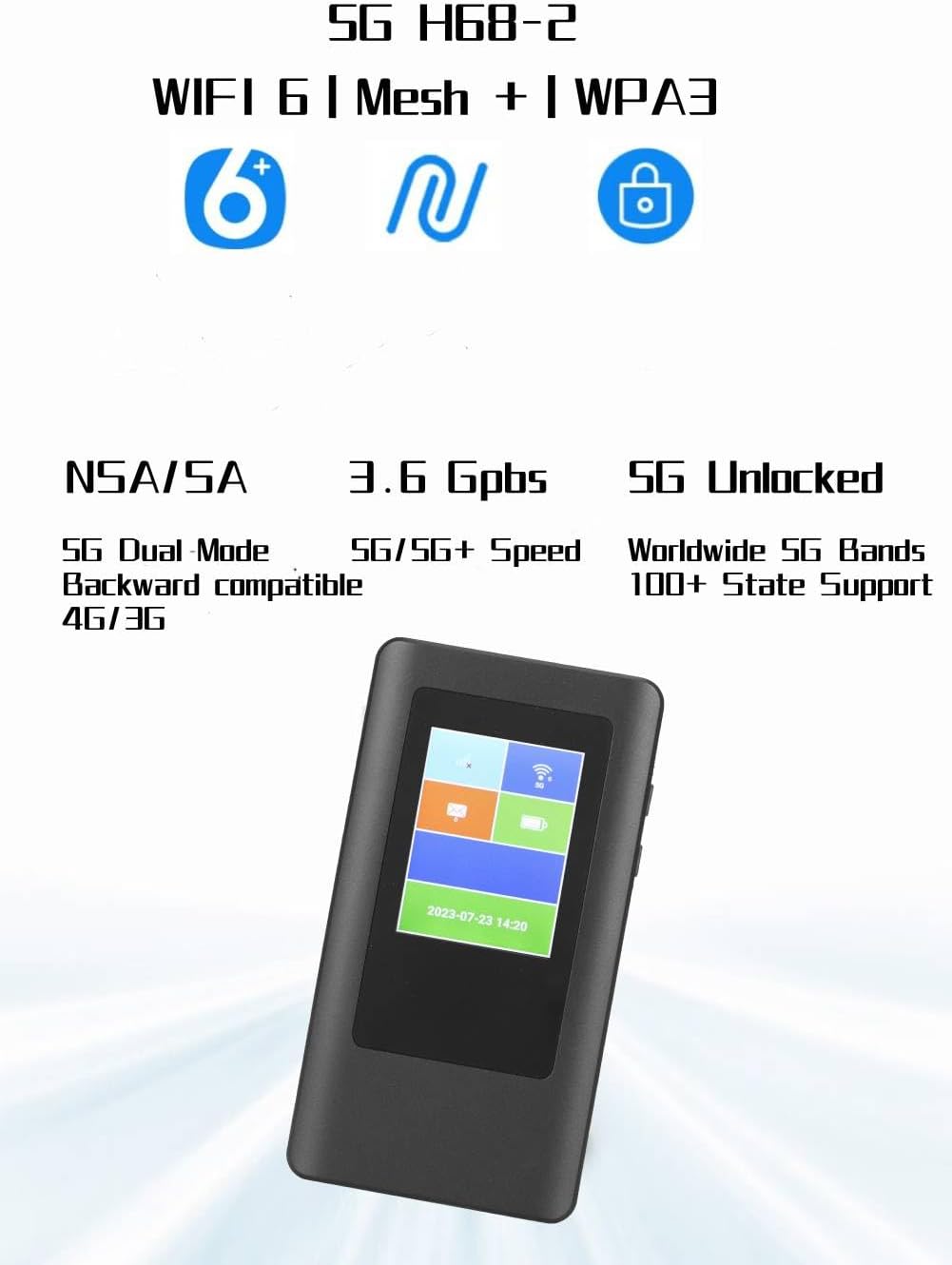
ചിത്രം 1: മുൻഭാഗം view of the Cuifati 5G Mobile Router.
2. പാക്കേജ് ഉള്ളടക്കം
നിങ്ങളുടെ പാക്കേജിൽ എല്ലാ ഇനങ്ങളും ഉണ്ടെന്ന് ഉറപ്പാക്കുക:
- 1 x Cuifati 5G Mobile Router
- 1 x ചാർജിംഗ് കേബിൾ
- 1 x ഇൻസ്ട്രക്ഷൻ മാനുവൽ
3. സജ്ജീകരണം
3.1 സിം കാർഡ് ഇൻസ്റ്റാളേഷൻ
The device uses a Nano SIM card (not included). Ensure the device is powered off before inserting or removing the SIM card.
- Locate the SIM card slot on the side of the router.
- Gently insert the Nano SIM card into the slot with the gold contacts facing down and the notched corner aligned correctly. Push until it clicks into place.
- To remove, gently push the SIM card inward until it springs out.

ചിത്രം 2: വശം view of the router, indicating the SIM card slot location.
3.2 പവർ ഓൺ/ഓഫ്
- പവർ ഓണാക്കാൻ: Press and hold the power button (usually located on the side) for a few seconds until the display screen illuminates.
- പവർ ഓഫ് ചെയ്യാൻ: Press and hold the power button until a power-off option appears on the screen, then confirm. Alternatively, continue holding the button until the device shuts down.
3.3 പ്രാരംഭ കോൺഫിഗറേഷൻ
Upon first power-on or after a factory reset, the device may guide you through an initial setup process on its 2.4-inch TFT display. This typically involves setting up Wi-Fi network name (SSID) and password. Refer to the on-screen prompts for detailed steps.
4. ഓപ്പറേഷൻ
4.1 വൈഫൈ വഴി ഉപകരണങ്ങൾ ബന്ധിപ്പിക്കൽ
The router supports up to 16 simultaneous connections. To connect your devices:
- Ensure the 5G Mobile Router is powered on.
- On your Wi-Fi enabled device (smartphone, laptop, tablet), open the Wi-Fi settings.
- ഇതിനായി തിരയുക available networks. The router's default SSID (network name) can be found on the device's display or on a label inside the battery compartment.
- Select the router's SSID and enter the Wi-Fi password (also found on the device's display or label).
- Once connected, your device will have internet access through the 5G Mobile Router.
4.2 ഡിസ്പ്ലേ മനസ്സിലാക്കുന്നു
The 2.4-inch TFT MIPI LCD display provides real-time information about the device's status, including:
- Signal strength (5G/4G/3G)
- ബാറ്ററി നില
- Connected users
- ഡാറ്റ ഉപയോഗം
- Wi-Fi SSID and password
- നിലവിലെ സമയവും തീയതിയും

Figure 3: Router display showing various status indicators.
4.3 Network Bands and Compatibility
The router supports a wide range of 5G, 4G, and 3G bands, making it suitable for use in various regions including the Americas, Europe, Australia, Asia, Southeast Asia, Africa, and the Middle East. For optimal performance, ensure your Nano SIM card's network provider operates on the supported frequency bands.
5. പരിപാലനം
5.1 ഉപകരണം ചാർജ് ചെയ്യുന്നു
The router is equipped with a 4000mAh Li-ion battery. Use the provided charging cable to connect the device to a compatible USB power adapter (not included) or a computer's USB port. The display will indicate charging status.
5.2 പൊതുവായ പരിചരണവും സംഭരണവും
- വെള്ളം, ഈർപ്പം, തീവ്രമായ താപനില എന്നിവയിൽ നിന്ന് ഉപകരണം അകറ്റി നിർത്തുക.
- ശക്തമായ ആഘാതങ്ങൾക്ക് ഉപകരണം ഇടുകയോ ഇടുകയോ ചെയ്യുന്നത് ഒഴിവാക്കുക.
- മൃദുവായതും ഉണങ്ങിയതുമായ തുണി ഉപയോഗിച്ച് ഉപകരണം വൃത്തിയാക്കുക. ലിക്വിഡ് ക്ലീനറുകൾ ഉപയോഗിക്കരുത്.
- ദീർഘനേരം സൂക്ഷിക്കുമ്പോൾ, ബാറ്ററിയുടെ ആയുസ്സ് വർദ്ധിപ്പിക്കുന്നതിന് ബാറ്ററി ഭാഗികമായി (ഏകദേശം 50%) ചാർജ്ജ് ചെയ്തിട്ടുണ്ടെന്ന് ഉറപ്പാക്കുക.
6. പ്രശ്നപരിഹാരം
6.1 ഇന്റർനെറ്റ് കണക്ഷൻ ഇല്ല
- സിം കാർഡ് പരിശോധിക്കുക: Ensure the Nano SIM card is correctly inserted and active with a data plan.
- നെറ്റ്വർക്ക് സിഗ്നൽ: Verify that the device has a sufficient 5G/4G/3G signal. Move to an area with better reception if needed.
- APN ക്രമീകരണങ്ങൾ: In some cases, you may need to manually configure the Access Point Name (APN) settings. Refer to your mobile network provider for the correct APN details.
- ഉപകരണം പുനരാരംഭിക്കുക: Power off the router, wait a few seconds, then power it back on.
6.2 കുറഞ്ഞ കണക്ഷൻ വേഗത
- സിഗ്നൽ ശക്തി: A weak signal can lead to slower speeds.
- ഉപയോക്താക്കളുടെ എണ്ണം: Too many connected devices can reduce individual speeds.
- നെറ്റ്വർക്ക് തിരക്ക്: Performance can be affected by network traffic from your service provider.
- Frequency Band Compatibility: Ensure your SIM card's network supports the router's bands for optimal speed.
6.3 ഉപകരണം ഓണാക്കുന്നില്ല
- ബാറ്ററി നില: ബാറ്ററി ചാർജ്ജ് ചെയ്തിട്ടുണ്ടെന്ന് ഉറപ്പാക്കുക. ഉപകരണം ഒരു പവർ സ്രോതസ്സുമായി ബന്ധിപ്പിക്കുക.
- Charging Cable/Adapter: Try a different charging cable or power adapter to rule out faulty accessories.
6.4 Frequency Band Verification
വാങ്ങുന്നതിന് മുമ്പ്asing or if experiencing connectivity issues, it is recommended to verify the frequency bands supported by your local network operators. You can often find this information on your operator's website or through resources like Wikipedia's List of LTE networks (note: this link is for LTE, but similar resources exist for 5G bands).
7 സ്പെസിഫിക്കേഷനുകൾ
| ഫീച്ചർ | വിശദാംശങ്ങൾ |
|---|---|
| മോഡൽ നമ്പർ | CUIFATIx13eym7fuc |
| ചിപ്സെറ്റ് | MTK MT6833 |
| മെമ്മറി | LPDDR4X 2GB, EMMC 16GB ROM |
| സ്ക്രീൻ വലിപ്പം | 2.4 Inch TFT MIPI LCD |
| സിം തരം | Nano SIM (Not Included) |
| 5 ജി ബാൻഡുകൾ | N2, N5, N12, N25, N66, N71, N41, N48, N77, N78 |
| 4 ജി ബാൻഡുകൾ | B2, B4, B5, B7, B12, B13, B14, B17, B25, B26, B29, B30, B41, B46, B48, B66, B71 |
| 3 ജി ബാൻഡുകൾ | B1, B2, B4, B5, B8 |
| വൈഫൈ സ്റ്റാൻഡേർഡ് | 802.11 A/B/G/N/Ac (Wi-Fi 6) |
| Wi-Fi ഫ്രീക്വൻസി | 2.4GHz, 5.8GHz (Dual-Band) |
| പിന്തുണയ്ക്കുന്ന ഉപയോക്താക്കൾ | ഒരേ സമയം 16 ഉപയോക്താക്കൾ വരെ |
| ബാറ്ററി തരം | ബിൽറ്റ്-ഇൻ 4000mAh Li-ion ബാറ്ററി |
| Download Speed (Max) | 2.77Gbps |
| Upload Speed (Max) | 1.25Gbps |
| ഇനത്തിൻ്റെ ഭാരം | 10.4 ഔൺസ് |
| അളവുകൾ | 6.69 x 4.72 x 2.36 ഇഞ്ച് (പാക്കേജ്) |
| ഓപ്പറേറ്റിംഗ് സിസ്റ്റം | റൂട്ടർഒഎസ് |
| പ്രത്യേക ഫീച്ചർ | WPS |
| ആൻ്റിന തരം | ആന്തരികം |
8. വാറൻ്റി വിവരങ്ങൾ
The Cuifati 5G Mobile Router is covered by a 90 ദിവസത്തെ വാറൻ്റി from the date of purchase. This warranty covers manufacturing defects and malfunctions under normal use. Please retain your proof of purchase for warranty claims. The warranty does not cover damage caused by misuse, accidents, unauthorized modifications, or external factors.
9. ഉപഭോക്തൃ പിന്തുണ
If you encounter any issues not covered in this manual or require further assistance, please contact Cuifati customer support through the retailer's platform where the product was purchased. Provide your model number (CUIFATIx13eym7fuc) and a detailed description of the problem for efficient support.
Video: Detailed overview and usage guide for the 5G Mobile Router. This video provides visual instructions and demonstrations of the device's features and functions.