1. ആമുഖം
This manual provides essential information for setting up, operating, and maintaining your ECOPAD Android 15 Tablet. Please read this guide thoroughly to ensure optimal performance and longevity of your device.

Image 1.1: The ECOPAD Android 15 Tablet shown with its accompanying keyboard, mouse, stylus, charger, and USB-C cable.
2. ബോക്സിൽ എന്താണുള്ളത്?
പാക്കേജിൽ എല്ലാ ഇനങ്ങളും ഉണ്ടെന്ന് ഉറപ്പാക്കുക:
- 1x ECOPAD K12 Tablet
- 1x വയർലെസ് കീബോർഡ്
- 1x മൗസ്
- 1x സ്റ്റൈലസ്
- 1x സ്ക്രീൻ പ്രൊട്ടക്ടർ
- 1x പവർ അഡാപ്റ്റർ
- 1x ടൈപ്പ്-സി കേബിൾ
- 1x Tablet Case (Stand Folio Protective Cover)
- 1x ഉപയോക്തൃ മാനുവൽ (ഈ പ്രമാണം)

Image 2.1: Visual representation of the items included in the ECOPAD tablet package, including the tablet, keyboard, mouse, stylus, and charging accessories.
3. ഉൽപ്പന്നം കഴിഞ്ഞുview
3.1 പ്രധാന സവിശേഷതകൾ
- ഓപ്പറേറ്റിംഗ് സിസ്റ്റം: Android 15 with GMS Certification
- ഡിസ്പ്ലേ: 10.1-inch HD IPS Touch Screen (1280x800 resolution)
- പ്രോസസ്സർ: Quad-Core ARM Processor (Mali-Gxx MPx Graphics Coprocessor)
- മെമ്മറി: 12GB RAM (4GB+8GB)
- സംഭരണം: 64GB ROM, expandable up to 1TB via Micro SD card
- ക്യാമറകൾ: 2MP ഫ്രണ്ട് ക്യാമറ, 8MP റിയർ ക്യാമറ
- കണക്റ്റിവിറ്റി: വൈഫൈ 6 (802.11ax), ബ്ലൂടൂത്ത് 5.0
- ബാറ്ററി: 6000mAh Lithium Battery (up to 6 hours average life)
- പ്രവർത്തനക്ഷമത: 2-in-1 Tablet with Keyboard and Mouse support, Smart Split-Screen
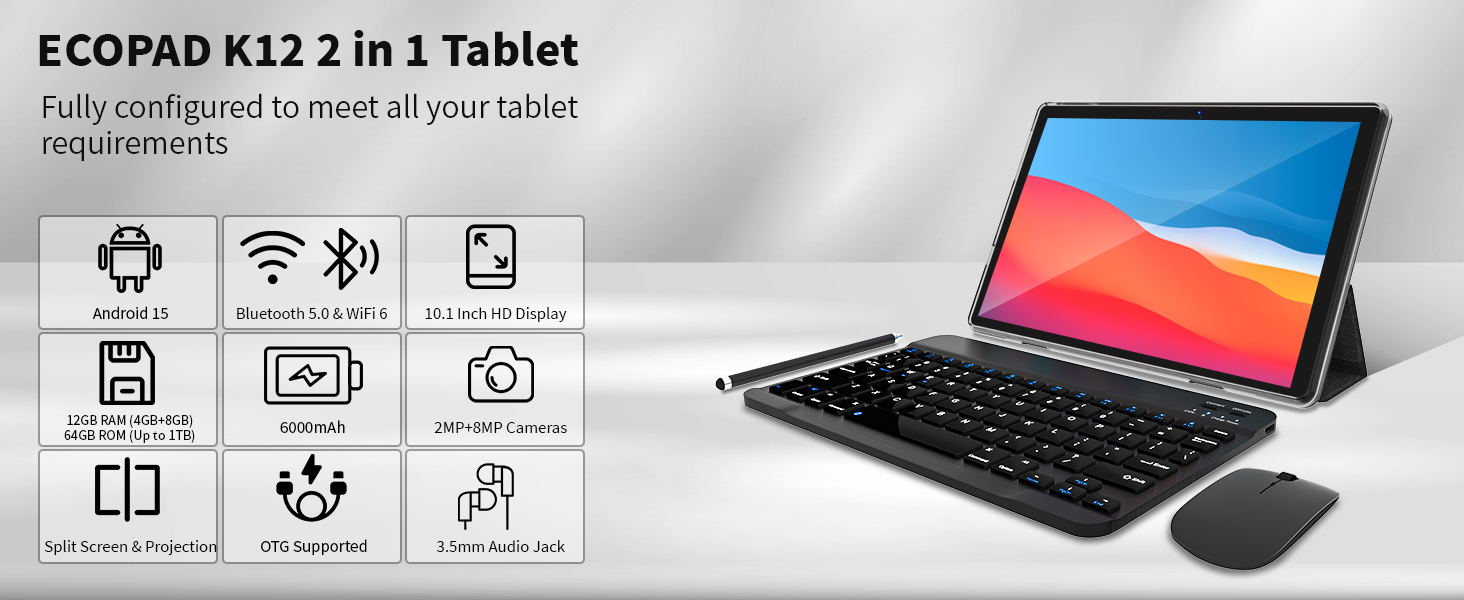
ചിത്രം 3.1: ഒരു ഓവർview graphic highlighting the ECOPAD K12 tablet's key features, including Android 15, Bluetooth 5.0 & WiFi 6, 10.1-inch HD Display, 12GB RAM, 64GB ROM, 6000mAh battery, and 2MP+8MP cameras.
4. സജ്ജീകരണം
4.1 പ്രാരംഭ പവർ ഓൺ
- Press and hold the Power button located on the side of the tablet until the ECOPAD logo appears.
- Follow the on-screen prompts to select your language, region, and accept the terms of service.
4.2 Wi-Fi-ലേക്ക് ബന്ധിപ്പിക്കുന്നു
- ഹോം സ്ക്രീനിൽ നിന്ന്, ക്വിക്ക് സെറ്റിംഗ്സ് പാനൽ തുറക്കാൻ മുകളിൽ നിന്ന് താഴേക്ക് സ്വൈപ്പ് ചെയ്യുക.
- അത് പ്രവർത്തനക്ഷമമാക്കാൻ Wi-Fi ഐക്കണിൽ ടാപ്പ് ചെയ്യുക.
- വൈഫൈ ക്രമീകരണങ്ങളിലേക്ക് പോകാൻ വൈഫൈ ഐക്കൺ ടാപ്പ് ചെയ്ത് പിടിക്കുക.
- ലിസ്റ്റിൽ നിന്ന് നിങ്ങൾക്ക് ആവശ്യമുള്ള നെറ്റ്വർക്ക് തിരഞ്ഞെടുത്ത് ആവശ്യപ്പെടുകയാണെങ്കിൽ പാസ്വേഡ് നൽകുക.
- Tap 'Connect'.

Image 4.1: The tablet screen showcasing its WiFi 6 connectivity, indicating faster and smoother wireless performance compared to 5GHz WiFi.
4.3 ഗൂഗിൾ അക്കൗണ്ട് സജ്ജീകരണം
To access the Google Play Store and other Google services, you will need to sign in with your Google account during the initial setup or later via the Settings app.
- During initial setup, select 'Sign in' when prompted.
- Enter your Google email or phone number and password.
- Follow any additional verification steps.
- If setting up later, go to Settings > Accounts > Add account > Google.
4.4 Connecting Keyboard and Mouse
The included wireless keyboard and mouse connect via Bluetooth.
- കീബോർഡും മൗസും ചാർജ് ചെയ്തിട്ടുണ്ടെന്നും പവർ ഓൺ ചെയ്തിട്ടുണ്ടെന്നും ഉറപ്പാക്കുക.
- നിങ്ങളുടെ ടാബ്ലെറ്റിൽ, ഇതിലേക്ക് പോകുക ക്രമീകരണങ്ങൾ > കണക്റ്റുചെയ്ത ഉപകരണങ്ങൾ > ബ്ലൂടൂത്ത്.
- Enable Bluetooth. The tablet will scan for available devices.
- Put your keyboard and mouse into pairing mode (refer to their individual manuals if needed).
- Select the keyboard and mouse from the list of available devices on your tablet to pair them.
5. ടാബ്ലെറ്റ് പ്രവർത്തിപ്പിക്കൽ
5.1 അടിസ്ഥാന നാവിഗേഷൻ
- സ്പർശന ആംഗ്യങ്ങൾ: തിരഞ്ഞെടുക്കാൻ ടാപ്പ് ചെയ്യുക, സ്ക്രോൾ ചെയ്യാൻ സ്വൈപ്പ് ചെയ്യുക, സൂം ചെയ്യാൻ പിഞ്ച് ചെയ്യുക.
- ഹോം സ്ക്രീൻ: Access apps and widgets.
- ആപ്പ് ഡ്രോയർ: സ്ക്രീനിന്റെ അടിയിൽ നിന്ന് മുകളിലേക്ക് സ്വൈപ്പുചെയ്യുക view ഇൻസ്റ്റാൾ ചെയ്ത എല്ലാ ആപ്ലിക്കേഷനുകളും.
- അറിയിപ്പുകളും ദ്രുത ക്രമീകരണങ്ങളും: സ്ക്രീനിൻ്റെ മുകളിൽ നിന്ന് താഴേക്ക് സ്വൈപ്പ് ചെയ്യുക.
5.2 2-in-1 Functionality
The ECOPAD tablet can be used in two primary modes:
- ടാബ്ലെറ്റ് മോഡ്: Use the touchscreen for direct interaction. Ideal for media consumption, reading, and casual browsing.
- ലാപ്ടോപ്പ് മോഡ്: Attach the keyboard and use the mouse for a more traditional computing experience. Suitable for productivity tasks like typing documents or managing spreadsheets.
5.3 Smart Split-Screen
The split-screen feature allows you to run two applications simultaneously, enhancing multitasking efficiency.
- നിങ്ങൾ ഉപയോഗിക്കാൻ ആഗ്രഹിക്കുന്ന ആദ്യ ആപ്ലിക്കേഷൻ തുറക്കുക.
- സമീപകാല ആപ്പുകൾ ബട്ടൺ (സാധാരണയായി ഒരു ചതുര ഐക്കൺ) ടാപ്പ് ചെയ്യുക, view ആപ്ലിക്കേഷനുകൾ തുറക്കുക.
- Tap and hold the icon of the first app at the top of its card, then select 'Split screen'.
- Choose the second application from your recent apps or app drawer to fill the other half of the screen.

Image 5.1: The 10.1-inch HD display demonstrating the split-screen feature, allowing two applications to be viewed and used simultaneously for improved productivity.
5.4 ആപ്ലിക്കേഷനുകൾ ഇൻസ്റ്റാൾ ചെയ്യുന്നു
The tablet is GMS certified, providing full access to the Google Play Store.
- Open the 'Play Store' app from your home screen or app drawer.
- ഇതിനായി തിരയുക ആവശ്യമുള്ള ആപ്ലിക്കേഷൻ.
- Tap 'Install' to download and install the app.
5.5 സംഭരണ വികസനം
The tablet supports Micro SD cards up to 1TB for additional storage.
- ടാബ്ലെറ്റിന്റെ വശത്ത് മൈക്രോ എസ്ഡി കാർഡ് സ്ലോട്ട് കണ്ടെത്തുക.
- Carefully insert the Micro SD card until it clicks into place.
- Follow any on-screen prompts to format the card if necessary.
5.6 ക്യാമറ ഉപയോഗം
The tablet features a 2MP front camera and an 8MP rear camera.
- 'ക്യാമറ' ആപ്പ് തുറക്കുക.
- ഫോട്ടോകൾ എടുക്കാൻ ഷട്ടർ ബട്ടൺ ടാപ്പ് ചെയ്യുക.
- ക്യാമറ ടോഗിൾ ഐക്കൺ ഉപയോഗിച്ച് മുൻ ക്യാമറയും പിൻ ക്യാമറയും തമ്മിൽ മാറുക.
- വീഡിയോകൾ റെക്കോർഡ് ചെയ്യാൻ വീഡിയോ മോഡ് തിരഞ്ഞെടുക്കുക.

Image 5.2: The tablet displaying a video conference call, demonstrating the clarity of the 10.1-inch Full HD IPS screen and the functionality of the dual cameras for communication.
6. പരിപാലനം
6.1 ബാറ്ററി കെയർ
- ബാറ്ററിയുടെ ആയുസ്സ് കുറയ്ക്കുമെന്നതിനാൽ തീവ്രമായ താപനില ഒഴിവാക്കുക.
- Charge the tablet using the provided Type-C cable and power adapter.
- ബാറ്ററി ഇടയ്ക്കിടെ പൂർണ്ണമായും തീർന്നുപോകാൻ അനുവദിക്കരുത്.

Image 6.1: Information regarding the 6000mAh Lithium Battery, including Type-C 10W Charging, 480H Standby, 20H Music playback, and 7H Video playback.
6.2 ഉപകരണം വൃത്തിയാക്കുന്നു
- സ്ക്രീനും ബോഡിയും വൃത്തിയാക്കാൻ മൃദുവായ, ലിന്റ് രഹിത തുണി ഉപയോഗിക്കുക.
- കഠിനമായ രാസവസ്തുക്കളോ ഉരച്ചിലുകളോ ഉപയോഗിക്കുന്നത് ഒഴിവാക്കുക.
- Ensure the tablet is powered off before cleaning.
6.3 സോഫ്റ്റ്വെയർ അപ്ഡേറ്റുകൾ
Regularly check for and install software updates to ensure your tablet has the latest features and security patches.
- പോകുക ക്രമീകരണങ്ങൾ > സിസ്റ്റം > സിസ്റ്റം അപ്ഡേറ്റ്.
- Tap 'Check for update' and follow the on-screen instructions.
7. പ്രശ്നപരിഹാരം
7.1 ടാബ്ലെറ്റ് ഓണാക്കുന്നില്ല
- Ensure the tablet is charged. Connect it to the charger for at least 30 minutes.
- നിർബന്ധിതമായി റീബൂട്ട് ചെയ്യാൻ പവർ ബട്ടൺ 10-15 സെക്കൻഡ് അമർത്തിപ്പിടിക്കുക.
7.2 വൈ-ഫൈ കണക്റ്റിവിറ്റി പ്രശ്നങ്ങൾ
- നിങ്ങളുടെ വൈഫൈ റൂട്ടർ പുനരാരംഭിക്കുക.
- വൈഫൈ ക്രമീകരണങ്ങളിൽ നെറ്റ്വർക്ക് മറന്ന് വീണ്ടും കണക്റ്റുചെയ്യുക.
- ടാബ്ലെറ്റ് വൈഫൈ സിഗ്നലിന്റെ പരിധിയിലാണെന്ന് ഉറപ്പാക്കുക.
7.3 Keyboard/Mouse Not Connecting
- Ensure both devices are charged and powered on.
- ടാബ്ലെറ്റിൽ ബ്ലൂടൂത്ത് പ്രവർത്തനക്ഷമമാക്കിയിട്ടുണ്ടെന്ന് ഉറപ്പാക്കുക.
- Unpair and re-pair the devices in Bluetooth settings.
- Check the individual manuals for the keyboard and mouse for specific pairing instructions.
7.4 ആപ്പുകൾ ക്രാഷാകുകയോ മരവിപ്പിക്കുകയോ ചെയ്യുന്നു
- ആപ്പ് അടച്ച് വീണ്ടും തുറക്കുക.
- ആപ്പിന്റെ കാഷെയും ഡാറ്റയും മായ്ക്കുക വഴി ക്രമീകരണങ്ങൾ > ആപ്പുകൾ > [ആപ്പ് നാമം] > സംഭരണം > കാഷെ മായ്ക്കുക/ഡാറ്റ മായ്ക്കുക.
- ആപ്പ് അൺഇൻസ്റ്റാൾ ചെയ്ത് വീണ്ടും ഇൻസ്റ്റാൾ ചെയ്യുക.
- നിങ്ങളുടെ ടാബ്ലെറ്റിന്റെ സോഫ്റ്റ്വെയർ കാലികമാണെന്ന് ഉറപ്പാക്കുക.
8 സ്പെസിഫിക്കേഷനുകൾ
| ഫീച്ചർ | സ്പെസിഫിക്കേഷൻ |
|---|---|
| ബ്രാൻഡ് | ഇക്കോപാഡ് |
| മോഡൽ നമ്പർ | 2025-2023 |
| ഓപ്പറേറ്റിംഗ് സിസ്റ്റം | ആൻഡ്രോയിഡ് 15 |
| സ്ക്രീൻ വലിപ്പം | 10.1 ഇഞ്ച് |
| സ്ക്രീൻ റെസല്യൂഷൻ | 1280 x 800 പിക്സലുകൾ (HD IPS) |
| പ്രോസസ്സർ ബ്രാൻഡ് | ARM Quad-Core |
| ഗ്രാഫിക്സ് കോപ്രൊസസർ | Mali-Gxx MPx |
| റാം | 12 ജിബി |
| ഫ്ലാഷ് മെമ്മറി വലുപ്പം | 64 ജിബി |
| വികസിപ്പിക്കാവുന്ന സംഭരണം | Up to 1 TB (Micro SD) |
| പിൻഭാഗം Webക്യാം റെസല്യൂഷൻ | 8 എം.പി |
| ഫ്രണ്ട് Webക്യാം റെസല്യൂഷൻ | 2 എം.പി |
| വയർലെസ് തരം | 802.11ax (വൈഫൈ 6) |
| ബ്ലൂടൂത്ത് | 5.0 |
| ബാറ്ററി ശേഷി | 6000mAh ലിഥിയം പോളിമർ |
| ശരാശരി ബാറ്ററി ലൈഫ് | 6 മണിക്കൂർ |
| ഇനത്തിൻ്റെ ഭാരം | 2.75 പൗണ്ട് |
| ഉൽപ്പന്ന അളവുകൾ | 9.7 x 6 x 0.3 ഇഞ്ച് |
9. വാറൻ്റിയും പിന്തുണയും
ECOPAD is committed to product quality and customer satisfaction. If you encounter any issues with your product, please do not hesitate to contact customer support.
- Most questions are answered within 24 hours.
- All products undergo strict quality testing before leaving the factory.
For further assistance, please refer to the contact information provided with your purchase or visit the official ECOPAD support webസൈറ്റ്.


