1. ആമുഖം
This instruction manual provides comprehensive guidance for the installation, operation, and maintenance of your Codnida Camera LC323 U. Please read this manual thoroughly before using the device to ensure proper functionality and safety. Keep this manual for future reference.
2. ഉൽപ്പന്നം കഴിഞ്ഞുview ഘടകങ്ങളും
The Codnida Camera LC323 U is a wireless security camera designed for surveillance. It features an E27 base for easy installation into standard light bulb sockets, offering a discreet and convenient monitoring solution.

Figure 2.1: Camera Components
This image displays the Codnida Camera LC323 U with its key components labeled, including the E27 Base, TF card slot, Reset button, Loudspeaker, Working indicator light, Lens, and Microphone.
പ്രധാന ഘടകങ്ങൾ:
- E27 ബേസ്: Standard screw-in base for power and mounting.
- ടിഎഫ് കാർഡ് സ്ലോട്ട്: For local storage of recordings (MicroSD card not included).
- റീസെറ്റ് ബട്ടൺ: ഫാക്ടറി ക്രമീകരണങ്ങൾ പുനഃസ്ഥാപിക്കാൻ ഉപയോഗിക്കുന്നു.
- ഉച്ചഭാഷിണി: For two-way audio communication and alarm sounds.
- പ്രവർത്തന സൂചകം: LED light indicating camera status.
- ലെൻസ്: വീഡിയോ foo ക്യാപ്ചർ ചെയ്യുന്നുtage.
- മൈക്രോഫോൺ: ടു-വേ ആശയവിനിമയ സമയത്ത് ഓഡിയോ ഇൻപുട്ടിനായി.
3. സജ്ജീകരണം
3.1. ഇൻസ്റ്റലേഷൻ
The Codnida Camera LC323 U is designed for simple, wire-free installation into a standard E27 light bulb socket. Ensure the power to the socket is turned off before installation.
- Locate an E27 light bulb socket in your desired monitoring area.
- Ensure the power supply to the socket is disconnected at the main switch.
- Carefully screw the camera into the E27 socket until it is secure.
- Restore power to the socket. The camera will power on and its indicator light will activate.

ചിത്രം 3.1: എളുപ്പത്തിലുള്ള ഇൻസ്റ്റാളേഷൻ
This image illustrates the straightforward installation process of screwing the Codnida Camera LC323 U into an existing E27 light fixture, highlighting its wire-free setup.
3.2. ആപ്പ് ഡൗൺലോഡും അക്കൗണ്ട് രജിസ്ട്രേഷനും
The camera operates via the CloudEdge application. Download the app from your device's app store (iOS or Android).
- ഇതിനായി തിരയുക "CloudEdge" in the App Store or Google Play Store.
- ആപ്ലിക്കേഷൻ ഡൗൺലോഡ് ചെയ്ത് ഇൻസ്റ്റാൾ ചെയ്യുക.
- Open the CloudEdge app and follow the on-screen instructions to register a new account or log in if you already have one.
3.3. ക്യാമറ വൈഫൈയിലേക്ക് ബന്ധിപ്പിക്കുന്നു
After installing the camera and setting up your CloudEdge account, proceed with connecting the camera to your Wi-Fi network.
- CloudEdge ആപ്പിൽ, ഒരു പുതിയ ഉപകരണം ചേർക്കാൻ "+" ഐക്കൺ ടാപ്പ് ചെയ്യുക.
- Select the appropriate camera model (LC323 U) from the list.
- Follow the in-app prompts to connect the camera to your 2.4GHz Wi-Fi network. Ensure your mobile device is connected to the same Wi-Fi network during setup.
- The app will guide you through scanning a QR code with the camera's lens or listening for a connection tone.
- Once connected, you can name your camera and begin monitoring.
4. പ്രവർത്തന നിർദ്ദേശങ്ങൾ
The CloudEdge app provides full control and access to your Codnida Camera LC323 U's features.

Figure 4.1: CloudEdge App Interface
This image displays the CloudEdge mobile application interface, showing a live camera feed and various control options such as screenshot, two-way talk, record, motion detection settings, PTZ control, and lens switch.
4.1. തത്സമയം View ഒപ്പം റെക്കോർഡിംഗ്
Access the live feed of your camera through the CloudEdge app. From the live view സ്ക്രീൻ, നിങ്ങൾക്ക് ഇവ ചെയ്യാനാകും:
- സ്ക്രീൻഷോട്ട്: തത്സമയ ഫീഡിൽ നിന്ന് നിശ്ചല ചിത്രങ്ങൾ എടുക്കുക.
- റെക്കോർഡ്: Manually start and stop video recording.
- പ്ലേബാക്ക്: Review രേഖപ്പെടുത്തി footage stored on the TF card or cloud storage.
4.2. Motion Detection and Auto Tracking
The camera features intelligent motion detection and auto-tracking capabilities.

Figure 4.2: Motion Detection & Auto Tracking
This image illustrates the camera's ability to detect motion and automatically track moving subjects, such as pets, within its 355-degree horizontal and 50-degree vertical range.
- ചലനം കണ്ടെത്തൽ: The camera can detect movement and send instant alerts to your mobile device.
- യാന്ത്രിക ട്രാക്കിംഗ്: When motion is detected, the camera can automatically pan and tilt to follow the moving object.
- സെൻസിറ്റിവിറ്റി ക്രമീകരണങ്ങൾ: Adjust motion detection sensitivity in the app settings to minimize false alarms.
4.3. ടു-വേ ഓഡിയോ
ടു-വേ ഓഡിയോ സവിശേഷത ഉപയോഗിച്ച് ക്യാമറയ്ക്ക് സമീപമുള്ള വ്യക്തികളുമായി ആശയവിനിമയം നടത്തുക.

ചിത്രം 4.3: ടു-വേ ഓഡിയോ കമ്മ്യൂണിക്കേഷൻ
This image demonstrates the two-way audio functionality, allowing users to speak and listen through the camera via the mobile app, useful for interacting with visitors or deterring unwanted guests.
ലൈവിലെ മൈക്രോഫോൺ ഐക്കണിൽ ടാപ്പ് ചെയ്യുക view to speak through the camera's loudspeaker. You can also hear audio from the camera's microphone.
4.4. നൈറ്റ് വിഷൻ
The camera provides clear surveillance even in low-light conditions with its color night vision capabilities.

Figure 4.4: 2K HD Quality with Color Night Vision
This image compares a scene captured in daylight with a vibrant color image to the same scene captured at night using the camera's color night vision, demonstrating its ability to provide detailed, colored footage കുറഞ്ഞ വെളിച്ചമുള്ള പരിതസ്ഥിതികളിൽ.
The camera automatically switches between day and night modes. Infrared (IR) LEDs provide black and white night vision, while integrated white lights enable color night vision when activated.
4.5. Intelligent Sound & White Light Alarm
Enhance security with customizable alarm options.
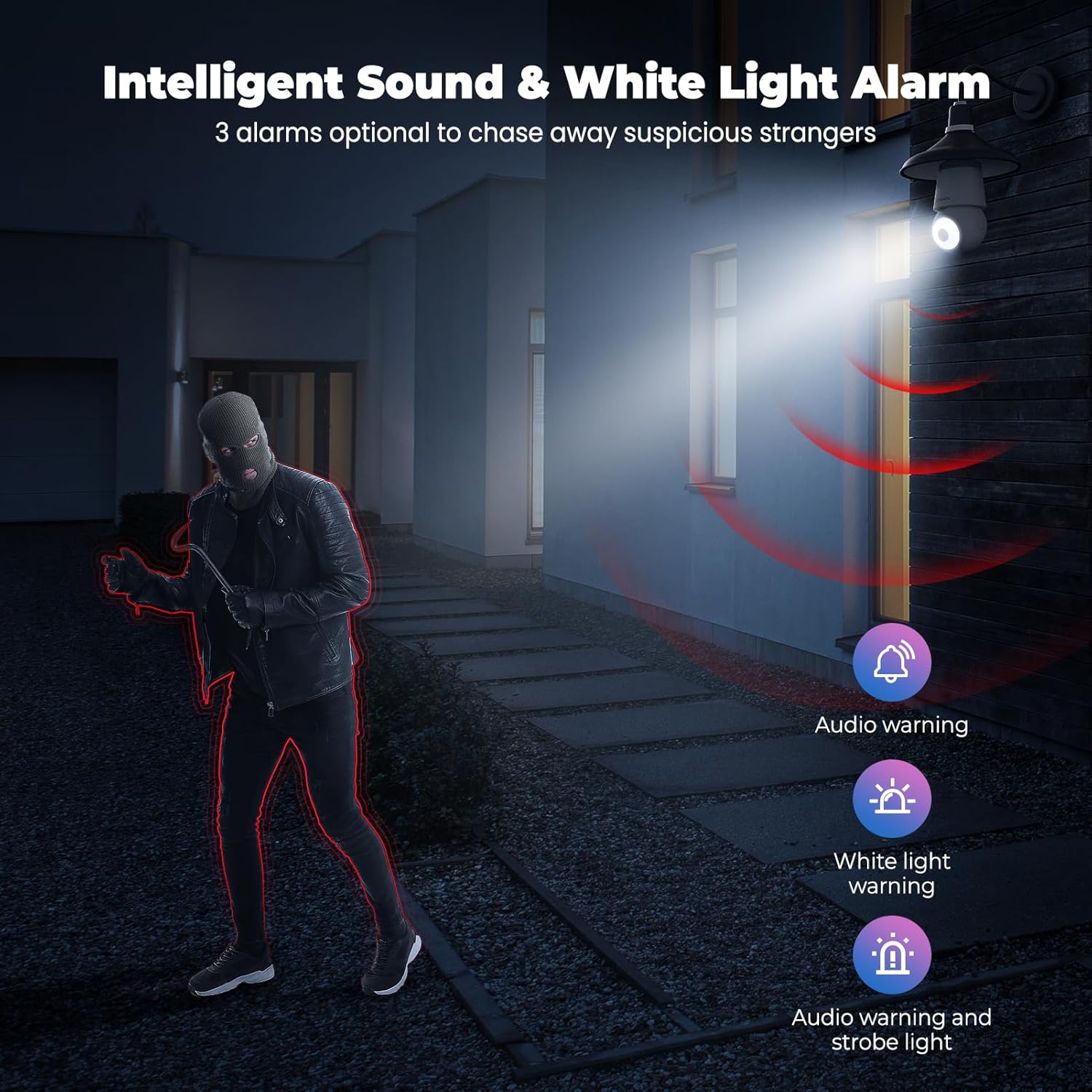
Figure 4.5: Intelligent Sound & White Light Alarm
This image illustrates the camera's alarm features, offering three optional responses to suspicious activity: an audio warning, a white light warning, or a combination of audio and strobe light to deter intruders.
In the app settings, you can configure the camera to trigger an alarm upon motion detection. Options include an audible warning, a bright white light, or a combination of both.
4.6. Human AI Intelligent Analytics
The camera utilizes AI for advanced object recognition.

Figure 4.6: Human AI Intelligent Analytics
This image demonstrates the camera's AI capabilities, which can differentiate and label various objects such as people, cars, animals, and packages within the surveillance area. Note that person analytics are typically free, while other object analytics may require a subscription.
The camera can distinguish between different types of objects (e.g., people, vehicles, animals, packages) to provide more accurate alerts. Person detection is typically a standard feature, while other specific object analytics may require a subscription service.
4.7. 24/7 Recording and Storage
The camera supports continuous recording and flexible storage options.
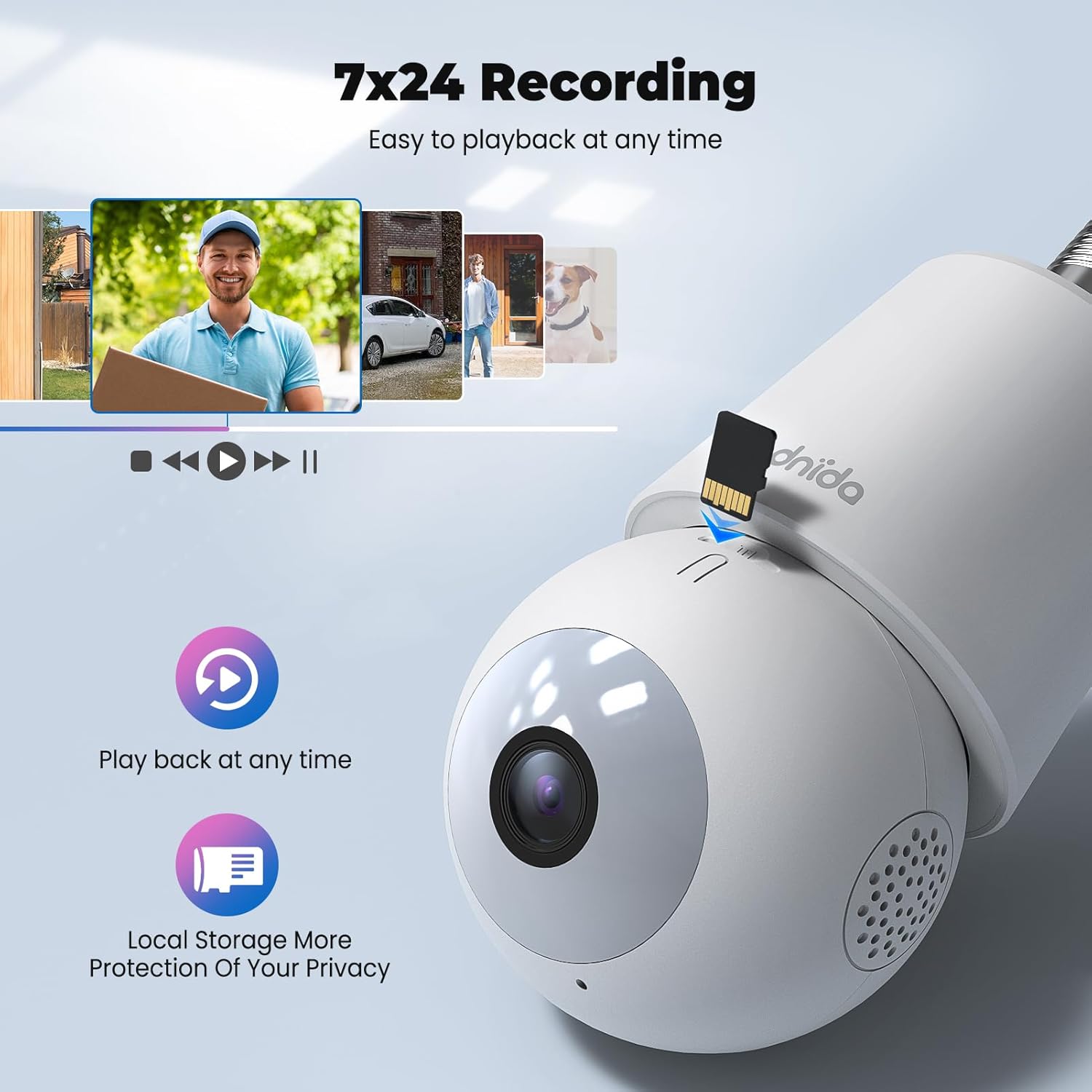
Figure 4.7: 24/7 Recording and Local Storage
This image highlights the camera's ability to record continuously (24/7) and store footage locally on a MicroSD card, ensuring privacy and easy playback of events at any time.
- പ്രാദേശിക സംഭരണം: Insert a MicroSD card (up to 128GB, not included) into the TF card slot for continuous 24/7 recording.
- ക്ലൗഡ് സംഭരണം: Optional cloud storage services are available through the CloudEdge app for secure off-site storage and easy access to recorded events.
- പ്ലേബാക്ക്: എളുപ്പത്തിൽ വീണ്ടുംview രേഖപ്പെടുത്തി footage directly from the app's history or cloud sections.
5. പരിപാലനം
Regular maintenance ensures optimal performance and longevity of your Codnida Camera LC323 U.
- വൃത്തിയാക്കൽ: Gently wipe the camera lens and body with a soft, dry cloth to remove dust and smudges. Avoid using harsh chemicals or abrasive materials.
- ഫേംവെയർ അപ്ഡേറ്റുകൾ: Periodically check the CloudEdge app for available firmware updates. Keeping the firmware updated ensures access to the latest features and security enhancements.
- പവർ സൈക്കിൾ: If the camera experiences issues, try power cycling it by turning off the power to the E27 socket, waiting a few seconds, and then turning it back on.
6. പ്രശ്നപരിഹാരം
നിങ്ങളുടെ ക്യാമറയിൽ പ്രശ്നങ്ങൾ നേരിടുകയാണെങ്കിൽ, ഇനിപ്പറയുന്ന പൊതുവായ ട്രബിൾഷൂട്ടിംഗ് ഘട്ടങ്ങൾ പരിശോധിക്കുക:
| പ്രശ്നം | സാധ്യമായ കാരണം | പരിഹാരം |
|---|---|---|
| ക്യാമറ ഓണാക്കുന്നില്ല | No power to the E27 socket; camera not screwed in properly. | Ensure the E27 socket has power and the camera is securely screwed in. |
| Wi-Fi-ലേക്ക് കണക്റ്റുചെയ്യാനായില്ല | തെറ്റായ വൈഫൈ പാസ്വേഡ്; ക്യാമറ റൂട്ടറിൽ നിന്ന് വളരെ അകലെയാണ്; 5GHz വൈഫൈ നെറ്റ്വർക്ക് ഉപയോഗിച്ചു. | Verify Wi-Fi password; move camera closer to router; ensure you are connecting to a 2.4GHz Wi-Fi network. Reset the camera and try again. |
| ഇടയ്ക്കിടെയുള്ള വിച്ഛേദങ്ങൾ | ദുർബലമായ വൈ-ഫൈ സിഗ്നൽ; നെറ്റ്വർക്ക് ഇടപെടൽ. | Improve Wi-Fi signal strength (e.g., use a Wi-Fi extender); reduce interference from other devices. |
| മോഷൻ ഡിറ്റക്ഷൻ പ്രവർത്തിക്കുന്നില്ല അല്ലെങ്കിൽ വളരെ സെൻസിറ്റീവ് ആണ് | Incorrect settings; environmental factors. | Adjust motion detection sensitivity and detection zones in the CloudEdge app. Ensure the camera lens is clean. |
| No recording to TF card | TF card not inserted or faulty; card full; recording settings incorrect. | Ensure TF card is correctly inserted and formatted (if prompted by app); check recording settings in the app. Replace card if faulty. |
If the problem persists, please contact Codnida customer support for further assistance.
7 സ്പെസിഫിക്കേഷനുകൾ
Detailed technical specifications for the Codnida Camera LC323 U:
- മോഡലിൻ്റെ പേര്: LC323
- നിർമ്മാതാവ്: കോഡ്നിഡ
- കണക്റ്റിവിറ്റി പ്രോട്ടോക്കോൾ: വൈഫൈ (2.4GHz)
- വയർലെസ് കമ്മ്യൂണിക്കേഷൻ ടെക്നോളജി: വൈഫൈ
- വീഡിയോ ക്യാപ്ചർ റെസല്യൂഷൻ: 1296p (2K HD)
- ഇൻഡോർ/ഔട്ട്ഡോർ ഉപയോഗം: ഔട്ട്ഡോർ
- മൗണ്ടിംഗ് തരം: Wall Mount (via E27 socket)
- കൺട്രോളർ തരം: CloudEdge ആപ്പ്
- പ്രകാശ സ്രോതസ്സ്: Infrared (for night vision)
- മെറ്റീരിയൽ: പ്ലാസ്റ്റിക്
- വാട്ട്tage: 10 വാട്ട്സ്
- ഇനത്തിന്റെ അളവുകൾ (L x W x H): 50 x 50 x 50 മിമി
- ഉൽപ്പന്ന അളവുകൾ: 5 x 5 x 5 സെ.മീ; 410 ഗ്രാം
- ആവശ്യമായ ബാറ്ററികൾ: ഇല്ല
- ഉൾപ്പെടുത്തിയ ഘടകങ്ങൾ: ക്യാമറ
8. വാറൻ്റിയും പിന്തുണയും
The Codnida Camera LC323 U typically comes with a manufacturer's warranty. Please refer to the product packaging or the official Codnida webനിർദ്ദിഷ്ട വാറന്റി നിബന്ധനകൾക്കും വ്യവസ്ഥകൾക്കും സൈറ്റ്.
For technical support, troubleshooting assistance, or warranty claims, please contact Codnida customer service through their official channels. Contact information can usually be found on the product packaging or their webസൈറ്റ്.


