1. ആമുഖം
കൃത്യമായ സിഗ്നൽ വിശകലനത്തിനായി രൂപകൽപ്പന ചെയ്തിരിക്കുന്ന ഉയർന്ന പ്രകടനമുള്ള ഉപകരണമാണ് RIGOL DHO802 ഡിജിറ്റൽ ഓസിലോസ്കോപ്പ്. ശുദ്ധമായ സിഗ്നൽ ശേഖരണത്തിനായി അൾട്രാ-ലോ പശ്ചാത്തല ശബ്ദവും എല്ലാ ശ്രേണികളിലുമുള്ള 12-ബിറ്റ് ഹാർഡ്വെയർ ഉയർന്ന റെസല്യൂഷനും ഇതിൽ ഉൾപ്പെടുന്നു. 70MHz വരെയുള്ള അനലോഗ് ബാൻഡ്വിഡ്ത്തും 2 അനലോഗ് ചാനലുകളും ഉള്ള ഇത് തത്സമയ സബ്സ്ക്രിപ്ഷനുകളെ പിന്തുണയ്ക്കുന്നു.amp1.25 GSa/s വരെയുള്ള ലിംഗ നിരക്കും 25 Mpts വരെയുള്ള സംഭരണ ആഴവും. അൾട്രാ അക്വാ മോഡ് 1 ദശലക്ഷം wfms/s എന്ന ശ്രദ്ധേയമായ വേവ്ഫോം ക്യാപ്ചർ നിരക്ക് നൽകുന്നു, ഇത് ക്ഷണികമായ ഇവന്റുകൾ പകർത്തുന്നതിന് അനുയോജ്യമാക്കുന്നു.
ഗ്രേ സ്കെയിൽ ഡിജിറ്റൽ റിയൽ-ടൈം ബ്രൈറ്റ്നസ് ഫംഗ്ഷൻ, വേവ്ഫോം സെർച്ച് ആൻഡ് നാവിഗേഷൻ, 7 ഇഞ്ച് 1024x600 ഹൈ-ഡെഫനിഷൻ ടച്ച് സ്ക്രീൻ, മെച്ചപ്പെടുത്തിയ സംവേദനാത്മക അനുഭവത്തിനായി ഒരു പുതിയ ഫ്ലെക്സ് നോബ് എന്നിവയാണ് പ്രധാന സവിശേഷതകൾ. കണക്റ്റിവിറ്റി ഓപ്ഷനുകളിൽ യുഎസ്ബി ഡിവൈസ് & ഹോസ്റ്റ്, ലാൻ, എച്ച്ഡിഎംഐ പോർട്ടുകൾ എന്നിവ ഉൾപ്പെടുന്നു. കോംപാക്റ്റ് ഡിസൈൻ സൗകര്യപ്രദമായ മാനുവറബിലിറ്റി ഉറപ്പാക്കുന്നു, കൂടാതെ ഇത് ഓൺലൈൻ പതിപ്പ് അപ്ഗ്രേഡുകളെ പിന്തുണയ്ക്കുന്നു.

ചിത്രം 1.1: എംബഡഡ് ഡെവലപ്മെന്റ്, ഫാക്ടറി പ്രൊഡക്ഷൻ ലൈനുകൾ, ഉപകരണ പരിപാലനം, വിദ്യാഭ്യാസവും ഗവേഷണവും, ഓട്ടോമോട്ടീവ് നിർമ്മാണം തുടങ്ങിയ DHO802 ഡിജിറ്റൽ ഓസിലോസ്കോപ്പിനുള്ള പൊതുവായ ആപ്ലിക്കേഷനുകൾ.
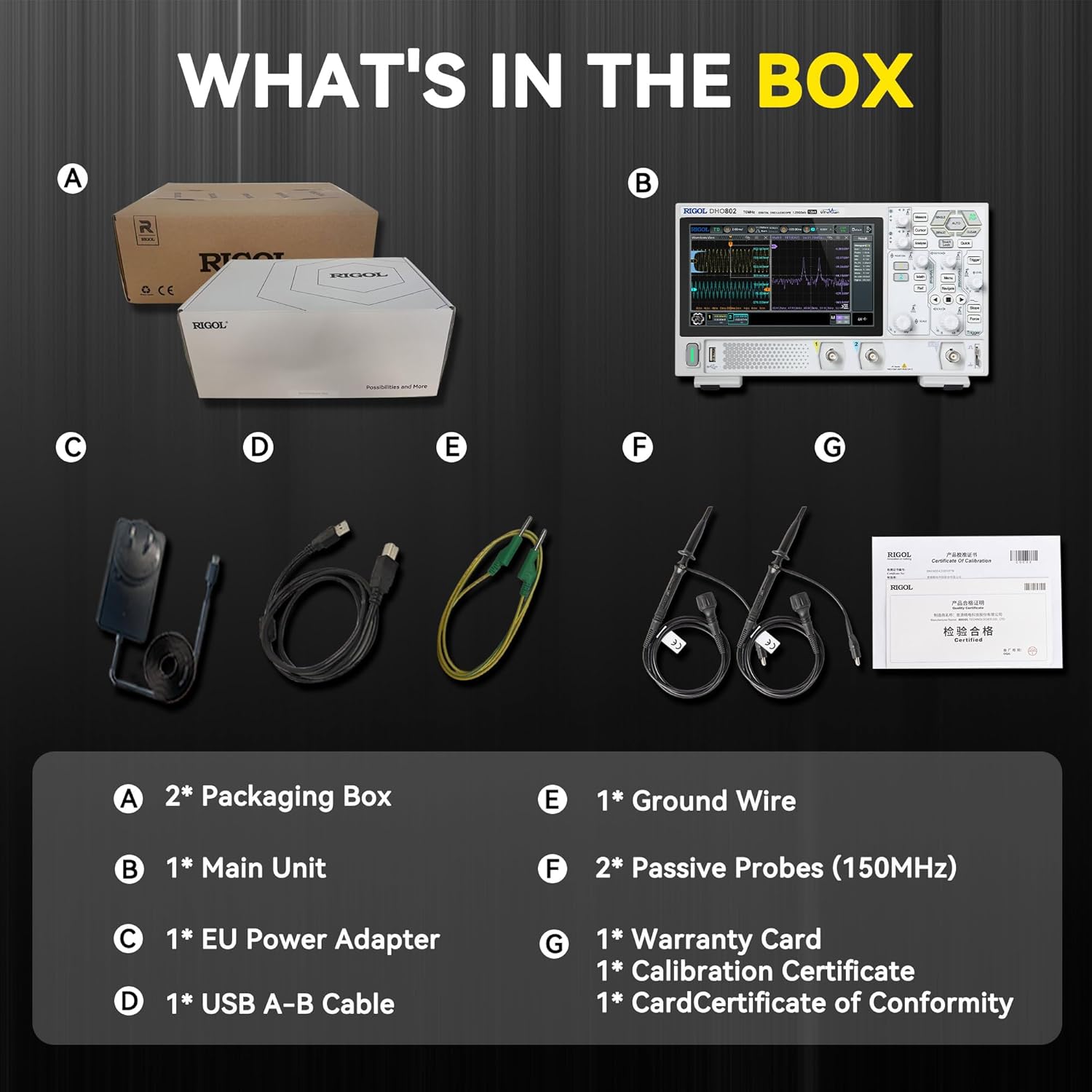
2. ബോക്സിൽ എന്താണുള്ളത്?
- പ്രധാന യൂണിറ്റ് (1)
- നിഷ്ക്രിയ പ്രോബുകൾ (150MHz) (2)
- വൈദ്യുതി വിതരണം (1)
- USB കേബിൾ (1)
- ഗ്രൗണ്ടിംഗ് കേബിൾ (1)
- വാറന്റി കാർഡ് (1)
- കാലിബ്രേഷൻ സർട്ടിഫിക്കറ്റ് (1)
- കാർഡ് സർട്ടിഫിക്കറ്റ് ഓഫ് കൺഫോർമിറ്റി (1)

ചിത്രം 2.1: പ്രധാന യൂണിറ്റ്, പ്രോബുകൾ, പവർ സപ്ലൈ, USB കേബിൾ, ഗ്രൗണ്ടിംഗ് കേബിൾ, ഡോക്യുമെന്റേഷൻ എന്നിവയുൾപ്പെടെ RIGOL DHO802 ഡിജിറ്റൽ ഓസിലോസ്കോപ്പ് പാക്കേജിംഗിന്റെ ഉള്ളടക്കം.
3. സജ്ജീകരണം
3.1 അൺപാക്കിംഗും പരിശോധനയും
പാക്കേജിംഗിൽ നിന്ന് ഓസിലോസ്കോപ്പും എല്ലാ അനുബന്ധ ഉപകരണങ്ങളും ശ്രദ്ധാപൂർവ്വം നീക്കം ചെയ്യുക. ഗതാഗത സമയത്ത് എല്ലാ ഇനങ്ങളിലും കേടുപാടുകൾ സംഭവിച്ചിട്ടുണ്ടോ എന്ന് പരിശോധിക്കുക. എന്തെങ്കിലും കേടുപാടുകൾ കണ്ടെത്തിയാൽ, ഉടൻ തന്നെ നിങ്ങളുടെ വിതരണക്കാരനെ ബന്ധപ്പെടുക.
3.2 പവർ കണക്ഷൻ
- ഓസിലോസ്കോപ്പ് മതിയായ വായുസഞ്ചാരമുള്ള ഒരു സ്ഥിരതയുള്ളതും പരന്നതുമായ പ്രതലത്തിൽ സ്ഥാപിച്ചിട്ടുണ്ടെന്ന് ഉറപ്പാക്കുക.
- നൽകിയിരിക്കുന്ന പവർ കേബിൾ ഓസിലോസ്കോപ്പിന്റെ പിൻ പാനലിലെ പവർ ഇൻപുട്ടുമായി ബന്ധിപ്പിക്കുക.
- പവർ കേബിളിന്റെ മറ്റേ അറ്റം അനുയോജ്യമായ ഒരു എസി പവർ ഔട്ട്ലെറ്റിലേക്ക് പ്ലഗ് ചെയ്യുക.
- ഉപകരണം ഓണാക്കാൻ മുൻ പാനലിലെ പവർ ബട്ടൺ അമർത്തുക.
3.3 പ്രോബ് കണക്ഷൻ
DHO802 രണ്ട് പാസീവ് പ്രോബുകളുമായാണ് വരുന്നത്. ഒരു പ്രോബ് ബന്ധിപ്പിക്കുന്നതിന്:
- മുൻ പാനലിലെ ഇൻപുട്ട് ചാനലുകളിൽ ഒന്നുമായി (CH1 അല്ലെങ്കിൽ CH2) പ്രോബിന്റെ BNC കണക്ടർ വിന്യസിക്കുക.
- കണക്ടർ ഉള്ളിലേക്ക് തള്ളി, അത് ലോക്ക് ആകുന്നതുവരെ ഘടികാരദിശയിൽ തിരിക്കുക.
- നിങ്ങളുടെ സർക്യൂട്ടിലെ ഒരു പൊതു ഗ്രൗണ്ട് പോയിന്റിലേക്ക് പ്രോബിന്റെ ഗ്രൗണ്ട് ക്ലിപ്പ് ഘടിപ്പിക്കുക.
- കൃത്യമായ അളവുകൾക്കായി, പ്രോബ് കോമ്പൻസേഷൻ ശരിയായി ക്രമീകരിച്ചിട്ടുണ്ടെന്ന് ഉറപ്പാക്കുക. വിശദമായ നിർദ്ദേശങ്ങൾക്ക് പൂർണ്ണ മാനുവലിൽ "പ്രോബ് കോമ്പൻസേഷൻ" വിഭാഗം കാണുക.

ചിത്രം 3.1: RIGOL DHO802 ഡിജിറ്റൽ ഓസിലോസ്കോപ്പ്, അതിൽ ഉൾപ്പെടുത്തിയിരിക്കുന്ന പ്രോബുകളും കേബിളുകളും, സജ്ജീകരണത്തിന് തയ്യാറാണ്.
4. പ്രവർത്തന നിർദ്ദേശങ്ങൾ
4.1 ഫ്രണ്ട് പാനൽ ഓവർview
DHO802 ന്റെ മുൻ പാനലിൽ 7 ഇഞ്ച് 1024x600 ഹൈ-ഡെഫനിഷൻ ടച്ച് സ്ക്രീനും അവബോധജന്യമായ പ്രവർത്തനത്തിനായി വിവിധ നിയന്ത്രണങ്ങളും ഉണ്ട്. പ്രധാന നിയന്ത്രണങ്ങളിൽ ഓരോ ചാനലിനുമുള്ള ലംബ സ്കെയിലും പൊസിഷൻ നോബുകളും, തിരശ്ചീന സ്കെയിലും പൊസിഷൻ നോബുകളും, ട്രിഗർ നിയന്ത്രണങ്ങളും, സമർപ്പിത ഫംഗ്ഷൻ ബട്ടണുകളും ഉൾപ്പെടുന്നു.

ചിത്രം 4.1: മുൻഭാഗം view DHO802 ന്റെ, ടച്ച് സ്ക്രീനും ഫിസിക്കൽ നിയന്ത്രണങ്ങളും എടുത്തുകാണിക്കുന്നു.
4.2 അടിസ്ഥാന തരംഗരൂപ ഏറ്റെടുക്കൽ
- നിങ്ങൾ അളക്കാൻ ആഗ്രഹിക്കുന്ന സിഗ്നൽ ഉറവിടത്തിലേക്ക് പ്രോബ് ബന്ധിപ്പിക്കുക.
- അമർത്തുക ഓട്ടോ ലംബ, തിരശ്ചീന, ട്രിഗർ പാരാമീറ്ററുകൾ യാന്ത്രികമായി സജ്ജീകരിക്കുന്നതിന് മുൻ പാനലിലെ ബട്ടൺ.
- ക്രമീകരിക്കുക ലംബ സ്കെയിൽ (V/div) കൂടാതെ ലംബ സ്ഥാനം വേവ്ഫോം ഡിസ്പ്ലേ ഒപ്റ്റിമൈസ് ചെയ്യുന്നതിന് ഓരോ ചാനലിനുമുള്ള നോബുകൾ.
- ക്രമീകരിക്കുക തിരശ്ചീന സ്കെയിൽ (s/div) കൂടാതെ തിരശ്ചീന സ്ഥാനം ബട്ടണുകൾ view തരംഗരൂപത്തിന്റെ ആവശ്യമുള്ള സമയ ദൈർഘ്യം.
- ഉപയോഗിക്കുക ട്രിഗർ ആവർത്തിച്ചുള്ള തരംഗരൂപങ്ങളെ സ്ഥിരപ്പെടുത്തുന്നതിനുള്ള നിയന്ത്രണങ്ങൾ.
4.3 വിപുലമായ സവിശേഷതകൾ
ടച്ച് സ്ക്രീൻ, ഫ്ലെക്സ് നോബ് എന്നിവയിലൂടെ ആക്സസ് ചെയ്യാവുന്ന വിവിധ നൂതന സവിശേഷതകളെ DHO802 പിന്തുണയ്ക്കുന്നു:
- വേവ്ഫോം തിരയലും നാവിഗേഷനും: ലോംഗ് വേവ്ഫോം റെക്കോർഡുകളിൽ എളുപ്പത്തിൽ നാവിഗേറ്റ് ചെയ്യാനും നിർദ്ദിഷ്ട ഇവന്റുകൾക്കായി തിരയാനും ടച്ച് സ്ക്രീൻ ഉപയോഗിക്കുക.
- ഗ്രേ സ്കെയിൽ ഡിജിറ്റൽ റിയൽ-ടൈം തെളിച്ചം: 256 ലെവൽ തെളിച്ചം ഉപയോഗിച്ച് തരംഗരൂപ ദൃശ്യപരത മെച്ചപ്പെടുത്തുക, മറഞ്ഞിരിക്കാവുന്ന സിഗ്നൽ വിശദാംശങ്ങൾ വെളിപ്പെടുത്തുക.
- കണക്റ്റിവിറ്റി: ഡാറ്റ കൈമാറ്റം, റിമോട്ട് കൺട്രോൾ, ബാഹ്യ ഡിസ്പ്ലേ എന്നിവയ്ക്കായി USB, LAN, HDMI പോർട്ടുകൾ ഉപയോഗിക്കുക.
ചൈനീസ്, ഇംഗ്ലീഷ്, ജർമ്മൻ, ഫ്രഞ്ച്, കൊറിയൻ, പോർച്ചുഗീസ്, പോളിഷ്, ജാപ്പനീസ് എന്നിവയുൾപ്പെടെ 8 പ്രധാന ഭാഷകൾക്കിടയിൽ മാറാൻ ഓസിലോസ്കോപ്പിന്റെ സിസ്റ്റം പിന്തുണയ്ക്കുന്നു.

ചിത്രം 4.2: ബഹുഭാഷാ പിന്തുണ പ്രദർശിപ്പിക്കുന്ന DHO802 ഡിസ്പ്ലേ.
4.4 വീഡിയോ പ്രദർശനം
എംബെഡിംഗ് മാർഗ്ഗനിർദ്ദേശങ്ങൾ അനുസരിച്ച്, വിൽപ്പനക്കാരന്റെ ഔദ്യോഗിക ഉൽപ്പന്ന വീഡിയോകളൊന്നും ഇപ്പോൾ എംബെഡ് ചെയ്യുന്നതിന് ലഭ്യമായിരുന്നില്ല.
5. പരിപാലനം
- ഓസിലോസ്കോപ്പ് വൃത്തിയായും പൊടിയില്ലാതെയും സൂക്ഷിക്കുക. പുറംഭാഗം വൃത്തിയാക്കാൻ മൃദുവായതും ഉണങ്ങിയതുമായ തുണി ഉപയോഗിക്കുക.
- തീവ്രമായ ഊഷ്മാവ്, ഈർപ്പം അല്ലെങ്കിൽ നേരിട്ടുള്ള സൂര്യപ്രകാശം എന്നിവയിലേക്ക് ഉപകരണം എക്സ്പോഷർ ചെയ്യുന്നത് ഒഴിവാക്കുക.
- ഉപകരണത്തിന്റെ പിൻഭാഗത്തും വശങ്ങളിലുമുള്ള വെന്റിലേഷൻ ദ്വാരങ്ങൾ തടയരുത്.
- പ്രോബുകളും കേബിളുകളും തേയ്മാനത്തിന്റെയോ കേടുപാടുകളുടെയോ ലക്ഷണങ്ങൾക്കായി പതിവായി പരിശോധിക്കുക. ആവശ്യമെങ്കിൽ മാറ്റിസ്ഥാപിക്കുക.
- ആന്തരിക വൃത്തിയാക്കലിനോ അറ്റകുറ്റപ്പണികൾക്കോ, യോഗ്യതയുള്ള സേവന ഉദ്യോഗസ്ഥരെ ബന്ധപ്പെടുക.
6. പ്രശ്നപരിഹാരം
- ശക്തിയില്ല: പവർ കേബിൾ സുരക്ഷിതമായി ബന്ധിപ്പിച്ചിട്ടുണ്ടെന്നും പവർ ഔട്ട്ലെറ്റ് പ്രവർത്തിക്കുന്നുണ്ടെന്നും ഉറപ്പാക്കുക. പവർ ബട്ടൺ പരിശോധിക്കുക.
- വേവ്ഫോം ഡിസ്പ്ലേ ഇല്ല: ഇൻപുട്ട് ചാനലുകളിലേക്കും സിഗ്നൽ ഉറവിടത്തിലേക്കും പ്രോബുകൾ ശരിയായി ബന്ധിപ്പിച്ചിട്ടുണ്ടെന്ന് ഉറപ്പാക്കുക. ലംബ, തിരശ്ചീന സ്കെയിൽ ക്രമീകരണങ്ങൾ പരിശോധിക്കുക. ട്രിഗർ ശരിയായി സജ്ജീകരിച്ചിട്ടുണ്ടെന്ന് ഉറപ്പാക്കുക അല്ലെങ്കിൽ ഓട്ടോ ബട്ടൺ ഉപയോഗിക്കുക.
- അസ്ഥിരമായ തരംഗരൂപം: ട്രിഗർ ലെവലും ട്രിഗർ മോഡും ക്രമീകരിക്കുക. ട്രിഗർ ഉറവിടം സിഗ്നലിന് അനുയോജ്യമാണെന്ന് ഉറപ്പാക്കുക.
- സോഫ്റ്റ്വെയർ ഫ്രീസിംഗ്: സോഫ്റ്റ്വെയർ ലോക്ക് ആകുകയാണെങ്കിൽ, ഉപകരണം റീസ്റ്റാർട്ട് ചെയ്യാൻ ശ്രമിക്കുക. പ്രശ്നം നിലനിൽക്കുകയാണെങ്കിൽ, ലഭ്യമായ ഓൺലൈൻ ഫേംവെയർ അപ്ഡേറ്റുകൾ പരിശോധിക്കുക.
- വികലമായ തരംഗരൂപം: പ്രോബ് നഷ്ടപരിഹാരം പരിശോധിക്കുക. ഇൻപുട്ട് സിഗ്നൽ ഓസിലോസ്കോപ്പിന്റെ പരമാവധി ഇൻപുട്ട് വോളിയം കവിയുന്നില്ലെന്ന് ഉറപ്പാക്കുക.tage.
സ്ഥിരമായ പ്രശ്നങ്ങൾക്ക്, സമഗ്ര സഹായം കാണുക. file ഉപകരണത്തിൽ തന്നെ ഇൻസ്റ്റാൾ ചെയ്തിരിക്കണം അല്ലെങ്കിൽ RIGOL ഉപഭോക്തൃ പിന്തുണയുമായി ബന്ധപ്പെടുക.
7 സ്പെസിഫിക്കേഷനുകൾ
| ഫീച്ചർ | സ്പെസിഫിക്കേഷൻ |
|---|---|
| ബാൻഡ്വിഡ്ത്ത് | 70 MHz |
| അനലോഗ് ചാനലുകൾ | 2 + എക്സ്റ്റൻഷൻ |
| തത്സമയ എസ്ample നിരക്ക് | 1.25 GSa/s വരെ |
| മെമ്മറി ഡെപ്ത് | 25 മെഗാപിക്സലുകൾ വരെ |
| വേവ്ഫോം ക്യാപ്ചർ നിരക്ക് | 1,000,000 wfms/s വരെ (അൾട്രാ അക്വാ മോഡ്) |
| ലംബ മിഴിവ് | 12-ബിറ്റ് |
| ലംബ സംവേദനക്ഷമത പരിധി | 500 µV/div മുതൽ 10 V/div വരെ |
| പ്രദർശിപ്പിക്കുക | 7-ഇഞ്ച് 1024 x 600 HD ടച്ച് സ്ക്രീൻ |
| കണക്റ്റിവിറ്റി | USB ഉപകരണം & ഹോസ്റ്റ്, LAN, HDMI |
| ഉൽപ്പന്ന അളവുകൾ | 10.5 x 6.4 x 3.0 ഇഞ്ച് (265.36 x 161.75 x 77.38 മിമി) |
| ഉൽപ്പന്ന ഭാരം | 3.9 പൗണ്ട് (1.78 കി.ഗ്രാം) |

ചിത്രം 7.1: DHO802 ഡിജിറ്റൽ ഓസിലോസ്കോപ്പിന്റെ പ്രധാന സാങ്കേതിക സവിശേഷതകൾ, അതിന്റെ 70MHz ബാൻഡ്വിഡ്ത്തും 12-ബിറ്റ് റെസല്യൂഷനും എടുത്തുകാണിക്കുന്നു.
ചിത്രം 7.2: RIGOL DHO802 ഡിജിറ്റൽ ഓസിലോസ്കോപ്പിന്റെ ഭൗതിക അളവുകളും ഭാരവും.
8. വാറൻ്റിയും പിന്തുണയും
DHO802 ഡിജിറ്റൽ ഓസിലോസ്കോപ്പ് ഉൾപ്പെടെയുള്ള RIGOL ഉപകരണങ്ങളുടെ പ്രധാന ഭാഗം 3 വർഷത്തെ സ്റ്റാൻഡേർഡ് വാറണ്ടിയോടെയാണ് വരുന്നത്. വിശദമായ വാറന്റി നിബന്ധനകൾക്കും വ്യവസ്ഥകൾക്കും, ഉൽപ്പന്ന പാക്കേജിംഗിൽ ഉൾപ്പെടുത്തിയിരിക്കുന്ന വാറന്റി കാർഡ് പരിശോധിക്കുക.
കൂടുതൽ പിന്തുണ, സാങ്കേതിക സഹായം അല്ലെങ്കിൽ സേവന അന്വേഷണങ്ങൾ എന്നിവയ്ക്കായി, ദയവായി ആമസോണിലെ ഔദ്യോഗിക റിഗോൾ സ്റ്റോർ സന്ദർശിക്കുക: റിഗോൾ സ്റ്റോർ.


