1. ആമുഖം
The AZDOME M580 is a high-performance 3-channel dash camera designed to provide comprehensive video surveillance for your vehicle. It features advanced recording capabilities, including 5K resolution for the front camera and simultaneous 4K+1080P+1080P recording for front, cabin, and rear views. Equipped with a 4-inch touchscreen, built-in 5G WiFi, GPS, IR night vision, G-sensor, and 24-hour parking monitoring, the M580 ensures detailed and reliable footage for your safety and peace of mind.

Figure 1.1: AZDOME M580 Dash Cam with its accompanying mobile application interface.
2. ബോക്സിൽ എന്താണുള്ളത്?
ഇൻസ്റ്റാൾ ചെയ്യുന്നതിനുമുമ്പ്, പാക്കേജിൽ എല്ലാ ഘടകങ്ങളും ഉണ്ടെന്ന് ദയവായി ഉറപ്പാക്കുക:
- Front Dash Camera (x1)
- Cabin Camera (x1)
- Rear Camera (x1)
- ടൈപ്പ്-സി യുഎസ്ബി പവർ കേബിൾ (3.5M/12 അടി) (x1)
- കാർ ചാർജർ (x1)
- Connection Cable for Rear and Cabin Camera (x1)
- 64GB Storage Card (x1)
- Installation Tools (Cable Clips x5, Pry Tool x1)
- Electrostatic Films for Front (x2)
- Electrostatic Films for Rear and Cabin (x4)
- ഉപയോക്തൃ മാനുവൽ (x1)
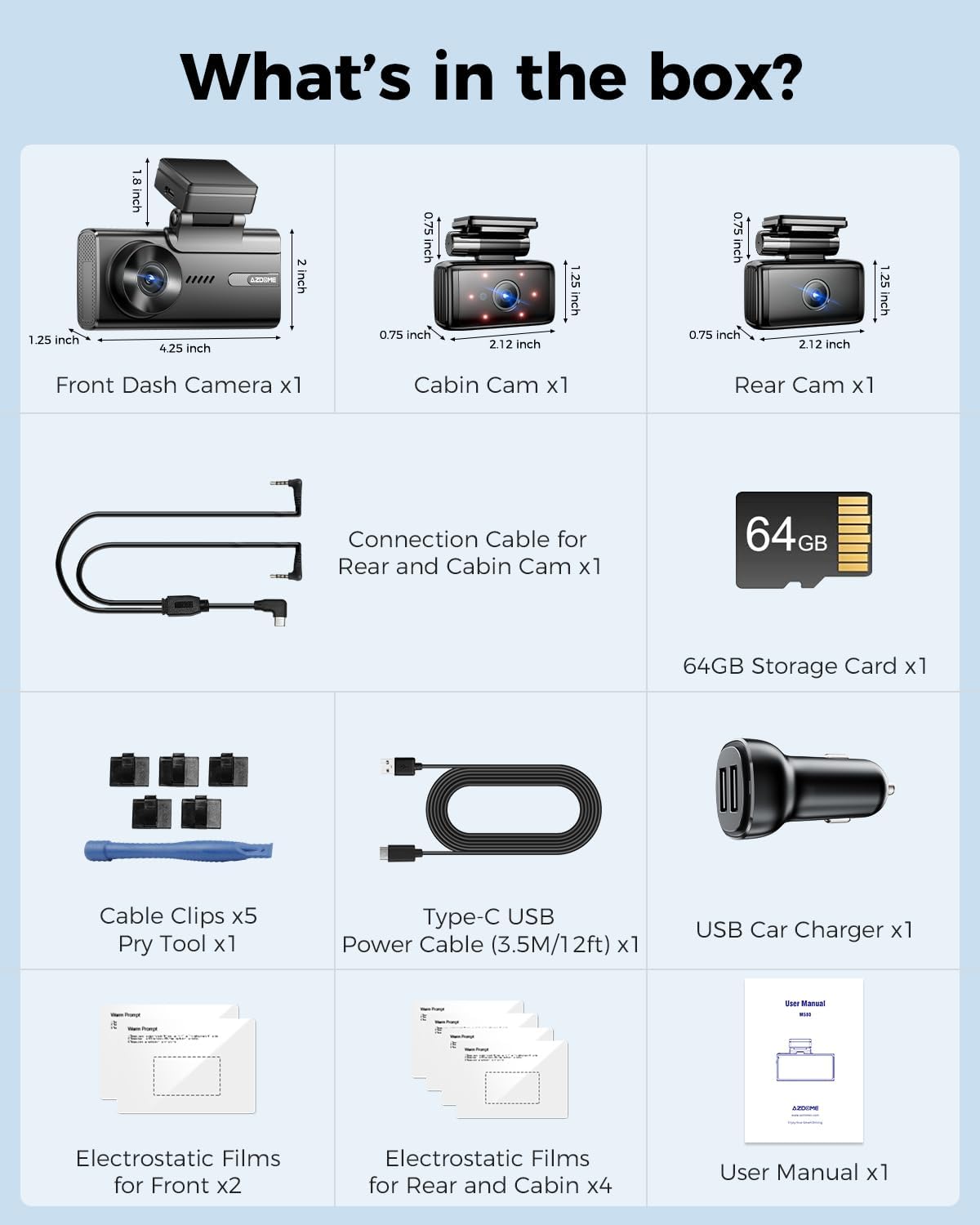
Figure 2.1: All items included in the AZDOME M580 package.
3. സജ്ജീകരണവും ഇൻസ്റ്റാളേഷനും
Follow these steps to properly install your AZDOME M580 dash cam system in your vehicle.
3.1 ക്യാമറകൾ സ്ഥാപിക്കൽ
- Front Dash Camera: Clean the windshield area where you intend to mount the front camera. Apply an electrostatic film to the windshield first, then attach the front dash camera using its windshield mount. Ensure it does not obstruct your view.
- Cabin Camera: The cabin camera is integrated with the front unit or connects via a dedicated cable. Position it to capture the interior of the vehicle.
- പിൻ ക്യാമറ: പിൻ ക്യാമറ പിൻ വിൻഡ്ഷീൽഡിൽ ഘടിപ്പിക്കുക, ക്ലിയർ ഉറപ്പാക്കുന്നു view of the road behind. Use an electrostatic film before attaching.
3.2 Connecting Power and Cables
- SD കാർഡ് ചേർക്കുക: Insert the provided 64GB storage card into the designated slot on the main dash camera unit.
- ക്യാമറകൾ ബന്ധിപ്പിക്കുക: Connect the cabin and rear cameras to the main front dash camera unit using the provided connection cables. Route cables neatly along the vehicle's trim using the included cable clips and pry tool.
- പവർ കണക്ഷൻ: Connect the Type-C USB Power Cable to the dash cam and plug the car charger into your vehicle's 12V power outlet.

Figure 3.1: Recommended cable routing for a clean and secure installation.
4. പ്രവർത്തന നിർദ്ദേശങ്ങൾ
This section details the various functions and modes of your AZDOME M580 dash cam.
4.1 പവർ ഓൺ/ഓഫ്
The dash cam will automatically power on and begin recording when your vehicle's ignition is turned on (and power is supplied to the 12V outlet). It will power off automatically when the ignition is turned off.
4.2 ടച്ച് സ്ക്രീൻ പ്രവർത്തനം
The 4-inch touchscreen allows for easy navigation through menus and settings. Tap icons to select options, swipe to scroll, and use the back button to return to previous screens.
4.3 റെക്കോർഡിംഗ് മോഡുകൾ
- 3-Channel Recording: The M580 can record simultaneously from the front (4K), cabin (1080P), and rear (1080P) cameras, providing comprehensive coverage.
- Single Front Recording: When only the front camera is used, it records in 5K (5160x2160P) resolution.
- ലൂപ്പ് റെക്കോർഡിംഗ്: When the storage card is full, the dash cam will automatically overwrite the oldest unlocked footage to continue recording.
- Emergency Lock (G-Sensor): The built-in G-sensor detects sudden impacts or collisions. When triggered, it automatically locks and saves the current video segment, preventing it from being overwritten by loop recording. You can also manually lock footage via the touchscreen.
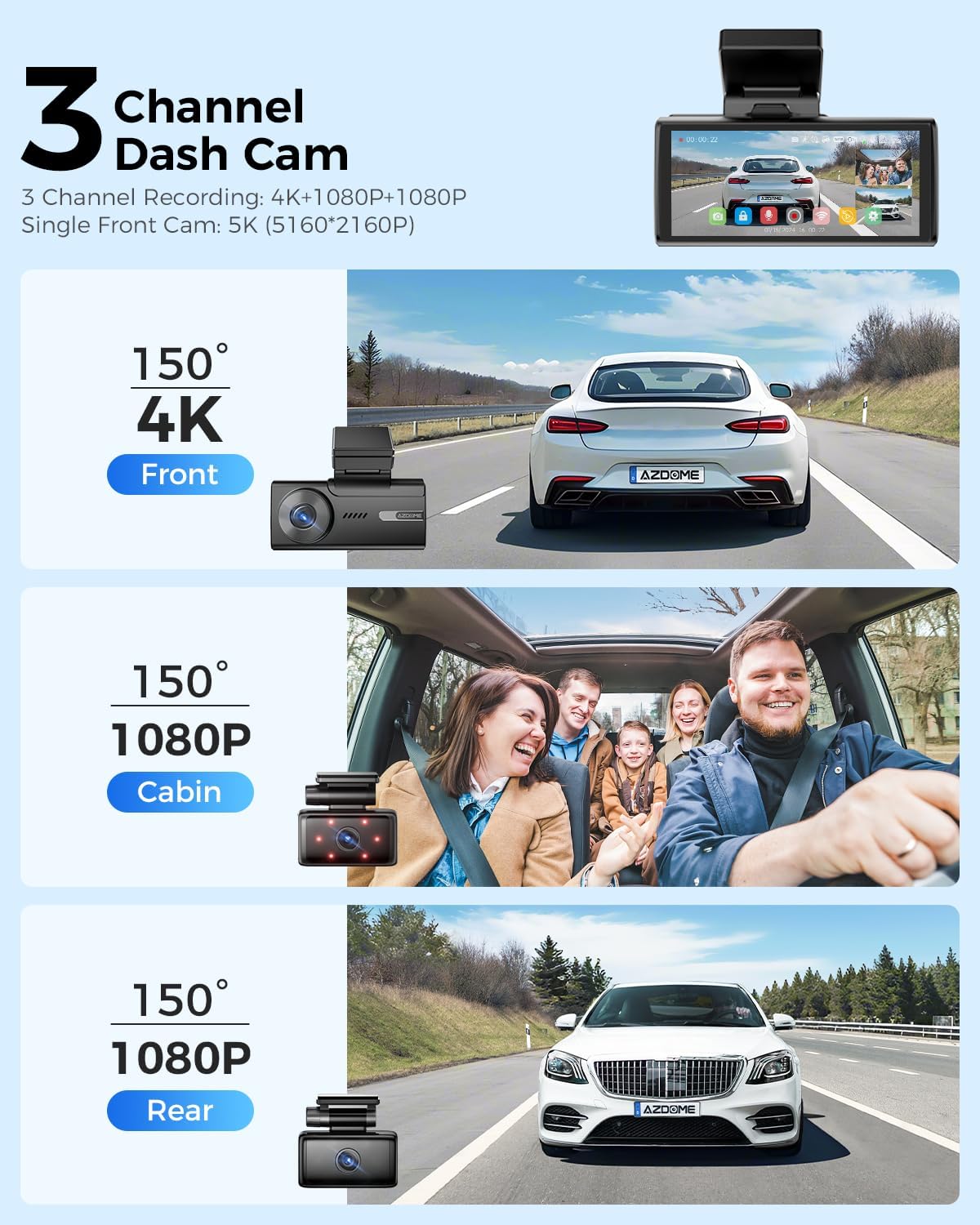
Figure 4.1: Visual representation of the 3-channel recording capabilities.

Figure 4.2: How loop recording manages storage and how emergency locked fileകൾ സംരക്ഷിക്കപ്പെടുന്നു.
4.4 പാർക്കിംഗ് മോണിറ്റർ
The M580 offers two parking monitoring modes (requires a 3-lead hardwire kit, sold separately):
- കൂട്ടിയിടി കണ്ടെത്തൽ പാർക്കിംഗ് മോഡ്: The G-sensor detects impacts while parked and automatically records and locks the video.
- ടൈം-ലാപ്സ് പാർക്കിംഗ് മോഡ്: ഡാഷ് ക്യാം 24 മണിക്കൂർ തുടർച്ചയായി കുറഞ്ഞ ഫ്രെയിം റേറ്റിൽ (ഉദാഹരണത്തിന്, 1fps) റെക്കോർഡുചെയ്യുന്നു, ദീർഘമായ വീഡിയോകളെ ഹ്രസ്വ വീഡിയോകളാക്കി ചുരുക്കുന്നു.

Figure 4.3: Explanation of the 24-hour parking monitoring features.
4.5 Built-in 5G WiFi & App Connectivity
The M580 features built-in 5.8G WiFi, offering faster data transmission speeds (4-6 times faster than 2.4GHz). This allows for quick viewing, playback, downloading, and sharing of videos via the AZDOME mobile application.
- Download the AZDOME APP from the App Store or Google Play.
- Connect your smartphone to the dash cam's WiFi network (SSID and password found on the device).
- Open the AZDOME APP and add your dash cam model.
- നിങ്ങൾക്ക് ഇപ്പോൾ കഴിയും view തത്സമയംtage, റെക്കോർഡ് ചെയ്ത വീഡിയോകൾ ആക്സസ് ചെയ്യുക, നിങ്ങളുടെ ഫോണിൽ നിന്ന് നേരിട്ട് ക്രമീകരണങ്ങൾ ക്രമീകരിക്കുക.

Figure 4.4: Part 1 of the APP WiFi Connection Guide for M580.

Figure 4.5: Part 2 of the APP WiFi Connection Guide for M580.
4.6 ബിൽറ്റ്-ഇൻ ജിപിഎസ്
The integrated GPS module records your driving route, speed, latitude, and longitude data. This information can be viewed and played back using the AZDOME GPS Player software on your computer, providing crucial evidence in case of an incident.
4.7 നൈറ്റ് വിഷൻ
The M580 features enhanced night vision capabilities with an F/1.8 aperture, 6-glass lens, and 6 hidden IR LED lights for the cabin camera. This technology ensures clear and detailed image capture even in low-light conditions, automatically optimizing image quality for nighttime driving.

Figure 4.6: Enhanced Night Vision performance with WDR (Wide Dynamic Range).
5. പരിപാലനം
Proper maintenance ensures the longevity and optimal performance of your dash cam.
- SD കാർഡ് ഫോർമാറ്റിംഗ്: It is recommended to format the SD card regularly (e.g., once a month) to prevent data corruption and ensure smooth recording. This can typically be done through the dash cam's settings menu or the mobile app.
- വൃത്തിയാക്കൽ: Gently wipe the camera lenses and touchscreen with a soft, lint-free cloth. Avoid using abrasive cleaners or solvents.
- സൂപ്പർ കപ്പാസിറ്റർ: The M580 utilizes a super capacitor instead of a traditional battery, providing enhanced durability and reliability, especially in extreme temperatures ranging from -4°F (-20°C) to 158°F (70°C). This eliminates concerns about battery degradation in hot or cold climates.

Figure 5.1: The super capacitor ensures reliable operation across a wide temperature range.
6. പ്രശ്നപരിഹാരം
If you encounter issues with your AZDOME M580, refer to the following common problems and solutions:
| പ്രശ്നം | സാധ്യമായ കാരണം | പരിഹാരം |
|---|---|---|
| ഡാഷ് ക്യാം പവർ ഓൺ ചെയ്യുന്നില്ല. | വൈദ്യുതി ഇല്ല; കേബിൾ തകരാറിലാണ്. | Check car charger connection and vehicle's 12V outlet. Ensure the power cable is securely connected to the dash cam. |
| റെക്കോർഡിംഗ് നിർത്തുന്നു അല്ലെങ്കിൽ ഫൂtage കേടായി. | SD card issue (full, corrupted, incompatible). | Format the SD card. If the issue persists, try a new high-quality SD card (U3, Class 10 recommended). |
| ആപ്പിലെ വൈഫൈ കണക്ഷൻ പ്രശ്നങ്ങൾ. | Incorrect WiFi password; distance from device; app glitch. | Ensure correct WiFi password. Stay within 10 feet of the dash cam. Restart the app and the dash cam. |
| Mounting adhesive fails in hot weather. | High temperatures affecting adhesive. | Ensure the windshield is clean and dry before applying. Consider alternative mounting solutions if persistent issues occur in extreme heat. |
| ശബ്ദ നിയന്ത്രണം പ്രതികരിക്കുന്നില്ല. | Environmental noise; incorrect commands. | Speak clearly and directly to the dash cam. Reduce background noise. Refer to the manual for specific voice commands. |
For further assistance, please contact AZDOME customer support.
7 സ്പെസിഫിക്കേഷനുകൾ
Detailed technical specifications for the AZDOME M580 dash cam:
- മോഡലിൻ്റെ പേര്: M580-3CH
- ബ്രാൻഡ്: അസ്ഡോം
- ഉൽപ്പന്ന അളവുകൾ: 1.18 x 4.06 x 1.75 ഇഞ്ച്
- ഇനത്തിൻ്റെ ഭാരം: 0.634 ഔൺസ്
- വീഡിയോ ക്യാപ്ചർ റെസല്യൂഷൻ: 2160p (5K Front), 4K+1080P+1080P (3-Channel)
- ഓറിയൻ്റേഷൻ: മുന്നിലും പിന്നിലും അകത്തും
- ഡിസ്പ്ലേ: 4" ടച്ച് സ്ക്രീൻ
- കണക്റ്റിവിറ്റി ടെക്നോളജി: 5.8G WiFi, GPS
- പ്രത്യേക സവിശേഷതകൾ: Automatic Incident Detection (G-Sensor), Built-In Supercapacitor, IR Night Vision
- മൗണ്ടിംഗ് തരം: വിൻഡ്ഷീൽഡ് മ .ണ്ട്
- ഊർജ്ജ സ്രോതസ്സ്: Car Charger (Type-C USB Power Cable)
- ഉൾപ്പെടുത്തിയ സംഭരണം: 64GB Storage Card
- പ്രവർത്തന താപനില: -4°F (-20°C) മുതൽ 158°F (70°C)
8. വാറൻ്റിയും പിന്തുണയും
AZDOME is committed to providing high-quality products and excellent customer service.
- വാറൻ്റി: The AZDOME M580 car dash camera comes with a 12-month warranty from the date of purchase.
- തിരികെ നൽകൽ നയം: A 30-day return policy is available. Returns are accepted for defects.
- സാങ്കേതിക സഹായം: AZDOME provides 24/7 technical support.
ബന്ധപ്പെടാനുള്ള വിവരങ്ങൾ:
ഇമെയിൽ: service@azdomevip.com
ഫോൺ: (833) 667-5545
Please email us when facing any problems with after-sales service. The AZDOME R&D team will endeavor to provide feedback within 24 working hours.

Figure 8.1: AZDOME Warranty and Customer Support details.


