ആമുഖം
The SUNOL T16 Wireless Earbuds are designed for an active lifestyle, offering high-quality audio and convenient features. These Bluetooth headphones provide up to 48 hours of total playtime with their wireless charging case, featuring an LED power display for easy monitoring. With earhooks for a secure fit and water resistance, they are ideal for workouts, running, and various sports activities. The built-in microphone with noise cancellation ensures clear calls.
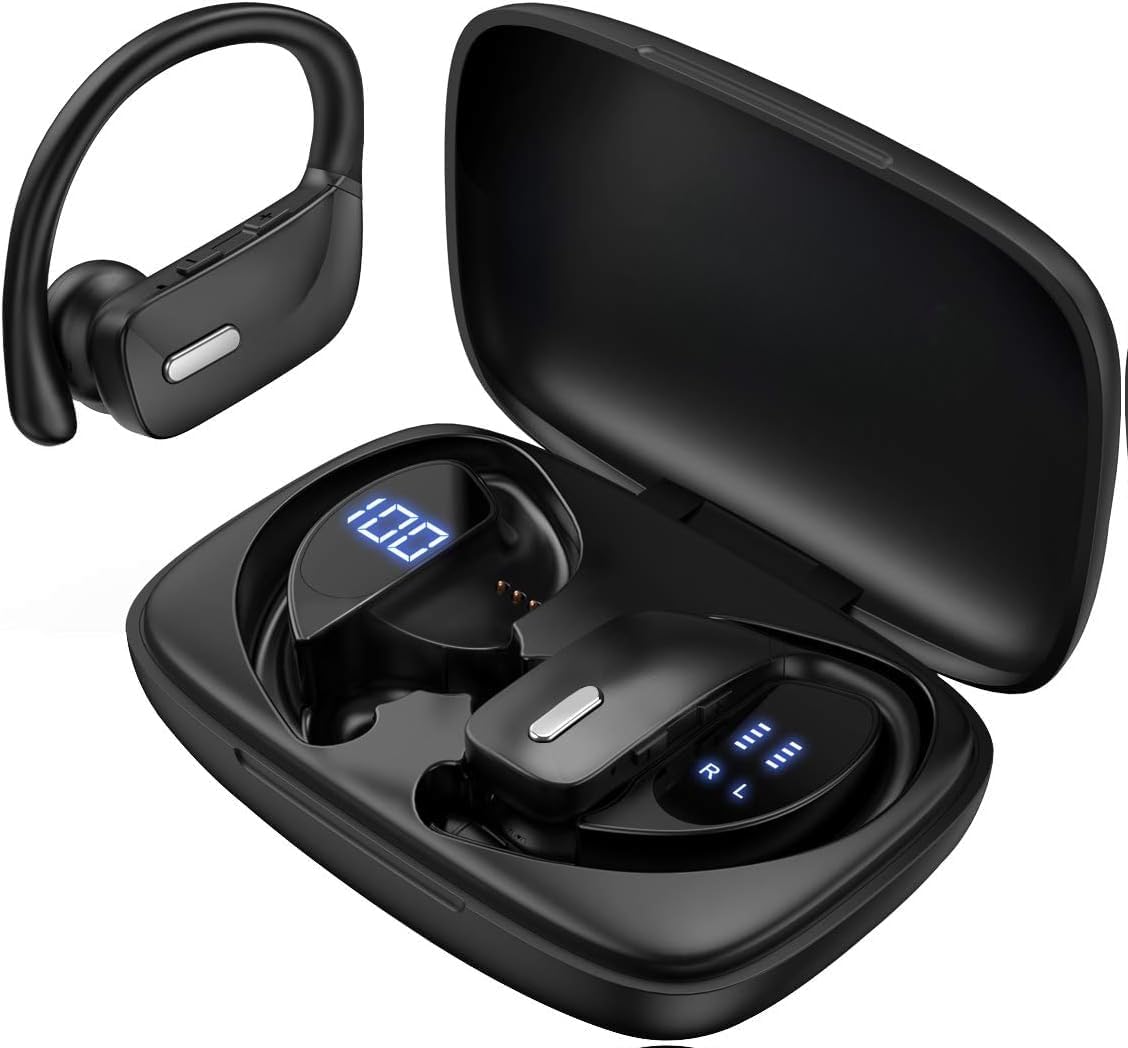
Image: The SUNOL T16 Wireless Earbuds with their charging case, showcasing the digital display.
ബോക്സിൽ എന്താണുള്ളത്
- SUNOL T16 Wireless Earbuds (Left and Right)
- വയർലെസ് ചാർജിംഗ് കേസ്
- USB-C ചാർജിംഗ് കേബിൾ
- 3 Pairs of Ear Caps (S, M, L)
സ്പെസിഫിക്കേഷനുകൾ
| ഫീച്ചർ | വിശദാംശങ്ങൾ |
|---|---|
| മോഡലിൻ്റെ പേര് | T16 |
| കണക്റ്റിവിറ്റി ടെക്നോളജി | വയർലെസ്സ് (ബ്ലൂടൂത്ത് 5.0) |
| ബ്ലൂടൂത്ത് ശ്രേണി | 10 മീറ്റർ വരെ |
| ഇയർബഡ് ബാറ്ററി ലൈഫ് | 9 മണിക്കൂർ വരെ (ഒറ്റ ചാർജ്) |
| ആകെ പ്ലേടൈം (കേസിനൊപ്പം) | 48 മണിക്കൂർ വരെ |
| ചാർജിംഗ് ഓപ്ഷനുകൾ | Wireless Charging, USB-C Charging |
| ഓഡിയോ ഡ്രൈവർ വലിപ്പം | 10 എംഎം ഡൈനാമിക് ഡ്രൈവർ |
| ഫ്രീക്വൻസി റേഞ്ച് | 20 ഹെർട്സ് - 20,000 ഹെർട്സ് |
| പ്രതിരോധം | 40 ഓം |
| ശബ്ദ നിയന്ത്രണം | സജീവ നോയ്സ് റദ്ദാക്കൽ |
| മൈക്രോഫോൺ | Built-in with Noise Cancellation |
| ജല പ്രതിരോധ നില | വെള്ളത്തെ പ്രതിരോധിക്കുന്ന |
| നിയന്ത്രണ തരം | Touch, Siri Voice Assistant |
| ചെവി പ്ലേസ്മെൻ്റ് | Over Ear (with earhooks) |
| മെറ്റീരിയൽ | അക്രിലോണിട്രൈൽ ബ്യൂട്ടാഡീൻ സ്റ്റൈറൈൻ (എബിഎസ്) |
| ഇനത്തിൻ്റെ ഭാരം | 6.4 ഔൺസ് |

Image: Diagram illustrating the premium stereo sound quality and Bluetooth 5.0 connectivity.
സജ്ജമാക്കുക
1. ഇയർബഡുകളും കേസും ചാർജ് ചെയ്യുന്നു
The charging case supports both wireless charging and USB-C charging. The impressive 9 hours of listening time on a single charge for the sports wireless headphones are extended to a remarkable 48 hours of play time with the included charging case.
- To charge the case, connect a USB-C cable to the charging port on the back of the case, or place it on a compatible wireless charging pad.
- ചാർജിംഗ് കെയ്സിലെ ഇയർബഡുകൾ അവയുടെ സ്ലോട്ടുകളിൽ വയ്ക്കുക. ചാർജിംഗ് ആരംഭിക്കാൻ അവ ശരിയായി സ്ഥാപിച്ചിട്ടുണ്ടെന്ന് ഉറപ്പാക്കുക.
- The smart LED digital power display on the case will show the remaining battery level of the charging case and the individual earbuds. The percentage in the middle indicates the case battery, while the battery icons on both sides indicate the left and right earbud charge levels.

Image: The charging case with its LED display showing battery levels for the case and individual earbuds.

Image: Diagram illustrating the battery life: 15 min charge for 1 hour playtime, 8 hours on a single charge, and 48 hours with the charging case.
2. നിങ്ങളുടെ ഉപകരണവുമായി ജോടിയാക്കുന്നു
The earbuds automatically enter pairing mode when removed from the charging case.
- ചാർജിംഗ് കെയ്സ് തുറന്ന് രണ്ട് ഇയർബഡുകളും നീക്കം ചെയ്യുക. അവ സ്വയമേവ ഓണാകുകയും ജോടിയാക്കൽ മോഡിലേക്ക് പ്രവേശിക്കുകയും ചെയ്യും.
- On your mobile device (smartphone, tablet, laptop), go to the Bluetooth settings.
- ഇതിനായി തിരയുക available devices. You should see "T16" or "S8" appear in the list.
- Select "T16" or "S8" to connect. Once connected, you will hear an audio prompt, and the earbuds will be ready for use.

Image: Diagram showing the earbuds automatically pairing with mobile phones.
Video: Official product video demonstrating the unboxing, charging, and Bluetooth pairing process of the SUNOL T16 Wireless Earbuds.
പ്രവർത്തന നിർദ്ദേശങ്ങൾ
ഇയർബഡുകൾ ധരിക്കുന്നു
The T16 earbuds are designed with flexible earhooks to ensure a secure and comfortable fit, especially during physical activity. Gently place the earbud into your ear canal and adjust the earhook over the top of your ear until it feels stable and comfortable. Experiment with the included ear cap sizes to find the best fit for optimal sound and comfort.

Image: A woman wearing the SUNOL T16 earbuds, demonstrating their secure fit for an active lifestyle.
ടച്ച് നിയന്ത്രണങ്ങൾ
The earbuds feature physical buttons for precise control of various functions:
- പ്ലേ/താൽക്കാലികമായി നിർത്തുക: ഇയർബഡുകളിൽ ഏതെങ്കിലുമൊന്നിൽ ഒറ്റ ടാപ്പ് ചെയ്യുക.
- ഉത്തരം/ഹാംഗ് അപ്പ് കോൾ: Single tap on either earbud during a call.
- മുൻ ഗാനം: ഇടതുവശത്തെ ഇയർബഡിൽ രണ്ടുതവണ ടാപ്പ് ചെയ്യുക.
- അടുത്ത ഗാനം: വലതുവശത്തെ ഇയർബഡിൽ രണ്ടുതവണ ടാപ്പ് ചെയ്യുക.
- Active Voice Assistant (Siri): ഇയർബഡുകളിൽ ഏതെങ്കിലുമൊന്നിൽ മൂന്ന് തവണ ടാപ്പ് ചെയ്യുക.
- കോളുകൾ നിരസിക്കുക: ഇൻകമിംഗ് കോൾ വരുമ്പോൾ ഏതെങ്കിലുമൊരു ഇയർബഡിൽ ദീർഘനേരം അമർത്തുക.
- വോളിയം ക്രമീകരണം: Use the dedicated volume buttons on the earbuds.

Image: Diagram detailing the physical buttons and their functions, including volume adjustment, play/pause, call management, and voice assistant activation.
മെയിൻ്റനൻസ്
To ensure the longevity and optimal performance of your SUNOL T16 Wireless Earbuds, follow these maintenance guidelines:
- വൃത്തിയാക്കൽ: Regularly wipe the earbuds and charging case with a soft, dry, lint-free cloth. For ear caps, remove them and clean with mild soap and water, then dry thoroughly before reattaching.
- ജല പ്രതിരോധം: While water-resistant, avoid submerging the earbuds in water. Dry them completely if they get wet from sweat or rain before placing them back in the charging case.
- സംഭരണം: ഉപയോഗത്തിലില്ലാത്തപ്പോൾ, ഇയർബഡുകൾ ചാർജിംഗ് കേസിൽ സൂക്ഷിക്കുക, അതുവഴി അവയെ സംരക്ഷിക്കുകയും ചാർജ്ജ് ആയി നിലനിർത്തുകയും ചെയ്യുക. ഉയർന്ന താപനിലയിൽ നിന്ന് മാറി തണുത്തതും വരണ്ടതുമായ സ്ഥലത്ത് സൂക്ഷിക്കുക.
- ചാർജിംഗ് പോർട്ട്: USB-C ചാർജിംഗ് പോർട്ട് പൊടിയും അവശിഷ്ടങ്ങളും ഇല്ലാതെ സൂക്ഷിക്കുക.
ട്രബിൾഷൂട്ടിംഗ്
If you encounter any issues with your SUNOL T16 Wireless Earbuds, try the following solutions:
- ഇയർബഡുകൾ ജോടിയാക്കുന്നില്ല:
- രണ്ട് ഇയർബഡുകളും പൂർണ്ണമായും ചാർജ് ചെയ്തിട്ടുണ്ടെന്ന് ഉറപ്പാക്കുക.
- Place earbuds back in the case, close the lid, wait a few seconds, then open and remove them again.
- നിങ്ങളുടെ ഉപകരണത്തിൽ Bluetooth ഓഫാക്കുക, തുടർന്ന് അത് വീണ്ടും ഓണാക്കി ജോടിയാക്കാൻ ശ്രമിക്കുക.
- Forget or remove the "T16" or "S8" device from your device's Bluetooth list and attempt to pair from scratch.
- ഒരു ഇയർബഡ് മാത്രമേ പ്രവർത്തിക്കുന്നുള്ളൂ:
- രണ്ട് ഇയർബഡുകളും ചാർജ്ജ് ചെയ്തിട്ടുണ്ടെന്ന് ഉറപ്പാക്കുക.
- Place both earbuds back in the charging case, close the lid, and then take them out simultaneously.
- If the issue persists, try resetting the earbuds.
- മോശം ശബ്ദ നിലവാരം:
- Ensure the earbuds are properly seated in your ears and the ear caps provide a good seal.
- Check the audio source device's volume and sound settings.
- Move closer to your connected device to avoid interference or exceeding the 10-meter Bluetooth range.
- Clean the earbud speakers and ear caps.
- ചാർജിംഗ് കേസ് ചാർജുചെയ്യുന്നില്ല:
- USB-C കേബിൾ കേസിലേക്കും പവർ സ്രോതസ്സിലേക്കും സുരക്ഷിതമായി ബന്ധിപ്പിച്ചിട്ടുണ്ടെന്ന് ഉറപ്പാക്കുക.
- മറ്റൊരു USB-C കേബിളോ പവർ അഡാപ്റ്ററോ പരീക്ഷിച്ചുനോക്കൂ.
- വയർലെസ് ചാർജിംഗ് ഉപയോഗിക്കുകയാണെങ്കിൽ, കേസ് ചാർജിംഗ് പാഡിൽ ശരിയായി സ്ഥാപിച്ചിട്ടുണ്ടെന്ന് ഉറപ്പാക്കുക.
വാറൻ്റിയും പിന്തുണയും
For warranty information and technical support, please refer to the documentation included with your product or contact the manufacturer, SUNOL, directly through their official website or customer service channels. Keep your purchase receipt as proof of purchase for any warranty claims.


