1. ആമുഖം
The Cuifati OBD Smart Gauge Display is an advanced vehicle information display system designed to enhance driving safety and awareness. Featuring a dual system (OBD and GPS), it provides real-time data such as speed, fuel consumption, voltage, altitude, and more. This device is equipped with LED ambient lighting and multiple customizable display interfaces to suit various user preferences and vehicle types.
പ്രധാന സവിശേഷതകളിൽ ഇവ ഉൾപ്പെടുന്നു:
- ഡ്യുവൽ സിസ്റ്റം പ്രവർത്തനം: Supports both OBD2 and GPS modes for comprehensive vehicle data.
- Real-time Data Monitoring: Displays critical information like speed, RPM, water temperature, voltage, fuel consumption, and more.
- Customizable Interfaces: Offers multiple display styles to personalize your driving experience.
- LED Ambient Lighting: Provides visual cues for normal operation (blue) and alarms (red flashing).
- വിശാലമായ അനുയോജ്യത: Supports 10 OBD2 protocols, compatible with most vehicles manufactured after 2005 (European) or 2008 (other regions). GPS mode is universally applicable.
2. പാക്കേജ് ഉള്ളടക്കം
പാക്കേജിൽ എല്ലാ ഇനങ്ങളും ഉണ്ടെന്ന് ദയവായി പരിശോധിക്കുക:
- 1 x Cuifati OBD Smart Gauge Display Host
- 1 x OBD Connection Line (1.5m/4.9ft)
- 2 x ഇരട്ട-വശങ്ങളുള്ള ടേപ്പ്
- 1 x Installation Wrench
- 1 x ഇംഗ്ലീഷ് മാനുവൽ (ഈ പ്രമാണം)

Image: The Cuifati OBD Smart Gauge Display unit shown with its connection cable, double-sided tape, and installation wrench.
3. സജ്ജീകരണവും ഇൻസ്റ്റാളേഷനും
The Cuifati OBD Smart Gauge Display offers flexible installation options. The OBD2 interface is typically located on the driver's side, approximately 30cm (11.8 inches) from the center of the dashboard.
- ഇഗ്നിഷൻ സ്വിച്ച് ഓഫ് ചെയ്യുക നിങ്ങളുടെ വാഹനത്തിൻ്റെ.
- Locate the OBD2 interface നിങ്ങളുടെ വാഹനത്തിൽ.
- Connect the provided OBD cable to the vehicle's OBD2 interface.
- Connect the other end of the OBD cable to the OBD interface on the smart gauge display.
- Position the display unit on your dashboard. You can use the included double-sided tape for a secure flat dashboard mount or consider alternative mounting methods if preferred.
- Carefully hide the OBD cable along the A-pillar or under the dashboard trim to ensure it does not obstruct driving.
- Turn on the ignition switch. The device will power on and begin operation.

Image: Illustration showing two common installation methods: flat on the dashboard or mounted on the windshield.
4. പ്രവർത്തന നിർദ്ദേശങ്ങൾ
4.1 Dual System Functionality (OBD+GPS)
The device operates with a dual system, automatically detecting the available connection:
- OBD System: Communicates strictly in accordance with SAE J1939 Protocol Standard. This CAN communication system is stable and can read over 100 data items from your car, including speed, RPM, water temperature, voltage, fuel consumption, and more.
- GPS സിസ്റ്റം: When OBD data is unavailable or for universal compatibility, the GPS system provides data such as speed, date, time, altitude, driving direction, latitude, longitude, and number of satellites.

Image: A conceptual diagram showing the integration of OBD and GPS chips for dual system functionality.
4.2 Ambient Light Function
The integrated LED ambient lighting provides visual feedback on the device's status:
- സാധാരണ പ്രവർത്തനം: The light illuminates normally after booting, displaying a blue color. The brightness adjusts with the surrounding environment.
- അലാറം നില: When an alarm condition is triggered (e.g., overspeed, high water temperature), the light turns red and flashes, maintaining its brightest state for clear visibility.
- തെളിച്ച നിയന്ത്രണം: The brightness can be manually adjusted or turned off. Even if turned off, it will still flash red in case of an alarm.

Image: A visual guide detailing the blue light for normal operation and red flashing for alarm conditions.
4.3 Display Interfaces and Data Points
The device offers multiple display interfaces, allowing you to customize the information presented. You can switch between these interfaces to view various data points relevant to your driving needs.

ചിത്രം: ഒരു കൊളാഷ് ഷോasing nine distinct display interfaces, each presenting vehicle data in a different visual layout.
Common data points that can be displayed include:
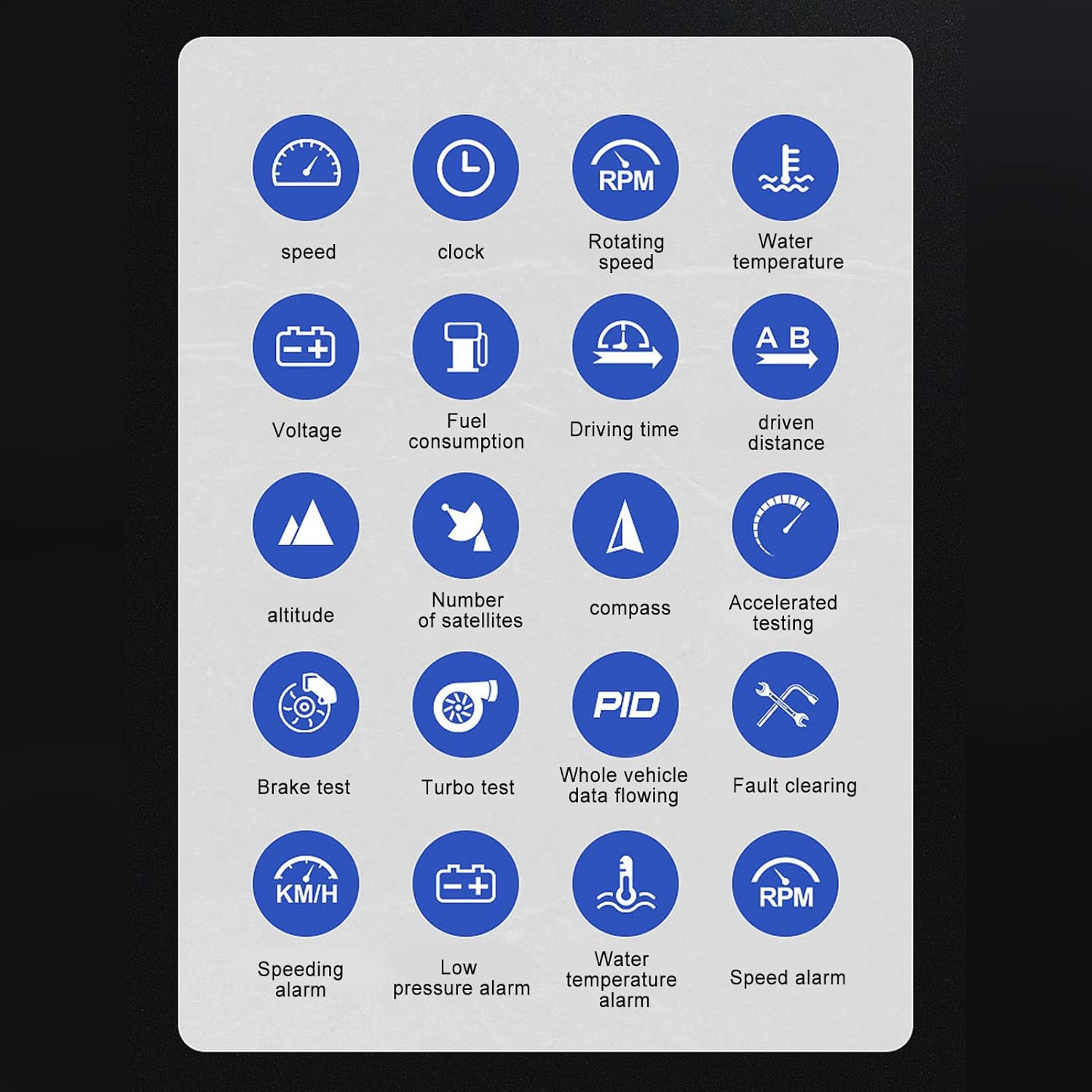
Image: A grid of icons representing various measurable parameters such as speed, clock, RPM, water temperature, voltage, fuel consumption, driving time, driven distance, altitude, number of satellites, compass, accelerated testing, brake test, turbo test, whole vehicle data flowing, fault clearing, speeding alarm, low pressure alarm, water temperature alarm, and speed alarm.
5. പരിപാലനം
To ensure the longevity and optimal performance of your Cuifati OBD Smart Gauge Display, follow these maintenance guidelines:
- വൃത്തിയാക്കൽ: Use a soft, dry cloth to clean the display screen and exterior. Avoid abrasive cleaners or solvents that could damage the surface.
- പരിസ്ഥിതി വ്യവസ്ഥകൾ: Avoid exposing the device to extreme temperatures, direct sunlight for prolonged periods, or high humidity.
- കേബിൾ കെയർ: Ensure the OBD connection cable is not pinched or excessively bent, which could damage the internal wiring.
- സുരക്ഷിത മൗണ്ടിംഗ്: Periodically check that the device is securely mounted to prevent it from dislodging during driving.
6. പ്രശ്നപരിഹാരം
If you encounter issues with your Cuifati OBD Smart Gauge Display, refer to the following common problems and solutions:
- ഉപകരണം പവർ ഓൺ ചെയ്യുന്നില്ല:
- Ensure the OBD cable is securely connected to both the device and the vehicle's OBD2 port.
- Verify that the vehicle's ignition is turned on.
- Check the vehicle's OBD2 port for any damage or loose connections.
- No data displayed in OBD mode:
- Confirm your vehicle is OBD2 compliant (European cars after 2005, other regions after 2008).
- Ensure the OBD cable is fully inserted.
- Try restarting the vehicle and the device.
- If OBD data is still not available, the device should automatically switch to GPS mode.
- Inaccurate GPS data (speed, altitude):
- ഉപകരണത്തിന് വ്യക്തത ഉണ്ടെന്ന് ഉറപ്പാക്കുക view of the sky to receive satellite signals. Obstructions like tunnels or dense urban areas can affect GPS accuracy.
- Allow a few minutes for the GPS to acquire sufficient satellites after power-on.
- Ambient light not functioning correctly:
- Check device settings to ensure the ambient light feature is enabled and not manually turned off.
- If an alarm condition is present, the light should flash red regardless of brightness settings.
7 സ്പെസിഫിക്കേഷനുകൾ
| ഫീച്ചർ | സ്പെസിഫിക്കേഷൻ |
|---|---|
| ബ്രാൻഡ് | ക്യൂഫാറ്റി |
| മോഡൽ നമ്പർ | CUIFATInbifq9u5ye |
| ഇനം തരം | OBD Smart Gauge Display |
| മെറ്റീരിയൽ | PC+ABS (Acrylonitrile Butadiene Styrene) |
| ഇൻസ്റ്റലേഷൻ ലൊക്കേഷൻ | ഡാഷ്ബോർഡ് |
| ഡ്യുവൽ സിസ്റ്റം | OBD+GPS |
| OBD Connection Line Length | 1.5മീ / 4.9 അടി |
| OBD System Protocol | SAE J1939 (Supports 10 OBD2 Protocols) |
| ആംബിയൻ്റ് ലൈറ്റ് ഫംഗ്ഷൻ | Blue (Normal), Red Flashing (Alarm), Adjustable Brightness |
| ഇനത്തിൻ്റെ ഭാരം | 10.1 ഔൺസ് (287 ഗ്രാം) |
| ആദ്യ തീയതി ലഭ്യമാണ് | ഓഗസ്റ്റ് 25, 2023 |
8. വാറൻ്റിയും പിന്തുണയും
For warranty information, please refer to the documentation provided at the time of purchase or contact your retailer. Specific warranty terms and conditions may vary.
If you require technical assistance or have questions not covered in this manual, please contact Cuifati customer support through their official channels or the platform where the product was purchased.