1. ആമുഖം
The Grandstream GWN7002 is a multi-WAN Gigabit VPN router designed to provide robust and secure network solutions for businesses. It features a built-in firewall and supports comprehensive wired, wireless, and VPN networks across single or multiple locations. This manual provides essential information for setting up, operating, and maintaining your GWN7002 router.
2. ഉൽപ്പന്നം കഴിഞ്ഞുview
The GWN7002 router offers a versatile set of ports and features to meet diverse networking requirements.
2.1 ഫ്രണ്ട് പാനൽ
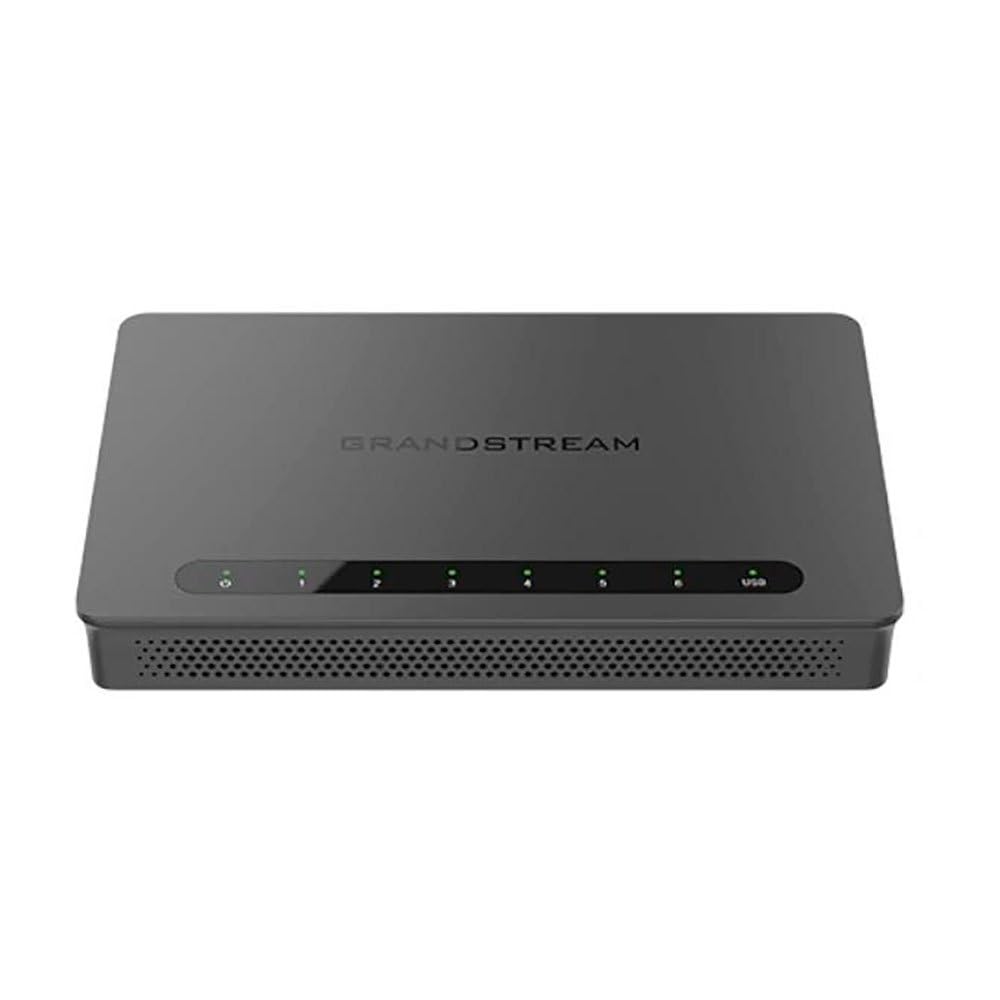
The front panel of the GWN7002 features LED indicators for power, system status, and port activity, providing a quick visual status of the device's operation.
2.2 പിൻ പാനലും പോർട്ടുകളും
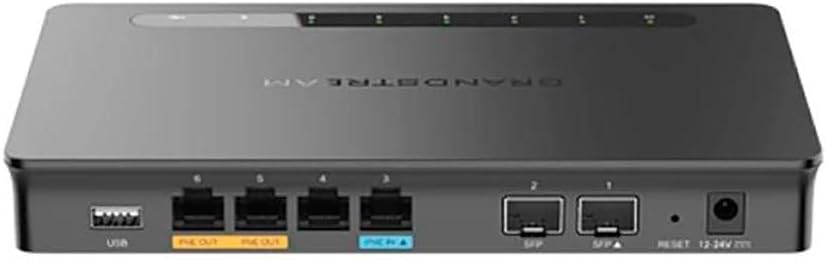
പിൻ പാനലിൽ കണക്റ്റിവിറ്റിക്കായി വിവിധ പോർട്ടുകൾ ഉൾപ്പെടുന്നു:
- WAN/LAN Ports: Multiple Gigabit RJ45 ports for flexible WAN/LAN configuration.
- PoE ഇൻപുട്ട്: One GbE RJ45 port with IEEE 802.3af/at PoE Input, allowing the router to be powered via Ethernet.
- PoE ഔട്ട്പുട്ട്: Two GbE RJ45 ports with 48V Passive PoE output or IEEE 802.3af, capable of powering compatible devices.
- SFP പോർട്ടുകൾ: Gigabit SFP ports for fiber optic connectivity.
- USB പോർട്ട്: ബാഹ്യ സംഭരണമോ മറ്റ് USB ഉപകരണങ്ങളോ ബന്ധിപ്പിക്കുന്നതിന്.
- റീസെറ്റ് ബട്ടൺ: ഉപകരണം ഫാക്ടറി ഡിഫോൾട്ടുകളിലേക്ക് പുനഃസജ്ജമാക്കാൻ ഉപയോഗിക്കുന്നു.
- പവർ ഇൻപുട്ട്: DC power input (12-24V) for standard power adapter connection.
3. സജ്ജീകരണം
Follow these steps for initial setup of your Grandstream GWN7002 router.
3.1 പാക്കേജ് ഉള്ളടക്കം
നിങ്ങളുടെ പാക്കേജിൽ ഇനിപ്പറയുന്ന ഇനങ്ങൾ അടങ്ങിയിട്ടുണ്ടെന്ന് പരിശോധിക്കുക:
- GWN7002 Router Unit
- പവർ അഡാപ്റ്റർ
- ക്വിക്ക് സ്റ്റാർട്ട് ഗൈഡ് (അല്ലെങ്കിൽ സമാനമായ ഡോക്യുമെന്റേഷൻ)
3.2 ഹാർഡ്വെയർ ഇൻസ്റ്റലേഷൻ
- പവർ ബന്ധിപ്പിക്കുക: Connect the provided power adapter to the router's DC power input. Alternatively, if using PoE, connect an Ethernet cable from a PoE switch or injector to the PoE Input port.
- WAN ബന്ധിപ്പിക്കുക: Connect your internet service provider's modem or main network line to one of the configurable WAN ports using an Ethernet cable.
- ലാൻ ഉപകരണങ്ങൾ ബന്ധിപ്പിക്കുക: Connect your local network devices (computers, switches, access points) to the LAN ports using Ethernet cables.
- പവർ ഓൺ: Ensure all connections are secure, then power on the router. Wait for the system LED indicators to stabilize.
3.3 പ്രാരംഭ കോൺഫിഗറേഷൻ
റൂട്ടറിലേക്ക് പ്രവേശിക്കുക web-based configuration interface for initial setup:
- LAN-ലേക്ക് കണക്റ്റുചെയ്യുക: Ensure your computer is connected to a LAN port of the GWN7002.
- പ്രവേശനം Web UI: എ തുറക്കുക web ബ്രൗസർ ചെയ്ത് ഡിഫോൾട്ട് ഐപി വിലാസം നൽകുക (സാധാരണയായി
192.168.1.1or check the Quick Start Guide) in the address bar. - ലോഗിൻ: Enter the default username and password (typically 'admin' for both, or as specified in the guide).
- വിസാർഡ് പിന്തുടരുക: The router may present an initial setup wizard. Follow the on-screen prompts to configure basic network settings, including WAN connection type, LAN IP address, and Wi-Fi settings (if applicable).
4. പ്രവർത്തിക്കുന്നു
This section covers key operational aspects of the GWN7002 router.
4.1 നെറ്റ്വർക്ക് ക്രമീകരണങ്ങൾ
- DHCP സെർവർ: Configure the DHCP server to automatically assign IP addresses to devices on your local network.
- സ്റ്റാറ്റിക് ഐപി: Assign static IP addresses to specific devices if needed.
- VLAN-കൾ: Create and manage Virtual Local Area Networks (VLANs) for network segmentation and improved security.
4.2 Multi-WAN Configuration
The GWN7002 supports multiple WAN connections for enhanced reliability and bandwidth.
- ലോഡ് ബാലൻസ്: Distribute internet traffic across multiple WAN links to optimize bandwidth utilization.
- പരാജയം: Configure a backup WAN connection to automatically take over if the primary connection fails, ensuring continuous internet access.
4.3 VPN Support
Utilize the built-in VPN capabilities for secure remote access and site-to-site connections.
- VPN സെർവർ: Set up the router as a VPN server to allow remote users to securely connect to your local network.
- VPN ക്ലയന്റ്: Configure the router to connect to an external VPN server.
- പിന്തുണയ്ക്കുന്ന പ്രോട്ടോക്കോളുകൾ: The router supports various VPN protocols, including IPsec, L2TP, and OpenVPN.
4.4 ഫയർവാളും സുരക്ഷയും
- Packet Filtering: Configure rules to filter incoming and outgoing network packets based on various criteria.
- പ്രവേശന നിയന്ത്രണം: Manage network access for specific devices or users.
- QoS (സേവന നിലവാരം): Prioritize network traffic for critical applications to ensure optimal performance.
5. പരിപാലനം
Regular maintenance ensures the optimal performance and security of your router.
5.1 ഫേംവെയർ നവീകരണം
Keep your router's firmware updated to benefit from the latest features, security patches, and performance improvements. Download the latest firmware from the Grandstream website and follow the instructions in the web UI to perform the upgrade.
5.2 ബാക്കപ്പ് ചെയ്ത് കോൺഫിഗറേഷൻ പുനഃസ്ഥാപിക്കുക
Regularly back up your router's configuration settings. This allows you to quickly restore your settings in case of a factory reset or device replacement.
5.3 ഫാക്ടറി റീസെറ്റ്
To restore the router to its factory default settings, press and hold the Reset button on the rear panel for approximately 10 seconds while the device is powered on. Release the button when the system LEDs begin to flash. The router will reboot with default settings.
6. പ്രശ്നപരിഹാരം
This section addresses common issues you might encounter with your GWN7002 router.
6.1 ഇന്റർനെറ്റ് കണക്ഷൻ ഇല്ല
- നിങ്ങളുടെ മോഡം ശരിയായി പ്രവർത്തിക്കുന്നുണ്ടെന്നും സജീവ ഇന്റർനെറ്റ് കണക്ഷൻ ഉണ്ടെന്നും ഉറപ്പാക്കുക.
- Check the Ethernet cable connection between the modem and the router's WAN port.
- Ensure the WAN settings in the router's web UI are correctly configured (e.g., DHCP, Static IP, PPPoE).
6.2 മന്ദഗതിയിലുള്ള നെറ്റ്വർക്ക് വേഗത
- നിങ്ങളുടെ ഇന്റർനെറ്റ് സേവന ദാതാവിന്റെ വേഗത പരിശോധിക്കുക.
- Ensure all Ethernet cables are Cat5e or higher for Gigabit speeds.
- Monitor network traffic in the router's web UI to identify any bandwidth-intensive applications or devices.
- Adjust QoS settings to prioritize critical traffic.
6.3 VPN Connection Issues
- Verify VPN server/client settings, including IP addresses, authentication methods, and encryption.
- Check firewall rules to ensure VPN traffic is not being blocked.
- Ensure the remote network is reachable.
7 സ്പെസിഫിക്കേഷനുകൾ
| ഉൽപ്പന്ന അളവുകൾ | 9.25 x 9.84 x 2.17 ഇഞ്ച് |
| ഇനത്തിൻ്റെ ഭാരം | 1.11 പൗണ്ട് |
| ഇനം മോഡൽ നമ്പർ | GWN7002 |
| നിർമ്മാതാവ് | ഗ്രാൻഡ് സ്ട്രീം |
| കണക്റ്റിവിറ്റി ടെക്നോളജി | Wi-Fi (Note: This is a wired router, Wi-Fi connectivity refers to its ability to manage Wi-Fi access points) |
| പ്രത്യേക ഫീച്ചർ | QoS |
| തുറമുഖങ്ങൾ | Multiple Gigabit RJ45 ports (1x PoE Input, 2x PoE Output), Gigabit SFP ports, USB port |
| VPN പിന്തുണ | Built-in VPN support for secure access |
| മൾട്ടി-വാൻ | Supports multiple WAN connections for load balancing and failover |
| നിറം | കറുപ്പ് |
8 സുരക്ഷാ വിവരങ്ങൾ
ഉപകരണത്തിന് കേടുപാടുകൾ സംഭവിക്കാതിരിക്കാനോ സ്വയം പരിക്കേൽക്കാതിരിക്കാനോ ഇനിപ്പറയുന്ന സുരക്ഷാ മുൻകരുതലുകൾ പാലിക്കുക:
- വെള്ളം അല്ലെങ്കിൽ ഈർപ്പം ഉപകരണം തുറന്നുകാട്ടരുത്.
- താപ സ്രോതസ്സുകൾക്ക് സമീപം അല്ലെങ്കിൽ നേരിട്ട് സൂര്യപ്രകാശത്തിൽ ഉപകരണം സ്ഥാപിക്കരുത്.
- ഉപകരണത്തിനൊപ്പം നൽകിയിരിക്കുന്ന പവർ അഡാപ്റ്റർ മാത്രം ഉപയോഗിക്കുക.
- അമിതമായി ചൂടാക്കുന്നത് തടയാൻ ഉപകരണത്തിന് ചുറ്റും ശരിയായ വായുസഞ്ചാരം ഉറപ്പാക്കുക.
- ഉപകരണം സ്വയം തുറക്കാനോ നന്നാക്കാനോ ശ്രമിക്കരുത്. യോഗ്യതയുള്ള സേവന ഉദ്യോഗസ്ഥരെ ബന്ധപ്പെടുക.
9. വാറൻ്റിയും പിന്തുണയും
For warranty information and technical support, please refer to the documentation included with your product or visit the official Grandstream webസൈറ്റ്. വാറൻ്റി ക്ലെയിമുകൾക്കായി നിങ്ങളുടെ വാങ്ങൽ രസീത് സൂക്ഷിക്കുക.