ആമുഖം
The Bresser MeteoCast Pico Color Weather Station provides comprehensive information about indoor and outdoor climate conditions. Equipped with a thermo-hygro outdoor sensor, it displays temperature, humidity, and a graphical weather forecast. Key features include max/min value memory, DCF radio-controlled time, and an alarm function with snooze. This manual will guide you through the setup, operation, and maintenance of your weather station.
പാക്കേജ് ഉള്ളടക്കം
- Bresser MeteoCast Pico Main Unit
- Wireless Thermo-Hygro Outdoor Sensor
- ഇൻസ്ട്രക്ഷൻ മാനുവൽ
ഉൽപ്പന്നം കഴിഞ്ഞുview

പ്രധാന യൂണിറ്റ് ഡിസ്പ്ലേ: Shows time, weather forecast, indoor/outdoor temperature and humidity, and max/min values.

ഔട്ട്ഡോർ സെൻസർ: Compact unit displaying current temperature and humidity, designed for outdoor use.
പ്രധാന യൂണിറ്റ് സവിശേഷതകൾ:
- Color display for clear readability.
- Indoor temperature and humidity measurement.
- Graphical weather forecast (5 icons).
- DCF radio-controlled time with alarm and snooze function.
- Max/Min value memory for temperature and humidity.
- ബാറ്ററി ലെവൽ ഇൻഡിക്കേറ്റർ.
Outdoor Sensor Features:
- പുറത്തെ താപനിലയും ഈർപ്പവും അളക്കുന്നു.
- Small integrated display for direct readings.
- Wireless transmission up to 80 meters (open area).
- IP44 water resistance for splash-proof protection.
സജ്ജമാക്കുക
1. ബാറ്ററി ഇൻസ്റ്റാളേഷൻ
പ്രധാന യൂണിറ്റ്:
- പ്രധാന യൂണിറ്റിന്റെ പിൻഭാഗത്തുള്ള ബാറ്ററി കമ്പാർട്ട്മെന്റ് കവർ തുറക്കുക.
- Insert 2x AAA 1.5V batteries, observing the correct polarity (+/-).
- ബാറ്ററി കമ്പാർട്ട്മെൻ്റ് കവർ അടയ്ക്കുക.
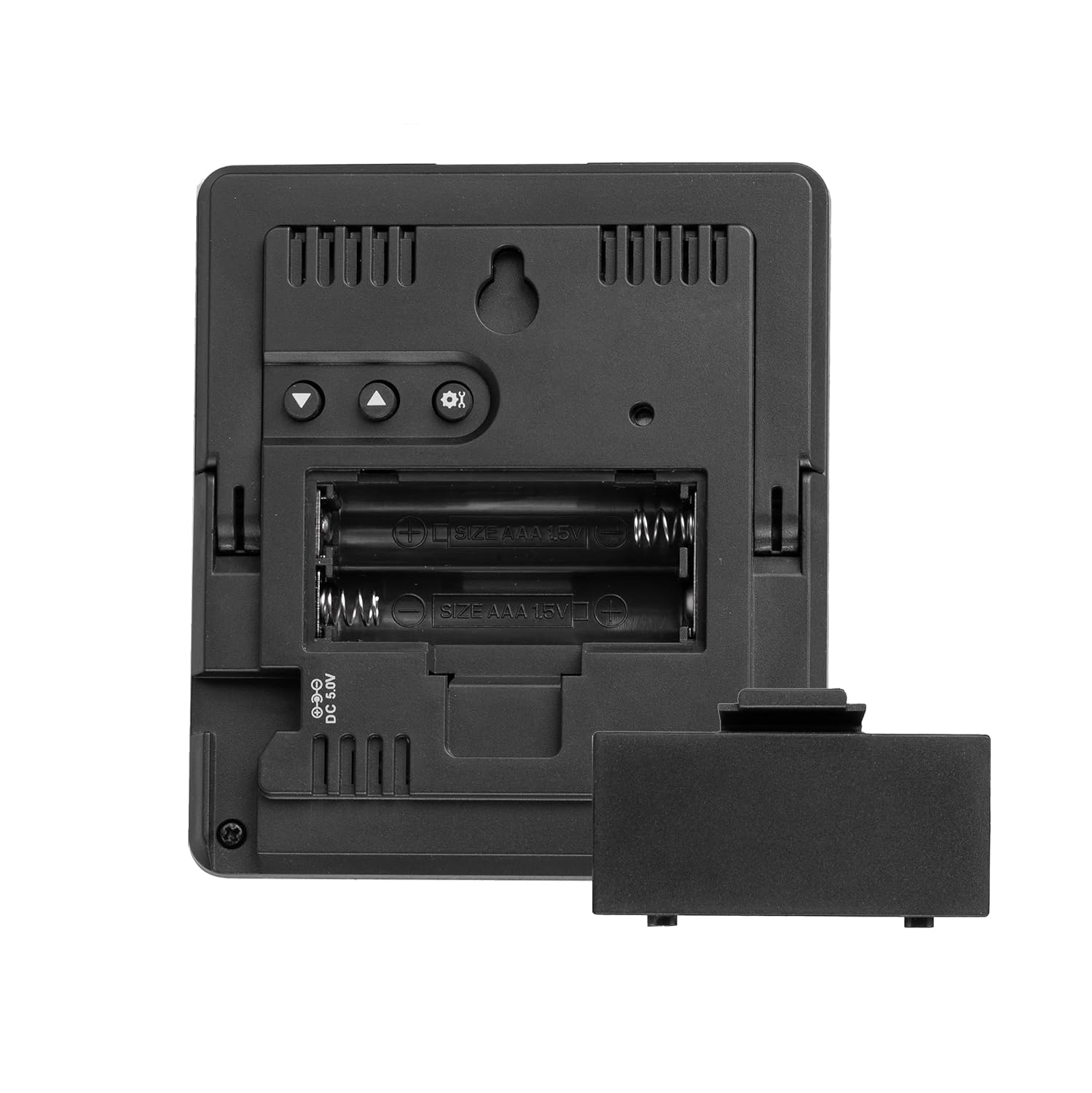
Main Unit Battery Compartment: Insert 2x AAA 1.5V batteries.
ഔട്ട്ഡോർ സെൻസർ:
- ഔട്ട്ഡോർ സെൻസറിന്റെ പിൻഭാഗത്തുള്ള ബാറ്ററി കമ്പാർട്ട്മെന്റ് കവർ തുറക്കുക.
- Insert 2x AAA 1.5V batteries, observing the correct polarity (+/-).
- ജല പ്രതിരോധം നിലനിർത്താൻ ബാറ്ററി കമ്പാർട്ട്മെന്റ് കവർ സുരക്ഷിതമായി അടയ്ക്കുക.

Outdoor Sensor Battery Compartment: Insert 2x AAA 1.5V batteries.
2. സെൻസർ പ്ലേസ്മെന്റ്
Place the outdoor sensor in a shaded, well-ventilated area, protected from direct sunlight and rain, to ensure accurate readings. The sensor is splash-proof (IP44), but direct exposure to heavy rain should be avoided. Ensure it is within 80 meters of the main unit, minimizing obstacles like thick walls or metal structures for optimal signal transmission.

IP44 ജല പ്രതിരോധം: The outdoor sensor is splash-proof.
3. Automatic Pairing & DCF Time Synchronization
After inserting batteries into both units, the main unit will automatically search for the outdoor sensor and the DCF radio signal for time synchronization. This process may take a few minutes. Ensure the main unit is placed away from sources of electrical interference for better DCF reception.
പ്രവർത്തന നിർദ്ദേശങ്ങൾ
1. വിവരങ്ങൾ പ്രദർശിപ്പിക്കുക

Detailed Display: Shows all key weather and time information.
കളർ ഡിസ്പ്ലേ ഇനിപ്പറയുന്ന വിവരങ്ങൾ നൽകുന്നു:
- സമയം: DCF സിഗ്നൽ വഴി യാന്ത്രികമായി സജ്ജമാക്കി.
- കാലാവസ്ഥാ പ്രവചനം: Represented by 5 graphical icons (e.g., sunny, cloudy, rainy).
- ഇൻഡോർ താപനിലയും ഈർപ്പവും: Measured by the main unit.
- പുറത്തെ താപനിലയും ഈർപ്പവും: Received from the wireless sensor.
- പരമാവധി/കുറഞ്ഞ മൂല്യങ്ങൾ: Highest and lowest recorded temperatures and humidity for both indoor and outdoor.
- അലാറം ഇൻഡിക്കേറ്റർ: Shows if the alarm is active.
2. ബട്ടൺ പ്രവർത്തനങ്ങൾ
The main unit features several buttons on its rear for settings and adjustments:

പിൻ നിയന്ത്രണങ്ങൾ: Buttons for setting time, alarm, and viewing മെമ്മറി.
- സജ്ജമാക്കുക: Enters setting mode for time, date, and alarm. Press to confirm selections.
- അപ് / ഡൗൺ: Adjusts values during setting mode. Scrolls through options.
- CH (ചാനൽ): Manually cycles through outdoor sensor channels if multiple sensors are used (not applicable for single sensor setup).
- എംഇഎം (മെമ്മറി): Displays maximum and minimum recorded values. Press again to cycle through max, min, and current values. Hold to reset max/min values.
- സ്നൂസ്/ലൈറ്റ്: (Often a dedicated button on top or front) Activates snooze during an alarm or temporarily illuminates the display.
3. അലാറം സജ്ജമാക്കുന്നു
- അമർത്തുക സെറ്റ് button repeatedly until the alarm time flashes.
- ഉപയോഗിക്കുക UP or താഴേക്ക് മണിക്കൂർ ക്രമീകരിക്കാൻ ബട്ടണുകൾ. അമർത്തുക സെറ്റ് സ്ഥിരീകരിക്കാൻ.
- ഉപയോഗിക്കുക UP or താഴേക്ക് മിനിറ്റ് ക്രമീകരിക്കാൻ ബട്ടണുകൾ. അമർത്തുക സെറ്റ് അലാറം ക്രമീകരണം സ്ഥിരീകരിച്ച് പുറത്തുകടക്കാൻ.
- അലാറം സജീവമാക്കുന്നതിനും നിർജ്ജീവമാക്കുന്നതിനും, അമർത്തുക UP button outside of setting mode. An alarm icon will appear/disappear on the display.
4. സ്നൂസ് ഫംഗ്ഷൻ
അലാറം മുഴങ്ങുമ്പോൾ, അമർത്തുക സ്നൂസ് / ലൈറ്റ് button (if available) to temporarily silence the alarm. The alarm will sound again after a few minutes. To stop the alarm completely, press any other button.
5. Viewപരമാവധി/മിനിറ്റ് മൂല്യങ്ങൾ
അമർത്തുക എം.ഇ.എം button to cycle through the maximum, minimum, and current recorded temperature and humidity values for both indoor and outdoor. Hold the എം.ഇ.എം button for a few seconds to reset all stored maximum and minimum values.
മെയിൻ്റനൻസ്
വൃത്തിയാക്കൽ
മെയിൻ യൂണിറ്റും ഔട്ട്ഡോർ സെൻസറും ഒരു സോഫ്റ്റ്, ഡി ക്ലീനർ ഉപയോഗിച്ച് തുടയ്ക്കുക.amp തുണി. അബ്രാസീവ് ക്ലീനറുകളോ ലായകങ്ങളോ ഉപയോഗിക്കരുത്, കാരണം ഇവ ഡിസ്പ്ലേയ്ക്കോ സി.asing. Ensure the outdoor sensor's battery compartment is sealed after cleaning.
ബാറ്ററി മാറ്റിസ്ഥാപിക്കൽ
Replace batteries in both the main unit and outdoor sensor when the low battery indicator appears on the display. Always replace all batteries in a unit at the same time with new ones of the same type. Dispose of used batteries responsibly.
ട്രബിൾഷൂട്ടിംഗ്
- No outdoor temperature/humidity display:
- Check if the outdoor sensor batteries are correctly inserted or need replacement.
- Ensure the outdoor sensor is within range (max. 80m) and free from major obstructions.
- Try re-pairing by removing batteries from both units, then reinserting them first into the outdoor sensor, then the main unit.
- തെറ്റായ സമയ പ്രദർശനം:
- Ensure the main unit is in an area with good DCF signal reception, away from electronic devices that may cause interference.
- The DCF signal synchronization can take several minutes or even hours, especially in areas with weak signals.
- ഡിസ്പ്ലേ മങ്ങിയതോ ശൂന്യമോ ആണ്:
- Check the main unit batteries and replace if necessary.
സ്പെസിഫിക്കേഷനുകൾ
| മോഡൽ നമ്പർ | 7000030 |
| അളവുകൾ (പ്രധാന യൂണിറ്റ്) | 9.6 x 8.5 x 2 സെ.മീ |
| ഭാരം | 107 ഗ്രാം |
| പവർ സോഴ്സ് (മെയിൻ യൂണിറ്റ്) | Battery powered (2x AAA 1.5V, not included) |
| പവർ സ്രോതസ്സ് (ഔട്ട്ഡോർ സെൻസർ) | Battery powered (2x AAA 1.5V, not included) |
| മെറ്റീരിയൽ | പ്ലാസ്റ്റിക് |
| കണക്റ്റിവിറ്റി ടെക്നോളജി | റേഡിയോ ആവൃത്തി |
| ഔട്ട്ഡോർ സെൻസർ ശ്രേണി | 80 മീറ്റർ വരെ (തുറന്ന പ്രദേശം) |
| ഔട്ട്ഡോർ സെൻസർ വാട്ടർ റെസിസ്റ്റൻസ് | IP44 (സ്പ്ലാഷ് പ്രൂഫ്) |
| പ്രത്യേക സവിശേഷതകൾ | Alarm function, Snooze function, Max/Min value memory, Weather forecast, Color display |
വാറൻ്റിയും പിന്തുണയും
Bresser products are designed for reliability and performance. For warranty information, technical support, or service inquiries, please refer to the official Bresser website or contact your local dealer. Keep your purchase receipt as proof of purchase for any warranty claims.


