1. ആമുഖം
This user manual provides comprehensive instructions for the setup, operation, and maintenance of your UPERFECT 17.3-inch 2K 144Hz Portable Monitor. Please read this manual thoroughly before using the product to ensure proper functionality and longevity.
The UPERFECT portable monitor is designed to enhance your gaming, productivity, and multimedia experiences with its high resolution, fast refresh rate, and versatile connectivity options.
2. ബോക്സിൽ എന്താണുള്ളത്?
താഴെ ലിസ്റ്റ് ചെയ്തിരിക്കുന്ന എല്ലാ ഇനങ്ങളും നിങ്ങളുടെ പാക്കേജിൽ ഉൾപ്പെടുത്തിയിട്ടുണ്ടെന്ന് ഉറപ്പാക്കുക:
- 1x UPERFECT 17.3-inch 2K 144Hz Portable Monitor
- 1x Mini HDMI to HDMI Cable (4K compatible)
- 2x USB-C മുതൽ USB-C കേബിൾ വരെ
- 1x PD 18W Power Adapter

This image displays the portable monitor along with its essential accessories, including the smart cover, various connection cables, and the power adapter, all neatly arranged.
3. ഉൽപ്പന്നം കഴിഞ്ഞുview ഫീച്ചറുകളും
The UPERFECT portable monitor offers a range of features designed for high-performance visual experiences:
- 144 Hz പുതുക്കൽ നിരക്ക്: Experience ultra-smooth visuals, crucial for fast-paced gaming, reducing motion blur and ghosting.
- 2K (2560x1440P) Resolution: Enjoy crisp, detailed images on the 17.3-inch IPS screen, providing superior clarity compared to standard 1080p displays.
- 100% DCI-P3 IPS Screen: Delivers a wider color gamut and precise color accuracy, ideal for professional design, photo editing, and immersive multimedia.
- HDR Functionality: Enhances contrast and color depth for a more dynamic and lifelike viewഅനുഭവം.
- ഫ്രീസിങ്ക് ടെക്നോളജി: Synchronizes the monitor's refresh rate with your GPU's frame rate, eliminating screen tearing and stuttering for fluid gameplay.
- VESA Compatible & Adjustable Kickstand: Features standard 75x75 mm VESA holes for mounting and an integrated kickstand for flexible positioning in landscape or portrait mode.
- Dual Speakers & 3.5mm Audio Jack: Built-in stereo speakers provide audio output, with an additional audio jack for headphones or external speakers.
- ബഹുമുഖ കണക്റ്റിവിറ്റി: Equipped with two full-featured USB-C ports and one HDMI port for broad compatibility with various devices.
3.1 Visual Performance
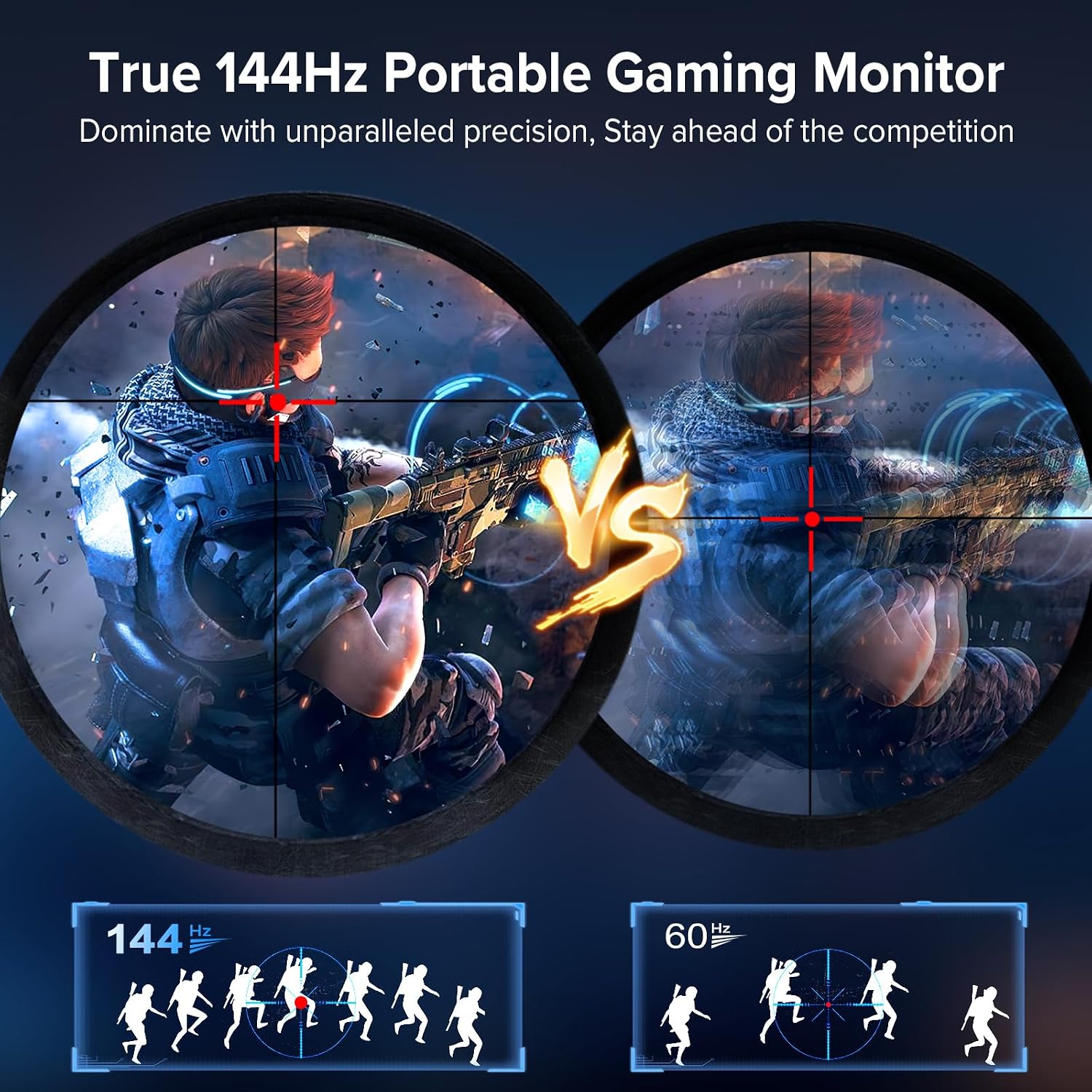
This image illustrates the enhanced smoothness and clarity provided by a 144Hz refresh rate compared to a standard 60Hz, particularly noticeable in fast-moving scenes like gaming.

This image highlights the superior image clarity and detail achieved with 2K resolution (2560x1440) compared to the lower pixel density of 1080p (1920x1080).

This diagram visually represents the monitor's ability to display 100% of the DCI-P3 color space, indicating exceptional color accuracy and vibrancy for professional and entertainment use.

This image demonstrates the benefit of FreeSync technology, showcasing how it prevents screen tearing and stuttering, resulting in smoother and more fluid motion during gameplay.
3.2 Physical Design and Ports

This image illustrates the monitor's VESA mounting points (75x75mm) for desk or wall mounts, alongside its integrated adjustable kickstand, offering versatile setup options.

ഈ ചിത്രം വിശദമായ ഒരു വിവരണം നൽകുന്നു view of the monitor's input/output ports, including two Type-C ports, one Mini HDMI port, and a 3.5mm audio jack, highlighting its broad device compatibility.

This image displays the physical dimensions of the portable monitor, indicating its slim profile and compact size for easy portability.
4. സജ്ജീകരണ നിർദ്ദേശങ്ങൾ
Follow these steps to set up your UPERFECT portable monitor:
- പവർ കണക്ഷൻ: Connect the provided PD 18W Power Adapter to one of the USB-C ports labeled "Type-C" on the monitor and plug it into a power outlet. Alternatively, if your device supports power delivery over USB-C, a single USB-C cable can provide both power and video signal.
- വീഡിയോ കണക്ഷൻ:
- USB-C കണക്ഷൻ: Use one of the provided USB-C to USB-C cables to connect your laptop, PC, phone, or game console (e.g., Steam Deck, Nintendo Switch) to a "Type-C" port on the monitor. Ensure your device's USB-C port supports video output (DisplayPort Alternate Mode).
- HDMI കണക്ഷൻ: Use the provided Mini HDMI to HDMI cable to connect your device (e.g., PC, game console like PS4/PS5, Xbox) to the "HD" (Mini HDMI) port on the monitor.
- സ്ഥാനനിർണ്ണയം: Utilize the integrated adjustable kickstand to position the monitor at your desired viewing angle. For a more permanent setup, use the VESA mount holes to attach the monitor to a compatible desk or wall mount.
- ഓഡിയോ: The monitor has built-in dual speakers. For private listening or higher quality audio, connect headphones or external speakers to the 3.5mm audio jack.
5. പ്രവർത്തന നിർദ്ദേശങ്ങൾ
The monitor features an intuitive control system for adjusting settings:
- പവർ ഓൺ/ഓഫ്: Press and hold the power button (often integrated with the scroll wheel/joystick) for a few seconds to turn the monitor on or off.
- ഓൺ-സ്ക്രീൻ ഡിസ്പ്ലേ (OSD) മെനു: Press the scroll wheel/joystick button to access the OSD menu.
- നാവിഗേഷൻ: Use the scroll wheel/joystick to navigate through the OSD menu options. Push up/down to scroll, and press to select.
- ക്രമീകരണങ്ങൾ ക്രമീകരിക്കുന്നു: Within the OSD menu, you can adjust various settings such as brightness, contrast, color temperature, input source, HDR mode, FreeSync, and more.
- വോളിയം നിയന്ത്രണം: Typically, pushing the scroll wheel/joystick up or down without entering the OSD menu will adjust the volume.
6. പരിപാലനം
നിങ്ങളുടെ UPERFECT പോർട്ടബിൾ മോണിറ്ററിന്റെ ദീർഘായുസ്സും ഒപ്റ്റിമൽ പ്രകടനവും ഉറപ്പാക്കാൻ, ഈ പരിപാലന മാർഗ്ഗനിർദ്ദേശങ്ങൾ പാലിക്കുക:
- സ്ക്രീൻ വൃത്തിയാക്കൽ: ഇലക്ട്രോണിക് ഉപകരണങ്ങൾക്കായി പ്രത്യേകം രൂപകൽപ്പന ചെയ്ത മൃദുവായ, ലിന്റ് രഹിത തുണി ഉപയോഗിക്കുക. നേരിയ തോതിൽ dampen the cloth with water or a screen-cleaning solution. Avoid harsh chemicals, abrasive cleaners, or direct spraying onto the screen.
- സി വൃത്തിയാക്കൽasing: മോണിറ്ററിന്റെ സി തുടയ്ക്കുകasinമൃദുവായതും ഉണങ്ങിയതുമായ തുണി ഉപയോഗിച്ച് ഗ്രാം.
- സംഭരണം: When not in use, store the monitor in its smart cover to protect the screen from scratches and dust. Store in a cool, dry place away from direct sunlight and extreme temperatures.
- കൈകാര്യം ചെയ്യൽ: Always handle the monitor with care. Avoid dropping it or applying excessive pressure to the screen.
- വെൻ്റിലേഷൻ: അമിതമായി ചൂടാകുന്നത് തടയാൻ മോണിറ്ററിന്റെ വെന്റിലേഷൻ ദ്വാരങ്ങൾ അടഞ്ഞിട്ടില്ലെന്ന് ഉറപ്പാക്കുക.
7. പ്രശ്നപരിഹാരം
If you encounter issues with your UPERFECT portable monitor, refer to the following common problems and solutions:
| പ്രശ്നം | സാധ്യമായ കാരണം | പരിഹാരം |
|---|---|---|
| സിഗ്നൽ ഇല്ല / കറുത്ത സ്ക്രീൻ | Incorrect input source selected, loose cable connection, insufficient power, device not outputting video. |
|
| Flickering Screen / Unstable Image | Cable quality, refresh rate mismatch, FreeSync issues. |
|
| ഓഡിയോ ഇല്ല / കുറഞ്ഞ ശബ്ദം | Volume too low, incorrect audio output selected on device, faulty cable. |
|
| മോണിറ്റർ ഓണാക്കുന്നില്ല | No power, faulty power adapter/cable. |
|
8 സ്പെസിഫിക്കേഷനുകൾ
| ഫീച്ചർ | വിശദാംശങ്ങൾ |
|---|---|
| സ്ക്രീൻ വലിപ്പം | 17.3 ഇഞ്ച് |
| റെസലൂഷൻ | 2560 x 1440 (2K QHD) |
| പുതുക്കിയ നിരക്ക് | 144 Hz |
| പാനൽ തരം | ഐ.പി.എസ് |
| വർണ്ണ ഗാമറ്റ് | 100% DCI-P3 |
| തെളിച്ചം | 400 കാൻഡല |
| വീക്ഷണാനുപാതം | 16:9 |
| സ്ക്രീൻ ഉപരിതലം | മാറ്റ് |
| കണക്റ്റിവിറ്റി | 2x USB-C (Full-featured), 1x Mini HDMI, 1x 3.5mm Audio Jack |
| വെസെ മൌണ്ട് | 75x75 മിമി (M4*4 മിമി സ്ക്രൂകൾ) |
| ഉൽപ്പന്ന അളവുകൾ | 0.39 x 15.35 x 9.45 ഇഞ്ച് |
| ഇനത്തിൻ്റെ ഭാരം | 4.22 പൗണ്ട് |
| മോഡൽ നമ്പർ | M173J07 |
| നിർമ്മാതാവ് | തികഞ്ഞ |
9. വാറൻ്റിയും പിന്തുണയും
UPERFECT is committed to providing excellent customer service and product reliability:
- വാറൻ്റി: The UPERFECT 17.3-inch 2K 144Hz portable monitor comes with a 3-year warranty.
- റിട്ടേണുകളും എക്സ്ചേഞ്ചുകളും: Enjoy a 30-day free return policy and a 90-day free exchange policy from the date of purchase.
- സാങ്കേതിക സഹായം: Lifetime technical support is available. For any issues or inquiries, contact UPERFECT customer service. Support is available 24/7, with problems typically resolved within 8 hours.
For support, please visit the official UPERFECT webസൈറ്റ് ചെയ്യുക അല്ലെങ്കിൽ അവരുടെ ഉപഭോക്തൃ സേവന ടീമിനെ നേരിട്ട് ബന്ധപ്പെടുക.


