1. ആമുഖം
This manual provides detailed instructions for the setup, operation, maintenance, and troubleshooting of your CUPEISI YQ10S MAX Android 15 Tablet. Please read this manual thoroughly before using your device to ensure proper functionality and to maximize your user experience. Keep this manual for future reference.

Image 1.1: CUPEISI YQ10S MAX Android 15 Tablet with included accessories (keyboard, mouse, stylus, and protective case).
2. പാക്കേജ് ഉള്ളടക്കം
താഴെ ലിസ്റ്റ് ചെയ്തിരിക്കുന്ന എല്ലാ ഇനങ്ങളും നിങ്ങളുടെ ഉൽപ്പന്ന പാക്കേജിൽ ഉണ്ടെന്ന് ഉറപ്പാക്കുക:
- CUPEISI YQ10S MAX Android 15 Tablet
- വയർലെസ് കീബോർഡ്
- ബ്ലൂടൂത്ത് മൗസ്
- Foldable Protective Cover
- സ്റ്റൈലസ്
- ടൈപ്പ്-സി കേബിൾ
- ചാർജർ
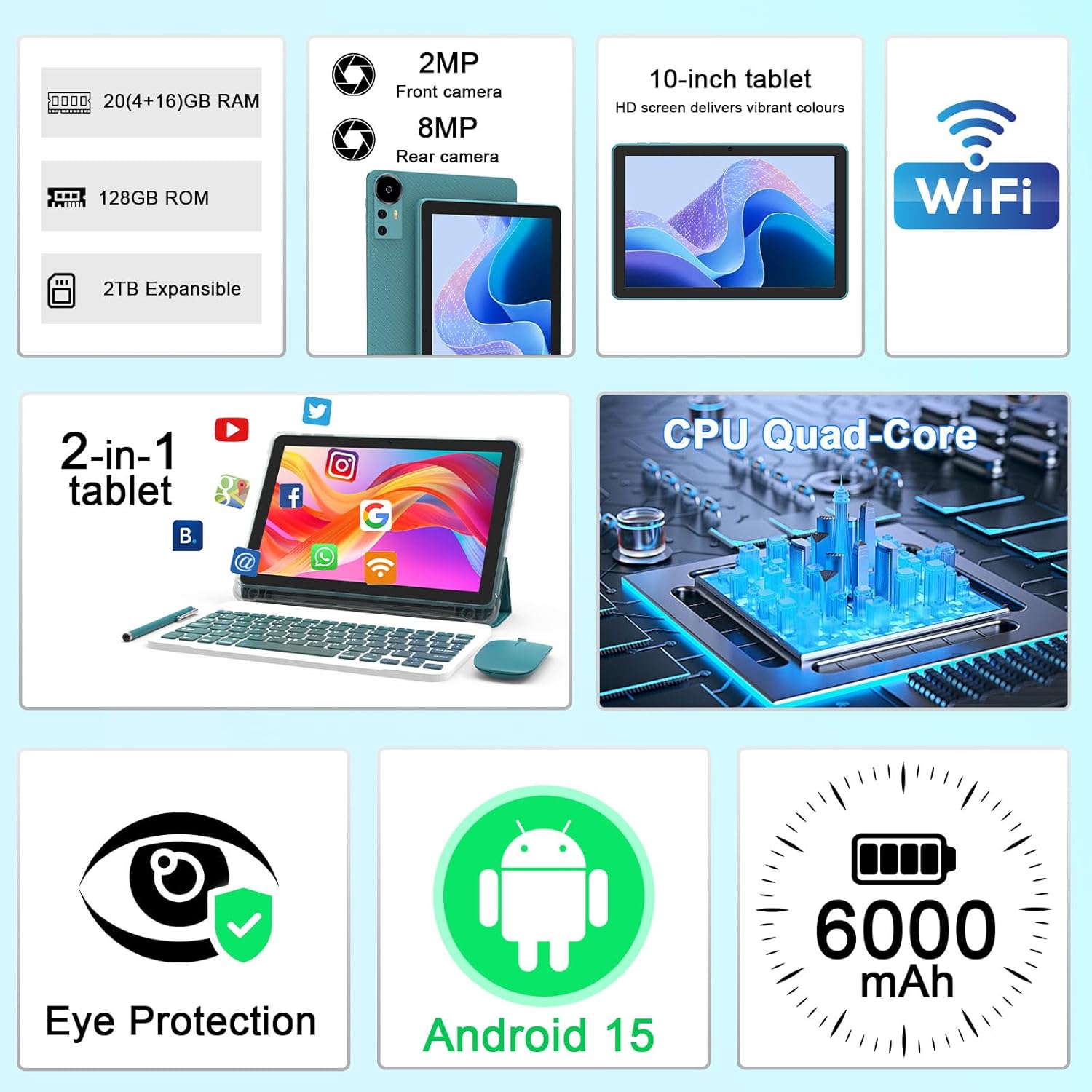
ചിത്രം 2.1: കഴിഞ്ഞുview of key features and included components.
3. പ്രാരംഭ സജ്ജീകരണം
3.1 പവർ ഓൺ/ഓഫ്
- പവർ ഓണാക്കാൻ: സ്ക്രീൻ പ്രകാശിക്കുന്നത് വരെ ടാബ്ലെറ്റിന്റെ വശത്തുള്ള പവർ ബട്ടൺ അമർത്തിപ്പിടിക്കുക.
- പവർ ഓഫ് ചെയ്യാൻ: പവർ ബട്ടൺ അമർത്തിപ്പിടിക്കുക, തുടർന്ന് സ്ക്രീനിൽ ദൃശ്യമാകുന്ന ഓപ്ഷനുകളിൽ നിന്ന് 'പവർ ഓഫ്' തിരഞ്ഞെടുക്കുക.
- പുനരാരംഭിക്കാൻ: പവർ ബട്ടൺ അമർത്തിപ്പിടിക്കുക, തുടർന്ന് ഓപ്ഷനുകളിൽ നിന്ന് 'റീസ്റ്റാർട്ട്' തിരഞ്ഞെടുക്കുക.
3.2 ടാബ്ലെറ്റ് ചാർജ് ചെയ്യുന്നു
Before first use, fully charge the tablet. Use the provided Type-C cable and charger.
- Connect the Type-C cable to the tablet's charging port.
- കേബിളിൻ്റെ മറ്റേ അറ്റം പവർ അഡാപ്റ്ററുമായി ബന്ധിപ്പിക്കുക.
- ഒരു മതിൽ ഔട്ട്ലെറ്റിലേക്ക് പവർ അഡാപ്റ്റർ പ്ലഗ് ചെയ്യുക.
- The battery icon on the screen will indicate charging status. A full charge typically takes several hours.

Image 3.1: Battery and charging information.
3.3 Connecting Accessories (Keyboard, Mouse, Stylus)
The tablet supports Bluetooth connectivity for the included keyboard and mouse.
- ബ്ലൂടൂത്ത് പ്രവർത്തനക്ഷമമാക്കുക: പോകുക ക്രമീകരണങ്ങൾ > ബന്ധിപ്പിച്ച ഉപകരണങ്ങൾ > ബ്ലൂടൂത്ത് അത് ഓണാക്കുക.
- Pair Keyboard/Mouse: Put the keyboard or mouse into pairing mode (refer to their individual instructions if needed). Select the device name from the list of available Bluetooth devices on your tablet to pair.
- സ്റ്റൈലസ്: The included stylus is typically passive and does not require pairing. It can be used directly on the screen for navigation or drawing.
3.4 വൈഫൈ കണക്ഷൻ
Connect your tablet to a Wi-Fi network for internet access.
- പോകുക ക്രമീകരണങ്ങൾ > നെറ്റ്വർക്കും ഇൻ്റർനെറ്റും > വൈഫൈ.
- വൈഫൈ ഓണാക്കുക. ലഭ്യമായ നെറ്റ്വർക്കുകൾക്കായി ടാബ്ലെറ്റ് സ്കാൻ ചെയ്യും.
- ലിസ്റ്റിൽ നിന്ന് നിങ്ങൾക്ക് ആവശ്യമുള്ള നെറ്റ്വർക്ക് തിരഞ്ഞെടുക്കുക.
- If prompted, enter the network password and tap ബന്ധിപ്പിക്കുക.
4. അടിസ്ഥാന പ്രവർത്തനം
4.1 ആൻഡ്രോയിഡ് 15 നാവിഗേറ്റ് ചെയ്യുന്നു
Your tablet runs on Android 15, offering an intuitive user interface. Swipe gestures, tap actions, and the navigation bar (Back, Home, Recents) are standard for interaction. The Google Mobile Services (GMS) certification ensures access to the Google Play Store and other Google applications.

Image 4.1: Android 15 operating system features.
4.2 ഡിസ്പ്ലേ ക്രമീകരണങ്ങൾ
The 10.1-inch IPS display with 1280x800 resolution provides clear visuals. You can adjust display settings to suit your preferences:
- തെളിച്ചം: Adjust screen brightness from the quick settings panel or in ക്രമീകരണങ്ങൾ > പ്രദർശിപ്പിക്കുക.
- വായനാ രീതി: Enable 'Reading Mode' in display settings to reduce blue light emission, which can enhance comfort during extended reading sessions.
- അക്ഷര വലിപ്പം: Customize text size for better readability.

Image 4.2: Details of the 10.1-inch HD screen display.
4.3 സ്റ്റോറേജ് മാനേജ്മെൻ്റ്
The tablet features 128GB of internal storage and 20GB RAM (4GB physical + 16GB virtual expansion). Storage can be expanded up to 2TB using a microSD card (not included).
- സംഭരണം പരിശോധിക്കുക: പോകുക ക്രമീകരണങ്ങൾ > സംഭരണം വരെ view ആന്തരികവും ബാഹ്യവുമായ സംഭരണ ഉപയോഗം.
- മൈക്രോ എസ്ഡി കാർഡ് ചേർക്കുക: Locate the microSD card slot on the tablet, insert the card gently until it clicks into place.

Image 4.3: Storage and RAM configuration.
4.4 ക്യാമറ ഉപയോഗം
The tablet is equipped with an 8MP rear camera and a 2MP front camera.
- ക്യാമറ ആപ്പ് തുറക്കുക: നിങ്ങളുടെ ഹോം സ്ക്രീനിലോ ആപ്പ് ഡ്രോയറിലോ ഉള്ള ക്യാമറ ഐക്കണിൽ ടാപ്പ് ചെയ്യുക.
- ക്യാമറകൾ മാറുക: മുൻ ക്യാമറയും പിൻ ക്യാമറയും തമ്മിൽ മാറാൻ ക്യാമറ സ്വിച്ച് ഐക്കൺ ഉപയോഗിക്കുക.
- ഫോട്ടോകൾ/വീഡിയോകൾ എടുക്കുക: ഒരു ഫോട്ടോ എടുക്കാൻ ഷട്ടർ ബട്ടൺ ടാപ്പ് ചെയ്യുക അല്ലെങ്കിൽ വീഡിയോ റെക്കോർഡിംഗ് ആരംഭിക്കുക/നിർത്തുക.

Image 4.4: Camera specifications and modes.
4.5 മൾട്ടിമീഡിയ പ്ലേബാക്ക്
The tablet supports Widevine L1, enabling high-definition streaming from platforms like Netflix, Hulu, YouTube, and Prime Video.
- Ensure a stable internet connection for optimal streaming quality.
- Download streaming apps from the Google Play Store.

Image 4.5: Widevine L1 support for multimedia streaming.
4.6 മൾട്ടിടാസ്കിംഗ്
Android 15 enhances multitasking capabilities. Use the 'Recents' button to switch between open applications or utilize split-screen mode for running two apps simultaneously.
- സ്പ്ലിറ്റ്-സ്ക്രീൻ: From the 'Recents' view, tap the app icon at the top of an app's card and select 'Split screen'. Choose a second app to open alongside it.
- The included keyboard and mouse facilitate a laptop-like experience for productivity tasks.

Image 4.6: Tablet used in 2-in-1 mode with keyboard and mouse.
5. പരിചരണവും പരിപാലനവും
5.1 വൃത്തിയാക്കൽ
- ടാബ്ലെറ്റിന്റെ സ്ക്രീനും ബോഡിയും വൃത്തിയാക്കാൻ മൃദുവായ, ലിന്റ് രഹിത തുണി ഉപയോഗിക്കുക.
- കഠിനമായ രാസവസ്തുക്കൾ, അബ്രസീവ് ക്ലീനറുകൾ, അല്ലെങ്കിൽ എയറോസോൾ സ്പ്രേകൾ എന്നിവ ഉപയോഗിക്കുന്നത് ഒഴിവാക്കുക.
- വൃത്തിയാക്കുന്നതിന് മുമ്പ് ടാബ്ലെറ്റ് ഓഫ് ചെയ്തിട്ടുണ്ടെന്നും അൺപ്ലഗ് ചെയ്തിട്ടുണ്ടെന്നും ഉറപ്പാക്കുക.
5.2 ബാറ്ററി കെയർ
- ടാബ്ലെറ്റ് ഉയർന്ന താപനിലയിൽ (ചൂടോ തണുപ്പോ) തുറന്നുകാട്ടുന്നത് ഒഴിവാക്കുക.
- ടാബ്ലെറ്റ് പൂർണ്ണമായി ഡിസ്ചാർജ് ചെയ്ത നിലയിൽ ദീർഘനേരം വയ്ക്കരുത്.
- Use only the provided charger and cable to prevent damage to the battery.
5.3 സോഫ്റ്റ്വെയർ അപ്ഡേറ്റുകൾ
- ഒപ്റ്റിമൽ പ്രകടനം, സുരക്ഷ, പുതിയ സവിശേഷതകളിലേക്കുള്ള ആക്സസ് എന്നിവ ഉറപ്പാക്കാൻ സോഫ്റ്റ്വെയർ അപ്ഡേറ്റുകൾ പതിവായി പരിശോധിച്ച് ഇൻസ്റ്റാൾ ചെയ്യുക.
- പോകുക ക്രമീകരണങ്ങൾ > സിസ്റ്റം > സിസ്റ്റം അപ്ഡേറ്റ് ലഭ്യമായ അപ്ഡേറ്റുകൾ പരിശോധിക്കാൻ.
6. പ്രശ്നപരിഹാരം
നിങ്ങളുടെ ടാബ്ലെറ്റിൽ പ്രശ്നങ്ങൾ നേരിടുകയാണെങ്കിൽ, ഇനിപ്പറയുന്ന പൊതുവായ പ്രശ്നങ്ങളും പരിഹാരങ്ങളും പരിശോധിക്കുക:
6.1 വൈദ്യുതി പ്രശ്നങ്ങൾ
- ടാബ്ലെറ്റ് ഓണാകുന്നില്ല: ബാറ്ററി ചാർജ്ജ് ചെയ്തിട്ടുണ്ടെന്ന് ഉറപ്പാക്കുക. ചാർജർ കണക്റ്റ് ചെയ്ത് വീണ്ടും പവർ ചെയ്യാൻ ശ്രമിക്കുന്നതിന് മുമ്പ് കുറച്ച് മിനിറ്റ് കാത്തിരിക്കുക.
- Tablet freezes: റീസ്റ്റാർട്ട് ചെയ്യാൻ പവർ ബട്ടൺ ഏകദേശം 10-15 സെക്കൻഡ് അമർത്തിപ്പിടിക്കുക.
6.2 കണക്റ്റിവിറ്റി പ്രശ്നങ്ങൾ
- വൈഫൈ കണക്റ്റ് ചെയ്യുന്നില്ല: Check if Wi-Fi is enabled in settings. Restart your router and the tablet. Ensure you are entering the correct password.
- ബ്ലൂടൂത്ത് ഉപകരണം ജോടിയാക്കുന്നില്ല: Ensure the Bluetooth accessory is in pairing mode and within range. Restart Bluetooth on the tablet and try pairing again.
6.3 Performance Lags
- മന്ദഗതിയിലുള്ള പ്രകടനം: Close unused applications running in the background. Clear cache data for frequently used apps. Consider adding a microSD card for additional storage if internal storage is nearly full.
- ആപ്പുകൾ ക്രാഷാകുന്നു: Ensure apps are updated to their latest versions. Clear the app's cache and data (ക്രമീകരണങ്ങൾ > ആപ്പുകൾ > [ആപ്പ് നാമം] > സംഭരണം).
7. ഉൽപ്പന്ന സവിശേഷതകൾ
| ഫീച്ചർ | സ്പെസിഫിക്കേഷൻ |
|---|---|
| ബ്രാൻഡ് | ക്യൂപൈസി |
| മോഡലിൻ്റെ പേര് | CP31M (Item model number: YQ10S MAX) |
| ഓപ്പറേറ്റിംഗ് സിസ്റ്റം | ആൻഡ്രോയിഡ് 15 |
| സ്ക്രീൻ വലിപ്പം | 10.1 ഇഞ്ച് |
| സ്ക്രീൻ റെസല്യൂഷൻ | 1280 x 800 പിക്സലുകൾ (HD) |
| പ്രോസസ്സർ | 2.0 GHz ക്വാഡ്-കോർ |
| റാം | 20GB (4GB physical + 16GB expansion) |
| ആന്തരിക സംഭരണം | 128 ജിബി |
| വികസിപ്പിക്കാവുന്ന സംഭരണം | Up to 2TB with microSD card (not included) |
| വയർലെസ് തരം | 802.11ax (Wi-Fi 6.0, 2.4G/5G) |
| ബ്ലൂടൂത്ത് | BT 5.0 |
| പിൻ ക്യാമറ | 8 എം.പി |
| മുൻ ക്യാമറ | 2 എം.പി |
| ബാറ്ററി ശേഷി | 6000 mAh |
| ശരാശരി ബാറ്ററി ലൈഫ് | 6-8 Hours (usage dependent) |
| അളവുകൾ (LxWxH) | 9.7 x 6.5 x 0.3 ഇഞ്ച് |
| ഇനത്തിൻ്റെ ഭാരം | 0.176 ഔൺസ് |
| നിറം | NavyBlue |
8. വാറൻ്റിയും പിന്തുണയും
For warranty information, please refer to the warranty card included in your product packaging or contact CUPEISI customer support directly. If you require technical assistance or have questions not covered in this manual, please reach out to our support team through the contact information provided with your purchase.


