1. ആമുഖം
Thank you for choosing the Rollei Powerstation 2000. This portable power station is designed to provide reliable and versatile power for various applications, from outdoor adventures to emergency backup. With a 1920 Wh LiFePo4 battery and 2000 W output, it offers a safe and efficient energy solution. This manual provides essential information for safe operation, setup, maintenance, and troubleshooting.
2. സുരക്ഷാ നിർദ്ദേശങ്ങൾ
- യൂണിറ്റ് ഡിസ്അസംബ്ലിംഗ്, റിപ്പയർ അല്ലെങ്കിൽ പരിഷ്ക്കരിക്കരുത്.
- താപ സ്രോതസ്സുകൾ, നേരിട്ടുള്ള സൂര്യപ്രകാശം, കത്തുന്ന വസ്തുക്കൾ എന്നിവയിൽ നിന്ന് യൂണിറ്റ് അകറ്റി നിർത്തുക.
- മഴയോ ഈർപ്പമോ യൂണിറ്റ് തുറന്നുകാട്ടരുത്.
- ഉപയോഗിക്കുമ്പോഴും ചാർജ് ചെയ്യുമ്പോഴും ശരിയായ വായുസഞ്ചാരം ഉറപ്പാക്കുക. വെന്റിലേഷൻ തുറസ്സുകൾ തടയരുത്.
- ഒറിജിനൽ അല്ലെങ്കിൽ സാക്ഷ്യപ്പെടുത്തിയ ചാർജിംഗ് കേബിളുകളും അഡാപ്റ്ററുകളും മാത്രം ഉപയോഗിക്കുക.
- കുട്ടികൾക്കും വളർത്തുമൃഗങ്ങൾക്കും ലഭ്യമാകാതെ സൂക്ഷിക്കുക.
- തീപിടുത്തമുണ്ടായാൽ, ഉണങ്ങിയ പൊടി അഗ്നിശമന ഉപകരണം ഉപയോഗിക്കുക. വെള്ളം വൈദ്യുതാഘാതത്തിന് കാരണമായേക്കാം.
3. പാക്കേജ് ഉള്ളടക്കം
നിങ്ങളുടെ പാക്കേജിൽ എല്ലാ ഇനങ്ങളും ഉണ്ടെന്ന് ഉറപ്പാക്കുക:
- Rollei Powerstation 2000
- എസി പവർ കേബിൾ
- കാർ ചാർജർ കേബിൾ
- Solar Charging Cable (Anderson connector)
- ഉപയോക്തൃ മാനുവൽ

4. ഉൽപ്പന്നം കഴിഞ്ഞുview
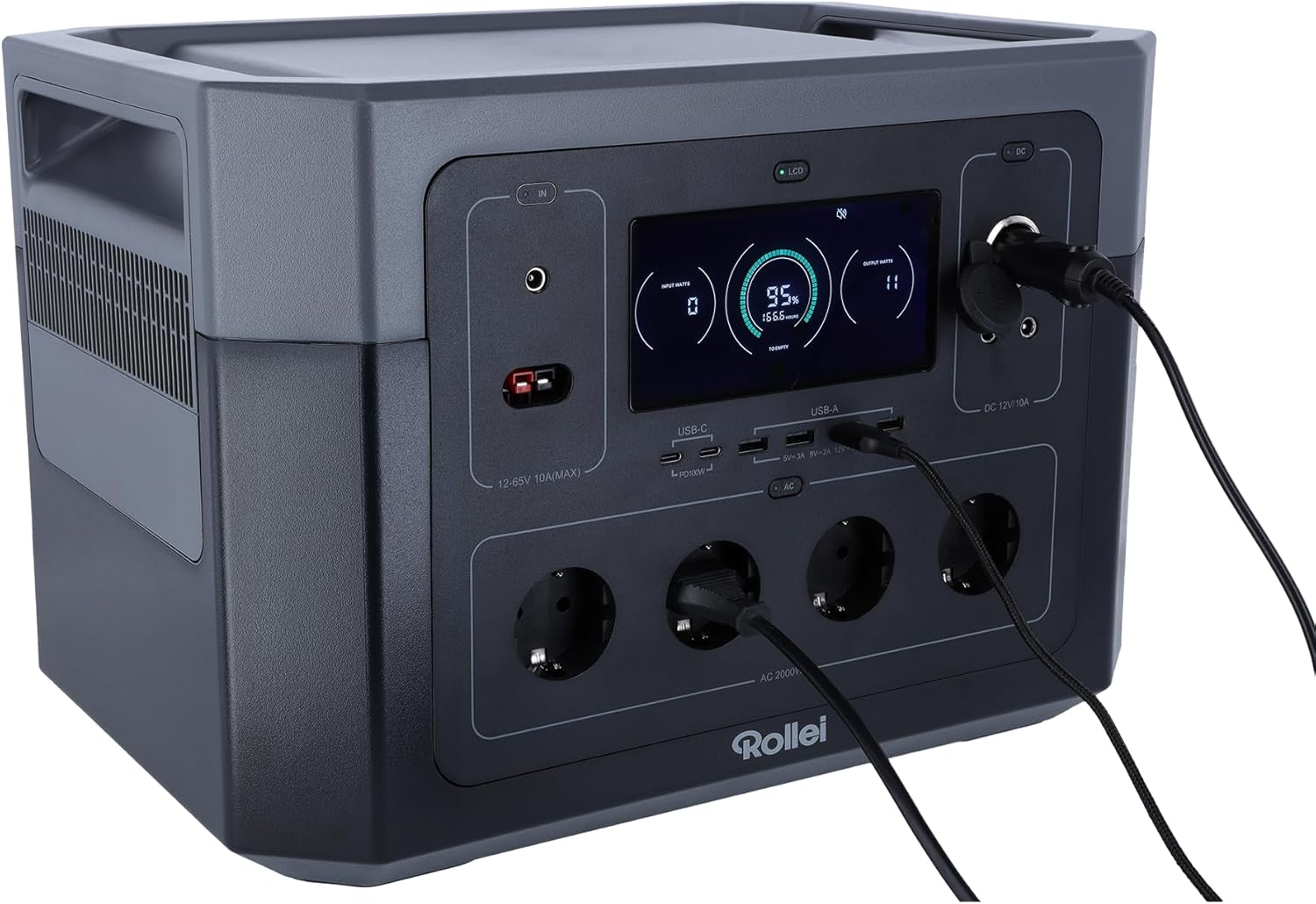
Familiarize yourself with the various ports and features of your Powerstation 2000.
ഫ്രണ്ട് പാനൽ

- LCD ഡിസ്പ്ലേ: ബാറ്ററി ലെവൽ, ഇൻപുട്ട്/ഔട്ട്പുട്ട് വാട്ട് എന്നിവ കാണിക്കുന്നുtage, സ്റ്റാറ്റസ് സൂചകങ്ങൾ.
- ഇൻപുട്ട് പോർട്ടുകൾ: For AC wall charging, solar charging (Anderson), and car charging.
- USB-C പോർട്ടുകൾ: Two ports, each with 100W Power Delivery for fast charging compatible devices.
- USB-A പോർട്ടുകൾ: Multiple ports for standard USB device charging.
- എസി ഔട്ട്ലെറ്റുകൾ: Four Schuko type F outlets providing 2000W total output.
- DC 12V/10A ഔട്ട്പുട്ട്: For powering 12V DC devices.
Rear Panel and Dimensions
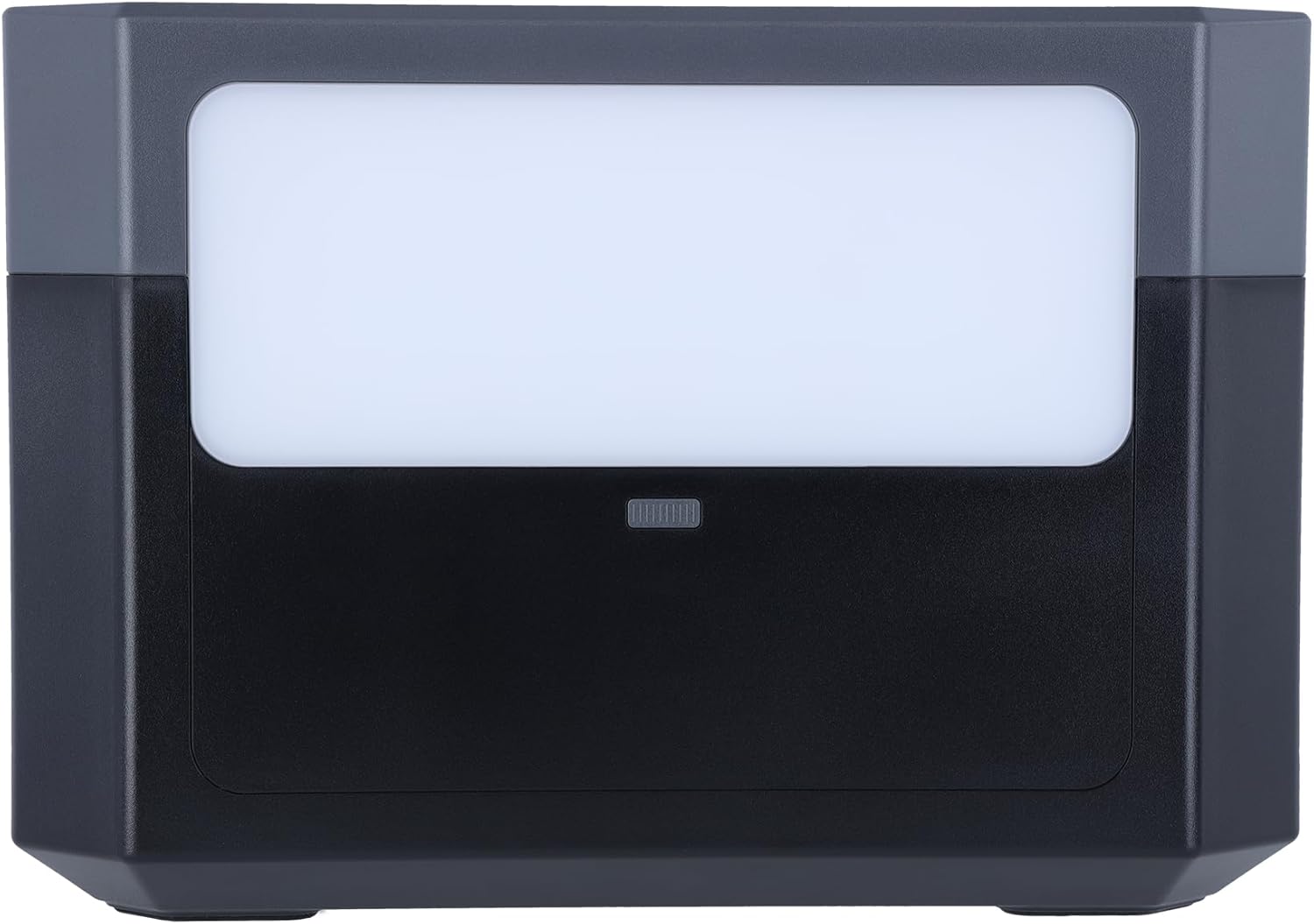
- LED ലൈറ്റ് പാനൽ: Provides illumination for various situations.
- വെന്റിലേഷൻ ഗ്രില്ലുകൾ: താപ വിസർജ്ജനത്തിനായി വശങ്ങളിൽ സ്ഥിതിചെയ്യുന്നു.

5. സജ്ജീകരണം
പ്രാരംഭ ചാർജിംഗ്
Before first use, fully charge the Powerstation 2000. This ensures optimal battery performance and longevity.
- എസി വാൾ ചാർജിംഗ്: Connect the AC power cable to the input port on the power station and then to a wall outlet. The LCD display will show the charging status.

- സോളാർ ചാർജിംഗ്: Connect compatible solar panels (not included) to the Anderson input port using the provided solar charging cable. Ensure the solar panels are placed in direct sunlight for efficient charging.
- കാർ ചാർജിംഗ്: Connect the car charger cable to the input port and then to your vehicle's 12V cigarette lighter socket.
6. പ്രവർത്തന നിർദ്ദേശങ്ങൾ
ഓൺ/ഓഫ് ചെയ്യുന്നു
യൂണിറ്റ് ഓണാക്കാനോ ഓഫാക്കാനോ പ്രധാന പവർ ബട്ടൺ കുറച്ച് സെക്കൻഡ് അമർത്തിപ്പിടിക്കുക. LCD ഡിസ്പ്ലേ പ്രകാശിക്കും.
ഔട്ട്പുട്ട് പോർട്ടുകൾ ഉപയോഗിക്കുന്നു
To activate specific output sections (AC, DC, USB), press the corresponding power button for that section. The indicator light next to the button will turn on.
- എസി ഔട്ട്ലെറ്റുകൾ: Plug your AC-powered devices into the Schuko outlets. Ensure the total wattagഇ 2000W കവിയരുത്.
- USB പോർട്ടുകൾ: Connect your USB devices (phones, tablets, laptops) to the USB-A or USB-C ports.
- DC 12V ഔട്ട്പുട്ട്: Connect 12V DC devices to the DC output port.
LED ലൈറ്റ് ഫംഗ്ഷൻ
Press the LED light button on the rear panel to turn the light on. Press again to cycle through different brightness modes or turn it off.
എൽസിഡി ഡിസ്പ്ലേ മനസ്സിലാക്കുന്നു
എൽസിഡി ഡിസ്പ്ലേ തത്സമയ വിവരങ്ങൾ നൽകുന്നു:
- ബാറ്ററി നില: Indicates the remaining battery percentage.
- ഇൻപുട്ട് വാട്ട്tage: Shows the power being drawn during charging.
- ഔട്ട്പുട്ട് വാട്ട്tage: Displays the power being consumed by connected devices.
- ശേഷിക്കുന്ന സമയം: Estimates the time until full charge or depletion based on current usage.
- നില സൂചകങ്ങൾ: Icons for AC, DC, USB active, fan status, and error warnings.
7. പരിപാലനം
ബാറ്ററി കെയർ
- For optimal battery life, fully charge the power station at least once every 3-6 months, even if not in use.
- ബാറ്ററി ഇടയ്ക്കിടെ പൂർണ്ണമായും കളയുന്നത് ഒഴിവാക്കുക.
- Store the unit in a cool, dry place, away from direct sunlight and extreme temperatures. The ideal storage temperature is between 0°C and 40°C (32°F and 104°F).
വൃത്തിയാക്കൽ
Use a dry, soft cloth to wipe the exterior of the power station. Do not use abrasive cleaners or immerse the unit in water.
8. പ്രശ്നപരിഹാരം
- യൂണിറ്റ് ഓണാക്കുന്നില്ല: ബാറ്ററി ചാർജ്ജ് ചെയ്തിട്ടുണ്ടെന്ന് ഉറപ്പാക്കുക. ഇല്ലെങ്കിൽ, ഒരു പവർ സ്രോതസ്സിലേക്ക് കണക്റ്റ് ചെയ്യുക.
- പോർട്ടുകളിൽ നിന്ന് ഔട്ട്പുട്ട് ഇല്ല: Check if the specific output section (AC, DC, USB) is activated by pressing its power button. Ensure the connected device is working and within the power station's wattagഇ പരിധികൾ.
- വേഗത കുറഞ്ഞ ചാർജിംഗ്: Verify that the charging cable and adapter are correctly connected and functioning. For solar charging, ensure panels are in direct sunlight and clean.
- ഓവർലോഡ് മുന്നറിയിപ്പ്: If an overload warning appears on the LCD, disconnect some devices to reduce the load. The unit may automatically shut down to prevent damage.
9 സ്പെസിഫിക്കേഷനുകൾ
| ഫീച്ചർ | സ്പെസിഫിക്കേഷൻ |
|---|---|
| മോഡൽ നമ്പർ | Powerstation 2000 |
| ബാറ്ററി തരം | LiFePo4 (Lithium-ion) |
| ശേഷി | 1920 Wh |
| എസി putട്ട്പുട്ട് പവർ | 2000 W (പരമാവധി) |
| Putട്ട്പുട്ട് വോളിയംtage | 230 വോൾട്ട് |
| USB-C ഔട്ട്പുട്ട് | 2 x 100W Power Delivery |
| DC 12V ഔട്ട്പുട്ട് | 10എ |
| കണക്റ്റർ തരം | Anderson, Schuko |
| ഔട്ട്ലെറ്റുകളുടെ എണ്ണം | 10 (Total) |
| നിറം | കറുപ്പ് |
| നിർമ്മാതാവ് | റോളി |
10. വാറണ്ടിയും പിന്തുണയും
വാറൻ്റി
The Rollei Powerstation 2000 comes with a 24-month exchange guarantee വാങ്ങിയ തീയതി മുതൽ. വാറന്റി ക്ലെയിമുകൾക്കായി നിങ്ങളുടെ വാങ്ങിയതിന്റെ തെളിവ് സൂക്ഷിക്കുക.
ഉപഭോക്തൃ പിന്തുണ
For technical assistance, troubleshooting, or warranty inquiries, please contact Rollei customer support:
- ഫോൺ: +49 40 270 750 277
- ലഭ്യത: Monday - Friday, 10:00 AM to 4:00 PM (CET)


