ആമുഖം
This manual provides essential information for the safe and efficient operation of your Proscan PDVD7751 7" Dual Screen Portable DVD Player. Please read this manual thoroughly before using the device and retain it for future reference.
The Proscan PDVD7751 is designed to provide portable entertainment with its dual 7-inch widescreen color LCD displays. It is suitable for various environments, including family road trips and general on-the-go use. The player supports multiple media formats and offers flexible power options for convenience.
പാക്കേജ് ഉള്ളടക്കം
താഴെ ലിസ്റ്റ് ചെയ്തിരിക്കുന്ന എല്ലാ ഇനങ്ങളും നിങ്ങളുടെ പാക്കേജിൽ ഉൾപ്പെടുത്തിയിട്ടുണ്ടെന്ന് ഉറപ്പാക്കുക:
- Main Unit Proscan 7" Dual Screen Portable DVD Player
- Second Display Screen Unit
- എസി വാൾ അഡാപ്റ്റർ
- ഡിസി കാർ അഡാപ്റ്റർ
- 2x Headrest Mounting Straps
- 1x Video Connection Cable (for connecting both displays)
- ഉപയോക്തൃ ഗൈഡ് (ഈ പ്രമാണം)

Image: All components included in the Proscan PDVD7751 package, laid out on a surface.
സജ്ജമാക്കുക
1. ഉപകരണം പവർ ചെയ്യുന്നു
The unit can be powered using either the included AC wall adapter for home use or the DC car adapter for in-vehicle use.
- എസി പവർ: Connect the AC wall adapter to the DC IN port on the main unit and plug it into a standard wall outlet.
- കാർ പവർ: Connect the DC car adapter to the DC IN port on the main unit and plug it into your vehicle's cigarette lighter socket.
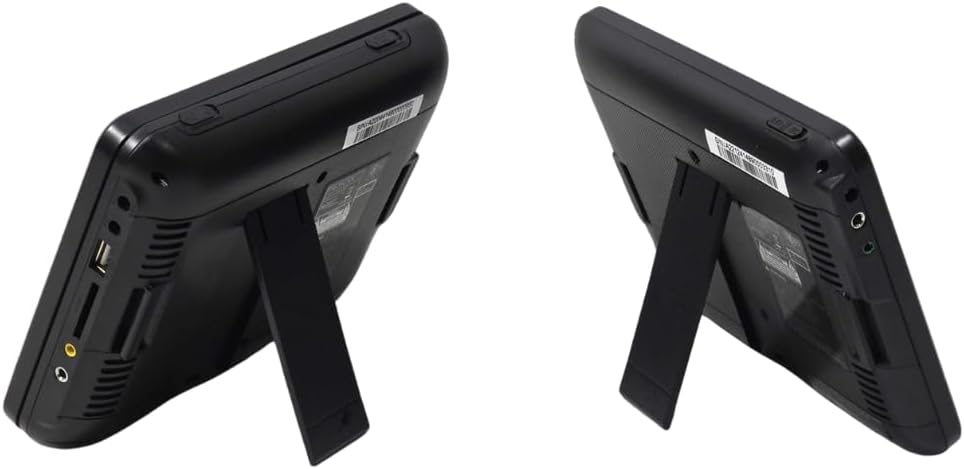
Image: Close-up of the side panel of the main DVD player unit, highlighting the power input and other ports.
2. Connecting the Dual Screens
To utilize both screens, connect the video connection cable from the main unit to the second display screen unit.
- Locate the AV OUT port on the main DVD player unit.
- Connect one end of the video connection cable to the AV OUT port.
- Locate the AV IN port on the second display screen unit.
- Connect the other end of the video connection cable to the AV IN port on the second display.
3. Headrest Installation (Optional)
The included headrest mounting straps allow for easy installation in a vehicle.
- Securely attach one mounting strap to the back of each screen unit.
- Wrap the straps around the vehicle's headrests and fasten them to hold the screens in place.
- Adjust the straps to ensure the screens are stable and at an optimal viewing ആംഗിൾ.

Image: Two Proscan screens securely attached to the back of car headrests using the provided straps.
പ്രവർത്തന നിർദ്ദേശങ്ങൾ
1. ഒരു ഡിസ്ക് ചേർക്കൽ
- Open the disc cover on the main DVD player unit.
- Carefully place a DVD or CD onto the spindle with the label side facing up.
- ഡിസ്ക് കവർ അതിന്റെ സ്ഥാനത്ത് ക്ലിക്ക് ആകുന്നതുവരെ ദൃഢമായി അടയ്ക്കുക.
2. മീഡിയ പ്ലേ ചെയ്യുന്നു
- Turn on the main unit using the power switch. The screen will display the Proscan logo.
- The player will automatically detect the disc and begin playback.
- Use the control buttons on the unit or the remote control to manage playback (Play/Pause, Stop, Skip, Volume).

Image: The main DVD player unit with a movie playing on its 7-inch screen.
3. Using USB and SD Card
The player supports media playback from USB drives and SD cards.
- Insert a USB drive into the USB port or an SD card into the SD card slot on the side of the main unit.
- Use the 'Mode' button on the unit or remote to select the appropriate input source (USB or SD).
- നിങ്ങളുടെ മീഡിയയിലൂടെ നാവിഗേറ്റ് ചെയ്യുക files using the control buttons and select the desired file പ്ലേബാക്കിനായി.

Image: Close-up of the side panel of the main DVD player unit, showing the USB port and SD card slot.
4. മീഡിയ അനുയോജ്യത
The Proscan PDVD7751 supports a wide range of media formats:
- ഡിവിഡി ഫോർമാറ്റുകൾ: DVD, DVD±R/RW, VCD
- CD Formats: CD, CD-R/RW
- ഓഡിയോ ഫോർമാറ്റുകൾ: MP3
മെയിൻ്റനൻസ്
- വൃത്തിയാക്കൽ: Use a soft, dry cloth to clean the screen and exterior of the unit. Do not use liquid cleaners or abrasive materials.
- ഡിസ്ക് പരിചരണം: വിരലടയാളങ്ങളും പോറലുകളും ഒഴിവാക്കാൻ ഡിസ്കുകൾ അവയുടെ അരികുകളിൽ തന്നെ കൈകാര്യം ചെയ്യുക. ഉപയോഗത്തിലില്ലാത്തപ്പോൾ ഡിസ്കുകൾ അവയുടെ കെയ്സുകളിൽ തന്നെ സൂക്ഷിക്കുക.
- സംഭരണം: ദീർഘനേരം ഉപയോഗിക്കാത്തപ്പോൾ, നേരിട്ടുള്ള സൂര്യപ്രകാശത്തിൽ നിന്നും കടുത്ത താപനിലയിൽ നിന്നും മാറി തണുത്തതും വരണ്ടതുമായ സ്ഥലത്ത് പ്ലെയർ സൂക്ഷിക്കുക.
ട്രബിൾഷൂട്ടിംഗ്
| പ്രശ്നം | സാധ്യമായ കാരണം | പരിഹാരം |
|---|---|---|
| ശക്തിയില്ല | പവർ അഡാപ്റ്റർ ബന്ധിപ്പിച്ചിട്ടില്ല അല്ലെങ്കിൽ തകരാറുണ്ട്. | Ensure the AC/DC adapter is securely connected to the unit and a working power source. Check the power outlet. |
| Disc not playing / "No Disc" error | Disc is dirty, scratched, or inserted incorrectly. Protective tag നീക്കം ചെയ്തിട്ടില്ല. | Clean the disc with a soft cloth. Reinsert the disc with the label side up. Ensure the yellow protective tag from the disc tray is removed before first use. |
| No picture on second screen | Video connection cable is loose or faulty. | Check that the video connection cable is securely plugged into both the main unit's AV OUT and the second screen's AV IN ports. |
| ശബ്ദമില്ല | ശബ്ദം വളരെ കുറവാണ് അല്ലെങ്കിൽ മ്യൂട്ട് ചെയ്തിരിക്കുന്നു. | Increase the volume using the VOL+ button or check if the unit is muted. |
സ്പെസിഫിക്കേഷനുകൾ
- ബ്രാൻഡ്: പ്രോസ്കാൻ
- മോഡൽ നമ്പർ: PDVD7751
- സ്ക്രീൻ വലിപ്പം: Dual 7 Inches
- ഡിസ്പ്ലേ തരം: എൽസിഡി
- നിറം: കറുപ്പ്
- ഇനത്തിൻ്റെ ഭാരം: ഏകദേശം 2 പൗണ്ട്
- Media Type Support: SD Card, USB, DVD, DVD±R/RW, CD, CD-R/RW, VCD, MP3
വാറൻ്റിയും പിന്തുണയും
For warranty information or technical support, please refer to the contact details provided with your purchase documentation or visit the official Proscan webസൈറ്റ്.
ഉൽപ്പന്ന വീഡിയോകൾ
FANGOR Car DVD Player - Make Kids Love Road Trips
Video: An official seller video demonstrating the FANGOR car DVD player, highlighting its use for entertaining children during road trips. This video showcases the dual screen setup and ease of use in a vehicle environment.
OTIC 10.1" Dual Screen DVD Player
വീഡിയോ: ഒരു ഔദ്യോഗിക വിൽപ്പനക്കാരന്റെ വീഡിയോ ഷോasing the OTIC 10.1" Dual Screen DVD Player. This short video demonstrates the product's features and how it can be used to provide entertainment on the go.
അനുബന്ധ രേഖകൾ - PDVD7751
 |
പ്രോസ്കാൻ എലൈറ്റ് 13.3" സ്വിവൽ സ്ക്രീൻ പോർട്ടബിൾ ഡിവിഡി പ്ലെയർ യൂസർ മാനുവൽ ഈ ഉപയോക്തൃ മാനുവൽ പ്രോസ്കാൻ എലൈറ്റ് 13.3" സ്വിവൽ സ്ക്രീൻ പോർട്ടബിൾ ഡിവിഡി പ്ലെയറിനായുള്ള (മോഡൽ നമ്പർ: PEDVD1332) സമഗ്രമായ നിർദ്ദേശങ്ങൾ നൽകുന്നു, ഇത് സജ്ജീകരണം, പ്രവർത്തനം, സവിശേഷതകൾ, ട്രബിൾഷൂട്ടിംഗ്, വാറന്റി വിവരങ്ങൾ എന്നിവ ഉൾക്കൊള്ളുന്നു. |
 |
പ്രോസ്കാൻ PDVD1187 പോർട്ടബിൾ ബ്ലൂ-റേ/ഡിവിഡി പ്ലെയർ യൂസർ മാനുവൽ പ്രോസ്കാൻ PDVD1187 പോർട്ടബിൾ ബ്ലൂ-റേ, ഡിവിഡി പ്ലെയറിനായുള്ള സമഗ്രമായ ഉപയോക്തൃ മാനുവൽ, സജ്ജീകരണം, പ്രവർത്തനം, സവിശേഷതകൾ, സ്പെസിഫിക്കേഷനുകൾ, ട്രബിൾഷൂട്ടിംഗ് എന്നിവ ഉൾക്കൊള്ളുന്നു. |
 |
Proscan PDVD7040B Portable DVD Player User Manual User manual for the Proscan PDVD7040B portable DVD player, covering safety precautions, features, operation, system connections, troubleshooting, and specifications. |
 |
ProScan PELTDV1029 User Manual User manual for the ProScan PELTDV1029 tablet, covering safety precautions, features, basic operation, DVD playback, camera function, Wi-Fi connection, mirror cast connection, text input, file transfer, battery use, specifications, troubleshooting, and warranty information. |
 |
Manuel d'utilisation du lecteur DVD portable Proscan PDVD1332 13,3 pouces Manuel d'utilisation détaillé pour le lecteur DVD portable Proscan PDVD1332 de 13,3 pouces, couvrant l'installation, le fonctionnement, la sécurité, le dépannage et la garantie. |
 |
പ്രോസ്കാൻ PLDV321300 LED ടിവി/ഡിവിഡി കോംബോ ഇൻസ്ട്രക്ഷൻ മാനുവൽ പ്രോസ്കാൻ PLDV321300 LED ടിവി/ഡിവിഡി കോംബോയ്ക്കുള്ള നിർദ്ദേശ മാനുവലാണിത്, സജ്ജീകരണം, പ്രവർത്തനം, കണക്ഷനുകൾ, ട്രബിൾഷൂട്ടിംഗ്, സ്പെസിഫിക്കേഷനുകൾ എന്നിവ ഇതിൽ ഉൾപ്പെടുന്നു. |