1. ആമുഖം
This manual provides essential information for the proper use and maintenance of your AULCMEET SX RCU 02 replacement remote control. This remote is designed to be compatible with a wide range of Octagon 4K UHD Linux SF and SX Series receivers, offering a direct replacement without the need for complex programming.
Compatible models include, but are not limited to: SX87/WL, SX88, SX88+, SX88+ SE/WL, SX88+ SE C/T2/WL, SX88+ Optima, Combo SX88 4K, SX89/WL, SX887/WL, SX888/WL/4K, SX889/WL, SX988, SF8008 Single, SF8008 Combo, SF8008 Twin, SF8008 Mini Combo, and SF8008 Limited Gold Edition.
2. സജ്ജീകരണം
2.1 ബാറ്ററി ഇൻസ്റ്റാളേഷൻ
The AULCMEET SX RCU 02 remote control requires two (2) AAA batteries for operation. Batteries are not included with the remote control.
- റിമോട്ട് കൺട്രോളിന്റെ പിൻഭാഗത്ത് ബാറ്ററി കമ്പാർട്ട്മെന്റ് കണ്ടെത്തുക.
- ടാബ് താഴേക്ക് അമർത്തി ബാറ്ററി കവർ താഴേക്ക് സ്ലൈഡ് ചെയ്ത് അത് തുറക്കുക.
- കമ്പാർട്ടുമെന്റിനുള്ളിലെ അടയാളപ്പെടുത്തലുകളുമായി പോസിറ്റീവ് (+), നെഗറ്റീവ് (-) ടെർമിനലുകൾ ശരിയായി വിന്യസിക്കുന്നുണ്ടെന്ന് ഉറപ്പാക്കാൻ രണ്ട് AAA ബാറ്ററികൾ ഇടുക.
- സുരക്ഷിതമായി ക്ലിക്കുചെയ്യുന്നത് വരെ ബാറ്ററി കവർ തിരികെ സ്ഥലത്തേക്ക് സ്ലൈഡ് ചെയ്യുക.

Image: Back of the remote control with the battery compartment open, illustrating correct AAA battery insertion.
Once batteries are installed, the remote control is ready for use with your compatible Octagon receiver. No additional programming is required.
3. പ്രവർത്തന നിർദ്ദേശങ്ങൾ
The AULCMEET SX RCU 02 remote control functions identically to the original remote for your Octagon 4K UHD Linux receiver. Ensure there is a clear line of sight between the remote control and your receiver for optimal performance.
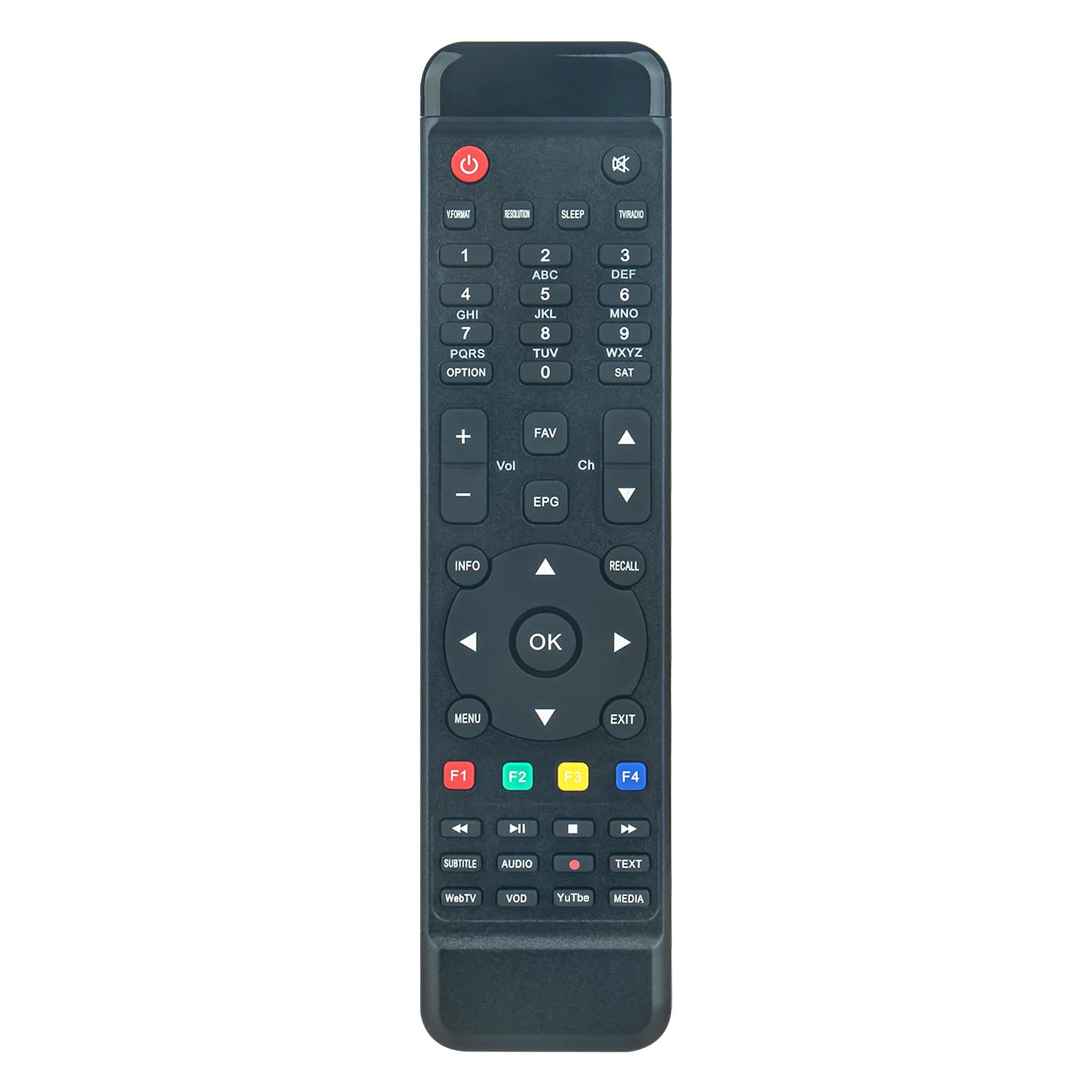
ചിത്രം: ആംഗിൾഡ് view റിമോട്ട് കൺട്രോളിന്റെ, ബട്ടൺ ലേഔട്ട് ഹൈലൈറ്റ് ചെയ്യുന്നു.

ചിത്രം: മുൻഭാഗം view of the remote control, detailing the various buttons.
3.1 Key Functions Overview
- പവർ ബട്ടൺ (⏻): റിസീവർ ഓണാക്കുകയോ ഓഫാക്കുകയോ ചെയ്യുന്നു.
- സംഖ്യാ കീപാഡ് (0-9): For direct channel selection or data entry.
- Volume Up/Down (Vol +/-): ഓഡിയോ വോളിയം ക്രമീകരിക്കുന്നു.
- Channel Up/Down (Ch +/-): ടെലിവിഷൻ ചാനൽ മാറ്റുന്നു.
- ശരി ബട്ടൺ: Confirms selections or opens channel lists.
- നാവിഗേഷൻ അമ്പടയാളങ്ങൾ (മുകളിലേക്ക്, താഴേക്ക്, ഇടത്തേക്ക്, വലത്തേക്ക്): മെനുകളിലൂടെയും ഓപ്ഷനുകളിലൂടെയും നാവിഗേറ്റ് ചെയ്യുന്നു.
- മെനു ബട്ടൺ: റിസീവറിന്റെ പ്രധാന മെനുവിലേക്ക് പ്രവേശിക്കുന്നു.
- പുറത്തുകടക്കുക ബട്ടൺ: Exits current menus or screens.
- വിവര ബട്ടൺ: പ്രോഗ്രാം വിവരങ്ങൾ പ്രദർശിപ്പിക്കുന്നു.
- EPG ബട്ടൺ: ഇലക്ട്രോണിക് പ്രോഗ്രാം ഗൈഡ് ആക്സസ് ചെയ്യുന്നു.
- തിരിച്ചുവിളിക്കാനുള്ള ബട്ടൺ: മുമ്പത്തേതിലേക്ക് മടങ്ങുന്നു viewഎഡി ചാനൽ.
- F1, F2, F3, F4 Buttons: Multi-functional keys, typically assigned specific functions by the receiver or user.
- Media Control Buttons (Play, Pause, Stop, Fast Forward, Rewind): മീഡിയ പ്ലേബാക്ക് നിയന്ത്രിക്കുന്നു.
- സബ്ടൈറ്റിൽ ബട്ടൺ: സബ്ടൈറ്റിലുകൾ ഓൺ/ഓഫ് ടോഗിൾ ചെയ്യുന്നു.
- ഓഡിയോ ബട്ടൺ: ഓഡിയോ ട്രാക്കുകളോ മോഡുകളോ തിരഞ്ഞെടുക്കുന്നു.
- ടെക്സ്റ്റ് ബട്ടൺ: ടെലിടെക്സ്റ്റ് സേവനങ്ങൾ ആക്സസ് ചെയ്യുന്നു.
- WebTV, VOD, YouTube, Media Buttons: Direct access to specific applications or media functions.
4. പരിപാലനം
4.1 റിമോട്ട് കൺട്രോൾ വൃത്തിയാക്കൽ
To clean your remote control, gently wipe its surface with a soft, dry cloth. For stubborn dirt, slightly dampen the cloth with water or a mild, non-abrasive cleaner. Avoid using harsh chemicals, solvents, or abrasive materials, as these can damage the remote's finish or internal components.
4.2 ബാറ്ററി മാറ്റിസ്ഥാപിക്കൽ
Replace batteries when the remote control's response becomes sluggish or stops working. Always replace both AAA batteries at the same time with new ones. Do not mix old and new batteries, or different types of batteries, as this can lead to leakage or malfunction.

Image: Back of the remote control, illustrating the battery compartment location.
ഉപയോഗിച്ച ബാറ്ററികൾ പ്രാദേശിക ചട്ടങ്ങൾക്കനുസൃതമായി നീക്കം ചെയ്യുക.
5. പ്രശ്നപരിഹാരം
5.1 റിമോട്ട് കൺട്രോൾ പ്രതികരിക്കുന്നില്ല
- ബാറ്ററികൾ പരിശോധിക്കുക: Ensure the batteries are inserted correctly with the correct polarity (+/-). Replace old batteries with new AAA batteries.
- വീക്ഷണരേഖ: Make sure there are no obstructions between the remote control and the infrared sensor on your Octagon receiver. The remote uses infrared technology, which requires a direct line of sight.
- ദൂരം: Ensure you are within the effective operating range (up to 10 meters) of the receiver.
- റിസീവർ പവർ: Confirm that your Octagon receiver is powered on and functioning correctly.
5.2 Specific Functions Not Working
If certain buttons do not perform their expected function, verify that your receiver model is listed as compatible. While this remote is a direct replacement, some advanced or model-specific functions might vary slightly depending on your receiver's firmware or specific model variant.
6 സ്പെസിഫിക്കേഷനുകൾ
| ബ്രാൻഡ് | ഓൾക്മീറ്റ് |
| മോഡൽ നമ്പർ | Kraz-MB1992-SX-RCU-02 |
| കണക്റ്റിവിറ്റി ടെക്നോളജി | ഇൻഫ്രാറെഡ് |
| പ്രത്യേക ഫീച്ചർ | എർഗണോമിക് ഡിസൈൻ |
| അനുയോജ്യമായ ഉപകരണങ്ങൾ | Octagon 4K UHD Linux SF and SX Series Receivers |
| കൺട്രോളർ തരം | ബട്ടൺ നിയന്ത്രണം |
| പരമാവധി പരിധി | 10 മീറ്റർ (ഏകദേശം 33 അടി) |
| ബാറ്ററി തരം | 2 x AAA (ഉൾപ്പെടുത്തിയിട്ടില്ല) |
7. വാറൻ്റി വിവരങ്ങൾ
Specific warranty details for the AULCMEET SX RCU 02 remote control may vary depending on your region and point of purchase. Please refer to the documentation provided at the time of purchase or contact your retailer for precise warranty terms and conditions.
8. ഉപഭോക്തൃ പിന്തുണ
If you encounter any issues or have questions regarding the compatibility or functionality of your AULCMEET SX RCU 02 remote control, please do not hesitate to contact customer support. When contacting support, it is helpful to provide the full model number of your Octagon receiver to ensure accurate assistance.
For general inquiries or to report a problem, please refer to the contact information provided by your seller or on the product packaging. We aim to respond to all inquiries within 24 hours.


