1. ആമുഖം
This manual provides detailed instructions for the installation, operation, and maintenance of your Srihome SH051 4MP QHD 5X Optical Zoom PTZ WiFi IP Camera. Please read this manual thoroughly before using the product to ensure proper functionality and safety. Keep this manual for future reference.

Image 1.1: Srihome SH051 PTZ WiFi IP Camera. This image displays the camera's exterior, highlighting its dome shape, dual antennas, and lens array.
2. ഉൽപ്പന്നം കഴിഞ്ഞുview
2.1 പ്രധാന സവിശേഷതകൾ
- 4MP QHD Resolution: Captures clear video at 2560*1440p.
- 5X ഒപ്റ്റിക്കൽ സൂം: വിശദമായി അനുവദിക്കുന്നു viewing of distant objects without loss of clarity.
- PTZ പ്രവർത്തനം: Pan 355° and Tilt 70° for comprehensive area coverage.
- ഡ്യുവൽ-ബാൻഡ് വൈ-ഫൈ: Supports 2.4G and 5G Wi-Fi for flexible and stable connectivity.
- ടു-വേ ഓഡിയോ: തത്സമയ ആശയവിനിമയത്തിനായി ബിൽറ്റ്-ഇൻ മൈക്രോഫോണും സ്പീക്കറും.
- കളർ നൈറ്റ് വിഷൻ: Starlight lens and warm light for full-color video in low-light conditions.
- മോഷൻ ഡിറ്റക്ഷനും ട്രാക്കിംഗും: Automatically detects movement and tracks subjects, sending alerts.
- IP65 വാട്ടർപ്രൂഫ്: Designed for both indoor and outdoor use, resistant to dust and water.
- പ്രാദേശിക സംഭരണം: Supports MicroSD card up to 128GB for video recording.
2.2 ക്യാമറ ഘടകങ്ങൾ

Image 2.1: Diagram illustrating the components of the Srihome SH051 camera. Key parts include the antenna, white light, zoom lens, infrared light, microphone, power port, LAN port, TF card slot, and reset button.
- ആൻ്റിന: വൈഫൈ സിഗ്നൽ സ്വീകരണത്തിനായി.
- വൈറ്റ് ലൈറ്റ്: വർണ്ണ രാത്രി കാഴ്ചയ്ക്ക് പ്രകാശം നൽകുന്നു.
- സൂം ലെൻസ്: 5X optical zoom capability.
- ഇൻഫ്രാറെഡ് ലൈറ്റ്: പരമ്പരാഗത കറുപ്പും വെളുപ്പും രാത്രി ദർശനത്തിനായി.
- മൈക്രോഫോൺ: Captures audio for two-way talk and recording.
- പവർ പോർട്ട്: പവർ അഡാപ്റ്ററുമായി ബന്ധിപ്പിക്കുന്നു.
- LAN പോർട്ട്: വയർഡ് നെറ്റ്വർക്ക് കണക്ഷന് (ഓപ്ഷണൽ).
- ടിഎഫ് കാർഡ് സ്ലോട്ട്: Insert MicroSD card for local storage.
- റീസെറ്റ് ബട്ടൺ: ഫാക്ടറി ക്രമീകരണങ്ങൾ പുനഃസ്ഥാപിക്കാൻ ഉപയോഗിക്കുന്നു.
2.3 പാക്കിംഗ് ലിസ്റ്റ്

Image 2.2: Contents of the Srihome SH051 package. This includes the camera unit, user manual, mounting screws, and power adapter.
- Srihome SH051 Camera Unit
- പവർ അഡാപ്റ്റർ
- മൗണ്ടിംഗ് സ്ക്രൂകൾ
- ഉപയോക്തൃ മാനുവൽ
3. സജ്ജീകരണം
3.1 ഫിസിക്കൽ ഇൻസ്റ്റലേഷൻ
- ഒരു ലൊക്കേഷൻ തിരഞ്ഞെടുക്കുക: ആവശ്യമുള്ളത് നൽകുന്ന അനുയോജ്യമായ ഒരു ഇൻഡോർ അല്ലെങ്കിൽ ഔട്ട്ഡോർ സ്ഥലം തിരഞ്ഞെടുക്കുക viewing angle and is within Wi-Fi range. Ensure the power outlet is accessible.
- ക്യാമറ ഘടിപ്പിക്കുക: Use the provided mounting screws to securely attach the camera bracket to a wall or ceiling.
- പവർ ബന്ധിപ്പിക്കുക: Plug the power adapter into the camera's power port and then into a power outlet. The camera will power on and initiate its self-test.
- (ഓപ്ഷണൽ) വയർഡ് കണക്ഷൻ: If preferred, connect an Ethernet cable from your router to the camera's LAN port.
3.2 ആപ്പ് ഡൗൺലോഡും അക്കൗണ്ട് രജിസ്ട്രേഷനും
The Srihome app is required to configure and operate your camera.

Image 3.1: Screenshot showing the Srihome app download options via QR codes for Android and iOS, alongside other camera features.
- ആപ്പ് ഡൗൺലോഡ് ചെയ്യുക: ഇതിനായി തിരയുക "Srihome" in your device's app store or scan the QR codes below:
ഗൂഗിൾ പ്ലേ സ്റ്റോർ (ആൻഡ്രോയിഡ്)
ആപ്പിൾ ആപ്പ് സ്റ്റോർ (iOS) - ഒരു അക്കൗണ്ട് രജിസ്റ്റർ ചെയ്യുക: Open the Srihome app and follow the on-screen instructions to register a new account using your email address or phone number.
3.3 Connecting the Camera to Wi-Fi

Image 3.2: Illustration of the camera's 5X optical zoom capability and its support for both 2.4GHz and 5GHz dual-band Wi-Fi connections.
- ഉപകരണം ചേർക്കുക: In the Srihome app, tap the "+" icon to add a new device.
- ക്യാമറ തരം തിരഞ്ഞെടുക്കുക: Choose the appropriate camera type (e.g., IP Camera).
- Wi-Fi കോൺഫിഗറേഷൻ: Follow the app's instructions to connect the camera to your Wi-Fi network. The SH051 supports both 2.4GHz and 5GHz bands for enhanced stability and speed.
- പാസ്വേഡ് സജ്ജമാക്കുക: Create a strong password for your camera for security purposes.
4. ഓപ്പറേഷൻ
4.1 Pan & Tilt Rotation

Image 4.1: Depiction of the camera's pan (350° horizontal) and tilt (90° vertical) rotation, controllable via a mobile phone interface.
തത്സമയം മുതൽ view interface in the Srihome app, use the on-screen controls to remotely adjust the camera's viewing angle. The camera supports 350° horizontal pan and 90° vertical tilt, allowing you to monitor a wide area.
4.2 5X Optical Zoom

Image 4.2: Visual representation of the 5X optical zoom lens, showing how it magnifies distant objects, and the camera's IP65 waterproof rating.
The SH051 features a 5X optical zoom lens (focal length 2.8mm-12mm). In the live view, use pinch-to-zoom gestures on your mobile device to zoom in or out, allowing you to view details from a distance without compromising image quality.
4.3 ടു-വേ ഓഡിയോ

Image 4.3: Scenario demonstrating the two-way audio feature, where a user can speak to a person near the camera through the app.
The camera includes a built-in microphone and speaker. Tap the microphone icon in the app's live view to speak through the camera, and listen to audio from the camera's surroundings. This enables real-time communication with individuals near the camera.
4.4 നൈറ്റ് വിഷൻ മോഡുകൾ
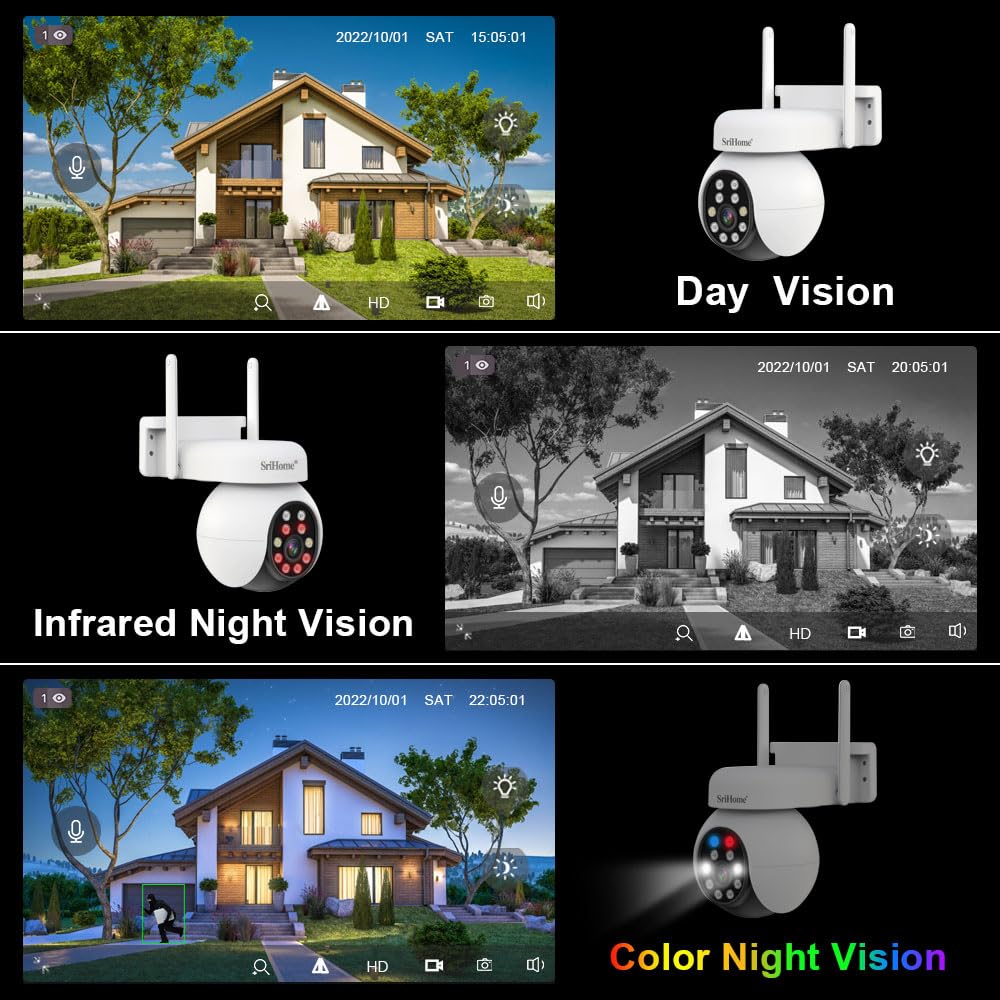
Image 4.4: Comparison of day vision, infrared night vision (black and white), and color night vision, showcasing the camera's versatility in different lighting conditions.
The SH051 offers multiple night vision options:
- ഇൻഫ്രാറെഡ് നൈറ്റ് വിഷൻ: Provides clear black and white video in complete darkness using infrared LEDs.
- കളർ നൈറ്റ് വിഷൻ: Utilizes the starlight lens and built-in warm lights to deliver full-color video even in very low light conditions.
- സ്മാർട്ട് നൈറ്റ് വിഷൻ: The camera can automatically switch between infrared and color night vision based on detected motion or ambient light.
4.5 മോഷൻ ഡിറ്റക്ഷനും അലാറങ്ങളും

Image 4.5: Illustration of the camera's active defense feature, showing a light alarm activating upon detecting a person.
The camera can detect motion and send real-time alerts to your mobile device. You can configure motion detection sensitivity and areas within the app. When motion is detected, the camera can also activate an audible alarm and flash its white lights as an active deterrent.
4.6 വീഡിയോ സംഭരണം
The SH051 supports multiple storage methods for recorded video:
- മൈക്രോ എസ്ഡി കാർഡ്: Insert a MicroSD card (up to 128GB) into the camera's TF card slot for local recording. The camera will record continuously or based on motion detection.
- എൻവിആർ (നെറ്റ്വർക്ക് വീഡിയോ റെക്കോർഡർ): The camera can be integrated with a compatible NVR system for centralized recording and management.
- ക്ലൗഡ് സംഭരണം: (Optional, subscription-based) Check the Srihome app for available cloud storage options.
5. പരിപാലനം
- വൃത്തിയാക്കൽ: Regularly wipe the camera lens and exterior with a soft, dry cloth to remove dust and smudges. Do not use harsh chemicals or abrasive materials.
- ഫേംവെയർ അപ്ഡേറ്റുകൾ: Check the Srihome app periodically for firmware updates. Keeping your camera's firmware updated ensures optimal performance, security, and access to new features.
- പവർ സൈക്കിൾ: ക്യാമറയ്ക്ക് പ്രശ്നങ്ങൾ നേരിടുകയാണെങ്കിൽ, പവർ സ്രോതസ്സിൽ നിന്ന് 10 സെക്കൻഡ് നേരത്തേക്ക് അത് അൺപ്ലഗ് ചെയ്ത് വീണ്ടും പ്ലഗ് ഇൻ ചെയ്യാൻ ശ്രമിക്കുക.
- മൈക്രോ എസ്ഡി കാർഡ് മാനേജ്മെൻ്റ്: If using a MicroSD card, ensure it is formatted periodically through the app to maintain recording efficiency. Back up important footagഫോർമാറ്റ് ചെയ്യുന്നതിന് മുമ്പ്.
6. പ്രശ്നപരിഹാരം
If you encounter problems with your Srihome SH051 camera, refer to the following common issues and solutions:
| പ്രശ്നം | സാധ്യമായ പരിഹാരം |
|---|---|
| ക്യാമറ ഓണാക്കുന്നില്ല | Ensure the power adapter is securely connected to the camera and a working power outlet. Try a different outlet or adapter if available. |
| Wi-Fi-ലേക്ക് കണക്റ്റുചെയ്യാനായില്ല | Verify your Wi-Fi password is correct. Ensure the camera is within range of your router. Try resetting the camera using the reset button and re-attempting the connection process in the app. Confirm your router supports 2.4GHz or 5GHz as required. |
| മോശം ചിത്ര നിലവാരം | Check the lens for dirt or smudges and clean it gently. Ensure there is adequate lighting. Verify the camera's resolution settings in the app. A weak Wi-Fi signal can also affect streaming quality. |
| മോഷൻ ഡിറ്റക്ഷൻ പ്രവർത്തിക്കുന്നില്ല | Ensure motion detection is enabled in the app settings. Adjust sensitivity levels and detection zones. Verify the camera has a clear view പ്രദേശത്തിൻ്റെ. |
| No recording to MicroSD card | Ensure a MicroSD card is inserted correctly and is not full. Format the MicroSD card through the app. Check recording settings (e.g., continuous recording, motion-triggered recording). |
| ടു-വേ ഓഡിയോ പ്രശ്നങ്ങൾ | Check the volume settings on your phone and in the app. Ensure the microphone and speaker on the camera are not obstructed. A stable internet connection is crucial for clear audio. |
7 സ്പെസിഫിക്കേഷനുകൾ
- മോഡലിൻ്റെ പേര്: SH051 4MP 5X Optical Zoom
- റെസലൂഷൻ: 4MP QHD (2560 x 1440p)
- ഒപ്റ്റിക്കൽ സൂം: 5X (Focal length 2.8mm-12mm)
- പാൻ/ടിൽറ്റ് ശ്രേണി: പാൻ 355°, ചരിവ് 70°
- കണക്റ്റിവിറ്റി: Wireless (2.4GHz/5GHz Wi-Fi), Wired (LAN Port)
- പ്രത്യേക സവിശേഷതകൾ: 2-Way Audio, Color Night Vision, Motion Detection, PTZ Technology
- സംഭരണം: 128 ജിബി വരെ മൈക്രോ എസ്ഡി കാർഡ് പിന്തുണയ്ക്കുന്നു
- ഇൻഡോർ/ഔട്ട്ഡോർ ഉപയോഗം: ഇൻഡോർ, ഔട്ട്ഡോർ
- IP റേറ്റിംഗ്: IP65 വാട്ടർപ്രൂഫ് ആൻഡ് ഡസ്റ്റ് പ്രൂഫ്
- ഊർജ്ജ സ്രോതസ്സ്: Adapter (Included)
- ഉൽപ്പന്ന അളവുകൾ: 20 x 10 x 6 സെ.മീ
- ഇനത്തിൻ്റെ ഭാരം: 500 ഗ്രാം
8. വാറൻ്റിയും പിന്തുണയും
8.1 വാറൻ്റി വിവരങ്ങൾ
ഈ ശ്രീഹോം SH051 ക്യാമറ ഒരു 1 വർഷത്തെ വാറൻ്റി from the date of purchase. Please retain your purchase receipt as proof of warranty. The warranty covers manufacturing defects but does not cover damage caused by misuse, accidents, unauthorized modifications, or improper installation.
8.2 ഉപഭോക്തൃ പിന്തുണ
For technical assistance, troubleshooting, or warranty claims, please contact Megaa Electronics, the authorized distributor:
- WhatsApp: 8328671337
- ഇമെയിൽ: support@megaaelectronics.com
- ഇതര ഇമെയിൽ: megaaelectronics@gmail.com


