1. ആമുഖം
This manual provides essential information for the safe and efficient operation of your DROK AC 110V/220V to DC 0-12V 2A 25W Adjustable Switching Power Supply. Please read this manual thoroughly before use and retain it for future reference.
2. സുരക്ഷാ നിർദ്ദേശങ്ങൾ
ഉപകരണത്തിന് പരിക്കേൽക്കുകയോ കേടുപാടുകൾ സംഭവിക്കുകയോ ചെയ്യാതിരിക്കാൻ ഇനിപ്പറയുന്ന സുരക്ഷാ മുൻകരുതലുകൾ എപ്പോഴും പാലിക്കുക:
- ഇൻപുട്ട് വോളിയം ഉറപ്പാക്കുകtage switch (110V/220V) is correctly set before connecting to power. Incorrect setting can cause damage.
- Do not exceed the maximum output current (2A) or power (25W) to prevent overload.
- Connect the earth wire properly to prevent electric shock.
- Do not operate in wet or humid environments.
- കത്തുന്ന വസ്തുക്കളിൽ നിന്ന് അകറ്റി നിർത്തുക.
- Do not disassemble or modify the power supply. Refer servicing to qualified personnel.
- അമിതമായി ചൂടാക്കുന്നത് തടയാൻ മതിയായ വായുസഞ്ചാരം ഉറപ്പാക്കുക.
3. ഉൽപ്പന്നം കഴിഞ്ഞുview
The DROK Switching Power Supply is designed to convert AC input voltage (110V or 220V) to a stable and adjustable DC output voltage ranging from 0-12V. It features built-in protection mechanisms for safe operation.
3.1 പ്രധാന സവിശേഷതകൾ
- ക്രമീകരിക്കാവുന്ന DC ഔട്ട്പുട്ട് വോളിയംtage (0-12V, up to 15V max).
- AC 110V/220V input voltagഇ സെലക്ഷൻ.
- ഓവർലോഡ് സംരക്ഷണം.
- ഓവർ വോൾtagഇ സംരക്ഷണം.
- ഷോർട്ട് സർക്യൂട്ട് സംരക്ഷണം.
- Durable aluminum cover for effective heat dissipation and impact resistance.
3.2 ഘടകങ്ങൾ

The power supply unit includes input terminals for AC power, output terminals for DC power, and an adjustable potentiometer for fine-tuning the output voltage. An LED display shows the output voltage.
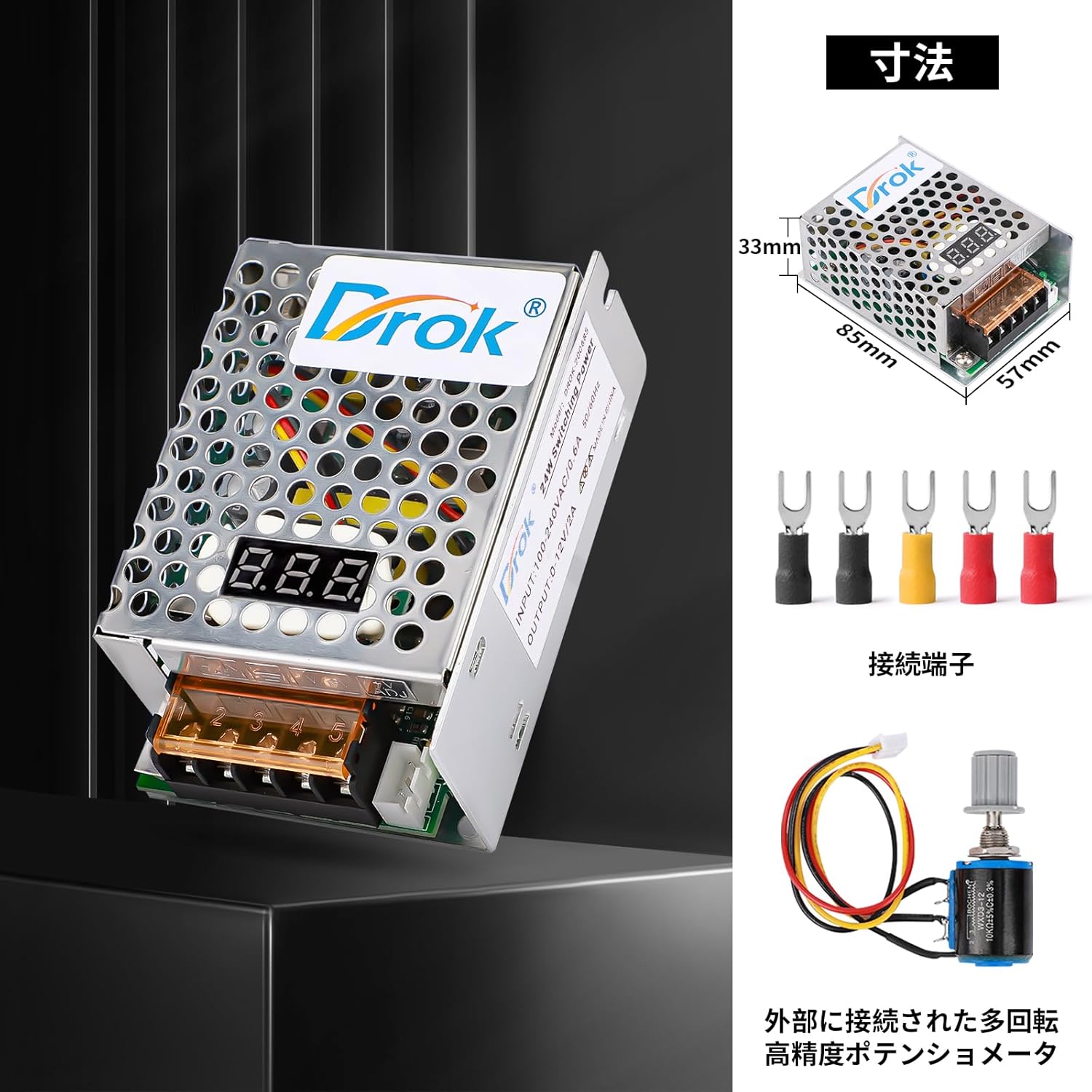
The external potentiometer allows for precise adjustment of the output voltage, offering greater control for various applications.

These integrated protection mechanisms safeguard both the power supply and connected devices from electrical faults.
4 സ്പെസിഫിക്കേഷനുകൾ
| പരാമീറ്റർ | മൂല്യം |
|---|---|
| ഇൻപുട്ട് വോളിയംtage | AC 110V/220V ±15% (Switchable) |
| Putട്ട്പുട്ട് വോളിയംtage | DC 0-12V (Adjustable, 15V Max) |
| ഔട്ട്പുട്ട് കറൻ്റ് | 2A |
| ഔട്ട്പുട്ട് പവർ | 25W |
| പ്രവർത്തന താപനില | -10°C മുതൽ 50°C വരെ |
| പ്രവർത്തന ഹ്യുമിഡിറ്റി | 20% മുതൽ 90% വരെ RH (കണ്ടെൻസിംഗ് അല്ലാത്തത്) |
| അളവുകൾ | 85mm x 57mm x 33mm |
| ഭാരം | 130 ഗ്രാം |
| മോഡൽ നമ്പർ | 200685_JPN |
5. സജ്ജീകരണം
Follow these steps to set up your power supply:
- ഇൻപുട്ട് വോളിയം പരിശോധിക്കുകtagഇ സ്വിച്ച്: Before connecting any power, locate the input voltage selector switch on the unit. Ensure it is set to either 110V or 220V, matching your local mains power supply.
മുന്നറിയിപ്പ്: Setting the switch incorrectly can cause severe damage to the power supply and connected devices.
- വയർ കണക്ഷനുകൾ: Connect your AC input wires and DC output wires to the appropriate terminals. Refer to Figure 4 for terminal identification.

ചിത്രം 4: വിശദമായി view of the terminal connections. Ensure correct wiring for Live (L), Neutral (N), Earth (GND), Negative (-), Positive (+), and ADJ for voltagഇ അഡ്ജസ്റ്റ്മെന്റ്. - എസി ഇൻപുട്ട്: Connect the Live wire to 'L' and the Neutral wire to 'N'. Connect the Earth wire to the 'GND' terminal.
- ഡിസി put ട്ട്പുട്ട്: Connect the positive lead of your device to '+' and the negative lead to '-'.
- ADJ Potentiometer: If using the external potentiometer for voltage adjustment, connect it to the 'ADJ' terminals as shown.
- സുരക്ഷിത കണക്ഷനുകൾ: Ensure all wire connections are tight and secure to prevent loose contacts and potential hazards.
6. പ്രവർത്തന നിർദ്ദേശങ്ങൾ
Once the power supply is correctly wired and the input voltage switch is set:
- പവർ ഓൺ: Connect the AC input to your mains power supply. The LED display on the unit should illuminate, showing the current output voltage.
- ഔട്ട്പുട്ട് വോളിയം ക്രമീകരിക്കുകtage: Use the built-in or external ADJ potentiometer to adjust the DC output voltage to your desired level (0-12V). Turn clockwise to increase voltage, counter-clockwise to decrease.
- Output ട്ട്പുട്ട് നിരീക്ഷിക്കുക: Observe the LED display to confirm the output voltage. If connecting sensitive equipment, it is recommended to verify the voltage with a multimeter before connecting the load.
- കണക്റ്റ് ലോഡ്: ആവശ്യമുള്ള വോള്യം ഒരിക്കൽtage is set, connect your DC-powered device to the output terminals. Ensure the device's current and power requirements do not exceed 2A and 25W, respectively.
- പവർ ഓഫ്: To turn off the power supply, disconnect it from the AC mains.
6.1 സാധാരണ ആപ്ലിക്കേഷനുകൾ

This power supply is versatile and can be used in various settings requiring a stable and adjustable DC power source.
7. പരിപാലനം
To ensure the longevity and optimal performance of your DROK power supply:
- യൂണിറ്റ് വൃത്തിയായും പൊടിയില്ലാതെയും സൂക്ഷിക്കുക. വൃത്തിയാക്കാൻ മൃദുവായതും ഉണങ്ങിയതുമായ തുണി ഉപയോഗിക്കുക.
- Ensure proper ventilation. Do not block the ventilation holes.
- ഉപയോഗത്തിലില്ലാത്തപ്പോൾ തണുത്തതും ഉണങ്ങിയതുമായ സ്ഥലത്ത് സൂക്ഷിക്കുക.
- Regularly check wire connections for tightness and signs of wear.
- തീവ്രമായ താപനിലയിലോ നേരിട്ടുള്ള സൂര്യപ്രകാശത്തിലോ വെളിപ്പെടുത്തരുത്.
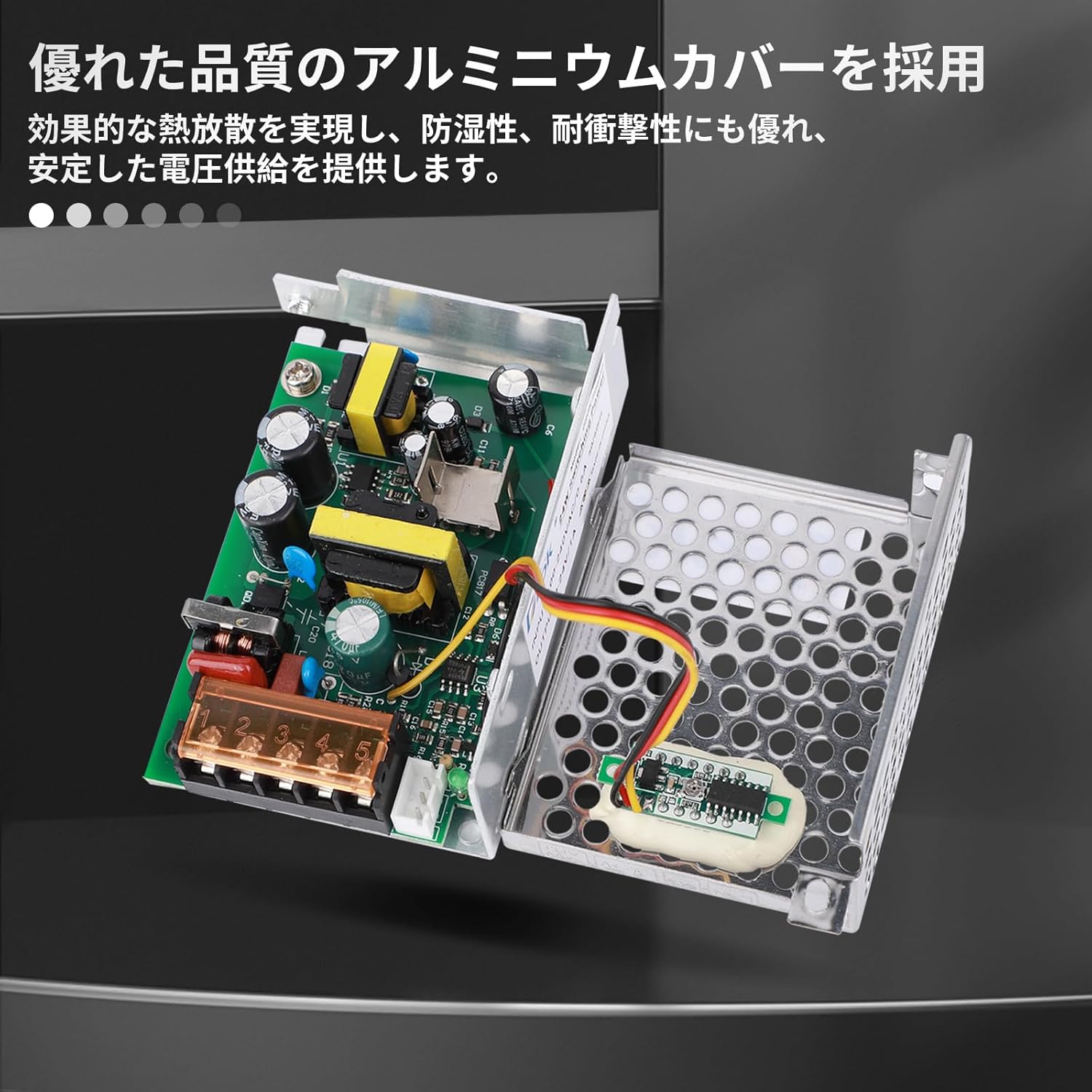
The robust aluminum casing provides protection and aids in thermal management, contributing to the device's reliability.
8. പ്രശ്നപരിഹാരം
നിങ്ങളുടെ വൈദ്യുതി വിതരണത്തിൽ പ്രശ്നങ്ങൾ നേരിടുകയാണെങ്കിൽ, ഇനിപ്പറയുന്ന പൊതുവായ പ്രശ്നങ്ങളും പരിഹാരങ്ങളും പരിശോധിക്കുക:
| പ്രശ്നം | സാധ്യമായ കാരണം | പരിഹാരം |
|---|---|---|
| ട്ട്പുട്ട് വോളിയം ഇല്ലtage / LED display off | No AC input power, incorrect input voltage switch setting, loose connections, internal fault. | Check AC power source. Verify input voltage switch (110V/220V) is correct. Inspect all wiring for secure connections. If problem persists, contact support. |
| Putട്ട്പുട്ട് വോളിയംtage unstable or fluctuating | Overload, faulty load, loose ADJ potentiometer connection, internal fault. | Reduce load to below 2A/25W. Disconnect load and test power supply independently. Check ADJ potentiometer wiring. |
| Power supply gets excessively hot | Insufficient ventilation, continuous overload, high ambient temperature. | Ensure clear airflow around the unit. Reduce load. Operate within specified temperature range. |
| Protection features (overload, short circuit) frequently activate | Load exceeding specifications, short circuit in connected device, incorrect wiring. | Verify load requirements are within 2A/25W. Check connected device for short circuits. Re-examine all wiring. |
9. വാറൻ്റിയും പിന്തുണയും
DROK products are designed for reliability and performance. For warranty information or technical support, please contact your retailer or visit the official DROK website. Please have your model number (200685_JPN) and purchase details ready when contacting support.
For further assistance, you may refer to the product page on Amazon: ആമസോൺ ഉൽപ്പന്ന പേജ്


