1. ആമുഖം
The MSXTTLY U2A-AIR Wireless Android Auto Adapter is designed to seamlessly transform your wired Android Auto experience into a wireless one. This compact dongle eliminates the need for constant cable connections, offering convenience and enhanced functionality for compatible vehicles.

Figure 1: MSXTTLY U2A-AIR Wireless Android Auto Adapter
2. പാക്കേജ് ഉള്ളടക്കം
നിങ്ങളുടെ പാക്കേജിൽ എല്ലാ ഇനങ്ങളും ഉണ്ടെന്ന് ഉറപ്പാക്കുക:
- U2A-AIR Android Auto Adapter x1
- USB Female A to C x1
- USB A Extension Cable x1
- 3.1USB 90 degree adapter x1
- ഉപയോക്തൃ മാനുവൽ x1

ചിത്രം 2: ബോക്സിൽ എന്താണുള്ളത്
3. സജ്ജീകരണ നിർദ്ദേശങ്ങൾ
Follow these steps for the first-time connection of your U2A-AIR adapter:
- Plug the Adapter into Car USB Port: Insert the U2A-AIR Android Auto Adapter into your car's USB data port. The adapter supports various connection methods including direct plug-in, USB A extension cable, or a 90-degree USB A adapter for convenience.
- Pair with Mobile Phone: Turn on the Wi-Fi and Bluetooth functions on your mobile phone. ഇതിനായി തിരയുക new Bluetooth devices and select the one named 'smartBox-xxxx' (the last four digits may vary).
- Android Auto സജീവമാക്കുക: Wait for a few seconds. The Android Auto interface will be activated on your car's screen. You may need to confirm data usage or agree to terms on your car's display.

Figure 3: Plugging in the Adapter
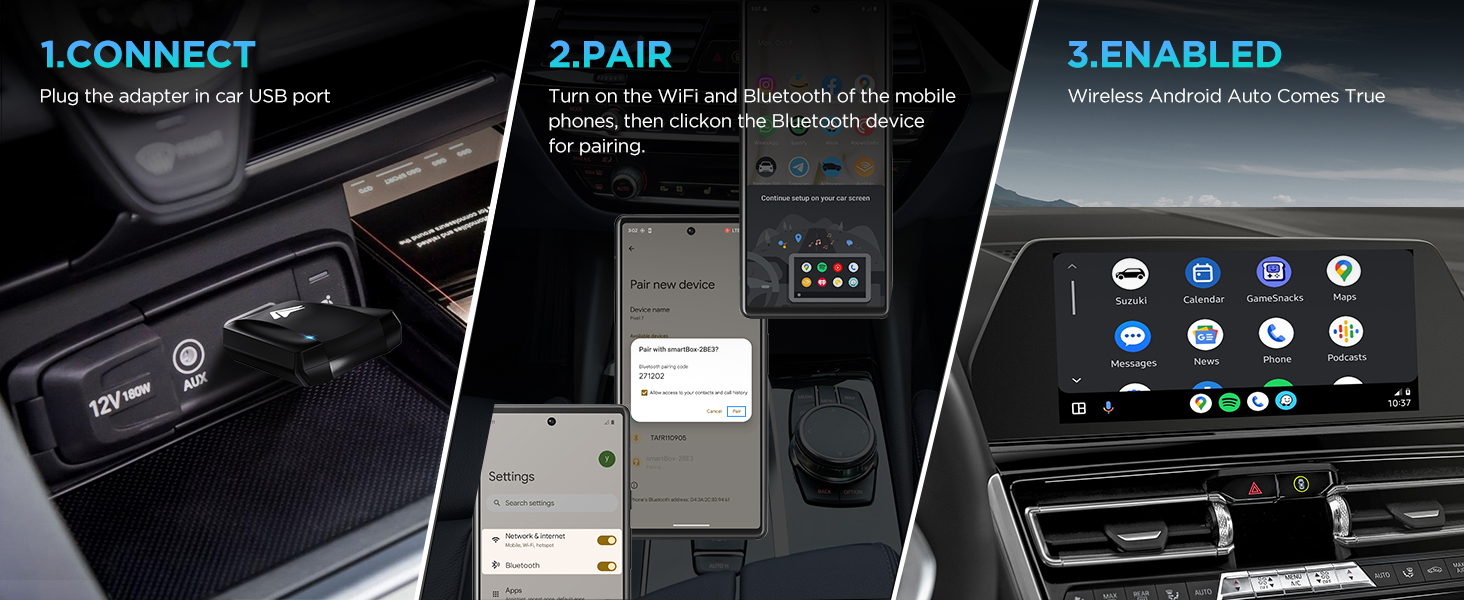
Figure 4: Multiple Connection Options
Figure 5: Pairing Process
Figure 6: Android Auto Activated
വീഡിയോ ഗൈഡ് സജ്ജീകരിക്കുക:
Video 1: First-time Connection Steps for Android Auto Dongle. This video demonstrates the initial setup process for connecting the wireless adapter to your car and phone.
4. പ്രവർത്തന നിർദ്ദേശങ്ങൾ
Once connected, the U2A-AIR adapter provides a fast and stable wireless Android Auto experience. It automatically connects within 5-15 seconds of starting your car.
- Seamless Functionality: Enjoy all standard Android Auto features such as navigation, music streaming, voice assistance, and phone calls without compromising on the original car operation.
- ശബ്ദ നിയന്ത്രണം: Use voice commands for navigation, music playback, and calls.
- GPS നാവിഗേഷൻ: Utilize your preferred navigation apps like Google Maps or Waze directly on your car's display.
- Online Music: Stream music from apps like Spotify, YouTube Music, and Amazon Music.

Figure 7: Android Auto Interface Features
ഓപ്പറേഷൻ വീഡിയോ ഗൈഡ്:
Video 2: Wireless Android Auto Adapter in action. This video showcases the adapter's quick response and stable connection during use.
5 അനുയോജ്യത
The U2A-AIR wireless Android Auto adapter is designed to work with cars or stereos that come with wired Android Auto from the factory. It is compatible with over 800 car models.
പ്രധാനപ്പെട്ടത്: Ensure your phone is compatible with Android Auto. Android 11 or higher versions are highly recommended for optimal performance.

ചിത്രം 8: വിശാലമായ വാഹന അനുയോജ്യത
ഇതുമായി പൊരുത്തപ്പെടുന്നില്ല:
- iPhones/Car stereos (this adapter is for Android Auto only)
- Non-factory wired Android Auto cars
6 സ്പെസിഫിക്കേഷനുകൾ
| ഫീച്ചർ | വിശദാംശങ്ങൾ |
|---|---|
| മോഡൽ നമ്പർ | U2A-AIR Android Auto Wireless |
| ബ്രാൻഡ് | MSXTTLY |
| കണക്റ്റിവിറ്റി ടെക്നോളജി | ബ്ലൂടൂത്ത് |
| വയർലെസ് കമ്മ്യൂണിക്കേഷൻ സ്റ്റാൻഡേർഡ് | ബ്ലൂടൂത്ത് |
| നിറം | കറുപ്പും വെളുപ്പും |
| ഇനത്തിൻ്റെ ഭാരം | 2.39 ഔൺസ് |
| പാക്കേജ് അളവുകൾ | 5.31 x 3.58 x 0.67 ഇഞ്ച് |
7. പ്രശ്നപരിഹാരം
- കണക്ഷൻ പ്രശ്നങ്ങൾ: Ensure your car's USB port is a data port, not just a charging port. Verify Bluetooth and Wi-Fi are enabled on your phone and correctly paired with 'smartBox-xxxx'.
- ഇടയ്ക്കിടെയുള്ള വിച്ഛേദങ്ങൾ: Check for any interference from other wireless devices in the car. Ensure your phone's Android Auto app is up to date.
- ഓഡിയോ ഇല്ല: Confirm your car's audio source is set to Android Auto or Bluetooth. Check volume levels on both your phone and car stereo.
- പ്രകടന കാലതാമസം: Ensure your phone's operating system (Android 11+) and Android Auto app are updated. Close unnecessary background apps on your phone.
8. പരിപാലനം
To ensure the longevity and optimal performance of your U2A-AIR adapter:
- Keep the adapter clean and free from dust and debris.
- Avoid exposing the adapter to extreme temperatures or direct sunlight for prolonged periods.
- ഉപകരണം സ്വയം ഡിസ്അസംബ്ലിംഗ് ചെയ്യാനോ നന്നാക്കാനോ ശ്രമിക്കരുത്.
9. വാറണ്ടിയും പിന്തുണയും
The MSXTTLY U2A-AIR Wireless Android Auto Adapter comes with a 12-month warranty.
For any technical assistance, online reporting, or OTA upgrades, MSXTTLY offers 24/7 professional technical support to ensure your wireless Android Auto adapter always performs at its peak.
Please refer to the contact information provided in your package or visit the official MSXTTLY webപിന്തുണാ വിശദാംശങ്ങൾക്കുള്ള സൈറ്റ്.


