1. ഉൽപ്പന്നം കഴിഞ്ഞുview
The GOYOJO H881 Tracking Camera is an advanced outdoor surveillance device designed for wildlife monitoring, security, and remote observation. It features high-resolution imaging, rapid trigger speed, night vision capabilities, and a robust waterproof design, making it suitable for various environmental conditions. The integrated solar charging option extends battery life for prolonged use.

ചിത്രം 1.1: കഴിഞ്ഞുview of the GOYOJO H881 Tracking Camera, highlighting its main features including 21 million HD pixels, 2.4" TFT LCD, 0.2s trigger time, 25m trigger distance, IP66 waterproof rating, and up to 16 months standby time.
2 പ്രധാന സവിശേഷതകൾ
- ഉയർന്ന റെസല്യൂഷൻ ഇമേജിംഗ്: Captures images up to 21 Megapixels and videos in 1080P resolution.
- ഫാസ്റ്റ് ട്രിഗർ വേഗത: Detects motion and triggers recording in as fast as 0.2 seconds.
- രാത്രി കാഴ്ച: Equipped with 40 IR LEDs for clear night recordings up to 25 meters.
- മോടിയുള്ള ഡിസൈൻ: IP66 waterproof rating ensures reliable operation in harsh weather.
- സംയോജിത ഡിസ്പ്ലേ: 2.4-inch TFT LCD screen for easy setup and playback.
- സോളാർ ചാർജിംഗ്: Built-in solar panel for continuous power and extended battery life.

ചിത്രം 2.1: Illustration of the camera's quick trigger speed. The camera activates in 0.2 seconds when an animal approaches from the front and 0.5 seconds from the side.

ചിത്രം 2.2: The 2.4-inch TFT LCD screen of the H881 camera, used for viewing captured photos and videos, and for navigating the camera's settings.
3. സജ്ജീകരണ ഗൈഡ്
3.1. ബാറ്ററി ഇൻസ്റ്റാളേഷൻ
- Open the camera's battery compartment latch.
- Insert 8 AA batteries (not included) into the designated slots, ensuring correct polarity (+/-).
- Close the battery compartment securely to maintain the waterproof seal.
3.2. TF കാർഡ് ഉൾപ്പെടുത്തൽ
- Locate the TF card slot, typically next to the LCD screen.
- Insert a TF (MicroSD) card (8MB-32GB, Class 6 or above recommended) with the gold contacts facing down until it clicks into place.
- കാർഡ് നീക്കം ചെയ്യാൻ, അത് പുറത്തേക്ക് വരുന്നത് വരെ സൌമ്യമായി അമർത്തുക.
3.3. ക്യാമറ ഘടിപ്പിക്കുന്നു
- Use the included mounting strap or a tripod to secure the camera to a tree, pole, or other stable surface.
- Ensure the camera is positioned at an appropriate height and angle to capture the desired area, avoiding direct sunlight on the lens.
- Verify that the solar panel is exposed to direct sunlight for optimal charging.
3.4. പവർ ചെയ്യുന്നു
- Switch the camera to the 'SETUP' mode to access the menu and configure settings.
- After configuration, switch to 'ON' mode for automatic operation.
4. പ്രവർത്തന നിർദ്ദേശങ്ങൾ
4.1. മെനു നാവിഗേഷൻ
- In 'SETUP' mode, use the 'MENU' button to enter the settings menu.
- Use the UP/DOWN arrow buttons to navigate through options and LEFT/RIGHT to change values.
- Press 'OK' to confirm selections.
4.2. അടിസ്ഥാന ക്രമീകരണങ്ങൾ
- തീയതിയും സമയവും: കൃത്യമായ സമയക്രമീകരണത്തിനായി നിലവിലെ തീയതിയും സമയവും സജ്ജമാക്കുകampറെക്കോർഡിംഗുകളിൽ എസ്.
- മോഡ്: Select 'Photo', 'Video', or 'Photo+Video' depending on your recording preference.
- Image/Video Resolution: Choose desired quality (e.g., 21MP for images, 1080P for video).
- PIR സംവേദനക്ഷമത: Adjust to 'High', 'Normal', or 'Low' based on the environment to prevent false triggers.
- ട്രിഗർ ഇടവേള: തുടർച്ചയായ ട്രിഗറുകൾക്കിടയിലുള്ള കാലതാമസം സജ്ജമാക്കുക.
- ടൈം ലാപ്സ്: Configure time-lapse settings if desired.
4.3. Viewing Playback
- In 'SETUP' mode, press the 'PLAY' button to enter playback mode.
- Use the UP/DOWN arrows to browse through recorded files.
- Press 'OK' to view an image or play a video.
5. പരിപാലനം
- വൃത്തിയാക്കൽ: Regularly clean the camera lens, PIR sensor, and solar panel with a soft, dry cloth. Avoid abrasive materials or harsh chemicals.
- ബാറ്ററി പരിശോധന: Monitor battery levels periodically, especially if not using the solar charging feature or during periods of low sunlight. Replace batteries when low.
- TF കാർഡ് മാനേജ്മെന്റ്: Format the TF card regularly to ensure optimal performance and prevent data corruption. Back up important fileഫോർമാറ്റ് ചെയ്യുന്നതിന് മുമ്പ് എസ്.
- പരിസ്ഥിതി സംരക്ഷണം: Ensure all latches and seals are properly closed to maintain the camera's waterproof integrity.
6. പ്രശ്നപരിഹാരം
- ക്യാമറ ഓണാക്കുന്നില്ല: Check battery installation and charge level. Ensure the power switch is in 'SETUP' or 'ON' position.
- No Images/Videos Recorded: Verify TF card is inserted correctly and has sufficient space. Check PIR sensitivity and trigger interval settings. Ensure the camera is in 'ON' mode.
- മോശം ചിത്രം/വീഡിയോ നിലവാരം: Clean the camera lens. Check resolution settings. Ensure adequate lighting for night vision.
- PIR Not Triggering: Adjust PIR sensitivity to 'High'. Ensure no obstructions are blocking the PIR sensor. Test in different environments.
- ഹ്രസ്വ ബാറ്ററി ലൈഫ്: Ensure solar panel is clean and receiving direct sunlight. Reduce video length or frequency of recordings. Use high-quality AA batteries.
- Camera Freezes: Remove batteries and TF card, then reinsert. If issue persists, format the TF card.
7 സ്പെസിഫിക്കേഷനുകൾ
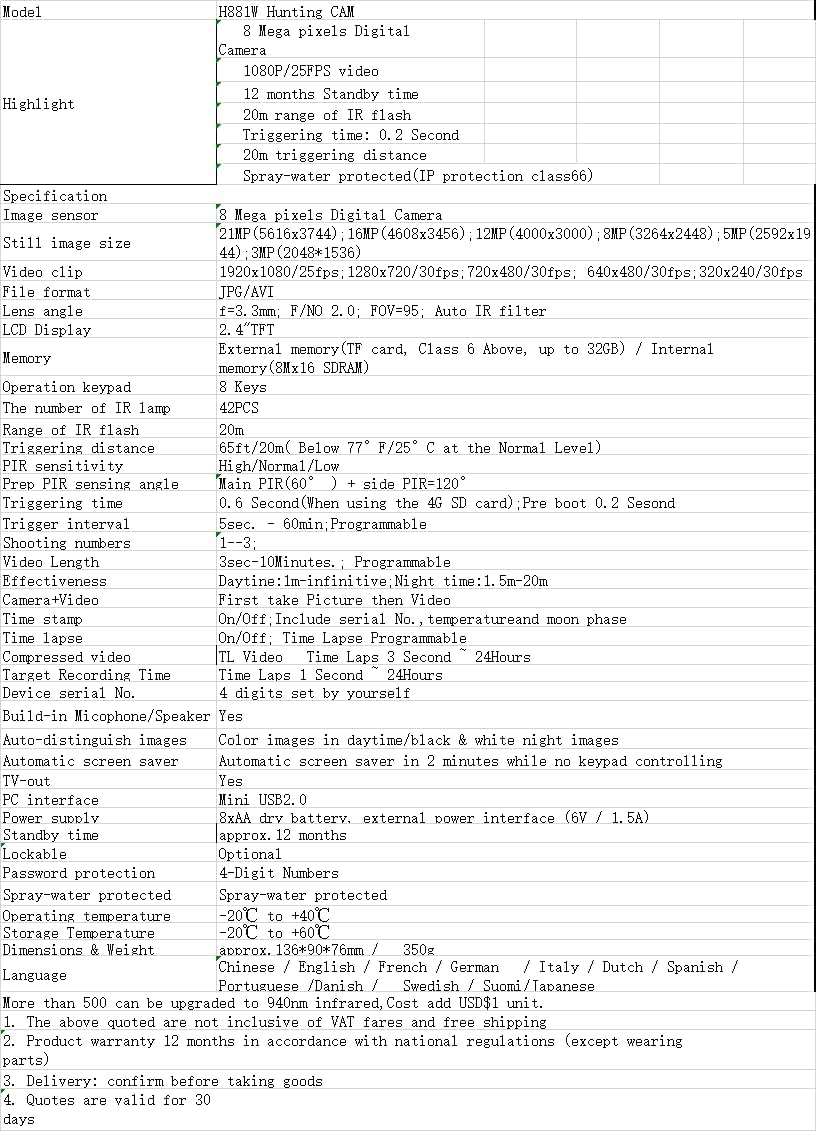
ചിത്രം 7.1: Detailed technical specifications for the GOYOJO H881 Tracking Camera.
| ഫീച്ചർ | സ്പെസിഫിക്കേഷൻ |
|---|---|
| ഇമേജ് സെൻസർ | 8 മെഗാപിക്സൽ സിഎംഒഎസ് സെൻസർ |
| വീഡിയോ റെസല്യൂഷൻ | 1080P/720P/VGA |
| ചിത്ര മിഴിവ് | 21MP/16MP/12MP/8MP |
| വാട്ടർപ്രൂഫ് റേറ്റിംഗ് | IP66 |
| IR LED- കൾ | 40 IR LED- കൾ |
| ട്രിഗർ സമയം | 0.2 seconds (front), 0.5 seconds (side) |
| ലെൻസ് FOV | 110° |
| PIR ദൂരം | 25 മീറ്റർ |
| മെമ്മറി | TF card 8MB-32GB (Class 6 or above) |
| സ്റ്റാൻഡ്ബൈ സമയം | 15-16 മാസം വരെ |
| എൽസിഡി ഡിസ്പ്ലേ | 2.4" ടിഎഫ്ടി |
| വൈദ്യുതി വിതരണം | 8x AA dry battery, external power interface (6V / 1.5A) |
| പ്രവർത്തന താപനില | -20°C മുതൽ +40°C വരെ |
| അളവുകൾ | ഏകദേശം. 136 x 96 x 76 മി.മീ |
8. വാറൻ്റിയും പിന്തുണയും
8.1. ഉൽപ്പന്ന വാറൻ്റി
The GOYOJO H881 Tracking Camera comes with a 12-month product warranty. This warranty is provided in accordance with national regulations and covers manufacturing defects. Please note that wearing parts are typically excluded from this warranty.
8.2. ഉപഭോക്തൃ പിന്തുണ
For technical assistance, troubleshooting, or warranty claims, please contact GOYOJO customer support. Refer to your purchase documentation or the official GOYOJO webബന്ധപ്പെടാനുള്ള വിവരങ്ങൾക്കുള്ള സൈറ്റ്.


