1. ആമുഖം
Welcome to the user manual for your Beafon SL270 Basic Mobile Phone. This guide provides essential information to help you set up, operate, maintain, and troubleshoot your device. Please read this manual carefully to ensure proper use and to maximize the phone's features.

Figure 1: Beafon SL270 Basic Mobile Phone in its charging cradle.
The Beafon SL270 is designed for ease of use, featuring a large display and essential functions for reliable communication.
2. സജ്ജീകരണം
2.1 പാക്കേജ് ഉള്ളടക്കം
ആരംഭിക്കുന്നതിന് മുമ്പ്, പാക്കേജിൽ എല്ലാ ഇനങ്ങളും ഉണ്ടെന്ന് ഉറപ്പാക്കുക:
- Beafon SL270 Mobile Phone
- Battery (1 Lithium-ion)
- ചാർജിംഗ് കേബിൾ
- Charging Cradle (if included)
- ഉപയോക്തൃ മാനുവൽ
2.2 ബാറ്ററി ഇൻസ്റ്റാളേഷൻ
- ഫോണിന്റെ പിൻ കവർ നോച്ചിൽ നിന്ന് പതുക്കെ തുറന്ന് നീക്കം ചെയ്യുക.
- Insert the Lithium-ion battery, ensuring the gold contacts align with the phone's terminals.
- പിൻ കവർ മാറ്റി, അത് സ്ഥലത്ത് ക്ലിക്ക് ചെയ്യുന്നതുവരെ ദൃഢമായി അമർത്തുക.
2.3 സിം കാർഡ് ഇൻസ്റ്റാളേഷൻ
The Beafon SL270 uses a standard SIM card. Ensure your SIM card is activated by your network provider.
- ബാറ്ററി നീക്കം ചെയ്ത ശേഷം, സിം കാർഡ് സ്ലോട്ട് കണ്ടെത്തുക.
- Carefully insert the SIM card into the slot with the gold contacts facing down and the cut corner aligned correctly.
- ബാറ്ററിയും ബാക്ക് കവറും വീണ്ടും ഇൻസ്റ്റാൾ ചെയ്യുക.
2.4 പ്രാരംഭ ചാർജിംഗ്
ആദ്യ ഉപയോഗത്തിന് മുമ്പ്, ഫോണിന്റെ ബാറ്ററി പൂർണ്ണമായും ചാർജ് ചെയ്യുക.
- Connect the charging cable to the phone or place the phone in the charging cradle.
- ചാർജിംഗ് കേബിളിൻ്റെ മറ്റേ അറ്റം ഒരു പവർ ഔട്ട്ലെറ്റിലേക്ക് പ്ലഗ് ചെയ്യുക.
- The battery indicator on the screen will show charging progress. A full charge may take several hours.
2.5 പവർ ഓൺ/ഓഫ്
- പവർ ഓണാക്കാൻ: സ്ക്രീൻ പ്രകാശിക്കുന്നത് വരെ പവർ/എൻഡ് കോൾ ബട്ടൺ (ചുവപ്പ് ബട്ടൺ) അമർത്തിപ്പിടിക്കുക.
- പവർ ഓഫ് ചെയ്യാൻ: Press and hold the Power/End Call button until the power-off options appear, then select 'Power off'.
3. പ്രവർത്തന നിർദ്ദേശങ്ങൾ
3.1 മെനു നാവിഗേറ്റ് ചെയ്യുന്നു
Use the navigation keys (up, down, left, right) and the central OK/Select button to move through the phone's menu. The left and right soft keys (below the screen) perform functions indicated on the display.

Figure 2: The Beafon SL270 features a large display for enhanced readability and comfort.
3.2 കോളുകൾ ചെയ്യലും സ്വീകരിക്കലും
- ഒരു കോൾ ചെയ്യാൻ: കീപാഡ് ഉപയോഗിച്ച് ഫോൺ നമ്പർ നൽകി കോൾ ബട്ടൺ (പച്ച ബട്ടൺ) അമർത്തുക.
- ഒരു കോൾ സ്വീകരിക്കുന്നതിന്: Press the Call button (green button) when the phone rings.
- ഒരു കോൾ അവസാനിപ്പിക്കാൻ: Press the End Call button (red button).
3.3 Contacts and Photo Contacts
You can save frequently used numbers in your phone's contact list. The Beafon SL270 supports Photo Contacts, allowing you to assign a picture to up to 8 contacts for easy identification.
- Go to the 'Contacts' menu.
- Select 'Add New Contact' or 'Edit Contact'.
- Enter the name and number. For Photo Contacts, select the option to add a photo from your gallery or take a new one.
Figure 3: The Beafon SL270 allows for up to 8 photo contacts, making it easier to identify callers.
3.4 SOS അടിയന്തര ബട്ടൺ
The Beafon SL270 features a dedicated SOS emergency button on the back of the device. This function allows you to quickly contact pre-set emergency numbers in critical situations.
- SOS നമ്പറുകൾ സജ്ജീകരിക്കുന്നു: Navigate to the 'SOS Settings' in the menu. You can set up to 5 emergency contacts.
- SOS സജീവമാക്കുന്നു: In an emergency, press and hold the SOS button on the back of the phone. The phone will automatically call and send an SMS to the pre-set numbers in sequence until a connection is made.

Figure 4: The SOS emergency button on the back of the Beafon SL270 allows for quick dialing of pre-selected emergency contacts.
3.5 സന്ദേശമയയ്ക്കൽ (എസ്എംഎസ്)
To send and receive text messages:
- Go to the 'Messages' menu.
- Select 'Write Message' to compose a new SMS.
- സ്വീകർത്താവിന്റെ നമ്പർ നൽകുകയോ കോൺടാക്റ്റുകളിൽ നിന്ന് തിരഞ്ഞെടുക്കുകയോ ചെയ്യുക, തുടർന്ന് നിങ്ങളുടെ സന്ദേശം ടൈപ്പ് ചെയ്യുക.
- 'അയയ്ക്കുക' അമർത്തുക.
3.6 Camera and Light Signal
The phone is equipped with a camera for basic photo capture and a light signal feature.
- ക്യാമറ: Access the camera from the main menu. Point and shoot to capture images.
- ലൈറ്റ് സിഗ്നൽ: The phone can provide a visual light signal for incoming calls or messages, useful in noisy environments or for users with hearing impairments. This feature can usually be enabled or disabled in the phone's settings under 'Call Settings' or 'Notification Settings'.

Figure 5: The Beafon SL270 provides a light signal for incoming calls or messages.
3.7 മറ്റ് സവിശേഷതകൾ
- ബ്ലൂടൂത്ത്: For connecting to wireless headsets or other Bluetooth devices.
- എഫ്എം റേഡിയോ: Listen to your favorite radio stations.
- അലാറം ക്ലോക്ക്: ഓർമ്മപ്പെടുത്തലുകൾക്കായി അലാറങ്ങൾ സജ്ജമാക്കുക.
4. പരിപാലനം
4.1 നിങ്ങളുടെ ഫോൺ വൃത്തിയാക്കൽ
നിങ്ങളുടെ ഫോൺ ഒപ്റ്റിമൽ അവസ്ഥയിൽ നിലനിർത്താൻ:
- Use a soft, dry cloth to wipe the phone's surface.
- കഠിനമായ രാസവസ്തുക്കൾ, ക്ലീനിംഗ് ലായകങ്ങൾ, അല്ലെങ്കിൽ ശക്തമായ ഡിറ്റർജന്റുകൾ എന്നിവ ഉപയോഗിക്കുന്നത് ഒഴിവാക്കുക.
- Do not expose the phone to excessive dust, moisture, or extreme temperatures.
4.2 ബാറ്ററി കെയർ
- ബാറ്ററി ഇടയ്ക്കിടെ പൂർണ്ണമായും ഡിസ്ചാർജ് ചെയ്യുന്നത് ഒഴിവാക്കുക.
- Do not leave the phone connected to the charger for extended periods after it is fully charged.
- If the phone will not be used for a long time, charge the battery to about 50% before storing it.
4.3 സോഫ്റ്റ്വെയർ അപ്ഡേറ്റുകൾ
While specific software update information is not available, it is generally recommended to keep your device's software updated to ensure optimal performance and security. Check the manufacturer's website or contact support for any available updates.
5. പ്രശ്നപരിഹാരം
If you encounter issues with your Beafon SL270, try the following solutions:
| പ്രശ്നം | സാധ്യമായ കാരണം | പരിഹാരം |
|---|---|---|
| ഫോൺ ഓൺ ആകുന്നില്ല. | ബാറ്ററി തീർന്നു അല്ലെങ്കിൽ ശരിയായി ഇൻസ്റ്റാൾ ചെയ്തിട്ടില്ല. | ബാറ്ററി ചാർജ് ചെയ്യുക. ബാറ്ററി ശരിയായി ചേർത്തിട്ടുണ്ടെന്ന് ഉറപ്പാക്കുക. |
| നെറ്റ്വർക്ക് സിഗ്നൽ ഇല്ല | SIM card issue, out of network coverage. | Check SIM card installation. Move to an area with better network coverage. Contact your service provider. |
| കോളുകൾ വിളിക്കാനോ സ്വീകരിക്കാനോ കഴിയില്ല | No network, incorrect number, call barring. | Check signal strength. Verify the number. Check call barring settings. |
| Sound issues (no sound/low volume) | Volume too low, speaker/earpiece blocked. | Adjust volume. Clean speaker/earpiece openings. |
| Phone freezes/unresponsive | താൽക്കാലിക സോഫ്റ്റ്വെയർ തകരാർ. | ഫോൺ പുനരാരംഭിക്കുന്നതിന് ബാറ്ററി നീക്കം ചെയ്ത് വീണ്ടും ചേർക്കുക. |
If the problem persists after trying these solutions, please contact Beafon customer support.
6 സ്പെസിഫിക്കേഷനുകൾ
Detailed technical specifications for the Beafon SL270:
| ഫീച്ചർ | വിശദാംശങ്ങൾ |
|---|---|
| ബ്രാൻഡ് | Beafon |
| മോഡൽ നമ്പർ | B0CJ6KX594 |
| സ്ക്രീൻ വലിപ്പം | 3.5 ഇഞ്ച് |
| ഡിസ്പ്ലേ തരം | എൽസിഡി |
| റെസലൂഷൻ | 480 x 320 |
| കണക്റ്റിവിറ്റി ടെക്നോളജി | ബ്ലൂടൂത്ത്, വൈ-ഫൈ, യു.എസ്.ബി |
| വയർലെസ് നെറ്റ്വർക്ക് സാങ്കേതികവിദ്യ | വൈഫൈ |
| വയർലെസ് കാരിയർ | All carriers (Unlocked) |
| പിൻ ക്യാമറ റെസല്യൂഷൻ | 3 മെഗാപിക്സലുകൾ |
| പ്രത്യേക സവിശേഷതകൾ | Wi-Fi, USB, Touchscreen, Camera, Flash, Radio |
| ബാറ്ററി | 1 ലിഥിയം-അയൺ (ഉൾപ്പെടുത്തിയിരിക്കുന്നു) |
| മോഡൽ വർഷം | 2023 |
| മെമ്മറി | 1 (unit not specified, typically GB or MB for basic phones) |
| സ്പെയർ പാർട്സ് ലഭ്യത | വിവരങ്ങൾ ലഭ്യമല്ല |
| സോഫ്റ്റ്വെയർ അപ്ഡേറ്റുകൾ ലഭിക്കുന്നതുവരെ ഉറപ്പ് | വിവരങ്ങൾ ലഭ്യമല്ല |
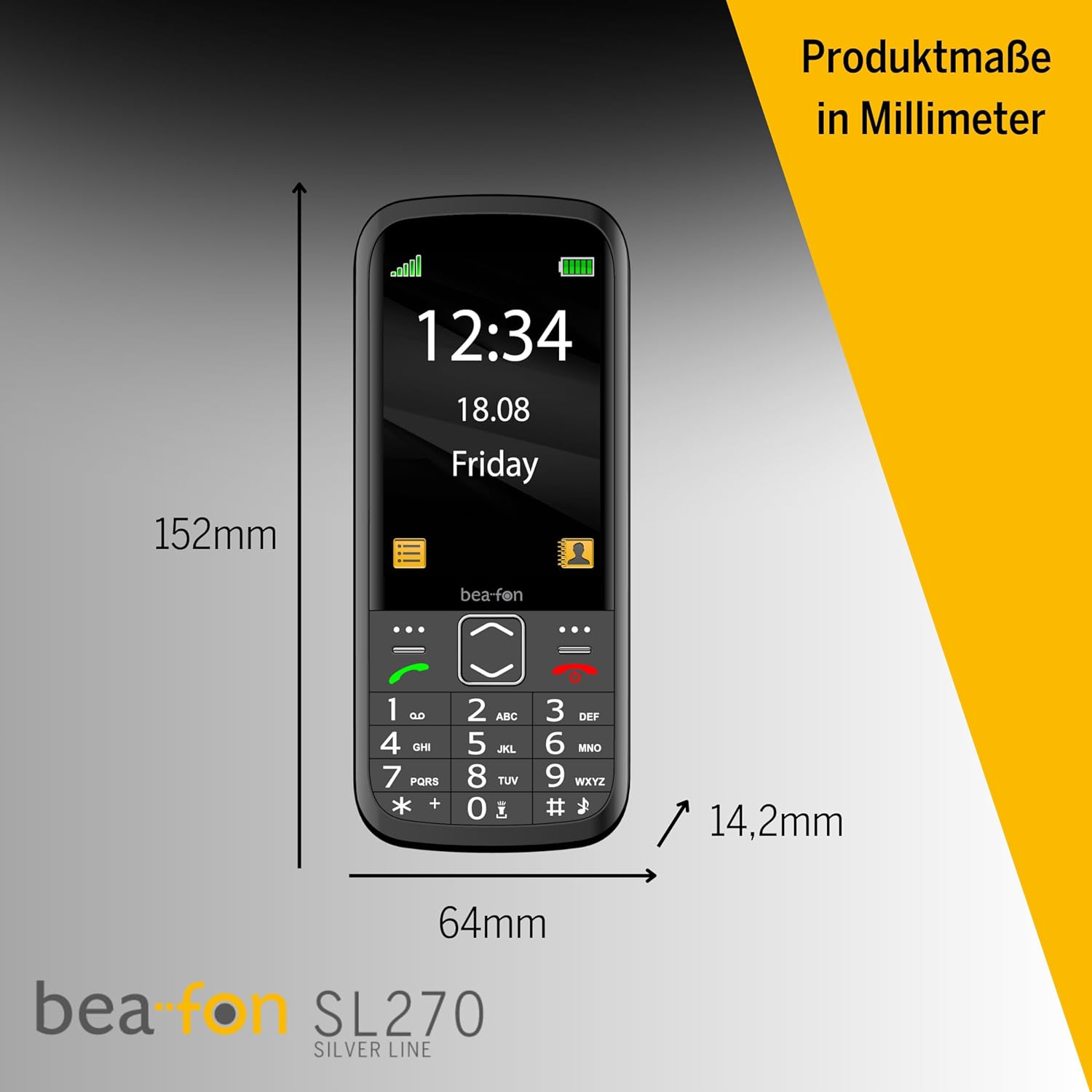
Figure 6: Product dimensions of the Beafon SL270 in millimeters.
7. വാറൻ്റിയും പിന്തുണയും
7.1 വാറൻ്റി വിവരങ്ങൾ
For detailed warranty information, please refer to the warranty card included with your product or visit the official Beafon webസൈറ്റ്. വാറന്റി സാധാരണയായി വാങ്ങിയ തീയതി മുതൽ ഒരു നിശ്ചിത കാലയളവിലേക്ക് നിർമ്മാണ വൈകല്യങ്ങൾ ഉൾക്കൊള്ളുന്നു.
7.2 ഉപഭോക്തൃ പിന്തുണ
If you require further assistance, have questions not covered in this manual, or need technical support, please contact Beafon customer service. Contact details can usually be found on the official Beafon webസൈറ്റ് അല്ലെങ്കിൽ ഉൽപ്പന്ന പാക്കേജിംഗിൽ.
- ഓൺലൈൻ പിന്തുണ: Visit the official Beafon webപതിവുചോദ്യങ്ങൾ, പിന്തുണാ ലേഖനങ്ങൾ, കോൺടാക്റ്റ് ഫോമുകൾ എന്നിവയ്ക്കുള്ള സൈറ്റ്.
- ഫോൺ പിന്തുണ: Check the Beafon webപ്രാദേശിക ഉപഭോക്തൃ സേവന ഫോൺ നമ്പറുകൾക്കായുള്ള സൈറ്റ്.


