1. ആമുഖം
This manual provides comprehensive instructions for the installation, operation, and maintenance of your EZVIZ CS-HB8/SP 2K+ 4MP PT Battery-Powered Wi-Fi Camera with Solar Panel. Please read this manual carefully before using the product to ensure proper functionality and safety. Keep this manual for future reference.
The EZVIZ HB8 is a battery-powered security camera designed for outdoor use, offering 360-degree pan and tilt capabilities with 2K+ resolution. It features an ultra-long battery life and can be optionally powered by a solar panel for continuous operation. The camera includes on-device storage for recording activity and advanced detection features.
2. പാക്കേജ് ഉള്ളടക്കം
Verify that all components are present and in good condition upon opening the package. If any items are missing or damaged, contact your retailer.
- EZVIZ CS-HB8/SP 2K+ 4MP PT Camera
- സോളാർ പാനൽ
- മ Template ണ്ടിംഗ് ടെംപ്ലേറ്റ്
- സ്ക്രീൻ കിറ്റ്
- Power Adapter (for initial charging)
- USB കേബിൾ
- ദ്രുത ആരംഭ ഗൈഡ്
- റെഗുലേറ്ററി വിവരങ്ങൾ
3. ഉൽപ്പന്നം കഴിഞ്ഞുview
Familiarize yourself with the camera's components before installation.
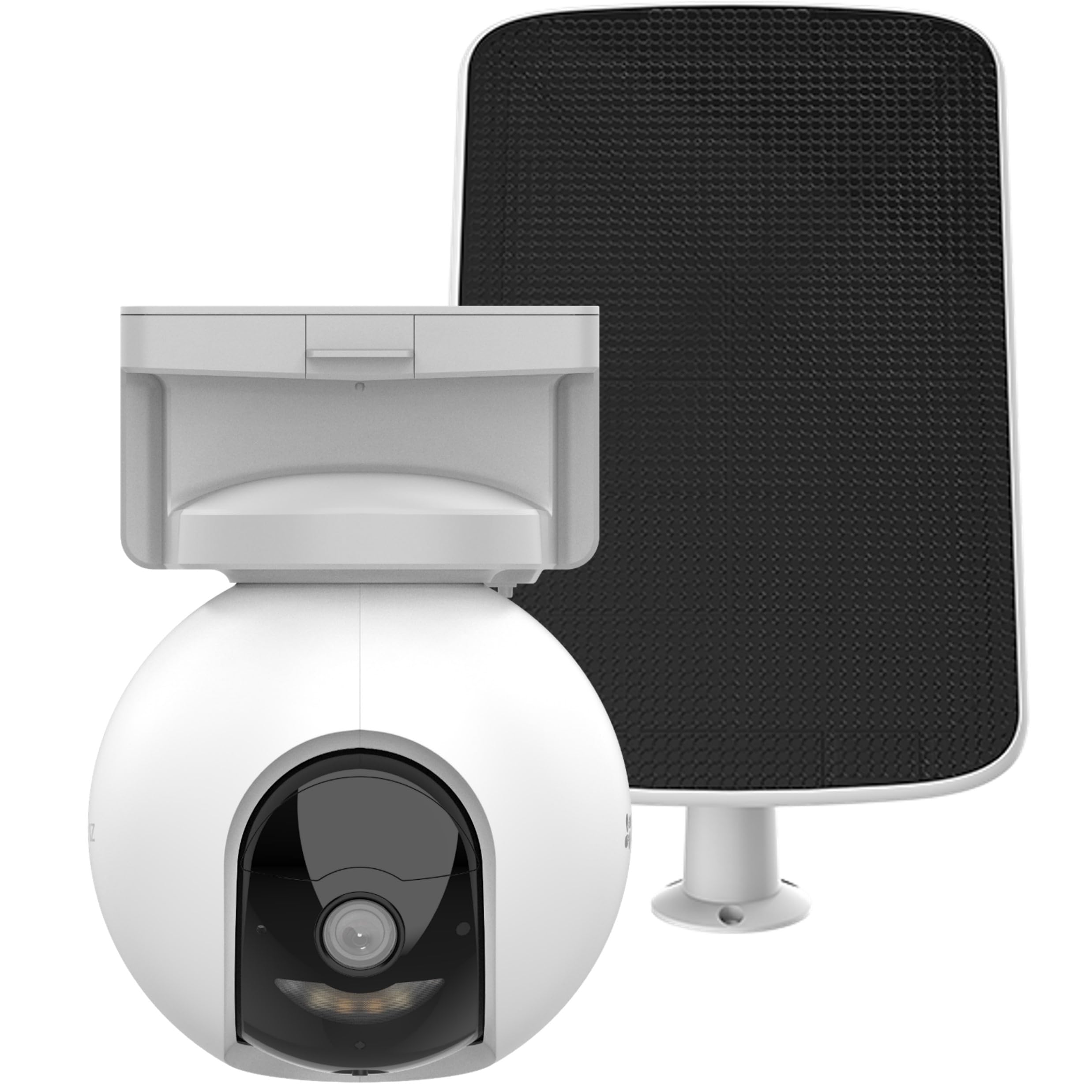
Image 1: EZVIZ CS-HB8/SP Camera and Solar Panel. This image displays the main camera unit with its pan-tilt base and the accompanying solar panel, highlighting their design and connection points.
ക്യാമറ ഘടകങ്ങൾ:
- ലെൻസ്: വീഡിയോ foo ക്യാപ്ചർ ചെയ്യുന്നുtage.
- ഇൻഫ്രാറെഡ് LED-കൾ: Provide night vision capabilities.
- മൈക്രോഫോൺ: For audio input and two-way talk.
- സ്പീക്കർ: For audio output and two-way talk.
- പിഐആർ സെൻസർ: Detects passive infrared motion.
- സ്റ്റാറ്റസ് ഇൻഡിക്കേറ്റർ: Displays camera status (e.g., charging, connected).
- റീസെറ്റ് ബട്ടൺ: ക്യാമറ ഫാക്ടറി ക്രമീകരണങ്ങളിലേക്ക് പുനഃസജ്ജമാക്കാൻ ഉപയോഗിക്കുന്നു.
- മൈക്രോ എസ്ഡി കാർഡ് സ്ലോട്ട്: പ്രാദേശിക വീഡിയോ സംഭരണത്തിനായി.
- യുഎസ്ബി-സി പോർട്ട്: For charging and connecting the solar panel.
Solar Panel Components:
- സൗരോര്ജ സെല്: Convert sunlight into electrical energy.
- മൌണ്ടിംഗ് ബ്രാക്കറ്റ്: For securing the solar panel.
- USB-C കേബിൾ: Connects the solar panel to the camera.
4. സജ്ജീകരണം
4.1 പ്രാരംഭ ചാർജിംഗ്
Before first use, fully charge the camera battery using the provided power adapter and USB cable. The status indicator will show a solid red light during charging and turn off when fully charged. This process may take several hours.
4.2 EZVIZ App Installation
- Download the EZVIZ app from the App Store (iOS) or Google Play Store (Android).
- ഒരു EZVIZ അക്കൗണ്ടിനായി രജിസ്റ്റർ ചെയ്യുക അല്ലെങ്കിൽ നിങ്ങൾക്ക് ഇതിനകം ഒന്ന് ഉണ്ടെങ്കിൽ ലോഗിൻ ചെയ്യുക.
4.3 ക്യാമറ ജോടിയാക്കൽ
- Power on the camera by pressing and holding the power button (if applicable, or it powers on automatically after charging).
- Open the EZVIZ app, tap the "+" icon on the home screen to add a device.
- ക്യാമറയിലോ അതിന്റെ പാക്കേജിംഗിലോ ഉള്ള QR കോഡ് സ്കാൻ ചെയ്യുക.
- Follow the on-screen instructions in the app to connect the camera to your Wi-Fi network. Ensure your Wi-Fi network is 2.4 GHz.
4.4 ക്യാമറയും സോളാർ പാനലും സ്ഥാപിക്കൽ
വ്യക്തമായ ഒരു മൗണ്ടിംഗ് സ്ഥലം തിരഞ്ഞെടുക്കുക view and good Wi-Fi signal strength. For the solar panel, select a spot that receives direct sunlight for most of the day.
- Use the mounting template to mark screw holes on the desired surface.
- Drill pilot holes and insert wall anchors if mounting on masonry or stucco.
- Secure the camera mounting base and solar panel bracket using the provided screws.
- Attach the camera to its base and adjust the angle as needed.
- Connect the solar panel's USB-C cable to the camera's USB-C port. Ensure the connection is secure and weatherproof.
കുറിപ്പ്: Ensure the solar panel is positioned to maximize sun exposure for optimal charging performance.
5. പ്രവർത്തന നിർദ്ദേശങ്ങൾ
5.1 തത്സമയം View ഒപ്പം പ്ലേബാക്ക്
- Open the EZVIZ app and select your camera from the device list.
- ലൈവിൽ ടാപ്പ് ചെയ്യുക view തത്സമയ ഫൂ കാണാൻtage.
- ക്യാമറ ക്രമീകരിക്കാൻ ആപ്പിനുള്ളിലെ പാൻ, ടിൽറ്റ് നിയന്ത്രണങ്ങൾ ഉപയോഗിക്കുക viewing ആംഗിൾ.
- Access the playback feature to review recorded events stored on the MicroSD card.
5.2 മോഷൻ ഡിറ്റക്ഷനും അലേർട്ടുകളും
The camera features intelligent motion detection with auto-tracking.
- In the EZVIZ app, navigate to camera settings.
- Enable motion detection and customize sensitivity levels.
- Set up alert notifications to receive instant alerts on your mobile device when motion is detected.
- Configure auto-tracking to allow the camera to follow detected subjects.
5.3 ടു-വേ ടോക്ക്
Use the two-way talk feature to communicate with visitors or deter intruders.
- ലൈവിൽ ആയിരിക്കുമ്പോൾ view, tap the microphone icon in the EZVIZ app to speak.
- Release the icon to listen.
5.4 നൈറ്റ് വിഷൻ
The camera automatically switches to night vision mode in low-light conditions, providing clear footage even in darkness. It supports vivid color night vision.
6. പരിപാലനം
6.1 വൃത്തിയാക്കൽ
- Regularly clean the camera lens and solar panel surface with a soft, damp പൊടിയും അവശിഷ്ടങ്ങളും നീക്കം ചെയ്യാനുള്ള തുണി.
- കഠിനമായ രാസവസ്തുക്കളോ ഉരച്ചിലുകൾ ഉപയോഗിക്കരുത്.
6.2 ബാറ്ററി മാനേജ്മെൻ്റ്
- Monitor the battery level through the EZVIZ app.
- Ensure the solar panel receives adequate sunlight to maintain battery charge.
- If the camera is not receiving enough sunlight, occasional manual charging with the power adapter may be necessary.
6.3 ഫേംവെയർ അപ്ഡേറ്റുകൾ
Keep your camera's firmware updated to ensure optimal performance and access to new features. Firmware updates can be initiated through the EZVIZ app.
7. പ്രശ്നപരിഹാരം
| പ്രശ്നം | സാധ്യമായ കാരണം | പരിഹാരം |
|---|---|---|
| ക്യാമറ വൈഫൈയിലേക്ക് കണക്റ്റ് ചെയ്യുന്നില്ല | Incorrect Wi-Fi password; Camera too far from router; 5GHz Wi-Fi network. | Verify password; Move camera closer to router; Ensure 2.4GHz Wi-Fi is used. |
| സോളാർ പാനൽ വഴി ബാറ്ററി ചാർജ് ചെയ്യുന്നില്ല | Insufficient sunlight; Dirty solar panel; Loose connection. | Relocate panel to direct sunlight; Clean panel surface; Check USB-C connection. |
| ചലനം കണ്ടെത്തൽ അലേർട്ടുകളൊന്നുമില്ല | Detection disabled; Sensitivity too low; App notifications off. | Enable detection in app; Increase sensitivity; Check app notification settings. |
| മോശം വീഡിയോ നിലവാരം | ലെൻസ് വൃത്തികേടാണ്; വൈ-ഫൈ സിഗ്നൽ ദുർബലമാണ്; വെളിച്ചം കുറവാണ്. | Clean lens; Improve Wi-Fi signal; Ensure adequate lighting or rely on night vision. |
If you encounter issues not listed here, please refer to the EZVIZ app's help section or contact customer support.
8 സ്പെസിഫിക്കേഷനുകൾ
| ഫീച്ചർ | വിശദാംശങ്ങൾ |
|---|---|
| മോഡൽ നമ്പർ | CS-HB8/SP (OB03698) |
| റെസലൂഷൻ | 2K+ (4MP) |
| പാൻ/ടിൽറ്റ് | 360-ഡിഗ്രി കവറേജ് |
| പവർ ഉറവിടം | Battery-powered with optional Solar Panel |
| ബാറ്ററി ലൈഫ് | Up to 210 days (without solar panel) |
| സംഭരണം | On-device storage (MicroSD card slot) |
| നൈറ്റ് വിഷൻ | കളർ നൈറ്റ് വിഷൻ |
| കണക്റ്റിവിറ്റി | വൈഫൈ (2.4 GHz) |
| ഇനത്തിൻ്റെ ഭാരം | 1.74 കിലോഗ്രാം |
| ഉൽപ്പന്ന അളവുകൾ | 10 x 5 x 1.27 സെ.മീ |
| വാട്ട്tage | 10 Watts (Solar Panel) |
| മൗണ്ടിംഗ് തരം | Ceiling mount base |
| ഉൾപ്പെടുത്തിയ ഘടകങ്ങൾ | സോളാർ പാനലുള്ള ക്യാമറ |
| മാതൃരാജ്യം | ചൈന |
9. വാറൻ്റിയും പിന്തുണയും
EZVIZ products come with a limited warranty. For detailed warranty information, please refer to the warranty card included in your package or visit the official EZVIZ webസൈറ്റ്.
For technical support, troubleshooting assistance, or to report issues, please contact EZVIZ customer service through the EZVIZ app or their official webസൈറ്റ്. പിന്തുണയുമായി ബന്ധപ്പെടുമ്പോൾ നിങ്ങളുടെ ഉൽപ്പന്ന മോഡൽ നമ്പറും വാങ്ങൽ വിശദാംശങ്ങളും തയ്യാറാണെന്ന് ഉറപ്പാക്കുക.
EZVIZ ഉദ്യോഗസ്ഥൻ Webസൈറ്റ്: www.ezviz.com


