ആമുഖം
Thank you for choosing the LIORQUE Colorful Digital Alarm Clock. This manual provides detailed instructions for setting up and operating your new alarm clock. Please read it carefully to ensure proper use and to fully utilize all its features.

The LIORQUE Colorful Digital Alarm Clock features a vibrant LED display showing time and temperature.
പാക്കേജ് ഉള്ളടക്കം
- LIORQUE Colorful Digital Alarm Clock
- യുഎസ്ബി ചാർജിംഗ് കേബിൾ
- ഉപയോക്തൃ മാനുവൽ (ഈ പ്രമാണം)
Note: AAA batteries are not included and must be purchased separately for battery power option.
ഉൽപ്പന്നം കഴിഞ്ഞുview
Familiarize yourself with the clock's components and controls.
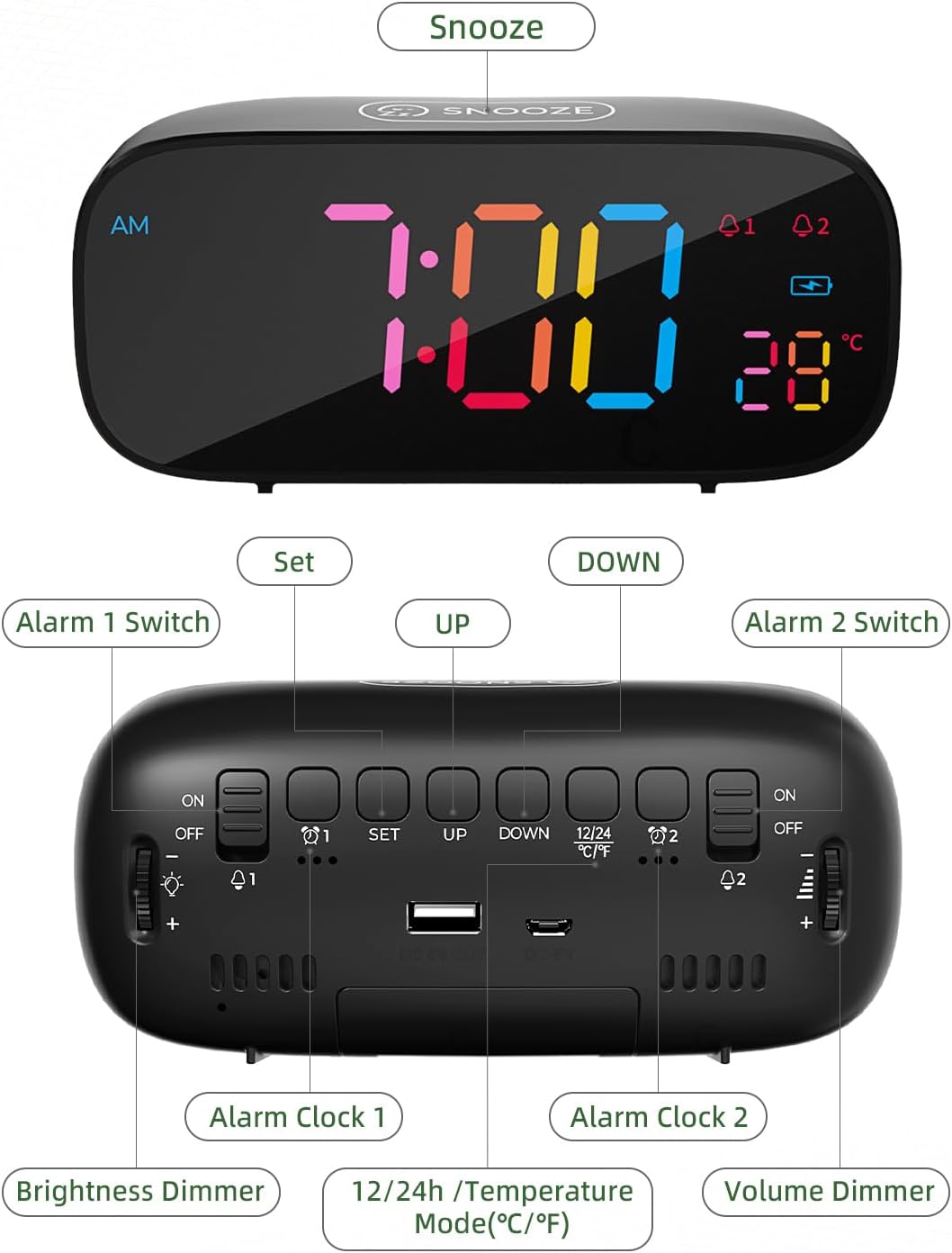
വിശദമായി view of the alarm clock's top and rear controls.
നിയന്ത്രണ ബട്ടണുകൾ:
- SNOOZE Button (Top): Activates snooze function, provides 10 extra minutes of sleep.
- ALARM 1 Switch (Rear): Toggles Alarm 1 ON/OFF.
- SET Button (Rear): Enters time/alarm setting mode.
- UP Button (Rear): Increases values during setting, switches 12/24H mode.
- DOWN Button (Rear): Decreases values during setting, switches Celsius/Fahrenheit.
- ALARM 2 Switch (Rear): Toggles Alarm 2 ON/OFF.
- Brightness Dimmer (Side): Rotary knob to adjust display brightness (0-100%).
- Volume Dimmer (Side): Rotary knob to adjust alarm volume.
- DC 5V Input (Rear): For USB power cable.
- USB Output (Rear): ബാഹ്യ ഉപകരണങ്ങൾ ചാർജ് ചെയ്യുന്നതിന്.
- Battery Compartment (Bottom): Holds 3x AAA batteries for backup power.
സജ്ജമാക്കുക
1. Powering the Clock
The LIORQUE alarm clock offers dual power options:
- കോർഡഡ് ഇലക്ട്രിക്: Connect the provided USB charging cable to the DC 5V input port on the back of the clock and plug the other end into a USB power adapter (not included) or a powered USB port. This is the primary power source.
- ബാറ്ററി ബാക്കപ്പ്: അധികാരത്തിനായിtage protection and to retain settings, insert 3 AAA batteries (not included) into the battery compartment on the bottom of the clock. The clock can also operate solely on battery power, but the display will only light up briefly when a button is pressed to conserve energy.

The clock can be powered by USB cable and supports battery backup. It also features a USB output for charging other devices.
2. പ്രാരംഭ സമയ ക്രമീകരണം
- അമർത്തിപ്പിടിക്കുക സെറ്റ് button on the back of the clock. The hour digits will begin to flash.
- ഉപയോഗിക്കുക UP or താഴേക്ക് മണിക്കൂർ ക്രമീകരിക്കാനുള്ള ബട്ടണുകൾ.
- അമർത്തുക സെറ്റ് മണിക്കൂർ സ്ഥിരീകരിച്ച് മിനിറ്റ് ക്രമീകരണത്തിലേക്ക് നീങ്ങാൻ വീണ്ടും അമർത്തുക. മിനിറ്റ് അക്കങ്ങൾ മിന്നിമറയും.
- ഉപയോഗിക്കുക UP or താഴേക്ക് മിനിറ്റ് ക്രമീകരിക്കാൻ ബട്ടണുകൾ.
- അമർത്തുക സെറ്റ് മിനിറ്റ് സ്ഥിരീകരിച്ച് സമയ ക്രമീകരണ മോഡിൽ നിന്ന് പുറത്തുകടക്കാൻ വീണ്ടും.
പ്രവർത്തന നിർദ്ദേശങ്ങൾ
1. അലാറങ്ങൾ സജ്ജീകരിക്കൽ (അലാറം 1 & അലാറം 2)
The clock features two independent alarms. The process is identical for both.
- അലാറം 1 സജ്ജീകരിക്കാൻ, അമർത്തുക സെറ്റ് button once (do not hold). The Alarm 1 icon (A1) will appear, and the hour digits will flash.
- ഉപയോഗിക്കുക UP or താഴേക്ക് അലാറം സമയം ക്രമീകരിക്കാനുള്ള ബട്ടണുകൾ.
- അമർത്തുക സെറ്റ് മണിക്കൂർ സ്ഥിരീകരിച്ച് മിനിറ്റ് ക്രമീകരണത്തിലേക്ക് നീങ്ങാൻ വീണ്ടും അമർത്തുക. മിനിറ്റ് അക്കങ്ങൾ മിന്നിമറയും.
- ഉപയോഗിക്കുക UP or താഴേക്ക് അലാറം മിനിറ്റ് ക്രമീകരിക്കാനുള്ള ബട്ടണുകൾ.
- അമർത്തുക സെറ്റ് again to confirm the minutes and move to alarm tone selection.
- ഉപയോഗിക്കുക UP or താഴേക്ക് buttons to cycle through the 8 available alarm tones.
- അമർത്തുക സെറ്റ് again to confirm the alarm tone and exit alarm setting mode.
- To activate Alarm 1, slide the അലാറം 1 സ്വിച്ച് on the back to the ON position. The Alarm 1 icon will remain lit on the display.
- Repeat the process for Alarm 2 using the അലാറം 2 സ്വിച്ച് and corresponding settings.

Set two distinct alarms to manage your schedule effectively.

Choose from 8 diverse alarm tones, including natural sounds and melodies.
2. സ്നൂസ് ഫംഗ്ഷൻ
അലാറം മുഴങ്ങുമ്പോൾ, വലിയ ബട്ടൺ അമർത്തുക സ്നൂസ് ചെയ്യുക button on the top of the clock. The alarm will pause and sound again after 10 minutes. To turn off the alarm completely, press any other button on the back of the clock, or slide the corresponding alarm switch to OFF.

Activate the snooze function for an additional 10 minutes of rest.
3. തെളിച്ചം ക്രമീകരിക്കുന്നു
The display brightness can be adjusted from 0% to 100% using the rotary Brightness Dimmer knob located on the side of the clock. Rotate the knob to achieve your preferred comfort level.

Customize the display brightness for optimal visibility day or night.
4. വോളിയം ക്രമീകരിക്കുന്നു
The alarm volume can be adjusted using the rotary Volume Dimmer knob located on the side of the clock. Rotate the knob to increase or decrease the alarm sound level.
5. 12/24 മണിക്കൂർ ഫോർമാറ്റ്
To switch between 12-hour and 24-hour time display formats, briefly press the UP button (labeled 12/24H) on the back of the clock when not in setting mode. In 12-hour format, an "AM" or "PM" indicator will be displayed.
6. താപനില പ്രദർശനം
The clock displays the indoor temperature. To switch between Celsius (℃) and Fahrenheit (℉) units, briefly press the താഴേക്ക് button (labeled ℃/℉) on the back of the clock when not in setting mode.

The clock provides an indoor temperature reading, switchable between Celsius and Fahrenheit.
7. യുഎസ്ബി ചാർജിംഗ് പോർട്ട്
The clock features a USB output port on the back, allowing you to charge external devices such as smartphones or tablets while the clock is powered via its USB cable.
മെയിൻ്റനൻസ്
- മൃദുവായതും ഉണങ്ങിയതുമായ തുണി ഉപയോഗിച്ച് ക്ലോക്ക് വൃത്തിയാക്കുക. അബ്രസീവ് ക്ലീനറുകളോ ലായകങ്ങളോ ഉപയോഗിക്കരുത്.
- ക്ലോക്കിനെ തീവ്രമായ താപനിലയിലോ, നേരിട്ടുള്ള സൂര്യപ്രകാശത്തിലോ, ഉയർന്ന ആർദ്രതയിലോ ഏൽപ്പിക്കുന്നത് ഒഴിവാക്കുക.
- If using batteries, replace them annually or when the display becomes dim (in battery-only mode) to ensure proper function and prevent leakage.
ട്രബിൾഷൂട്ടിംഗ്
| പ്രശ്നം | സാധ്യമായ കാരണം | പരിഹാരം |
|---|---|---|
| ഡിസ്പ്ലേ ശൂന്യമോ മങ്ങിയതോ ആണ്. | No power, low batteries, or brightness set too low. | Ensure USB cable is connected and powered. Replace AAA batteries if using battery-only mode. Adjust Brightness Dimmer knob. |
| അലാറം മുഴങ്ങുന്നില്ല. | Alarm not activated, volume too low, or incorrect alarm time. | Check if Alarm 1/2 switch is ON. Adjust Volume Dimmer knob. Verify alarm time is set correctly. |
| Time/Alarm settings reset. | പവർ യൂtage without battery backup, or dead backup batteries. | Ensure AAA batteries are installed and fresh for backup. |
| യുഎസ്ബി ചാർജിംഗ് പോർട്ട് പ്രവർത്തിക്കുന്നില്ല. | Clock not powered by USB cable, or device incompatible. | Ensure the clock is connected to a power source via its USB cable. Try a different device or cable. |
സ്പെസിഫിക്കേഷനുകൾ
- ബ്രാൻഡ്: ലിയോർക്ക്
- മോഡൽ: Colorful Digital Alarm Clock
- ഡിസ്പ്ലേ തരം: ഡിജിറ്റൽ LED
- നിറം: കറുപ്പ്
- ഉൽപ്പന്ന അളവുകൾ: 16.3 x 3.81 x 9.6 സെ.മീ
- ഇനത്തിൻ്റെ ഭാരം: 290 ഗ്രാം
- പ്രത്യേക സവിശേഷതകൾ: Adjustable Brightness, Adjustable Volume, Dual Alarms, Snooze, Temperature Display (℃/℉), 12/24H Format, USB Charging Port
- ഊർജ്ജ സ്രോതസ്സ്: Corded Electric (USB DC 5V) & Battery Powered (3x AAA, not included)
- മുറിയുടെ തരം: കിടപ്പുമുറി
വാറൻ്റിയും പിന്തുണയും
LIORQUE products are designed for reliability and performance. For any questions, technical support, or warranty inquiries, please refer to the contact information provided with your purchase or visit the official LIORQUE webസൈറ്റ്. വാറന്റി ക്ലെയിമുകൾക്കായി നിങ്ങളുടെ വാങ്ങലിന്റെ തെളിവ് സൂക്ഷിക്കുക.


