1. ആമുഖം
The CAMMHD C2-32G is a compact, head-mounted 4K camera designed for hands-free video recording. Featuring anti-shake technology and Wi-Fi connectivity, it is suitable for various activities such as vlogging, cycling, and professional use. This manual provides essential information for setting up, operating, and maintaining your camera.

Image 1.1: The CAMMHD C2-32G camera is versatile for various applications including vlogging, cycling, work, and shift recording, offering a hands-free recording experience.
2. പാക്കേജ് ഉള്ളടക്കം
താഴെ ലിസ്റ്റ് ചെയ്തിരിക്കുന്ന എല്ലാ ഇനങ്ങളും നിങ്ങളുടെ പാക്കേജിൽ ഉൾപ്പെടുത്തിയിട്ടുണ്ടെന്ന് ഉറപ്പാക്കുക:
- CAMMHD C2 Camera
- Head Mounted Bracket
- ഉപയോക്തൃ മാനുവൽ
- ടൈപ്പ്-സി കേബിൾ
- ചാർജർ
- Helmet Accessories (including 3M adhesive and fixing tool)
- Rubber Stickers

Image 2.1: This image displays the complete package contents for the CAMMHD C2-32G, including the camera, head-mounted bracket, user manual, Type-C cable, charger, and helmet accessories.
3. ഉൽപ്പന്നം കഴിഞ്ഞുview
ക്യാമറയുടെ ഘടകങ്ങളും നിയന്ത്രണങ്ങളും പരിചയപ്പെടുക:
- Power/WIFI Button: Used to power the device on/off and activate Wi-Fi.
- ഫോട്ടോ ബട്ടൺ: നിശ്ചല ചിത്രങ്ങൾ പകർത്തുന്നു.
- ക്യാമറ ബട്ടൺ: വീഡിയോ റെക്കോർഡിംഗ് ആരംഭിക്കുകയും നിർത്തുകയും ചെയ്യുന്നു.
- ലെൻസ്: The primary optical component for capturing images and videos.
- പ്രകാശം സൂചിപ്പിക്കുന്നത്: Provides status feedback (e.g., recording, charging, Wi-Fi status).
- ദ്വാരം പുനഃസജ്ജമാക്കുക: Used to reset the device to factory settings if needed.
- TF Card Seat: Slot for inserting the Micro SD card.
- ടൈപ്പ്-സി പോർട്ട്: ചാർജിംഗിനും ഡാറ്റ കൈമാറ്റത്തിനും.

Image 3.1: This diagram highlights the various buttons, ports, and features of the CAMMHD C2-32G camera, including the Power/WIFI button, Photo button, Camera button, lens, indicating light, reset hole, TF card seat, and Type-C port.
4. സജ്ജീകരണം
4.1 ബാറ്ററി ചാർജ് ചെയ്യുന്നു
Before first use, fully charge the camera's 2200mAh lithium battery. Connect the camera to a 5V/1A or 2A charger using the provided Type-C cable. A full charge takes approximately 6 hours. The indicating light will show charging status.
4.2 മൈക്രോ എസ്ഡി കാർഡ് ചേർക്കുന്നു
The camera supports Micro SD cards up to 512GB. Insert the Micro SD card into the TF Card Seat with the contacts facing down until it clicks into place. Ensure the camera is powered off before inserting or removing the card.
4.3 ക്യാമറ മൗണ്ടിംഗ്
The CAMMHD C2-32G offers flexible mounting options:
- Headband Mount: Attach the camera to the head-mounted bracket and secure it comfortably on your head.
- ഹെൽമറ്റ് മൗണ്ട്: Use the provided helmet accessories, including 3M adhesive and the fixing tool, to securely attach the camera to a helmet.

Image 4.1: This image illustrates the easy installation process for the CAMMHD C2-32G camera, showing how to attach it to a head-mounted bracket or a helmet using the provided accessories.
5. പ്രവർത്തന നിർദ്ദേശങ്ങൾ
5.1 പവർ ഓൺ/ഓഫ്
- പവർ ഓണാക്കാൻ: അമർത്തിപ്പിടിക്കുക Power/WIFI Button until the indicating light illuminates.
- പവർ ഓഫ് ചെയ്യാൻ: അമർത്തിപ്പിടിക്കുക Power/WIFI Button until the indicating light turns off.
5.2 വീഡിയോ റെക്കോർഡിംഗ്
- ക്യാമറ ഓണാണെന്ന് ഉറപ്പാക്കുക.
- അമർത്തുക ക്യാമറ ബട്ടൺ once to start video recording. The indicating light will change to show recording status.
- അമർത്തുക ക്യാമറ ബട്ടൺ റെക്കോർഡിംഗ് നിർത്താൻ വീണ്ടും.
5.3 ഫോട്ടോ എടുക്കൽ
- ക്യാമറ ഓണാണെന്ന് ഉറപ്പാക്കുക.
- അമർത്തുക ഫോട്ടോ ബട്ടൺ once to capture a still image.
5.4 Wi-Fi Connection and App Control
The camera supports real-time Wi-Fi connectivity for app control, preview, playback, download, and sharing.
- ഡൗൺലോഡ് ചെയ്യുക "Viidure" application from your mobile device's app store.
- Power on the camera and activate its Wi-Fi function by pressing the Power/WIFI Button briefly (if not already active).
- On your mobile device, go to Wi-Fi settings and connect to the camera's Wi-Fi network (e.g., "M20Pro_20F_XXXXXXXXXX").
- Enter the Wi-Fi password: "12345678" വസ്തുതകൾ or "123456789" വസ്തുതകൾ.
- Open the "Viidure" app. You can now control the camera, view തത്സമയംtagഇ, ഡൗൺലോഡ് ചെയ്യുക files, and adjust settings. The transmission range is up to 20 meters.

Image 5.1: This image demonstrates the Wi-Fi and app control features of the CAMMHD C2-32G, showing the camera connected to a mobile phone running the "Viidure" app for preview, playback, download, share, and settings.
5.5 Resolution Settings
The camera supports various video resolutions, including 3840x2160 (4K) at 30fps and 2704x1520 (2K) at 30fps. Resolution settings can typically be adjusted via the "Viidure" mobile application.
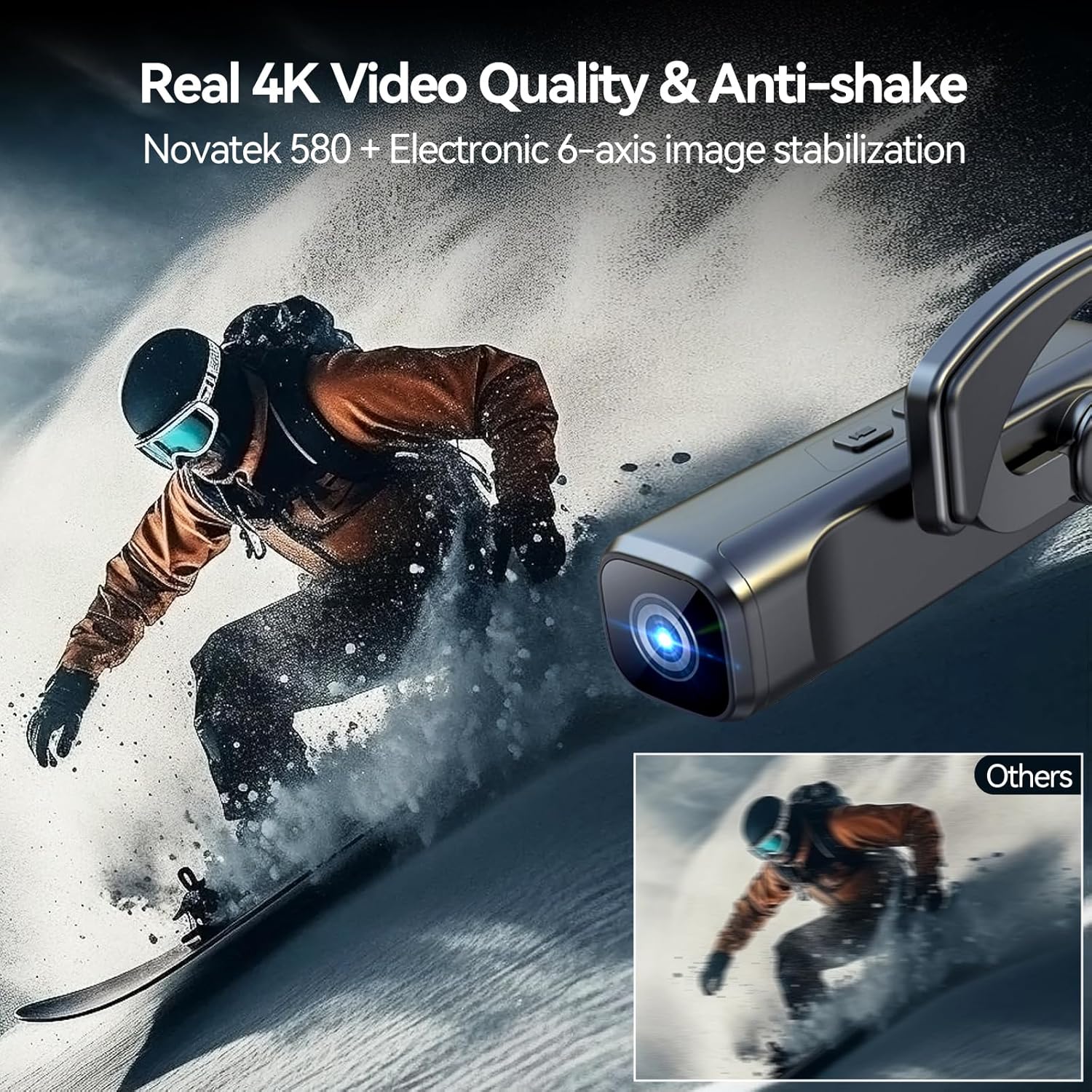
Image 5.2: This image highlights the real 4K video quality and anti-shake capabilities of the CAMMHD C2-32G camera, powered by Novatek 580 and electronic 6-axis image stabilization.
6. പരിപാലനം
6.1 വൃത്തിയാക്കൽ
- ക്യാമറ ബോഡി വൃത്തിയാക്കാൻ മൃദുവായതും ഉണങ്ങിയതുമായ തുണി ഉപയോഗിക്കുക.
- ലെൻസിന്, പോറലുകൾ ഒഴിവാക്കാൻ ഒരു പ്രത്യേക ലെൻസ് ക്ലീനിംഗ് തുണിയും ലായനിയും ഉപയോഗിക്കുക.
- കഠിനമായ രാസവസ്തുക്കളോ ഉരച്ചിലുകളോ ഉപയോഗിക്കരുത്.
6.2 സംഭരണം
- നേരിട്ടുള്ള സൂര്യപ്രകാശവും ഉയർന്ന താപനിലയും ഏൽക്കാത്ത തണുത്തതും വരണ്ടതുമായ സ്ഥലത്ത് ക്യാമറ സൂക്ഷിക്കുക.
- ദീർഘനേരം സൂക്ഷിക്കുകയാണെങ്കിൽ, ബാറ്ററിയുടെ ആയുസ്സ് വർദ്ധിപ്പിക്കുന്നതിന് ബാറ്ററി ഭാഗികമായി (ഏകദേശം 50%) ചാർജ്ജ് ചെയ്തിട്ടുണ്ടെന്ന് ഉറപ്പാക്കുക.
6.3 ബാറ്ററി കെയർ
- ബാറ്ററി ഇടയ്ക്കിടെ പൂർണ്ണമായും ഡിസ്ചാർജ് ചെയ്യുന്നത് ഒഴിവാക്കുക.
- Charge the battery regularly, even if the camera is not in use, to maintain battery health.
- Use only the provided charger and cable or compatible 5V/1A-2A chargers.
7. പ്രശ്നപരിഹാരം
If you encounter issues with your CAMMHD C2-32G camera, refer to the following common problems and solutions:
- ക്യാമറ പവർ ഓൺ ചെയ്യുന്നില്ല:
- Ensure the battery is charged. Connect to a charger and wait a few minutes before attempting to power on again.
- Press and hold the Power/WIFI button for at least 5 seconds. - Wi-Fi-ലേക്ക് കണക്റ്റുചെയ്യാൻ കഴിയില്ല:
- Ensure the camera's Wi-Fi is activated.
- Double-check the Wi-Fi password ("12345678" or "123456789").
- Move closer to the camera (within 20 meters).
- Restart both the camera and your mobile device. - റെക്കോർഡിംഗ് അപ്രതീക്ഷിതമായി നിലയ്ക്കുന്നു:
- Check if the Micro SD card is full. Transfer files to another device or delete unnecessary files.
- Ensure the Micro SD card is properly inserted and not corrupted. Try reformatting the card (this will erase all data).
- The battery might be low. Charge the camera. - മോശം വീഡിയോ നിലവാരം:
- Ensure the lens is clean and free from smudges.
- Check the resolution settings in the "Viidure" app to ensure it's set to your desired quality (e.g., 4K).
- Ensure adequate lighting conditions. - ക്യാമറ പ്രതികരിക്കുന്നില്ല:
- Use a thin object (like a paperclip) to gently press the ദ്വാരം പുന et സജ്ജമാക്കുക ക്യാമറ പുനരാരംഭിക്കാൻ.
8 സ്പെസിഫിക്കേഷനുകൾ
Detailed technical specifications for the CAMMHD C2-32G camera:
| ഫീച്ചർ | സ്പെസിഫിക്കേഷൻ |
|---|---|
| ബ്രാൻഡ് | CAMMHD |
| മോഡലിൻ്റെ പേര് | C2-32G |
| ഉൽപ്പന്ന തരം | Head-mounted Camera / Action Camera |
| വീഡിയോ റെസല്യൂഷൻ | 4K (3840x2160 @ 30fps), 2K (2704x1520 @ 30fps) |
| ഫലപ്രദമായ സ്റ്റിൽ റെസല്യൂഷൻ | 8 മെഗാപിക്സലുകൾ |
| ഇമേജ് സ്റ്റെബിലൈസേഷൻ | Dynamic, Anti-shake (Electronic 6-axis) |
| കണക്റ്റിവിറ്റി ടെക്നോളജി | വൈഫൈ |
| അനുയോജ്യമായ ഉപകരണങ്ങൾ | Mobile devices (via Viidure App) |
| ഫ്ലാഷ് മെമ്മറി തരം | മൈക്രോ എസ്ഡി (512 ജിബി വരെ) |
| വീഡിയോ ക്യാപ്ചർ ഫോർമാറ്റ് | MP4 |
| പിന്തുണയ്ക്കുന്ന ഓഡിയോ ഫോർമാറ്റുകൾ | MP3, WAV, AAC, FLAC, OPUS |
| ബാറ്ററി | 2200mAh Lithium (1 C - included) |
| ചാർജിംഗ് സമയം | Approx. 6 hours (with 5V/1A-2A charger) |
| ബാറ്ററി ലൈഫ് | Approx. 5 hours (with Wi-Fi), 6-7 hours (without Wi-Fi) |
| ഉൽപ്പന്ന അളവുകൾ (L x W x H) | 101 x 28 x 26 മിമി (4.06 x 1.14 x 1.16 ഇഞ്ച്) |
| ഭാരം | ഏകദേശം. 72 ഗ്രാം (0.16 പൗണ്ട്) |
| വാട്ടർപ്രൂഫ് ലെവൽ | വാട്ടർപ്രൂഫ് അല്ല |
| സൂം തരം | ഡിജിറ്റൽ |
| ഫോക്കസ് തരം | ഓട്ടോ ഫോക്കസ് |

Image 8.1: This image illustrates the extended battery life of the CAMMHD C2-32G (2200mAh for 5 hours) compared to other cameras, and highlights features like better image quality and faster transmission due to H.265 encoding.
9. വാറൻ്റിയും പിന്തുണയും
For warranty information and customer support, please refer to the documentation provided with your purchase or contact CAMMHD customer service directly. Specific warranty terms and support channels may vary by region.


