ആമുഖം
This manual provides detailed instructions for the safe and efficient operation of your boAt Partypal 390 Bluetooth Speaker. Please read this manual thoroughly before using the product and retain it for future reference. The Partypal 390 is a powerful portable speaker designed for various audio needs, featuring 160W boAt Signature Sound, multiple connectivity options, and integrated LED lighting.
സുരക്ഷാ വിവരങ്ങൾ
- സ്പീക്കറിനെ തീവ്രമായ താപനിലയിലോ, നേരിട്ടുള്ള സൂര്യപ്രകാശത്തിലോ, ഉയർന്ന ആർദ്രതയിലോ തുറന്നുകാട്ടരുത്.
- സ്പീക്കറെ ശക്തമായ ആഘാതങ്ങൾക്ക് വിധേയമാക്കുകയോ താഴെയിടുകയോ ചെയ്യുന്നത് ഒഴിവാക്കുക.
- സ്പീക്കർ സ്വയം ഡിസ്അസംബ്ലിംഗ് ചെയ്യാനോ നന്നാക്കാനോ പരിഷ്ക്കരിക്കാനോ ശ്രമിക്കരുത്. സഹായത്തിനായി യോഗ്യതയുള്ള സേവന ഉദ്യോഗസ്ഥരെ ബന്ധപ്പെടുക.
- Keep the speaker away from water and other liquids. Although it is waterproof, prolonged submersion or exposure to high-pressure water jets should be avoided.
- നൽകിയിരിക്കുന്ന ചാർജിംഗ് കേബിൾ അല്ലെങ്കിൽ സാക്ഷ്യപ്പെടുത്തിയ തത്തുല്യമായത് മാത്രം ഉപയോഗിക്കുക.
- സ്പീക്കർ പ്രവർത്തിപ്പിക്കുമ്പോൾ ശരിയായ വായുസഞ്ചാരം ഉറപ്പാക്കുക.
- മൃദുവായതും ഉണങ്ങിയതുമായ തുണി ഉപയോഗിച്ച് സ്പീക്കർ വൃത്തിയാക്കുക. അബ്രസീവ് ക്ലീനറുകളോ ലായകങ്ങളോ ഉപയോഗിക്കരുത്.
പാക്കേജ് ഉള്ളടക്കം
താഴെ കൊടുത്തിരിക്കുന്ന എല്ലാ ഇനങ്ങളും നിങ്ങളുടെ പാക്കേജിൽ ഉണ്ടെന്ന് ഉറപ്പാക്കുക:
- boAt Partypal 390 Speaker
- ചാർജിംഗ് കേബിൾ
- ഉപയോക്തൃ മാനുവൽ
- വാറൻ്റി കാർഡ്
ഉൽപ്പന്നം കഴിഞ്ഞുview
The boAt Partypal 390 is a versatile Bluetooth speaker featuring powerful audio output and dynamic LED lighting. Below are key visual references and descriptions of its components.
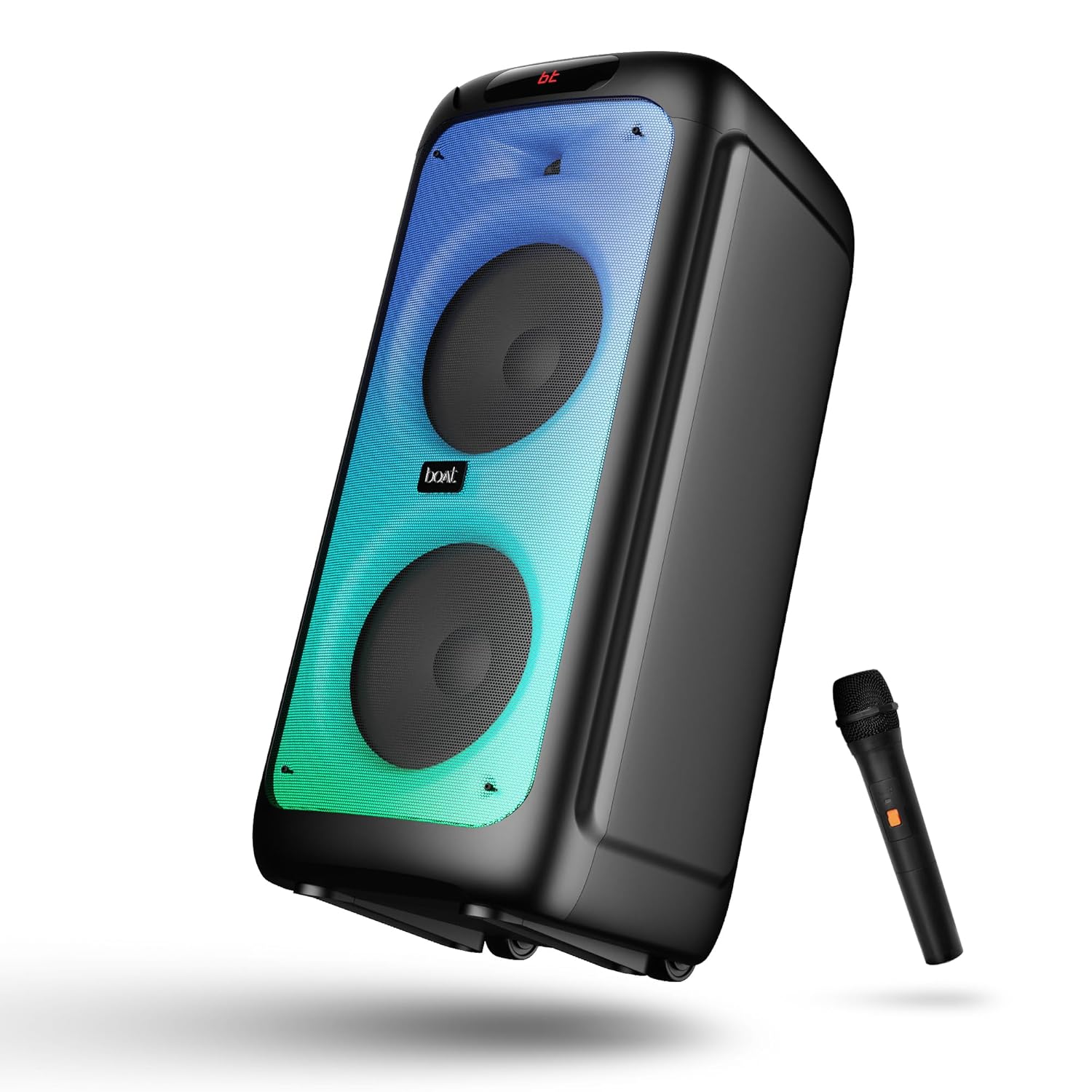
ചിത്രം 1: ഫ്രണ്ട് view of the boAt Partypal 390 speaker, showcasing its dual speaker design, integrated flame LEDs, and the included wired microphone.

ചിത്രം 2: Top panel of the speaker displaying the control buttons and various input ports including USB, AUX, Guitar In, Mic 1, Mic 2, and the USB Type-C charging port. Also shown are dedicated controls for Bass/Treble, LED modes, and volume.
പ്രധാന സവിശേഷതകൾ:
- 160W boAt Signature Sound: ശക്തവും വ്യക്തവുമായ ഓഡിയോ നൽകുന്നു.
- Flame LEDs: Dynamic lighting effects to enhance the listening experience.
- ഒന്നിലധികം കണക്റ്റിവിറ്റി: Bluetooth v5.3, AUX, USB, and TF card support.
- കരോക്കെ പ്രവർത്തനം: Two microphone input ports for vocal performances.
- ഗിറ്റാർ ഇൻപുട്ട്: Dedicated port for connecting a guitar.
- EQ മോഡുകൾ: Pre-set sound modes (Normal, Party, Pop, Rock, Jazz) for different audio preferences.
- ടിഡബ്ല്യുഎസ് മോഡ്: Allows wireless connection of two Partypal speakers for stereo sound.
- ബാസും ട്രെബിൾ നിയന്ത്രണങ്ങളും: Adjustable audio settings for personalized sound.
- നീണ്ട പ്ലേബാക്ക്: 6 മണിക്കൂർ വരെ ബാറ്ററി ലൈഫ്.
സജ്ജമാക്കുക
1. സ്പീക്കറിൽ നിന്ന് നിരക്ക് ഈടാക്കുന്നു
Before first use, fully charge the speaker. Connect the provided USB Type-C charging cable to the speaker's charging port and the other end to a compatible USB power adapter (not included). The charging indicator will show the charging status. A full charge provides up to 6 hours of playback.

ചിത്രം 3: The speaker in an outdoor setting, illustrating its portability and battery life.
2. പവർ ഓൺ/ഓഫ്
- To power on, press and hold the Power button located on the control panel until the display illuminates.
- To power off, press and hold the Power button again until the display turns off.
3. പ്രാരംഭ ബ്ലൂടൂത്ത് ജോടിയാക്കൽ
- Ensure the speaker is powered on and in Bluetooth mode. The display will show "bt" and the Bluetooth indicator will flash, indicating it's ready for pairing.
- നിങ്ങളുടെ മൊബൈൽ ഉപകരണത്തിൽ, ബ്ലൂടൂത്ത് പ്രവർത്തനക്ഷമമാക്കി ലഭ്യമായ ഉപകരണങ്ങൾക്കായി തിരയുക.
- Select "boAt Partypal 390" from the list of devices.
- ജോടിയാക്കിക്കഴിഞ്ഞാൽ, സ്പീക്കർ ഒരു സ്ഥിരീകരണ ശബ്ദം പുറപ്പെടുവിക്കും, ബ്ലൂടൂത്ത് ഇൻഡിക്കേറ്റർ മിന്നുന്നത് നിർത്തും.
പ്രവർത്തന നിർദ്ദേശങ്ങൾ
1. മോഡ് തിരഞ്ഞെടുക്കൽ
Press the "Mode" button on the control panel to cycle through available input modes: Bluetooth, AUX, USB, and TF Card.
2. ബ്ലൂടൂത്ത് മോഡ്
- വിജയകരമായ ജോടിയാക്കലിന് ശേഷം, നിങ്ങളുടെ കണക്റ്റുചെയ്ത ഉപകരണത്തിൽ നിന്നുള്ള ഓഡിയോ സ്പീക്കറിലൂടെ പ്ലേ ചെയ്യും.
- Use the volume knob on the speaker or your connected device to adjust the volume.
- Use the Previous/Next buttons to skip tracks.
- Press the Play/Pause button to control playback.
3. ഓക്സ് മോഡ്
- Connect an audio device to the AUX input port using a 3.5mm audio cable.
- Switch the speaker to AUX mode using the "Mode" button.
- നിങ്ങളുടെ കണക്റ്റുചെയ്ത ഉപകരണത്തിൽ നിന്ന് പ്ലേബാക്കും വോളിയവും നിയന്ത്രിക്കുക.
4. USB/TF Card Mode
- Insert a USB flash drive into the USB port or a TF card into the TF card slot.
- സ്പീക്കർ യാന്ത്രികമായി USB അല്ലെങ്കിൽ TF കാർഡ് മോഡിലേക്ക് മാറുകയും ഓഡിയോ പ്ലേ ചെയ്യാൻ തുടങ്ങുകയും ചെയ്യും. files. If not, switch manually using the "Mode" button.
- Use the Previous/Next buttons to navigate tracks and Play/Pause for playback control.
5. Karaoke Function (Microphone Input)
- Connect up to two wired microphones to the "MIC 1" and "MIC 2" input ports.
- Adjust microphone volume using the dedicated MIC VOL knob.
- Adjust microphone echo effect using the ECHO knob.
6. ഗിറ്റാർ ഇൻപുട്ട്
- Connect a guitar to the "GUITAR IN" port.
- Adjust guitar volume using the dedicated GUITAR VOL knob.
7. ഇക്യു മോഡുകൾ
The speaker offers several pre-set equalizer modes to optimize audio for different content types. Press the "EQ" button to cycle through:
- സാധാരണ
- പാർട്ടി
- പോപ്പ്
- പാറ
- ജാസ്

ചിത്രം 4: Visual representation of the available EQ modes for sound customization.
8. TWS (True Wireless Stereo) Mode
To connect two Partypal 390 speakers for a stereo audio experience:
- രണ്ട് സ്പീക്കറുകളും ഓണാണെന്നും ബ്ലൂടൂത്ത് മോഡിലാണെന്നും ഉറപ്പാക്കുക, എന്നാൽ ഇതുവരെ ഒരു ഉപകരണവുമായും ജോടിയാക്കിയിട്ടില്ല.
- On one speaker (this will be the primary speaker), press and hold the TWS button. The speaker will emit a sound indicating it's searching for another speaker.
- രണ്ട് സ്പീക്കറുകളും പരസ്പരം യാന്ത്രികമായി ബന്ധിപ്പിക്കും. ഒരു സ്ഥിരീകരണ ശബ്ദം വിജയകരമായ TWS ജോടിയാക്കലിനെ സൂചിപ്പിക്കുന്നു.
- Now, pair your mobile device to the primary speaker via Bluetooth as described in the "Initial Bluetooth Pairing" section. Audio will play in stereo through both speakers.

ചിത്രം 5: Two Partypal 390 speakers wirelessly connected, demonstrating the TWS feature.
9. LED നിയന്ത്രണം
Press the "LED Mode" button to cycle through different flame LED lighting effects or to turn them off.
10. Bass and Treble Controls
Use the dedicated Bass and Treble knobs on the control panel to adjust the low and high frequencies of the audio output according to your preference.
മെയിൻ്റനൻസ്
- വൃത്തിയാക്കൽ: സ്പീക്കറിന്റെ പുറംഭാഗം വൃത്തിയാക്കാൻ മൃദുവായതും ഉണങ്ങിയതും ലിന്റ് രഹിതവുമായ തുണി ഉപയോഗിക്കുക. ലിക്വിഡ് ക്ലീനറുകൾ, എയറോസോളുകൾ അല്ലെങ്കിൽ ലായകങ്ങൾ ഉപയോഗിക്കരുത്.
- സംഭരണം: ദീർഘനേരം ഉപയോഗിക്കാത്തപ്പോൾ, സ്പീക്കർ തണുത്തതും വരണ്ടതുമായ സ്ഥലത്ത് സൂക്ഷിക്കുക, നേരിട്ടുള്ള സൂര്യപ്രകാശത്തിൽ നിന്നും കടുത്ത താപനിലയിൽ നിന്നും അകറ്റി നിർത്തുക.
- ബാറ്ററി കെയർ: To prolong battery life, avoid fully discharging the speaker frequently. Charge it regularly, even if not in use.
ട്രബിൾഷൂട്ടിംഗ്
| പ്രശ്നം | സാധ്യമായ കാരണം | പരിഹാരം |
|---|---|---|
| സ്പീക്കർ പവർ ഓൺ ചെയ്യുന്നില്ല. | ബാറ്ററി ചാർജ് കുറവാണ്; പവർ ബട്ടൺ ശരിയായി അമർത്തിയിട്ടില്ല. | സ്പീക്കർ പൂർണ്ണമായും ചാർജ് ചെയ്യുക. പവർ ബട്ടൺ കുറച്ച് സെക്കൻഡ് അമർത്തിപ്പിടിക്കുക. |
| ശബ്ദമില്ല. | ശബ്ദം വളരെ കുറവാണ്; തെറ്റായ ഇൻപുട്ട് മോഡ്; ഉപകരണം കണക്റ്റുചെയ്തിട്ടില്ല. | Increase speaker and device volume. Ensure correct mode is selected (Bluetooth, AUX, USB, TF). Re-pair Bluetooth device or check cable connections. |
| ബ്ലൂടൂത്ത് ജോടിയാക്കൽ പരാജയപ്പെട്ടു. | സ്പീക്കർ ജോടിയാക്കൽ മോഡിലല്ല; ഉപകരണം വളരെ അകലെയാണ്; തടസ്സം. | Ensure speaker is in Bluetooth pairing mode (flashing "bt"). Move device closer to speaker. Turn off other Bluetooth devices. Forget "boAt Partypal 390" on your device and try pairing again. |
| മൈക്രോഫോൺ പ്രവർത്തിക്കുന്നില്ല. | Microphone not connected properly; MIC VOL too low. | Ensure microphone is securely plugged into MIC 1 or MIC 2 port. Increase the MIC VOL knob. |
| TWS കണക്ഷൻ പരാജയപ്പെട്ടു. | സ്പീക്കറുകൾ ഇതിനകം ഒരു ഉപകരണവുമായി ജോടിയാക്കി; സ്പീക്കറുകൾ വളരെ അകലെയാണ്. | Ensure both speakers are not connected to any Bluetooth device. Place speakers within close proximity. Repeat TWS pairing steps. |
സ്പെസിഫിക്കേഷനുകൾ
Below are the technical specifications for the boAt Partypal 390 speaker:
| മോഡലിൻ്റെ പേര് | Partypal 390 |
| സ്പീക്കർ തരം | Multimedia, Floor Standing |
| ഓഡിയോ ഔട്ട്പുട്ട് പവർ | 160 വാട്ട്സ് |
| കണക്റ്റിവിറ്റി ടെക്നോളജി | Bluetooth v5.3, AUX, USB, TF Card |
| ബ്ലൂടൂത്ത് ശ്രേണി | 10 മീറ്റർ വരെ |
| ബാറ്ററി ലൈഫ് | 6 മണിക്കൂർ വരെ |
| ബാറ്ററി ശേഷി | 7500 mAh (Lead Acid) |
| ഉൽപ്പന്ന അളവുകൾ (D x W x H) | 70D x 32W x 32H സെന്റീമീറ്ററുകൾ |
| ഇനത്തിൻ്റെ ഭാരം | 10.8 കി.ഗ്രാം |
| ജല പ്രതിരോധ നില | വാട്ടർപ്രൂഫ് |
| ഉൾപ്പെടുത്തിയ ഘടകങ്ങൾ | Speaker, Charging Cable, User Manual, Warranty Card |

ചിത്രം 6: Diagram illustrating the physical dimensions of the Partypal 390 speaker.
വാറൻ്റിയും പിന്തുണയും
Your boAt Partypal 390 speaker comes with a limited warranty. Please refer to the included Warranty Card for specific terms and conditions, including the warranty period and coverage details. For technical support, service, or warranty claims, please contact boAt customer service through their official webസൈറ്റ് അല്ലെങ്കിൽ നിങ്ങളുടെ വാറന്റി കാർഡിൽ നൽകിയിരിക്കുന്ന ബന്ധപ്പെടാനുള്ള വിവരങ്ങൾ.
For more information, visit the official boAt store: boAt Store on Amazon


